What Does Thermal Paste Do
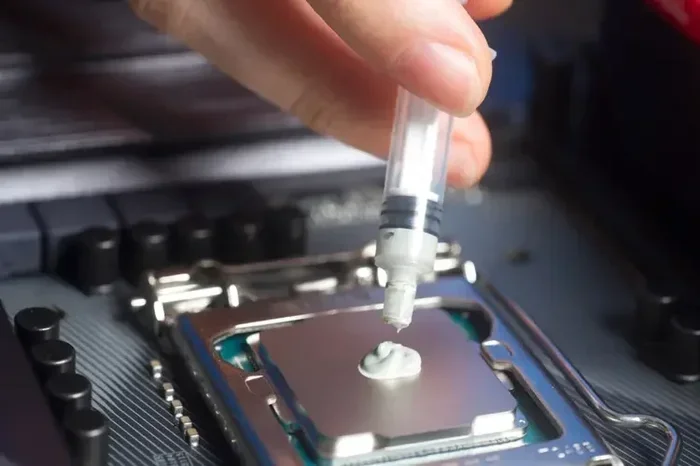
Thermal paste fills tiny gaps between your CPU and cooler to improve heat transfer. It keeps your processor from overheating and helps your system run smoothly. Without it, your computer can suffer from thermal throttling, slowdowns, and even permanent damage.
Have you ever wondered what that small tube of goo does inside your computer? That stuff is thermal paste, and it plays a huge role in keeping your processor happy. Without it, your CPU would quickly overheat and fail. In this guide, we will break down exactly what thermal paste does, why you need it, and how to use it the right way. Let us dive in.
Thermal paste is one of those small components that makes a massive difference. It is cheap, easy to apply, and can save you from expensive repairs. Whether you are building a new PC or just curious about how your computer stays cool, this article has you covered. We will walk through everything step by step.
Key Takeaways
- Thermal paste bridges the gap: It fills microscopic imperfections between the CPU and heatsink for better heat flow.
- It prevents overheating: Good thermal compound keeps your processor within safe temperature ranges.
- Application matters: Too much or too little paste can reduce cooling performance.
- It needs replacement: Thermal paste dries out over time and should be reapplied every few years.
- Water cooling still needs it: Even with a water cooling setup, thermal paste is essential.
- Not all paste is equal: Different compounds offer varying levels of thermal conductivity.
📑 Table of Contents
What Is Thermal Paste?
Thermal paste, also called thermal compound or thermal grease, is a soft material that sits between your CPU and its cooler. It fills in the tiny air gaps on the surface of the processor and the heatsink. Air is a poor conductor of heat, so those gaps slow down heat transfer. The paste replaces the air with a material that conducts heat much better.
Most thermal pastes are made from silicone, ceramic, or metal particles suspended in a carrier fluid. They come in tubes, syringes, or small packets. The consistency is usually smooth and slightly sticky, kind of like putty. You do not need much of it, just a small dot or line in the center of the CPU.
There are different types of thermal compound on the market. Some are basic and affordable, while others promise superior thermal conductivity. Brands like Thermal Grizzly, Noctua, and Arctic make popular options. For most users, a standard paste works perfectly fine. You only need premium compounds if you are overclocking or pushing your hardware to the limit.
Why Does Surface Roughness Matter?
Here is something most people do not think about. The surface of a CPU and a heatsink look smooth to the naked eye, but under a microscope, they are rough and uneven. These tiny bumps and valleys trap air pockets. Air does not transfer heat well at all. Thermal paste fills those valleys and creates a solid path for heat to travel from the chip to the cooler.
Think of it like filling cracks in a wall with spackle. The spackle makes the surface flat and even. Thermal compound does the same thing for your processor. It creates a tight seal that maximizes contact and improves cooling efficiency.
How Does Thermal Paste Work?
The science behind thermal paste is pretty straightforward. Heat moves from hot areas to cooler areas. Your CPU generates a lot of heat when it runs. The cooler sits on top of the CPU and pulls that heat away. The paste helps bridge the two surfaces so heat can flow freely.
Without paste, those microscopic air gaps act as insulation. Heat gets trapped against the CPU, and the temperature climbs fast. With paste, the heat moves through the compound and into the heatsink. From there, the heatsink fans blow the heat out of the case.
The thermal conductivity of the paste determines how well it moves heat. Higher conductivity means better cooling. Most standard pastes range from 1 to 10 watts per meter-kelvin (W/mK). Premium pastes can go above 12 W/mK. For everyday use, anything in the middle range works great.
The Role of Thermal Resistance
Every material has some level of thermal resistance. This is how much it resists the flow of heat. A good thermal paste has low resistance, meaning heat passes through it easily. Cheap or dried-out paste has high resistance, which hurts cooling performance.
This is why it matters to use quality paste and to replace it when it gets old. Over time, thermal paste dries out and its resistance goes up. Your CPU temperatures will slowly creep higher even if nothing else in your system has changed.
Why Thermal Paste Matters for Your CPU
Thermal paste is not optional. It is a critical part of any CPU cooling setup. Whether you use an air cooler or a liquid cooler, you need paste to make the connection work properly. Skipping it can cause serious problems in minutes.
When your CPU runs hot, several bad things can happen. First, the system may thermal throttle, which means it slows itself down to prevent damage. This causes lag, stuttering, and poor performance. Second, prolonged high temperatures can shorten the lifespan of your processor. Third, in extreme cases, the CPU can physically shut down or suffer permanent harm.
Using the right paste and applying it correctly helps your CPU stay cool and run at full speed. It is especially important if you are doing overclocking, gaming, video editing, or any task that pushes the processor hard.
Does Every CPU Need Thermal Paste?
Almost every CPU needs thermal paste. Some processors come with a cooler pre-applied with compound, but many do not. If you buy a CPU and a cooler separately, you must apply paste yourself. Even if your cooler comes with paste, it is often a low-quality stock compound. Upgrading to a better paste can lower your temperatures by several degrees.
If you are wondering whether you need paste for a specific setup, check out our guide on do you need thermal paste for CPU for more details.
When Should You Apply Thermal Paste?
There are a few key moments when you should apply or reapply thermal paste. The first is when you install a new CPU cooler. Whether it is an air cooler or a liquid cooler, fresh paste ensures the best thermal connection.
The second time is when you notice rising temperatures. If your CPU is running hotter than usual, the paste may have dried out. Replacing it can bring temperatures back down. This is especially common in laptops and older desktops that have been running for two or more years.
The third time is when you remove the cooler for any reason. Every time you take the cooler off, some paste gets pulled away or spread unevenly. You should always clean it off and apply fresh paste when you put the cooler back on.
How Often Should You Replace Thermal Paste?
As a general rule, replace your thermal compound every two to three years. High-quality pastes can last longer, but they still degrade over time. If you run your computer under heavy loads often, the paste may dry out faster. Watch your CPU temperatures and reapply if you notice a steady increase.
If you want tips on choosing the right paste for your laptop, check out our article on the best thermal paste for laptop options.
How to Apply Thermal Paste Correctly
Applying thermal paste is simple, but doing it wrong can hurt your cooling performance. You do not need a lot of paste. A small amount, about the size of a pea or a rice grain, placed in the center of the CPU is all you need.
Here is a quick step-by-step process:
- Clean the CPU surface and the cooler base with isopropyl alcohol and a lint-free cloth.
- Let the surfaces dry completely.
- Place a small dot of paste in the center of the CPU.
- Carefully seat the cooler on top, pressing evenly.
- Secure the cooler with screws or clips in a cross pattern.
Do not spread the paste by hand. The pressure from the cooler will spread it naturally. Using too much paste can actually cause problems, as excess paste can act as an insulator if it squeezes out onto the motherboard.
The Pea Method vs. the Cross Method
There are two popular ways to apply paste. The pea method uses a single small dot in the center. The cross method uses an X shape. Both work well for most users. The pea method is simpler and less likely to result in too much paste. The cross method can cover a slightly larger surface area.
For most people, the pea method is the way to go. It is clean, simple, and effective. Just make sure the dot is not too big. A little goes a long way with thermal compound.
Common Thermal Paste Mistakes to Avoid
Even though applying paste is easy, people still make mistakes. Here are the most common ones to watch out for.
- Using too much paste: This is the number one mistake. Excess paste can squeeze out and cause short circuits on the motherboard. Keep it thin and even.
- Using too little paste: Not enough paste leaves air gaps, which defeats the purpose. A small, centered dot is the sweet spot.
- Skipping it altogether: Never run a CPU without paste. Even a few minutes without it can cause dangerous temperature spikes.
- Reusing old paste: If you remove a cooler, do not put the old paste back on. Clean it off and use fresh compound.
- Using the wrong type: Some pastes are designed for specific applications. Make sure you are using a paste made for CPUs or GPUs, not something random from a hardware store.
Can You Use Thermal Paste on a GPU?
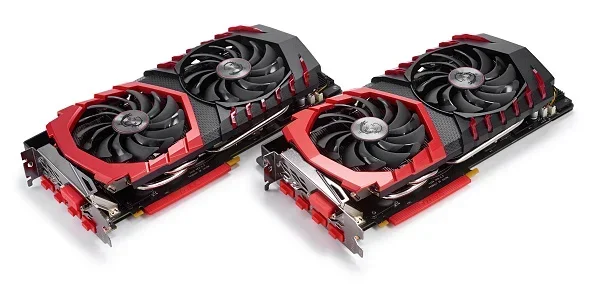
Yes, GPUs also use thermal paste. If you are replacing a GPU cooler or repasting your graphics card, the same principles apply. Clean the old paste off, apply a small amount of new paste, and reseat the cooler. Proper GPU cooling paste can lower your graphics card temperatures and reduce fan noise. For more on GPU temperatures, see our guide on what temperature does GPU fan turn on.
Does Water Cooling Still Need Thermal Paste?
Yes, even with water cooling, you still need thermal paste. The water block sits directly on the CPU, and paste fills the gap between the block and the processor surface. Some people think liquid cooling eliminates the need for paste, but that is not true. The paste ensures proper contact and heat transfer from the CPU to the water block.
If you are considering a liquid cooling setup, our guide on do you need thermal paste for water cooling covers this topic in detail.
Thermal Pads vs. Thermal Paste
Some coolers come with thermal pads instead of paste. Thermal pads are solid sheets that sit between the CPU and the cooler. They are easier to apply but generally have lower thermal conductivity than paste. Paste is the better choice for most CPUs because it fills gaps more effectively and provides superior heat transfer.
Thermal pads are more common on VRMs and memory modules where the surface is less sensitive. For the CPU itself, paste is almost always the better option.
Final Thoughts
Thermal paste is a small but essential part of keeping your computer cool and running well. It bridges the gap between your CPU and cooler, improves heat transfer, and prevents dangerous overheating. Applying it correctly and replacing it every few years can extend the life of your processor and keep your system performing at its best.
Whether you are a casual user, a gamer, or a power user, do not overlook this simple compound. A few dollars spent on good thermal paste can save you from costly repairs and performance issues. Keep your PC cool, keep it running strong, and never skip the paste.
If you are curious about related topics, check out our other guides on CPU cooling, thermal management, and PC maintenance. Stay cool out there.
Frequently Asked Questions
Can you use too much thermal paste?
Yes, using too much paste can cause problems. Excess paste may squeeze out when you seat the cooler and can reach the motherboard, potentially causing short circuits. Always use a small amount, about the size of a pea, in the center of the CPU.
How do you know when thermal paste needs to be replaced?
If your CPU temperatures are rising over time even with normal use, the paste may be drying out. You can also check the paste itself. If it looks cracked, crumbly, or has separated, it is time to replace it. Most users should reapply paste every two to three years.
Is thermal paste necessary for a new CPU?
Yes, thermal paste is necessary for almost every CPU installation. The paste fills microscopic gaps between the processor and the cooler, ensuring proper heat transfer. Without it, your CPU will overheat quickly, even during light tasks.
Can you reuse old thermal paste?
It is best not to reuse old paste. When you remove a cooler, the paste gets stretched and uneven. It also loses effectiveness over time. Clean the surfaces thoroughly and apply fresh paste for the best cooling performance.
Does thermal paste expire?
Yes, thermal paste can expire. Over time, the carrier fluid evaporates and the paste dries out, reducing its ability to transfer heat. Check the expiration date on the tube and store it in a cool, dry place to extend its shelf life.
What happens if you run a CPU without thermal paste?
Running a CPU without thermal paste causes rapid heat buildup. The processor will overheat within minutes, leading to thermal throttling, system crashes, or permanent damage. Always apply a proper layer of thermal compound before powering on your system.