What Is a Kensington Security Slot
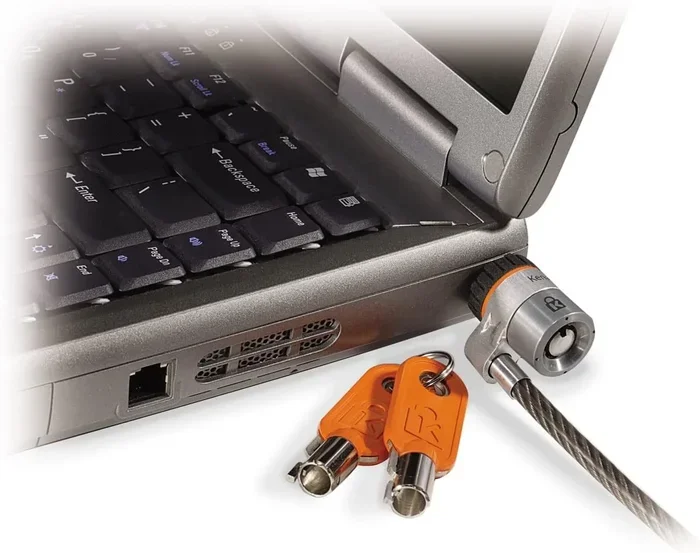
A Kensington Security Slot is a small, standardized opening built into laptops and other devices that lets you attach a lock cable to prevent theft. It is one of the simplest and most effective ways to protect your portable computer in offices, libraries, and shared spaces. This guide covers everything you need to know, from how it works to practical tips for using it.
A Kensington Security Slot is one of those small features on your laptop that you might never notice until you actually need it. It is a tiny metal slot, usually located on the side or back of a laptop, designed to accept a special lock cable. This lock cable attaches your laptop to a desk, table leg, or any sturdy fixed object, making it much harder for someone to walk off with your device.
You might also hear people call it a Kensington lock slot, a security slot, or a Kensington lock. No matter what name you use, the purpose is the same: to add a physical layer of laptop security that stops casual thieves in their tracks. In this article, we will break down everything you need to know about this feature, from how it works to how you can get the most out of it.
Whether you use your laptop at a coffee shop, in a busy office, or in a college library, understanding how this slot works can save you a lot of stress and money. Let us dive right in.
Key Takeaways
- What it is: A Kensington Security Slot is a tiny rectangular slot found on most laptops and monitors designed to accept a security cable lock.
- How it works: A metal pin inside the slot catches a lock or cable, physically tethering your device to a fixed object.
- Why it matters: It is a simple but powerful anti-theft measure that deters opportunistic theft in public and shared environments.
- Compatibility: Most modern laptops from brands like Dell, HP, Lenovo, and Apple include this slot, though some thinner models may not.
- Limitations exist: The slot can be vulnerable to forceful removal or specialized tools, so it works best as part of a broader security strategy.
- Alternatives are available: Other laptop security options include tracking software, biometric locks, and portable safe boxes.
📑 Table of Contents
- What Exactly Is a Kensington Security Slot?
- How Does a Kensington Security Slot Work?
- Why Does the Kensington Security Slot Matter for Laptop Owners?
- How to Choose the Right Kensington Lock for Your Needs
- Common Mistakes People Make with Kensington Locks
- Limitations of the Kensington Security Slot
- Alternatives and Complementary Security Measures
- Final Thoughts
What Exactly Is a Kensington Security Slot?
A Kensington Security Slot is a standardized small metal opening found on many laptops, monitors, and other portable devices. It was originally designed and popularized by Kensington, a company that makes computer accessories and security products. The slot is built into the chassis of the device, and it accepts a special locking mechanism called a Kensington lock or a security cable.
The slot itself is very small, usually about the size of a pencil eraser. It has a tiny metal pin inside that acts as an anchor point. When you insert a lock cable through the slot and tighten it, the pin prevents the cable from being pulled out easily. This creates a physical tether between your device and something immovable, like a desk or a railing.
Most people who work in shared spaces or travel frequently rely on this feature for laptop theft prevention. It is a passive security measure, meaning it does not require batteries, software, or any setup beyond plugging in the lock. That simplicity is one of the main reasons it has remained popular for decades.
Where Is the Slot Usually Located?
The location of the security slot varies depending on the laptop brand and model. On most Windows laptops, you will find it on the left or right side, near the back edge. Some laptops place it near the front hinge area. On iMacs and Apple displays, the slot is on the back of the screen near the bottom.
Here are some common locations where you might find the slot:
- Side panel: The most common spot on Windows laptops, often near the USB ports.
- Back edge: Found on some business laptops and all-in-one desktop monitors.
- Underneath the laptop: Rare, but some models place it on the bottom near the hinge.
- On the display: Common on iMacs and external monitors, usually near the lower bezel.
Not every laptop has this slot. Some ultra-thin models, especially newer ones, have dropped the feature to save space or reduce weight. If you are unsure whether your device has one, look for a small rectangular hole with a metal pin visible inside. You can also check your laptop’s manual or the manufacturer’s website for confirmation.
How Does a Kensington Security Slot Work?
The mechanism behind a Kensington Security Slot is beautifully simple. Inside the slot, there is a small metal loop or pin that is permanently attached to the laptop chassis. A Kensington lock cable has a small T-shaped or L-shaped end that slides into the slot. Once inserted, the lock clicks into place and the cable cannot be removed without unlocking it.
Here is a simple step-by-step of how the process works:
- Slide the lock end into the security slot until you hear a click.
- Route the cable around or through a fixed object, such as a desk leg.
- Lock the cable using the built-in combination or key lock on the connector.
- Your laptop is now physically tethered and cannot be carried away easily.
The lock itself uses a basic pin-tumbler mechanism, similar to what you find on a padlock. Some Kensington locks use a simple key, while others use a combination dial. The cable is usually made of braided steel, which makes it quite resistant to cutting, though not impossible to defeat with bolt cutters.
One thing worth noting is that the Kensington lock standard is not exclusive to Kensington-branded products. Many third-party lock manufacturers make compatible cables and locks. As long as the lock follows the Kensington standard, it will work with any slot that follows the same standard. This universality is a big part of why the system has endured for so long.
Why Does the Kensington Security Slot Matter for Laptop Owners?
Laptop theft is a real and common problem. According to various studies, millions of laptops are stolen each year, and a large percentage of those thefts happen in offices, classrooms, and public spaces. A Kensington Security Slot provides a quick and effective way to reduce the risk of becoming a victim.
Here are some of the key reasons why this feature matters:
- Deters opportunistic theft: Most thieves look for easy targets. A locked laptop is much less appealing than an unlocked one.
- Peace of mind: You can step away from your desk for a meeting or a bathroom break without constantly worrying about your device.
- Insurance compliance: Some insurance policies require physical security measures for expensive electronics. Using a lock can help you meet those requirements.
- Protects sensitive data: Beyond the hardware, your laptop contains personal files, passwords, and work documents that could be compromised if stolen.
- Simple and affordable: A basic Kensington lock costs between $15 and $40, making it one of the cheapest security investments you can make.
If you use your laptop in a shared office, a coworking space, a university library, or a hotel room while traveling, the Kensington Security Slot becomes even more important. It is not a guarantee against every type of theft, but it raises the barrier enough that most casual thieves will move on to an easier target.
For those of you who also worry about keeping your device running smoothly, checking your what is the ram on a laptop and ensuring your system has enough memory can complement your physical security efforts by keeping your device performing at its best. A well-maintained laptop is less likely to be replaced and less likely to attract thieves looking for quick resale opportunities.
How to Choose the Right Kensington Lock for Your Needs
Not all Kensington locks are the same, and choosing the right one depends on how and where you use your laptop. Here are the main types you will encounter:
Key-Based Locks
These are the most traditional type. You use a physical key to lock and unlock the cable. They are simple, reliable, and widely available. The downside is that you need to keep track of the key, and if you lose it, you may need to replace the entire lock.
Combination Locks
Combination locks let you set your own code, so you do not need to carry a key. They are very convenient for everyday use. However, the combination can sometimes be observed by someone nearby, so you should choose a code that is not easy to guess.
Cable Length and Thickness
Kensington locks come with cables of different lengths and thicknesses. A shorter cable is fine if you are locking your laptop to a nearby desk. A longer cable gives you more flexibility if you need to loop it around a larger object like a table leg or a railing. Thicker cables are harder to cut, so look for a braided steel cable with a diameter of at least 5mm for better security.
T-Style vs. K-Style Connectors
Kensington uses two main connector styles: T-style and K-style. T-style connectors are the most common and fit most standard slots. K-style connectors are smaller and are used on some specific devices. Make sure you buy a lock that matches your slot type to ensure a proper fit.
When you are shopping for a lock, also consider whether you need additional features like a rubber-coated cable to prevent scratching your laptop or a lock that doubles as a backpack strap lock for travel. These small extras can make a big difference in day-to-day use.
Common Mistakes People Make with Kensington Locks
Using a Kensington Security Slot seems straightforward, but there are a few common mistakes that can reduce its effectiveness. Here is what to watch out for:
- Leaving the lock unlocked: It sounds obvious, but many people lock their laptop and then leave the key or combination in an easy-to-guess setting. Always use a strong, unique combination or keep your key on your person.
- Attaching to weak objects: If you loop the cable around a thin chair leg or a flimsy table, a thief can simply lift the whole object and walk away. Always attach the lock to something heavy and fixed.
- Ignoring the slot’s strength limits: The slot is designed to resist pulling force, but it is not indestructible. A determined thief with the right tools can still remove the slot from the laptop. This is why you should always combine the lock with other security measures.
- Using a damaged cable: A frayed or kinked cable is easier to cut. Inspect your lock cable regularly and replace it if you notice any damage.
- Assuming all slots are the same: Some laptops have a reinforced security slot that is harder to pry out. If you are buying a laptop specifically for its security features, check whether it has a reinforced slot design.
One mistake that many people overlook is failing to check whether their laptop even has the slot. Some slim and lightweight laptops, especially those with aluminum unibody designs, may not include a Kensington slot. If you are in the market for a new laptop and security is a priority, make sure to verify that the model includes this feature. You might also want to look into how much is 8GB RAM for a laptop if you are upgrading or replacing your device, as memory capacity can affect how long your laptop stays useful and secure against obsolescence-driven replacements.
Limitations of the Kensington Security Slot
While the Kensington Security Slot is a valuable security feature, it is important to understand its limitations. No security measure is perfect, and knowing the weaknesses helps you use the slot more effectively.
First, the slot itself can be pried out of the laptop with enough force and the right tools. A thief who is determined and prepared can use pliers or a flathead screwdriver to rip the slot out of the plastic or metal chassis. This is especially true on laptops where the slot is not reinforced with metal brackets.
Second, the lock cable, while sturdy, can be cut with heavy-duty bolt cutters. A thief who is willing to make some noise and spend a few seconds on the cable can still walk away with your laptop. This is why the slot works best as a theft deterrent rather than an impenetrable barrier.
Third, not all laptops include this feature anymore. Some manufacturers have moved away from including the slot to achieve thinner and lighter designs. If you have a modern ultrabook or a MacBook Air, there is a chance your device does not have one. Always verify before you rely on this feature.
Finally, the Kensington slot only protects against theft of the physical device. It does nothing to protect the data stored on your laptop. For comprehensive protection, you should also use strong passwords, encryption, and tracking software. If you are concerned about data security, checking your is 8GB of RAM good for a laptop can help ensure your system runs security software smoothly without performance issues.
Alternatives and Complementary Security Measures
The Kensington Security Slot works best when it is part of a broader security strategy. Here are some additional measures you can take to protect your laptop:
Laptop Tracking Software
Software like Find My Device (for Windows), Find My Mac (for Apple), and third-party tools like Prey or Absolute can help you locate your laptop if it is stolen. These tools use GPS or IP tracking to pinpoint the device’s location.
BIOS and Login Passwords
Setting a strong BIOS password and a login password adds layers of protection. Even if a thief gets physical access to your laptop, they will have a harder time accessing your data or resetting the system.
Full Disk Encryption
Tools like BitLocker (Windows) or FileVault (Mac) encrypt your entire hard drive. This means that even if someone removes the drive, they cannot read your files without the encryption key.
Laptop Safes and Lockable Bags
For home or office use, a small laptop safe or a lockable bag provides an extra layer of protection. These are especially useful overnight or when you are away from your desk for extended periods.
Biometric Security
Many modern laptops now include fingerprint readers or facial recognition. These biometric features make it very difficult for someone else to log into your device, even if they have physical access.
Combining a Kensington lock with these digital security measures creates a robust defense against both physical and data theft. Think of the physical lock as the first line of defense and the software measures as your backup plan.
Final Thoughts
The Kensington Security Slot is a small but mighty feature that every laptop owner should know about. It is simple, affordable, and effective at deterring the most common type of laptop theft: the quick grab-and-go. Whether you work in a busy office, study at a university, or travel frequently, taking a few seconds to lock your laptop can save you from a world of headaches.
Remember that no single security measure is foolproof. The slot works best when combined with strong passwords, encryption, tracking software, and smart habits like never leaving your laptop unattended in a public space. By layering your security measures, you create multiple barriers that make it much harder for a thief to succeed.
Take a moment right now to check if your laptop has a Kensington Security Slot. If it does, consider investing in a good quality lock. If it does not, now you know what to look for the next time you are in the market for a new device. Your laptop is a significant investment, and protecting it is well worth the small effort it takes to use a lock. Stay safe, stay secure, and never underestimate the power of a simple physical barrier.
Frequently Asked Questions
Can I add a Kensington Security Slot to my laptop if it does not have one?
Unfortunately, you cannot add a Kensington slot after manufacturing because it is built into the laptop chassis during production. However, you can use alternative security solutions like laptop lock cables that wrap around the entire device or portable laptop safes that provide physical protection without needing a slot.
Are Kensington locks universal across all devices?
Most Kensington locks follow a universal standard that works with any device that has a compatible slot. However, some manufacturers use slightly different slot designs, so it is always a good idea to check compatibility before purchasing. The vast majority of laptops and monitors from major brands work with standard Kensington locks.
How strong is a Kensington lock against theft?
A Kensington lock is effective against opportunistic theft but not against a determined professional thief. The lock cable can be cut with heavy-duty tools, and the slot itself can be pried out of the laptop. Think of it as a strong deterrent rather than an impenetrable security system. It works best when combined with other security measures.
Is using a Kensington lock covered by laptop insurance?
Many laptop insurance policies do cover theft, but the requirements vary by provider. Some insurers may require that you use a physical lock like a Kensington lock to qualify for a claim. Always check the terms of your specific policy to understand what is covered and what security measures are expected.
Can a Kensington lock damage my laptop?
A Kensington lock should not damage your laptop if used correctly. The lock cable sits gently in the slot without applying pressure to the chassis. However, if you use a lock with a rough or sharp cable end, it could scratch the surface. Look for locks with rubber-coated cables to protect your laptop’s finish.
What should I do if my Kensington slot is broken or damaged?
If your slot is damaged, you can still use your laptop, but you will lose the ability to attach a physical lock. Contact the manufacturer to see if a repair or replacement is possible. In the meantime, consider using a laptop safe or a lockable bag as an alternative physical security measure for your device.