What Is a Laptop Ac Power Adapter
A laptop AC power adapter is the external power supply that converts alternating current from your wall outlet into the direct current your laptop needs to run and charge. This guide explains exactly what is a laptop AC power adapter, how it works, and how to pick the right replacement if yours fails.
Key Takeaways
- A laptop AC power adapter converts wall outlet AC power into DC power your laptop can use.
- Matching voltage, wattage, and connector tip is critical when replacing an adapter.
- OEM adapters are safest, but universal adapters offer flexibility if you check polarity.
- Common problems include frayed cables, overheating, and failing to charge.
- Simple habits like unplugging when not in use can extend adapter life.
- Never use a charger with the wrong polarity or voltage, as it can damage your laptop.
📑 Table of Contents
- What Exactly Is a Laptop AC Power Adapter?
- How Does a Laptop AC Power Adapter Work?
- Key Components of a Laptop Power Adapter
- Understanding Laptop Adapter Ratings
- Common Problems with Laptop AC Adapters
- How to Choose the Right Replacement Adapter
- Tips to Extend Your Laptop Adapter’s Lifespan
- When to Replace Your Laptop AC Adapter
- Conclusion
What Exactly Is a Laptop AC Power Adapter?
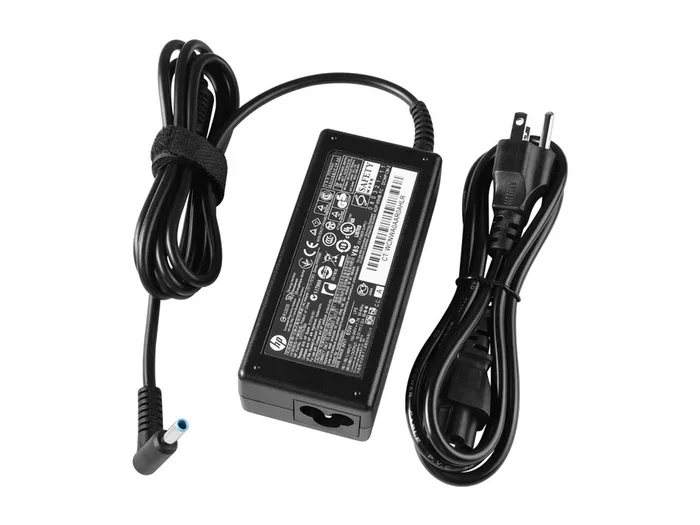
At its core, a laptop AC power adapter is the boxy external power supply that plugs into your wall outlet and delivers electricity to your laptop. You might call it a charger, a power brick, or an AC adapter. Whatever name you use, its job is the same: take the alternating current (AC) from your home’s electrical outlet and convert it into the direct current (DC) that your laptop’s internal components need to work. Without this little brick, your laptop runs solely on battery and dies quickly. Understanding what is a laptop AC power adapter helps you troubleshoot charging issues and choose the right replacement.
The adapter does more than just charge the battery. It powers the laptop while you use it, supplies stable voltage to the motherboard, RAM, and processor, and protects against electrical surges. Think of it as the lifeline that keeps your machine running whether you are at a desk or on the go. If the adapter fails, you lose that lifeline.
How Does a Laptop AC Power Adapter Work?
Inside the adapter, a small circuit board handles the conversion from AC to DC. The process involves several steps. First, the AC power enters the adapter through the prongs. A rectifier converts the alternating current into pulsating direct current. Then, filters smooth out those pulses, and a voltage regulator ensures the output stays at a steady level. Finally, the DC power travels through a cable to your laptop via a connector tip.
All of this happens in milliseconds. The adapter must match your laptop’s specific power requirements. If you want to understand how much power your entire system draws, you can read about how much power a laptop uses when plugged in. That article breaks down the total consumption of the system, which starts with the adapter’s output.
The adapter also powers the components inside your laptop. For example, the memory modules need stable DC power to function. To learn more about what the RAM in your laptop does, check out what the RAM on a laptop is and how it relies on the power supply.
Key Components of a Laptop Power Adapter
A typical laptop AC adapter has several parts that work together. Knowing these helps you understand why a replacement must match the original.
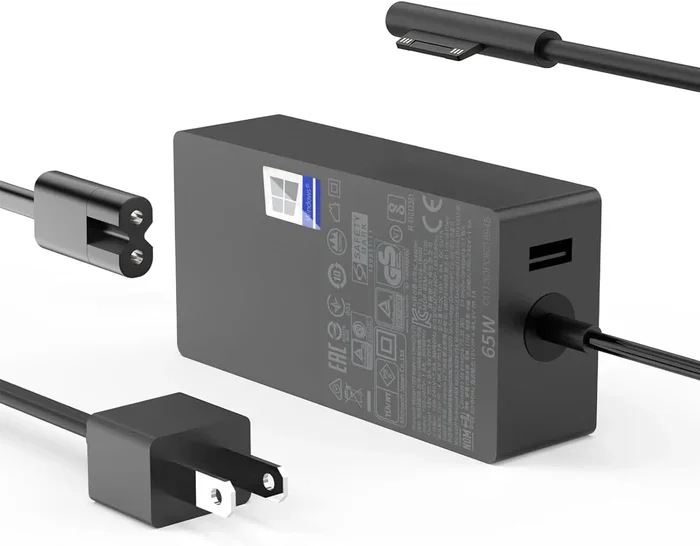
- AC Input Plug: The pronged end that goes into the wall outlet. Some adapters have detachable cords.
- Adapter Brick: The rectangular box that houses the conversion circuitry. It often gets warm during use.
- DC Output Cable: The wire that runs from the brick to the laptop. It ends in a barrel connector.
- Barrel Connector Tip: The plug that inserts into the laptop’s power jack. It comes in different diameters and lengths.
- Indicator LED: A small light that shows the adapter is receiving power and charging the laptop.
Understanding the Barrel Connector
The barrel connector is the small cylindrical plug on the end of the DC cable. It has an outer sleeve and an inner center pin. The size of the tip, measured in millimeters, must fit your laptop’s power jack exactly. Using the wrong tip can cause poor contact or damage the jack. Always check the tip diameter and length before buying a replacement.
Understanding Laptop Adapter Ratings
Every adapter has a label that tells you its electrical specifications. You need to match these when replacing a lost or broken charger.
- Output Voltage (V): Measured in volts. This must match your laptop’s requirement exactly. Common values are 19V, 20V, or 15V.
- Output Current (A): Measured in amperes. The adapter must supply at least as much current as the laptop needs. A higher amperage rating is usually safe.
- Wattage (W): Calculated by multiplying voltage by amperage. A 19V, 3.42A adapter delivers 65W. Choose an adapter with equal or higher wattage.
- Polarity: The barrel connector has a center-positive or center-negative polarity. The symbol on the adapter label shows this. Wrong polarity can fry your laptop.
Quick Tips for Reading Adapter Labels
- Look for the output section, not the input section. Input is AC 100-240V; output is DC 19V 3.42A.
- Keep a photo of your original adapter label on your phone for easy reference.
- If the label is worn off, search your laptop model number plus “power adapter specs” online.
Common Problems with Laptop AC Adapters
Adapters can fail over time. Recognizing the signs early saves you from unexpected shutdowns.
- Frayed or Damaged Cable: A broken wire near the brick or tip causes intermittent charging. Stop using it immediately to avoid fire risk.
- Overheating: If the adapter brick is too hot to touch, it may be failing or undersized for your laptop’s power needs. Check the wattage rating.
- Laptop Not Charging: A loose connector tip or a dead adapter can prevent charging. Try a different outlet first, then test with a known-good adapter.
- Intermittent Connection: If the charging light flickers, the tip might be worn out or the jack inside the laptop is loose.
Common Mistakes to Avoid
- Never use an adapter with a different voltage. Even a small mismatch can damage the motherboard.
- Do not ignore polarity. A center-negative plug in a center-positive jack can cause a short circuit.
- Avoid cheap, unbranded adapters that lack surge protection. They may save money but risk your laptop.
- Do not wrap the cable tightly around the brick. This damages the internal wires over time.
How to Choose the Right Replacement Adapter
When your original adapter dies, you have options. The goal is to find a safe, compatible replacement.
OEM vs. Universal Adapters
An OEM (original equipment manufacturer) adapter is made by your laptop’s brand. It guarantees perfect fit and correct voltage. Universal adapters come with multiple interchangeable tips and adjustable voltage settings. They are convenient for people with several devices. However, you must set the voltage correctly and use the right tip for your laptop.
Matching Connector Tip and Polarity
The connector tip is the most critical part. Measure the outer diameter of the sleeve and the inner diameter of the center pin. Most tips are 5.5mm x 2.1mm or 5.5mm x 2.5mm, but sizes vary. The polarity symbol on the adapter label shows which side is positive. If you are unsure, check your laptop manual or search online for your model’s power jack specs.
Expert Insights on Adapter Safety
Always look for adapters with built-in surge protection and overheat shutdown. These features protect your laptop from electrical spikes. A quality adapter will have a UL or CE certification mark. If you are buying a universal adapter, make sure it lists the exact voltage and amperage your laptop requires. For more on how your laptop’s components affect power draw, you can read about what a good idle GPU temperature is, because a hot GPU can increase overall power consumption and put extra strain on your adapter.
Tips to Extend Your Laptop Adapter’s Lifespan
Simple habits can make your AC adapter last longer and perform better.
- Unplug when not in use: Even when the laptop is off, a plugged-in adapter draws a small amount of power and generates heat.
- Store it properly: Coil the cable loosely with a Velcro tie. Avoid tight folds that break internal wires.
- Keep it cool: Do not place the adapter brick under a pillow or on a carpet. Airflow prevents overheating.
- Check the tip regularly: A dirty or bent tip can cause poor contact. Clean it gently with a dry cloth.
- Use a surge protector: Plug the adapter into a surge protector, not directly into a wall outlet, to guard against power spikes.
When to Replace Your Laptop AC Adapter
Sometimes repair is not possible. Here are clear signs that you need a new adapter.
- The adapter brick is physically damaged, cracked, or shows burn marks.
- The laptop only works when the tip is wiggled in a specific position.
- The charging light never turns on, even with a known-good outlet.
- The adapter gets excessively hot and smells like burning plastic.
- The cable has exposed wires near the plug or brick.
If you notice any of these, stop using the adapter right away. Continuing to use a faulty adapter can permanently damage your laptop’s power input circuit. Always replace it with a model that matches the original specifications.
Conclusion
The laptop AC power adapter is a small but essential part of your daily computing setup. It converts wall outlet power into the clean, stable DC electricity your laptop needs. By understanding its ratings, components, and common issues, you can keep your charger working and your laptop powered. When it is time for a replacement, match the voltage, amperage, connector tip, and polarity exactly. A little care goes a long way in protecting your investment. Now you know exactly what is a laptop AC power adapter and how to get the most from it.
Frequently Asked Questions
Can I use a higher wattage adapter on my laptop?
Yes, as long as the voltage matches exactly and the connector tip is the same. A higher wattage adapter simply means it can supply more current if the laptop demands it, but it will not force extra power into the laptop. This is safe and often preferred for heavy workloads.
What happens if I use the wrong polarity adapter?
Using an adapter with reversed polarity can damage your laptop’s internal circuitry. The center pin might receive voltage where it should be grounded, causing a short circuit. Always check the polarity symbol on both the original adapter and the replacement.
How do I know if my adapter is failing?
Common signs include the laptop not charging, the adapter getting excessively hot, a burning smell, or the cable fraying near the plug. If the charging light flickers or goes out when you move the tip slightly, the adapter or connector may be failing.
Is it safe to leave my laptop plugged in all the time?
It is generally safe for modern laptops, which have built-in circuits to stop charging once the battery is full. However, keeping the adapter plugged in continuously can cause the adapter itself to run hot and degrade faster. Unplugging when not in use can extend both the adapter and battery life.
Can I buy a universal adapter for my laptop?
Yes, universal adapters work well if you select the correct voltage, amperage, and connector tip. Make sure the polarity matches your laptop’s requirements. Universal adapters are great for travel or for households with multiple devices.
What is the difference between an AC adapter and a DC adapter?
An AC adapter converts alternating current from the wall into direct current for your laptop. A DC adapter would just be a DC power source, which is not what comes from a wall outlet. So a laptop AC adapter is specifically an AC-to-DC converter designed for portable computers.