What Is an Rj45 Gigabit Lan Port
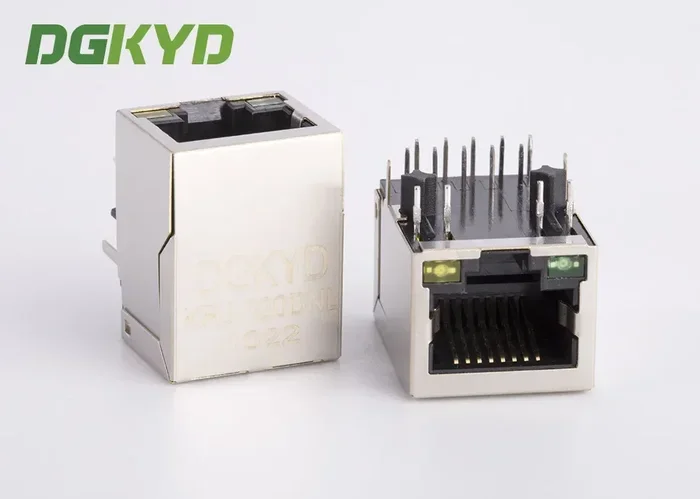
An RJ45 Gigabit LAN port is the standard Ethernet port on computers, routers, and switches that delivers data speeds up to 1 gigabit per second. It uses an RJ45 connector and Cat5e or Cat6 cables to provide fast, stable wired network connections. Understanding this port helps you build a faster, more reliable home or office network.
This is a comprehensive guide about What Is An Rj45 Gigabit Lan Port.
Key Takeaways
- RJ45 Gigabit LAN ports deliver speeds up to 1 Gbps over standard Ethernet cables.
- The RJ45 connector is the small rectangular plug you plug into your computer or router.
- Cat5e and Cat6 cables are the best choices for Gigabit Ethernet performance.
- Gigabit LAN ports are backward compatible with slower Ethernet standards.
- Wired connections through a Gigabit LAN port offer lower latency and more stability than Wi-Fi.
- Most modern computers and routers include built-in RJ45 Gigabit LAN ports.
- Upgrading your network hardware and cables can significantly boost your internet experience.
[FEATURED_IMAGE_PLACEHOLDER]
What Is an RJ45 Gigabit LAN Port?
An RJ45 Gigabit LAN port is the small rectangular slot on your computer, router, or network switch that lets you connect to a wired network using an Ethernet cable. The term RJ45 refers to the type of connector on the end of the cable, and “Gigabit” means it supports data transfer speeds of up to 1 gigabit per second (1 Gbps). This port is the backbone of most wired home and office networks today.
If you have ever plugged a thick network cable into the back of your desktop or laptop, you have used an RJ45 Gigabit LAN port. It looks like a wider version of a phone jack, about half an inch wide, with a small plastic clip that holds the cable in place. These ports are found on desktop PCs, laptops with Ethernet slots, routers, modems, and network switches.
Gigabit LAN ports have become the standard because they strike a perfect balance between speed and affordability. They are fast enough for streaming 4K video, video calls, online gaming, and large file transfers. And unlike older Fast Ethernet ports that maxed out at 100 Mbps, Gigabit ports offer ten times the speed. For anyone building or upgrading a network, understanding how these ports work is essential.
How Does a Gigabit LAN Port Work?
At its core, an RJ45 Gigabit LAN port sends and receives data using electrical signals over copper wiring inside an Ethernet cable. The port contains tiny circuits that encode and decode data packets at incredibly fast rates. When your computer sends data, the port converts digital information into electrical pulses that travel through the cable to the destination device.
The Role of the RJ45 Connector
The RJ45 connector is the small plastic plug at the end of every Ethernet cable. It has eight pins arranged in a specific pattern that align with the wires inside the cable. When you push the connector into the Gigabit LAN port, those pins make contact with the port’s internal pins, completing the electrical circuit. A small plastic clip locks the connector in place so it does not accidentally pull out.
Data Transfer and Signal Processing
Gigabit Ethernet uses all four pairs of wires inside a standard Ethernet cable (eight wires total) to send and receive data simultaneously. This is called full-duplex communication. The port processes data at 1,000 megabits per second, which translates to roughly 125 megabytes per second in real-world file transfers. The port’s network interface controller (NIC) handles all the encoding and decoding, ensuring data reaches its destination accurately and quickly.
RJ45 Connectors and Cable Standards
Not all Ethernet cables are the same. To get the full Gigabit LAN port performance, you need the right cable type. The cable standard determines how fast data can travel and how far it can go without signal loss.
Cat5e Cables
Cat5e (Category 5 enhanced) cables are the minimum standard recommended for Gigabit Ethernet. They support speeds up to 1 Gbps at distances up to 100 meters (about 328 feet). Cat5e cables are widely available and affordable, making them the go-to choice for most home networks.
Cat6 Cables
Cat6 cables offer better performance than Cat5e. They have tighter wire twists and a plastic separator that reduces interference between wires. Cat6 supports 1 Gbps up to 100 meters and can handle 10 Gbps at shorter distances up to 55 meters. If you are building a new network or running cables through walls, Cat6 is a smart investment for future-proofing.
Cat6a and Cat7 Cables
Cat6a and Cat7 cables are designed for even higher speeds and better shielding against interference. Cat6a supports 10 Gbps at 100 meters, while Cat7 can handle 10 Gbps with superior shielding. These cables are thicker and stiffer than Cat5e or Cat6, and they cost more. For most home users, Cat5e or Cat6 is more than enough for a Gigabit LAN port.
| Cable Type | Max Speed | Max Distance | Best For |
|---|---|---|---|
| Cat5e | 1 Gbps | 100 meters | Basic Gigabit networking |
| Cat6 | 1 Gbps (10 Gbps at 55m) | 100 meters | Most home and office setups |
| Cat6a | 10 Gbps | 100 meters | High-performance networks |
| Cat7 | 10 Gbps | 100 meters | Enterprise and demanding setups |
Benefits of Using a Gigabit LAN Port
Wired connections through an RJ45 Gigabit LAN port offer several advantages over wireless connections. Here is why you should consider using a Gigabit port whenever possible.
Faster and More Consistent Speeds
Wi-Fi speeds can vary based on distance, walls, and interference from other devices. A Gigabit LAN port delivers a consistent 1 Gbps connection every time. You get the full speed of your internet plan without drops or fluctuations.
Lower Latency for Gaming and Video Calls
Latency, or ping, is the time it takes for data to travel from your device to the server and back. Wired Ethernet connections have significantly lower latency than Wi-Fi. This makes a huge difference for online gaming, video conferencing, and real-time applications like cloud computing.
Better Security
Wired connections are inherently more secure than wireless ones. Data travels through a physical cable, making it much harder for outsiders to intercept. If you handle sensitive data or work from home, a Gigabit LAN port adds an extra layer of protection.
Reliability and Stability
Wi-Fi connections can drop unexpectedly, especially in crowded apartment buildings or offices with many networks. An Ethernet connection through a Gigabit LAN port stays stable and does not suffer from random disconnects. This reliability is critical for tasks like streaming, uploading large files, or running a home server.
How to Check If Your Device Has a Gigabit LAN Port
Not all devices have a Gigabit Ethernet port. Older computers and budget laptops may have a Fast Ethernet port (100 Mbps) or no Ethernet port at all. Here is how you can check.
On Windows
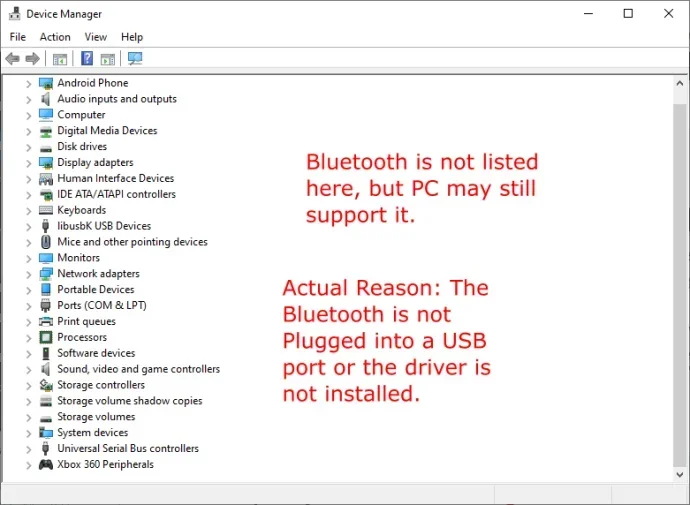
Open the Device Manager and expand the “Network adapters” section. Look for your Ethernet adapter in the list. If it says “Gigabit,” “GbE,” or “10/100/1000” in the name, you have a Gigabit LAN port. If it only says “10/100,” your port is limited to Fast Ethernet speeds.
On Mac
Click the Apple menu, then go to System Preferences > Network. Select Ethernet from the left panel. If your Mac has a Gigabit port, it will show the connection speed as 1000 Mb/s. If it shows 100 Mb/s, your port is Fast Ethernet.
On Laptops Without Ethernet Ports
Many modern laptops, especially ultrabooks, do not include an Ethernet port. In this case, you can use a USB-to-Ethernet adapter that supports Gigabit speeds. Just make sure the adapter supports 10/100/1000 Mbps. You can also check if your laptop has a USB-C dock with a built-in Gigabit Ethernet port for a clean setup.
Common Issues and How to Fix Them
Even with a Gigabit LAN port, you may sometimes run into problems. Here are the most common issues and how to solve them.
Connecting at 100 Mbps Instead of 1 Gbps
If your connection shows 100 Mbps instead of 1000 Mbps, the most common cause is a Cat5 cable or a faulty port. Replace the cable with a Cat5e or Cat6 cable and try a different port on your router. Also check that your Ethernet cable is not damaged or too long.
Intermittent Connection Drops
Loose cable connections can cause frequent drops. Make sure the RJ45 connector is fully pushed into the port until you hear the click. If the problem persists, try a different cable. Damaged cables are a leading cause of unstable connections.
Driver Issues on Windows
Outdated or corrupted network drivers can prevent your Gigabit LAN port from working correctly. Go to your PC manufacturer’s website or the motherboard manufacturer’s site and download the latest Ethernet driver. Updating the driver often resolves speed and connectivity issues.
Port Not Recognized at All
If your device does not recognize the Ethernet port at all, the port may be disabled in the BIOS or the NIC may have failed. Check your BIOS settings to ensure the onboard Ethernet is enabled. If the port still does not work, you may need to use a USB-to-Ethernet adapter as an alternative.
Quick Tips for Getting the Most From Your Gigabit LAN Port
- Always use Cat5e or Cat6 cables for Gigabit speeds. Avoid old Cat5 cables.
- Keep Ethernet cables away from power cords to reduce electromagnetic interference.
- Use cable clips or velcro ties to keep cables organized and prevent damage.
- Check your network speed regularly using online speed test tools to confirm you are getting Gigabit performance.
- If you are building a new PC, consider investing in a quality motherboard with built-in Gigabit Ethernet. This saves you money on separate network cards.
- For the best results, pair your Gigabit LAN port with a Gigabit-capable router and switch.
Expert Insights on RJ45 Gigabit LAN Ports
Network engineers and IT professionals agree that wired Ethernet connections remain the gold standard for reliable networking. While Wi-Fi has improved dramatically, a Gigabit LAN port still delivers superior speed, stability, and security. As one expert notes, “For anyone who works from home, streams a lot of content, or plays competitive games, a wired connection through a Gigabit port is a game changer.”
The RJ45 Gigabit LAN port has been around for over two decades, but it is still the most widely used wired networking standard in the world. Its simplicity, reliability, and speed make it a timeless technology. Even as newer standards like 2.5G and 10G Ethernet emerge, the basic RJ45 connector and Gigabit Ethernet remain the foundation of most networks.
If you are wondering whether to upgrade your network hardware, investing in Gigabit-capable equipment is one of the best investments for the lifespan of your PC. A Gigabit switch or router can breathe new life into an older computer and give you the speed and reliability you need for modern internet use. Check out our guide on what is the best investment for the lifespan of your PC to learn more about smart upgrades.
Conclusion
An RJ45 Gigabit LAN port is a simple yet powerful piece of hardware that forms the foundation of wired networking. It delivers speeds up to 1 Gbps, offers lower latency than Wi-Fi, and provides a stable, secure connection for all your online activities. Whether you are setting up a home office, building a gaming rig, or upgrading your office network, a Gigabit LAN port is a must-have.
The key to getting the most from your Gigabit LAN port is using the right cable, keeping your drivers updated, and understanding how the port fits into your overall network setup. With Cat5e or Cat6 cables and a Gigabit-capable router, you will enjoy fast, reliable wired connections for years to come. Take a moment today to check your devices and make sure you are getting the full Gigabit speed your hardware is capable of.
FAQs
What is the difference between an RJ45 port and a Gigabit LAN port?
The RJ45 refers to the physical connector shape on the cable, while Gigabit LAN refers to the speed capability of the port. A Gigabit LAN port uses an RJ45 connector, but not all RJ45 ports support Gigabit speeds. Some older RJ45 ports only support 100 Mbps Fast Ethernet.
Can I use a Cat5 cable with a Gigabit LAN port?
Technically yes, but Cat5 cables are not recommended for Gigabit speeds. They can cause connection drops and may only work at 100 Mbps. Always use Cat5e or Cat6 cables for reliable Gigabit performance.
Do I need a special router for a Gigabit LAN port?
Your router needs to have Gigabit Ethernet ports as well. If your router only has Fast Ethernet ports, your connection will be limited to 100 Mbps even if your computer has a Gigabit port. Check your router specifications before purchasing.
Is a Gigabit LAN port faster than Wi-Fi 6?
In real-world conditions, a wired Gigabit LAN port is generally faster and more stable than Wi-Fi 6. Wi-Fi 6 can theoretically reach higher speeds, but interference, distance, and walls often reduce real-world performance. For consistency, Ethernet wins.
How do I know if my Ethernet cable supports Gigabit speeds?
Look at the printing on the cable itself. Cat5e, Cat6, Cat6a, and Cat7 cables all support Gigabit speeds. If the cable says “Cat5” without the “e,” it is likely only rated for Fast Ethernet at 100 Mbps.
Can I add a Gigabit LAN port to a laptop that does not have one?
Yes, you can use a USB-to-Ethernet adapter that supports 10/100/1000 Mbps. These adapters are affordable and easy to use. Just plug the adapter into your laptop, connect an Ethernet cable, and you will have a working Gigabit LAN connection.
Frequently Asked Questions
What is What Is An Rj45 Gigabit Lan Port?
What Is An Rj45 Gigabit Lan Port is an important topic with many practical applications.