What Is an Rj45 Cable
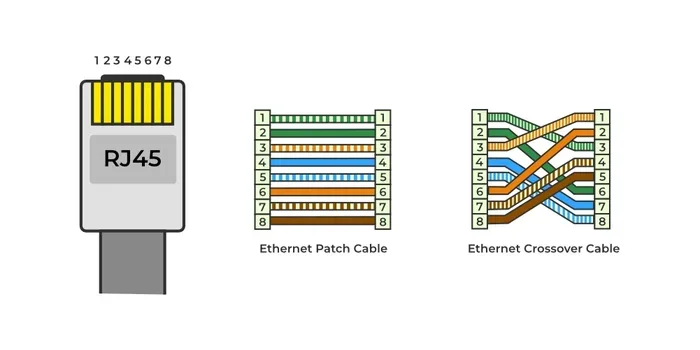
An RJ45 cable is the standard plug-and-play connector used to wire Ethernet networks in homes and offices. It looks like a wider phone plug and locks into place with a small tab. Understanding RJ45 cables helps you build faster, more reliable connections for internet, gaming, and file sharing.
If you have ever plugged a thick, rectangular-ended cable into the back of your computer or router, you have used an RJ45 cable. These small but mighty connectors power almost every wired internet connection in the world today. Whether you are setting up a home office, building a gaming rig, or managing a business network, understanding RJ45 cables is essential.
This guide breaks down everything you need to know. We will cover what an RJ45 cable looks like, how it works, the different types available, and how to pick the right one for your setup. By the end, you will feel confident choosing, wiring, and troubleshooting these connectors like a pro.
An RJ45 cable is more than just a piece of wire. It is a carefully engineered tool designed to deliver fast, stable data transfers. Let us dive into the details and explore why this simple connector plays such a huge role in modern networking.
Key Takeaways
- RJ45 cables are the backbone of wired Ethernet networks: They connect computers, routers, switches, and modems using a standardized modular connector.
- Multiple categories exist for different speeds: Cat5e, Cat6, and Cat6a cables support different bandwidths and network speeds.
- Proper wiring matters for performance: T568A and T568B wiring standards ensure your connection works correctly and efficiently.
- RJ45 cables boost reliability over Wi-Fi: A wired connection reduces latency and interference for gaming, streaming, and remote work.
- Choosing the right length and type prevents signal loss: Keep cables under 100 meters and match the category to your network needs.
📑 Table of Contents
What Is an RJ45 Cable?
An RJ45 cable gets its name from the registered jack connector at each end. The “RJ” stands for Registered Jack, and the “45” is simply the standard number assigned to this specific connector type. Each end of the cable has a plastic plug with eight tiny gold pins inside. These pins carry data between devices over an Ethernet network.
The connector looks very similar to a phone cable plug, but it is much wider. A phone plug has two or four pins, while an RJ45 plug has eight. This extra width allows the cable to handle much more data at faster speeds. You will find RJ45 cables in offices, schools, data centers, and homes around the globe.
These cables are the foundation of local area networks, or LANs. They connect your computer to a router, a router to a modem, and switches to multiple devices. Without RJ45 cables, wired internet as we know it would not exist. They are simple, affordable, and incredibly reliable.
How Does an RJ45 Cable Work?
Inside every RJ45 cable, you will find twisted pairs of copper wires. Most standard cables have four pairs, giving you eight individual wires total. Each wire carries a small electrical signal. When data travels from one device to another, these signals encode the information being sent.
The twisting of the wire pairs is key. It reduces electromagnetic interference from nearby cables and electronic devices. The tighter the twist, the better the cable handles high-speed data. This is exactly why higher-category cables like Cat6 and Cat6a perform better than older Cat5 cables.
When you plug an RJ45 connector into an Ethernet port, the eight pins make contact with the corresponding wires inside the cable. The network interface card in your device then translates those electrical signals into digital data. The whole process happens in milliseconds, making wired connections feel instant.
Types of RJ45 Cables by Category
Not all RJ45 cables are the same. They come in different categories, each designed for specific speeds and bandwidths. The category is printed right on the cable jacket, so you can easily identify what you have.
Cat5e Cable
The enhanced Cat5 cable, known as Cat5e, supports speeds up to 1 gigabit per second at 100 MHz bandwidth. It is the most common type found in older homes and small offices. Cat5e cables work well for basic internet browsing, email, and standard streaming.
Cat5e cables are affordable and widely available. They are a solid choice if your internet plan does not exceed 1 Gbps. However, they are starting to show their age as faster internet plans become more common.
Cat6 Cable
Cat6 cables handle speeds up to 10 Gbps, but only at shorter distances of up to 55 meters. They operate at 250 MHz bandwidth, which is double that of Cat5e. The tighter wire twists and better shielding in Cat6 cables reduce crosstalk and signal interference.
For most home networks and small businesses, Cat6 is the sweet spot. It offers excellent performance at a reasonable price. If you are building a new network or upgrading an old one, Cat6 is a smart choice.
Cat6a and Cat7 Cables
Cat6a cables support 10 Gbps speeds at the full 100-meter distance. They have thicker shielding that protects against interference even in noisy environments. These cables are popular in enterprise settings and data centers.
Cat7 cables go a step further with individual shielding for each wire pair. They support frequencies up to 600 MHz. However, Cat7 cables use a non-standard connector type in many cases, which can limit compatibility. For most users, Cat6a is the better practical choice.
RJ45 Cable Wiring Standards
When you crimp or terminate an RJ45 cable, you need to follow a specific wiring order. Two standards govern how the eight wires are arranged inside the connector. Knowing both standards helps you make correct cables for any situation.
T568A vs T568B
The T568A and T568B standards define the pin arrangement for RJ45 connectors. The only real difference is that the green and orange wire pairs are swapped between the two standards. Both work equally well for data transmission.
In the United States, T568B is the most commonly used standard. Most commercial equipment and patch cables follow T568B. T568A is often used in residential installations and government facilities. The key rule is to be consistent: use the same standard on both ends of a cable for a straight-through connection.
If you need to connect two similar devices directly, such as two computers, you would use a crossover cable. This means one end uses T568A and the other uses T568B. However, modern devices often auto-detect the connection type, making crossover cables less necessary today.
Common Uses for RJ45 Cables
RJ45 cables are everywhere in modern networking. Their versatility and reliability make them the go-to choice for wired connections in many settings.
Home Networks
At home, RJ45 cables connect your desktop computer or gaming console to the router. A wired connection gives you lower latency and more stable speeds than Wi-Fi. If you play online games or stream 4K video, plugging in with an RJ45 cable can make a noticeable difference.
Many people are surprised to learn that a quality Ethernet cable can also improve their overall PC experience. For instance, keeping your GPU cool during intense gaming sessions matters a lot. You can check what is a good idle GPU temperature to make sure your entire system is running optimally alongside your wired network.
Office and Business Networks
In offices, RJ45 cables run through walls and ceilings to connect dozens or even hundreds of devices. Network administrators rely on these cables for everything from file sharing to video conferencing. A well-organized cabling infrastructure is a core part of any IT setup.
Managing a large network also involves broader planning and coordination. Understanding what project management helps IT teams plan, execute, and maintain network infrastructure projects efficiently.
Data Centers and Server Rooms
Data centers use massive amounts of RJ45 cabling to connect servers, switches, and storage systems. High-density patch panels and rack-mounted connectors keep everything organized. In these environments, cable quality and proper termination are critical for maintaining top network performance.
Outdoor and Industrial Settings
Specialized RJ45 cables with rugged jackets are used in outdoor installations and industrial environments. These cables resist moisture, UV light, and physical damage. They connect security cameras, access points, and industrial control systems in factories and warehouses.
How to Choose the Right RJ45 Cable
Selecting the right cable for your needs is simpler than you might think. A few key factors will guide your decision.
Consider Your Speed Needs
Start by checking your internet plan speed. If you have a 500 Mbps plan, a Cat5e cable is more than enough. If you have a 10 Gbps plan or plan to upgrade soon, go with Cat6a or higher. Matching the cable category to your speed requirements prevents overspending on unnecessary features.
Think About Distance
The maximum recommended length for an RJ45 Ethernet cable is 100 meters, or about 328 feet. Beyond this distance, signal degradation becomes a real problem. If you need to cover a longer run, use a switch or repeater to boost the signal along the way.
Check Your Environment
If you are running cables through walls or near power lines, choose a cable with better shielding. Cat6a and Cat7 cables offer superior protection against interference. For basic runs in open spaces, Cat5e or Cat6 will work just fine.
Investing in quality networking gear pays off in the long run. A reliable Ethernet connection is one of the best investments you can make for the lifespan of your PC. Learn more about what is the best investment for lifespan of PC to see how networking components fit into the bigger picture.
Shielded vs. Unshielded
Shielded cables (STP) have a metal foil or braid around the wire pairs. This shielding blocks external interference from power cables and fluorescent lights. Unshielded cables (UTP) are thinner, more flexible, and cheaper. For most home and office setups, unshielded Cat5e or Cat6 cables work perfectly.
In industrial or high-interference environments, shielded cables are worth the extra cost. They prevent packet loss and keep your network running smoothly under demanding conditions.
RJ45 vs Other Connector Types
While RJ45 is the standard for Ethernet, other connectors serve different purposes. Understanding the differences helps you choose the right cable for each job.
RJ11 connectors are the smaller plugs used for telephone lines. They have four or six pins and look like a narrow version of the RJ45. You cannot plug an RJ11 into an RJ45 port, and vice versa. The two connectors serve completely different purposes.
USB-to-Ethernet adapters allow you to connect an RJ45 cable to a USB port. These are handy for laptops that do not have a built-in Ethernet port. However, a direct RJ45 connection to a router or switch always provides the best performance and lowest latency.
Fiber optic cables use light instead of electricity to transmit data. They support much longer distances and higher speeds than copper RJ45 cables. Fiber is common in backbone networks and long-haul connections. But for most everyday uses, an RJ45 copper cable is more practical and cost-effective.
For those building a custom setup or managing a home lab, you may also use tools like Webflow to create dashboards or documentation sites that track your network inventory and cable management. It is a great way to keep your networking projects organized.
Common RJ45 Cable Mistakes to Avoid
Even experienced users sometimes make mistakes when working with RJ45 cables. Avoiding these common errors saves time and prevents frustration.
- Using the wrong wiring standard: Mixing T568A and T568B on the same cable end creates a bad connection. Always double-check your wiring order before crimping.
- Bending cables too sharply: Sharp bends can damage the internal wire pairs and reduce signal quality. Keep bend radiuses generous, especially with Cat6 and thicker cables.
- Ignoring cable length limits: Running a cable longer than 100 meters causes signal loss and dropped connections. Use a repeater or switch for longer runs.
- Choosing the wrong category: Using a Cat5 cable on a gigabit network will cap your speeds at 100 Mbps. Always match the cable category to your network speed.
- Poor crimp quality: A loose or incomplete crimp leads to intermittent connections. Use a quality crimping tool and test every cable before installing it.
Quick Tips for Working with RJ45 Cables
- Label your cables: Use a label maker or colored cable ties to identify what each cable connects. This saves hours of troubleshooting later.
- Keep a cable tester handy: A basic continuity tester checks that all eight pins are properly connected. It is a small investment that pays off quickly.
- Store cables properly: Coil cables loosely and avoid tight knots. Proper storage extends the life of your cables significantly.
- Match your laptop memory to your networking needs: If you are upgrading your laptop for better network performance, check what the RAM on a laptop supports, as system performance and network processing go hand in hand.
- Buy from reputable brands: Quality cables from trusted manufacturers use better copper and tighter twists, resulting in more reliable performance.
Conclusion
The RJ45 cable might look simple, but it is the unsung hero of modern networking. From your home router to massive data centers, these connectors deliver the reliable, high-speed connections that the digital world depends on. Understanding the different types, wiring standards, and use cases empowers you to build better networks and troubleshoot problems faster.
Whether you are a home user plugging in a gaming PC or an IT professional managing enterprise infrastructure, choosing the right RJ45 cable makes a real difference. Pick the right category, follow the proper wiring standard, and invest in quality cables. Your network will thank you with faster speeds, fewer dropped connections, and years of reliable service.
Start by assessing your current setup. Do you need an upgrade? Are your cables the right category for your speed plan? A small change today can lead to a much better network experience tomorrow.
Frequently Asked Questions
What does RJ45 stand for?
RJ stands for Registered Jack, and 45 is the standard number assigned to this specific connector type. The RJ45 connector is the universal plug used at the ends of Ethernet cables to connect devices in a wired network.
Can I use an RJ45 cable for phone lines?
No, RJ45 cables are designed for Ethernet networking and have eight pins. Phone lines use RJ11 connectors, which are smaller and have four or six pins. The two connectors are not interchangeable.
What is the maximum length for an RJ45 cable?
The maximum recommended length for an RJ45 Ethernet cable is 100 meters, or about 328 feet. Beyond this distance, signal degradation can cause dropped connections and slower speeds. Use a switch or repeater for longer runs.
Is Cat5e good enough for gaming?
Yes, Cat5e supports speeds up to 1 Gbps, which is more than enough for most online gaming. However, if you want the best possible performance and lowest latency, Cat6 or Cat6a cables offer better shielding and future-proofing for your setup.
Can I plug an RJ45 cable directly into my wall?
Yes, if you have an Ethernet wall jack installed. The wall jack connects to your router or network switch through in-wall wiring. Make sure the wall jack matches the wiring standard used for your cable to ensure a proper connection.
Do I need a special tool to make RJ45 cables?
Yes, you need a crimping tool to attach RJ45 connectors to bare cable. A good cable tester is also highly recommended to verify that your crimps are correct and all eight pins are properly connected. Both tools are affordable and easy to use.