What Is Cloud Gaming on Xbox
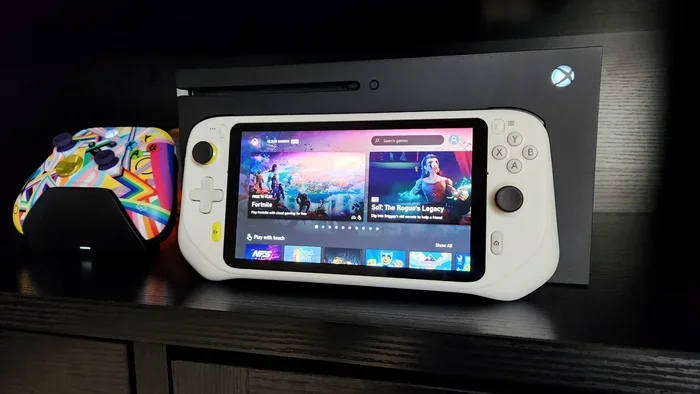
Cloud gaming on Xbox lets you play Xbox games on any device without needing a powerful console or PC. It works through Xbox Cloud Gaming, part of the Xbox Game Pass Ultimate subscription, and streams games directly from Microsoft servers. You can play on your phone, tablet, laptop, or smart TV with just a controller and a solid internet connection. This guide covers everything you need to know about Xbox cloud gaming, from setup to tips for the best experience.
Key Takeaways
- Xbox Cloud Gaming streams games from Microsoft servers, so you do not need an Xbox console.
- You need an Xbox Game Pass Ultimate subscription to access the full library.
- A fast, stable internet connection with at least 10 Mbps is essential for smooth game streaming.
- You can play on phones, tablets, PCs, and smart TVs using the Xbox app or browser.
- Controller latency and Wi-Fi quality are the biggest factors affecting your game streaming quality.
- Cloud gaming on Xbox offers a huge library including new releases and classic titles.
📑 Table of Contents
What Is Cloud Gaming on Xbox?
Cloud gaming on Xbox is a service that lets you play Xbox games through the internet instead of running them on your own device. Microsoft streams the game from its powerful servers directly to your screen. You control the game in real time, and the server sends back the video instantly. This means you can enjoy AAA Xbox titles on a phone, a budget laptop, or even a smart TV.
The technology behind Xbox cloud gaming is called xCloud. It is part of the broader Xbox Game Pass Ultimate subscription. This subscription gives you access to hundreds of games, and you can play many of them through the cloud. No downloads. No installs. Just pick a game and start playing.
The idea is simple but powerful. Instead of your device doing all the heavy lifting, Microsoft’s data centers handle the processing. Your device just receives the video stream and sends your button presses back. This makes cloud gaming on Xbox one of the most accessible ways to play high-quality games today.
How Does Xbox Cloud Gaming Work?
Understanding how Xbox cloud gaming works helps you get the most out of it. The process happens in a few quick steps every time you play.
The Streaming Process
When you launch a game, the Xbox server runs it on a real Xbox console in a Microsoft data center. The server captures the video output and sends it to your device over the internet. Your controller inputs travel back to the server in real time. This loop happens so fast that it feels like you are playing locally.
The quality of your game streaming depends heavily on your internet connection. A fast and stable connection keeps the video smooth and the controls responsive. If your connection drops, the stream stutters or disconnects.
The Role of Xbox Game Pass Ultimate
Xbox Game Pass Ultimate is the key that unlocks cloud gaming on Xbox. This subscription costs around $14.99 per month and includes both console and PC game passes plus cloud gaming access. Subscribers get access to a rotating library of over 100 high-quality games. New titles are added regularly, and some are available on day one of release.
You can also try Xbox cloud gaming for free through a trial period. Microsoft often offers new subscribers a chance to test the service before committing. This is a great way to see if cloud gaming works well on your setup.
What You Need to Get Started
Setting up cloud gaming on Xbox is easy, but you do need a few things in place. Here is what you need before you start game streaming.
A Stable Internet Connection
This is the most important requirement. Microsoft recommends at least 10 Mbps for reliable game streaming. For the best game streaming quality, aim for 20 Mbps or higher. A wired Ethernet connection is always better than Wi-Fi, but a strong 5GHz Wi-Fi signal works well too.
Low latency is critical for cloud gaming on Xbox. If your ping is high, you will notice a delay between pressing a button and seeing the action on screen. This can make fast-paced games feel sluggish. Test your connection before you start playing.
A Compatible Device
You can play Xbox cloud gaming on many devices. Here are the most common options:
- Android phones and tablets — Use the Xbox app from the Google Play Store.
- iPhones and iPads — Use the Xbox app or Safari browser. Note that iOS support has some limitations.
- Windows PCs and laptops — Use the Xbox app or Microsoft Edge browser.
- Smart TVs — Some Samsung and LG TVs support the Xbox app directly.
- Amazon Fire TV and Apple TV — Both work with the Xbox app.
Your device does not need to be powerful. Even an older laptop or a budget tablet can handle Xbox cloud gaming because the heavy lifting happens on Microsoft’s servers.
A Compatible Controller
You need an Xbox controller to play. The Xbox Wireless Controller works best, but you can also use Bluetooth-compatible controllers. If you want to elevate your setup, check out what are the best Xbox gaming headsets to pair with your controller for a full immersive experience. A good headset makes a big difference when you are deep into a game.
Storage and Hardware Considerations
Since cloud gaming on Xbox streams games from the cloud, you do not need much local storage. However, you may still want space for game installs if you also use the Xbox app on PC. Having a solid state drive helps with overall performance. For more on storage, see is 1TB NVMe SSD good for gaming.
Your device’s GPU and CPU do not need to be top of the line for cloud gaming. But if you are curious about how your hardware compares, you can check what GPU is the Ryzen 7 5700G equivalent to to understand your system’s gaming capabilities better.
Xbox Cloud Gaming vs Traditional Gaming
Cloud gaming on Xbox is different from traditional gaming in several important ways. Understanding these differences helps you decide which approach fits your lifestyle.
No Need for a Console or Powerful PC
With traditional gaming, you need an Xbox console or a gaming PC with a strong GPU. Cloud gaming on Xbox removes that barrier entirely. You can play the same games on a device that costs a fraction of the price. This makes high-quality gaming much more accessible.
Instant Access to Games
Traditional gaming often requires downloads that can take hours. With Xbox cloud gaming, you select a game and start playing almost instantly. There is no waiting for downloads or installs. This is a huge advantage for gamers who want to jump in quickly.
Quality and Performance
Traditional gaming gives you full control over graphics settings and frame rates. Cloud gaming depends on the stream quality set by Microsoft. In most cases, the stream looks excellent, but it may not match the visual fidelity of a local 4K setup. Also, your game streaming quality can fluctuate if your internet connection is unstable.
Latency and Input Delay
Local gaming has virtually zero input delay. Cloud gaming on Xbox has a small amount of latency due to the round-trip of data between your device and Microsoft’s servers. For most casual and mid-core games, this delay is barely noticeable. For competitive or fast-paced games, it can be a factor.
| Feature | Xbox Cloud Gaming | Traditional Gaming |
|---|---|---|
| Hardware Needed | Any device with internet | Xbox console or gaming PC |
| Game Access | Instant streaming | Download and install required |
| Internet Required | Yes, always | No (for single-player) |
| Graphics Quality | Stream-dependent | Full local rendering |
| Input Lag | Small delay | Near zero |
| Cost to Start | Subscription only | Console or PC purchase |
Tips for the Best Cloud Gaming Experience
Getting the most out of cloud gaming on Xbox comes down to a few practical tips. These small changes can make a big difference in your game streaming quality.
Use a Wired Connection When Possible
Wi-Fi is convenient, but a wired Ethernet connection gives you the most stable game streaming experience. If you cannot use a cable, make sure you are close to your router and on a 5GHz band. Avoid public Wi-Fi networks for competitive gaming.
Keep Your Device Cool
Even though cloud gaming does not tax your device’s GPU, it does use the network and display constantly. Overheating can cause throttling and stuttering. Keep your device well-ventilated, especially during long gaming sessions.
Use a Compatible Controller
The official Xbox Wireless Controller provides the best experience. It connects easily via Bluetooth or the Xbox Wireless Adapter. Third-party controllers can work, but some may have slight input lag or compatibility issues.
Adjust Stream Quality Settings
In the Xbox app, you can adjust the game streaming quality settings. Lowering the resolution can reduce latency and improve responsiveness. If you have a strong connection, keep it at 1080p or higher for the best visuals.
Close Background Apps
Other apps using your internet connection can hurt your cloud gaming on Xbox performance. Close unnecessary apps and browser tabs before you start playing. This ensures your bandwidth goes entirely to the game stream.
Limitations of Xbox Cloud Gaming
Cloud gaming on Xbox is impressive, but it does have some limitations. Being aware of these helps you set realistic expectations.
First, you always need an internet connection. You cannot play offline, even for single-player games. This is a dealbreaker for gamers who travel to areas with poor connectivity.
Second, not every game in the Xbox library is available for cloud gaming. Some titles require local installation due to performance or licensing reasons. Always check if a specific game supports Xbox cloud gaming before you expect to play it.
Third, peak hours can affect server performance. When many people are streaming at the same time, you might notice slightly lower quality or increased latency. Microsoft continuously expands its Xbox server infrastructure to handle growing demand.
Finally, controller battery life matters. Since you rely on a wireless controller for game streaming, a dead battery mid-game is frustrating. Keep your controller charged or have spares ready.
Is Cloud Gaming on Xbox Worth It?
The answer depends on your gaming habits and setup. If you want to play Xbox games without buying a console, cloud gaming on Xbox is an excellent choice. It is especially great for casual gamers, people who travel, or anyone who wants to try a large library without a big upfront cost.
The Xbox Game Pass Ultimate subscription offers great value. You get access to hundreds of games, EA Play, and Xbox cloud gaming all in one package. For many gamers, this is the best deal in gaming today.
If you are serious about competitive gaming or want the highest possible visual quality, traditional local gaming may still be better. But for convenience and accessibility, Xbox cloud gaming is hard to beat. It brings the Xbox experience to places you would never expect.
Cloud gaming on Xbox continues to improve as Microsoft invests in its infrastructure. The future looks bright for game streaming on Xbox. Whether you are a seasoned gamer or just starting out, it is worth trying today.
Frequently Asked Questions
Do I need an Xbox console to use cloud gaming on Xbox?
No, you do not need an Xbox console at all. Xbox cloud gaming works through the Xbox Game Pass Ultimate subscription and streams games from Microsoft servers. You can play on your phone, tablet, laptop, or smart TV with just a controller and internet connection.
How much internet speed do I need for Xbox cloud gaming?
Microsoft recommends at least 10 Mbps for a reliable game streaming experience. For the best game streaming quality, 20 Mbps or higher is ideal. A wired connection is always preferred over Wi-Fi for the lowest latency and most stable performance.
Can I play Xbox cloud games offline?
No, cloud gaming on Xbox requires an active internet connection at all times. The games run on Microsoft servers, so you cannot play offline. If you lose your connection mid-game, the stream will pause or disconnect until you reconnect.
Is Xbox cloud gaming free?
No, you need an Xbox Game Pass Ultimate subscription to access cloud gaming. The subscription costs around $14.99 per month and includes the full game library, console and PC access, and EA Play. Microsoft sometimes offers free trial periods for new subscribers.
What devices support Xbox cloud gaming?
You can play Xbox cloud gaming on Android phones and tablets, iPhones and iPads, Windows PCs, smart TVs (Samsung and LG), Amazon Fire TV, and Apple TV. The Xbox app or a compatible browser is required on each device for game streaming to work.
Does cloud gaming on Xbox have input lag?
Yes, there is a small amount of input lag because your controller inputs travel to a Microsoft server and back. For most casual and single-player games, this delay is barely noticeable. Competitive or fast-paced games may feel slightly less responsive compared to local gaming, especially on slower connections.