What Is Ddr4 Ram
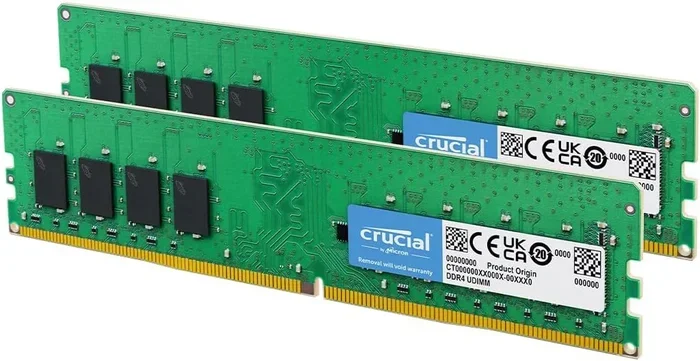
Ddr4 Ram is the fourth generation of double data rate synchronous dynamic random access memory. It is the standard memory type used in most modern laptops today. Ddr4 Ram offers faster speeds, lower power consumption, and better performance compared to older DDR3 modules. Understanding Ddr4 Ram helps you choose the right memory for your laptop needs.
If you have ever opened your laptop and wondered what that small chip on the motherboard does, you have already touched on the world of Ddr4 Ram. Random access memory, or RAM, is the short-term memory your laptop uses to handle everything you do right now. Without it, your laptop simply cannot function.
Ddr4 Ram stands for Double Data Rate fourth generation. It is the fourth version of DDR memory technology. Every new generation brings faster speeds, better efficiency, and improved performance. Ddr4 Ram has been the go-to choice for laptops since around 2014. Today, it powers the vast majority of modern laptops on the market.
You might be asking yourself, why does Ddr4 Ram matter? The answer is simple. It affects how fast your laptop opens apps, how many tabs you can keep open in your browser, and how smoothly your system runs when you multitask. Whether you are a student, a professional, or a casual user, understanding Ddr4 Ram helps you make smarter choices about your laptop.
In this guide, we will break down everything you need to know about Ddr4 Ram. We will cover how it works, what makes it different from older types, and how to choose the right amount for your needs. By the end, you will feel confident about your laptop memory decisions.
Key Takeaways
- DDR4 Ram is the latest standard for laptop memory: It delivers faster speeds and uses less power than DDR3.
- DDR4 Ram works at lower voltage: It runs at 1.2 volts compared to DDR3’s 1.5 volts, which saves battery life.
- DDR4 Ram comes in SO-DIMM form: These smaller modules fit perfectly into laptop memory slots.
- DDR4 Ram speeds range from 2133 MHz to 3200 MHz: Higher speeds mean better multitasking and smoother performance.
- DDR4 Ram is not backward compatible with DDR3: You cannot mix DDR4 and DDR3 modules in the same laptop.
- 16 GB DDR4 Ram is ideal for most users: It handles everyday tasks, light gaming, and even some creative work with ease.
- Checking compatibility before buying is essential: Use tools or check your laptop manual to confirm DDR4 support.
📑 Table of Contents
- What Is Ddr4 Ram and How Does It Work?
- Ddr4 Ram vs Ddr3 Ram: What Is the Difference?
- How Much Ddr4 Ram Do You Need for a Laptop?
- How to Check if Your Laptop Supports Ddr4 Ram
- How to Upgrade Your Laptop with Ddr4 Ram
- Common Mistakes to Avoid When Buying Ddr4 Ram
- Is Ddr4 Ram Worth It in 2024 and Beyond?
What Is Ddr4 Ram and How Does It Work?
Ddr4 Ram stands for Double Data Rate 4 Synchronous Dynamic Random Access Memory. Let us break that down into simple terms. “Double Data Rate” means the memory transfers data on both the rising and falling edges of a clock signal. This doubles the data rate compared to older single data rate memory.
Synchronous means the RAM syncs its operations with the motherboard clock. Dynamic means the data is stored in capacitors that need regular refreshing. Random Access means any byte of memory can be accessed directly without reading through everything before it.
The Evolution of DDR Memory
DDR memory has gone through several generations. Each one brought meaningful improvements.
- DDR1: The original DDR standard. It ran at lower speeds and has been completely phased out.
- DDR2: Faster than DDR1 but now considered outdated for modern use.
- DDR3: A big step forward. Many older laptops still use DDR3 memory today.
- DDR4: The current standard. It offers the best balance of speed, efficiency, and affordability.
- DDR5: The newest generation. It is just starting to appear in premium laptops.
Ddr4 Ram sits right in the sweet spot. It is fast enough for demanding tasks but still widely available at reasonable prices. If you are shopping for a new laptop or planning an upgrade, Ddr4 Ram is almost certainly what you will encounter.
Key Technical Features of Ddr4 Ram
Ddr4 Ram has several technical features that set it apart from previous generations. Let us look at the most important ones.
- Operating voltage: Ddr4 Ram runs at 1.2 volts. DDR3 ran at 1.5 volts. This 0.3-volt reduction adds up to meaningful battery savings over time.
- Speed: DDR4 modules typically start at 2133 MHz and can go all the way up to 3200 MHz or more for high-performance kits.
- Capacity: Individual DDR4 SO-DIMM modules commonly come in 4 GB, 8 GB, 16 GB, and 32 GB sizes.
- Pin count: DDR4 SO-DIMM modules have 260 pins. DDR3 SO-DIMM modules have 204 pins. This physical difference prevents cross-compatibility.
- Bank groups: DDR4 uses bank groups to improve data access efficiency. This leads to better overall memory performance.
These features make Ddr4 Ram a strong performer for everyday laptop use. It handles web browsing, office applications, video playback, and light creative work with ease.
Ddr4 Ram vs Ddr3 Ram: What Is the Difference?
If you are comparing Ddr4 Ram to Ddr3 Ram, there are clear differences you should know about. Understanding these differences helps you decide whether an upgrade makes sense.
Speed and Performance
Ddr4 Ram is noticeably faster than Ddr3 Ram in real-world use. The base speed of DDR4 starts at 2133 MHz, while DDR3 typically maxes out around 1600 MHz. For tasks like opening large applications or switching between multiple programs, Ddr4 Ram delivers a smoother experience.
For example, imagine you have a laptop with 8 GB of DDR4 memory running at 2400 MHz. Compared to an older laptop with 8 GB of DDR3 at 1600 MHz, the DDR4 machine will feel snappier. Apps will launch faster, and you can keep more browser tabs open without slowdowns.
Power Consumption
Ddr4 Ram uses less power than Ddr3 Ram. As mentioned, DDR4 operates at 1.2 volts while DDR3 uses 1.5 volts. On a laptop, this translates to slightly better battery life. Over a full workday, the difference may be small but it adds up.
Physical Compatibility
One of the most important differences is physical. Ddr4 Ram modules use a different notch position than DDR3 modules. This means you cannot insert a DDR4 stick into a DDR3 slot, and vice versa. Your laptop motherboard is designed for one type or the other, not both.
| Feature | DDR3 | DDR4 |
|---|---|---|
| Operating Voltage | 1.5V | 1.2V |
| Base Speed | 1600 MHz | 2133 MHz |
| Max Speed (Common) | 2133 MHz | 3200 MHz |
| Pin Count (SO-DIMM) | 204 | 260 |
| Power Efficiency | Lower | Higher |
| Typical Capacity per Module | Up to 8 GB | Up to 16 GB or 32 GB |
As you can see, Ddr4 Ram wins in nearly every category. If your laptop supports DDR4, there is no reason to choose DDR3 for a new purchase.
How Much Ddr4 Ram Do You Need for a Laptop?
Choosing the right amount of Ddr4 Ram depends on what you plan to do with your laptop. Different tasks demand different levels of memory. Let us walk through the common scenarios.
For Everyday Use
If you mainly browse the web, check email, watch videos, and use office apps, 8 GB of Ddr4 Ram is a solid starting point. This is enough for most casual users. It handles multiple browser tabs and light multitasking without issues.
For Students
Students who take notes, write papers, and run educational software will do well with 8 GB to 16 GB of Ddr4 Ram. If you are studying fields that involve heavy research or running multiple applications at once, 16 GB gives you comfortable headroom. Students can learn more about this in our guide on is 8gb ram enough for laptop for students.
For Creative Work
Photo editing, video editing, and music production benefit greatly from more memory. 16 GB of Ddr4 Ram is a good baseline for creative professionals. For heavy video rendering or working with large design files, 32 GB provides a noticeable boost. If you are unsure about what is good ram for a laptop in your specific case, the answer usually comes down to your workflow demands.
For Gaming and Multitasking
Gamers and power users should aim for at least 16 GB of Ddr4 Ram. Modern games and streaming setups consume a lot of memory. Having extra RAM ensures your laptop stays responsive even when running demanding applications in the background.
For most people, 16 GB DDR4 Ram hits the sweet spot between performance and value. It covers the vast majority of use cases without overspending.
How to Check if Your Laptop Supports Ddr4 Ram
Before you buy any Ddr4 Ram, you need to confirm your laptop supports it. Not every laptop uses DDR4 memory, and compatibility matters a great deal.
Check Your Laptop Manual
The easiest way is to look up your laptop model number. Visit the manufacturer’s website and find the specifications page. Look for the memory section. It will tell you the RAM type, maximum capacity, and supported speeds.
Use System Information Tools
On Windows, you can press the Windows key, type “System Information,” and hit Enter. Look for the “Installed Physical Memory (RAM)” section. On macOS, click the Apple menu, choose “About This Mac,” and the memory details will appear right there.
Use Third-Party Software
Tools like CPU-Z or Speccy give you detailed information about your current RAM. They show you the type (DDR3, DDR4, or DDR5), the speed, and the module size. This is a quick way to confirm whether your laptop uses Ddr4 Ram.
Consult a Compatibility Guide
If you are unsure, checking a how to know what ram is compatible with my laptop guide can save you from buying the wrong type. Always double-check before making a purchase.
How to Upgrade Your Laptop with Ddr4 Ram
Upgrading your laptop memory with Ddr4 Ram is one of the most rewarding DIY projects you can tackle. It is affordable, fast, and can breathe new life into an older machine.
Step-by-Step Upgrade Process
- Confirm compatibility: Check your laptop manual or use a system tool to verify DDR4 support and maximum capacity.
- Buy the right module: Choose a Ddr4 SO-DIMM that matches your needs in terms of capacity and speed.
- Purchase the correct type: Look for what is good ram on a laptop to make sure you get the right specifications for your model.
- Power down and unplug: Turn off your laptop, disconnect the charger, and remove the battery if possible.
- Open the back panel: Use a screwdriver to remove the screws and carefully lift off the panel.
- Locate the RAM slot: Find the existing RAM module. If there is an empty slot, you are in luck. If not, you may need to remove the current module.
- Install the new module: Align the notch on the DDR4 SO-DIMM with the slot. Press it down firmly at a 45-degree angle until it clicks.
- Close up and test: Replace the back panel, reconnect the battery and charger, and power on your laptop.
Quick Tips for a Smooth Upgrade
- Ground yourself: Touch a metal surface before handling RAM to prevent static damage.
- Match speeds: If you are adding a second module, try to match the speed and capacity of your existing RAM for the best results.
- Check dual channel support: Using two matching RAM modules enables dual channel mode, which improves memory bandwidth and performance.
- Keep your receipt: Save the packaging and receipt in case you need to return or exchange the module.
Upgrading your Ddr4 Ram is a simple way to boost laptop performance without spending a fortune. Many users notice a real difference in speed and responsiveness right after the upgrade.
Common Mistakes to Avoid When Buying Ddr4 Ram
Buying Ddr4 Ram seems straightforward, but there are a few common mistakes that can cause problems. Avoiding these pitfalls saves time, money, and frustration.
Buying the Wrong RAM Type
The biggest mistake is buying DDR3 when your laptop needs DDR4. The two types look similar but have different pin counts and notch positions. Always verify the RAM type before ordering.
Ignoring Speed Ratings
Not all DDR4 modules run at the same speed. A 2133 MHz module and a 3200 MHz module will perform differently. Check what speed your laptop supports and try to match or exceed it. Going faster than what your laptop supports will result in the module running at the maximum supported speed anyway.
Overlooking Capacity Needs
Some people buy the cheapest 4 GB module and call it a day. For modern use, 4 GB is barely enough. 8 GB is the practical minimum, and 16 GB is the recommended sweet spot for most users.
Forgetting About Compatibility
Not every DDR4 module works with every laptop. Some laptops have specific requirements for voltage or speed. Always check the manufacturer’s compatibility list before purchasing.
Is Ddr4 Ram Worth It in 2024 and Beyond?
The short answer is yes. Ddr4 Ram remains the most widely used and affordable laptop memory standard today. While DDR5 is the next generation, DDR4 is still the backbone of the laptop market. Prices for Ddr4 Ram are low, availability is excellent, and performance is more than adequate for the vast majority of users.
DDR5 does offer faster speeds and lower power consumption. However, DDR5 laptops are still relatively new and tend to cost more. For most buyers, Ddr4 Ram provides the best value for money. It delivers solid performance at a price that is hard to beat.
If you are building or upgrading a laptop today, Ddr4 Ram is the smart choice. It gives you the performance you need without breaking the bank. Whether you need 8 GB for basic tasks or 16 GB for more demanding work, there is a DDR4 module that fits your budget and your needs.
Understanding your memory options empowers you to make confident decisions. You no longer have to rely on someone else to tell you what is right for your laptop. With the knowledge you have gained from this guide, you are now equipped to choose the best Ddr4 Ram for your situation.
Take a moment to check your current laptop specs. See how much RAM you have now. Then think about what you use your laptop for most. If your current memory feels slow or limiting, a Ddr4 Ram upgrade might be exactly what you need. It is one of the simplest and most cost-effective ways to improve your laptop experience.
Remember, your laptop is only as fast as its weakest component. Upgrading the memory can unlock smoother performance, faster app launches, and better multitasking. Ddr4 Ram makes this upgrade accessible to everyone, from casual users to power professionals.
Frequently Asked Questions
What is Ddr4 Ram used for in a laptop?
Ddr4 Ram serves as the short-term memory your laptop uses to run applications and process data. It handles everything from opening web browsers to editing documents and streaming videos. The more Ddr4 Ram you have, the more tasks your laptop can handle at the same time without slowing down.
How do I know if my laptop uses Ddr4 Ram?
You can check your laptop manual, look up your model online, or use system information tools like CPU-Z. On Windows, go to System Information and look for the RAM type. On macOS, click the Apple menu and select About This Mac. These methods will tell you whether your laptop uses DDR3, DDR4, or DDR5 memory.
Can I mix Ddr4 Ram with Ddr3 Ram?
No, you cannot mix DDR4 and DDR3 RAM. They have different pin counts, notch positions, and voltage requirements. Your laptop motherboard is designed for one type only. Always match the RAM type to what your laptop supports.
Is 16 GB of Ddr4 Ram enough for most users?
Yes, 16 GB of Ddr4 Ram is enough for the vast majority of users. It handles everyday tasks, multitasking, light creative work, and casual gaming with ease. Only very demanding workloads like heavy video editing or machine learning require more than 16 GB.
Does more Ddr4 Ram make my laptop faster?
More RAM helps when your laptop runs out of memory. If you have enough RAM for your tasks, adding more will not make a noticeable difference. However, if you frequently run out of memory, upgrading Ddr4 Ram can make your laptop feel significantly faster and more responsive.
What is the best Ddr4 Ram speed for a laptop?
The best speed depends on your laptop and your needs. Most DDR4 laptop RAM runs between 2400 MHz and 3200 MHz. For everyday use, 2400 MHz is more than sufficient. For creative work or gaming, 3200 MHz provides a small but noticeable performance boost. Always check your laptop’s maximum supported speed first.
=== CONCLUSION ===
Ddr4 Ram is the foundation of modern laptop performance. It offers the right balance of speed, efficiency, and affordability for users of all types. From students to professionals, Ddr4 Ram powers the laptops we rely on every day. Understanding how it works and how much you need puts you in control of your laptop experience.
If you are considering an upgrade or shopping for a new laptop, keep Ddr4 Ram in mind. Check your compatibility, choose the right capacity, and enjoy the difference that better memory makes. Your laptop will thank you with faster speeds, smoother multitasking, and a more responsive experience overall.