Laptop Screen Cracked but Still Works
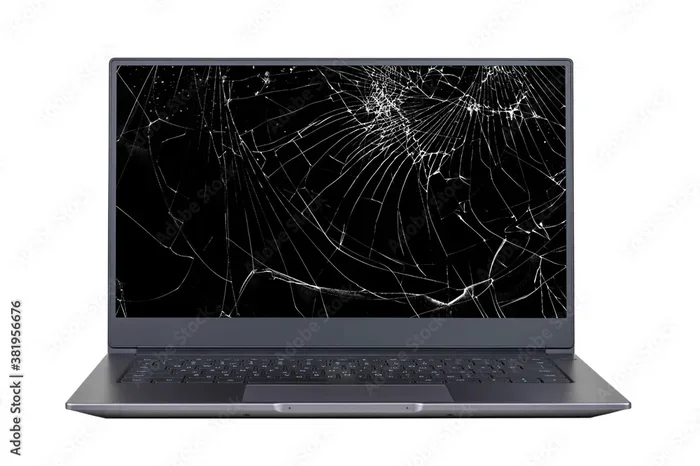
A laptop screen cracked but still works can be frustrating, but you have options. You can keep using it temporarily, explore affordable repair paths, or even upgrade. This guide covers everything you need to know to make the best decision for your cracked display.
Key Takeaways
- Keep using it safely: A cracked screen does not mean your laptop is dead. You can still work and browse with care.
- Repair costs vary widely: Depending on the damage, a cracked laptop screen fix can range from budget-friendly to pricey.
- Try temporary fixes first: External monitors and screen protectors can buy you time before a full repair.
- Prevent further damage: Simple habits like using a laptop screen protector can save you money long term.
- Know when to replace: Sometimes a new laptop makes more sense than repairing an old one.
- Back up your data: A cracked screen can worsen over time, so always keep your files safe.
📑 Table of Contents
- Laptop Screen Cracked but Still Works: What You Need to Know
- Why Does a Cracked Laptop Screen Still Work?
- Can You Keep Using a Laptop with a Cracked Screen?
- How Much Does It Cost to Fix a Cracked Laptop Screen?
- When Should You Replace the Whole Laptop?
- How to Prevent Future Screen Damage
- Can You Use a Mouse with a Cracked Touch Screen?
- Expert Insights: What Repair Technicians Want You to Know
- Final Thoughts
Laptop Screen Cracked but Still Works: What You Need to Know
You drop your laptop. You hear a sickening crack. But then you open it, and — surprise — the laptop screen cracked but still works. The display shows images. The cursor moves. Everything seems fine, except for that ugly spiderweb pattern staring back at you.
This happens more often than you might think. A cracked laptop screen does not always mean the end of your device. In many cases, the LCD or LED panel underneath the glass is still intact. The damage stays on the surface, and the display keeps functioning. But just because it works does not mean you should ignore it.
A cracked screen can worsen over time. Dust can seep in. The crack can spread from minor bumps or temperature changes. And let us be honest — staring at a fractured display all day is not great for your eyes or your mood. So what should you do? Let us walk through it together.
Why Does a Cracked Laptop Screen Still Work?
Understanding how your laptop display works helps you understand why a crack does not always kill it. The screen has layers. The outermost layer is the glass. Below that is the LCD or LED panel, which creates the images you see. Below the panel are the cables and connectors that send signals from your computer.
When you crack the glass, you usually damage only the top layer. The panel and the connections beneath it stay safe. That is why your laptop screen cracked but still works. The real question is how long that will last.
Types of Screen Damage
Not all cracks are the same. Here is a quick breakdown of common cracked laptop screen types:
- Hairline cracks: Thin lines that do not spread much. These often cause no display issues.
- Spiderweb cracks: A central impact point with cracks radiating outward. These look bad but may still function.
- Black spots or bleeding: Liquid crystal leakage under the panel. This can worsen and kill parts of the display.
- Flickering or dimming: The crack may have damaged the panel itself. This needs attention fast.
- Touchscreen unresponsiveness: If your laptop has a touch screen, cracks can interfere with touch input.
If you notice flickering, colors washing out, or dark spots spreading, your panel may be hurt. In that case, you should act quickly. A laptop screen replacement cost is much lower when you catch the problem early.
Can You Keep Using a Laptop with a Cracked Screen?
The short answer is yes. Many people use a laptop with cracked screen for weeks or even months without fixing it. But there are trade-offs you should know about.
First, a cracked screen can hurt your eyes. The fractures distort light and create glare. After a long work session, you may experience headaches or eye strain. Second, the crack can spread. A small bump or even a change in humidity can turn a minor crack into a shattered panel.
Third, there is a safety concern. Broken glass can get sharper over time. If you carry your laptop around, loose glass fragments are not something you want near your hands or your other gear.
Safe Ways to Keep Using Your Cracked Screen
If you need to keep using your laptop before you can fix it, here are some practical steps:
- Apply a screen protector: A tempered glass laptop screen protector can hold cracked pieces together and prevent cuts.
- Use an external monitor: Plug in a monitor and close the laptop. This gives your eyes a break and protects the cracked panel.
- Avoid pressing on the screen: Do not lean on the lid or put anything on top of the laptop.
- Clean gently: Use a soft microfiber cloth. Check out the best way to clean computer screen laptop for safe cleaning tips.
- Keep it in a padded bag: A good laptop sleeve absorbs shocks and reduces the chance of the crack spreading.
These steps buy you time. But they are not permanent solutions. Eventually, you will want a proper fix.
How Much Does It Cost to Fix a Cracked Laptop Screen?
The laptop screen replacement cost depends on several factors. Your laptop brand, screen size, panel type, and where you get it repaired all play a role.
For budget laptops, a new screen can cost between $50 and $150. Mid-range machines usually run $150 to $300. Premium laptops with high-resolution or touch screen panels can push the price past $400. Some models with special displays like OLED or ultra-wide screens cost even more.
DIY vs. Professional Repair
You have two main paths. You can do it yourself or hire a professional.
DIY repair saves money. Screen replacement kits are available online for most popular models. They come with tools, instructions, and the replacement panel. If you are handy and watch a few tutorial videos, you can save a lot of cash. Just be careful — one wrong move can damage the new panel.
Professional repair costs more but gives you peace of mind. Authorized service centers use genuine parts and trained technicians. Third-party repair shops often charge less and still do solid work. Either way, always ask for a quote before committing.
Also, check if your laptop is still under warranty. Some warranties cover accidental damage. And if you have laptop insurance, a cracked screen may be fully covered.
Repair Cost Comparison Table
- Budget laptops (under $500): $50 – $150
- Mid-range laptops ($500 – $1,000): $150 – $300
- Premium laptops ($1,000+): $300 – $500+
- DIY kit cost: $30 – $100 (parts only)
- Professional labor add-on: $50 – $150
As you can see, fixing a cracked laptop screen is almost always cheaper than buying a new laptop. Unless the damage is part of a bigger problem, repair makes the most sense.
When Should You Replace the Whole Laptop?
Sometimes a cracked screen is not the only issue. If your laptop is old and slow, a new screen alone might not fix the bigger picture. Here are signs that replacing the whole machine makes sense:
- Your laptop is over 5 years old: Older machines struggle with modern software updates and tasks.
- Multiple hardware problems: If the battery dies, the keyboard fails, and the screen cracks, it is a pattern.
- Repair costs exceed 50% of a new laptop: Spending $600 to fix a $700 laptop does not make financial sense.
- Your needs have changed: Maybe you need more RAM, a better processor, or a larger display for your work.
If you decide to upgrade, look for a machine that fits your workflow. If you need a reliable machine for everyday tasks, check out the best laptop with touch screen options for a solid all-around choice. For those watching their budget, the best affordable touch screen laptop guide can help you find great value.
How to Prevent Future Screen Damage
Once you fix or replace your screen, you want to keep it safe. Prevention is always better than repair. Here are simple habits that protect your laptop display:
- Use a laptop sleeve or case. A padded sleeve absorbs shocks during transport. It is one of the cheapest protections you can buy.
- Apply a screen protector. Tempered glass protectors take the hit instead of your actual screen. They are easy to replace and very effective.
- Close the lid gently. Slamming the lid puts pressure on the hinges and the screen. A soft close goes a long way.
- Keep liquids away. A single spill can destroy a screen from the inside. Use a spill-proof keyboard cover if you tend to drink near your laptop.
- Clean with care. Use only microfiber cloths and screen-safe cleaners. Avoid harsh chemicals or rough paper towels.
- Avoid extreme temperatures. Heat and cold can weaken the panel and spread existing cracks. Keep your laptop in a stable environment.
These small actions add up. Over time, they save you from the headache — and cost — of a broken screen. If you want to learn more about protecting your investment, the best way to clean computer screen laptop article has great tips for daily care.
Can You Use a Mouse with a Cracked Touch Screen?
If your laptop has a touch screen and the crack is interfering with touch input, you are not stuck. You can use a mouse instead. A wireless or USB mouse works perfectly with any laptop, cracked screen or not. This lets you keep working without touching the damaged display.
For more details on this, check out our guide on can you use a mouse with touch screen laptop. It covers all the options and helps you stay productive no matter what happens to your screen.
Expert Insights: What Repair Technicians Want You to Know
We spoke with a few experienced laptop repair techs. Here is what they had to say about laptop screen cracked but still works situations:
- Act fast: Small cracks tend to spread. The longer you wait, the worse the damage gets.
- Do not ignore flickering: If the crack causes flickering or color changes, the panel is likely hurt. Get it checked.
- Back up your data: A cracked screen is annoying, but a dead motherboard is worse. Always keep backups.
- Ask about refurbished screens: Many shops offer certified refurbished panels at a lower price. They work just as well as new ones.
- Check the hinge too: A drop that cracks the screen may also damage the hinges. Have the tech inspect the whole unit.
These insights come from real repair professionals. They see cracked screens every day. Their advice is simple: do not wait too long, and do not ignore warning signs.
Final Thoughts
A laptop screen cracked but still works is a common situation, and it is one you can handle. You have options. You can keep using it with temporary fixes, get it repaired affordably, or upgrade to a new machine if the time is right.
The most important thing is to act before the damage gets worse. Protect your screen, back up your files, and explore repair options that fit your budget. A cracked display does not have to ruin your day or your wallet. With the right approach, you can get back to a clear, bright screen in no time.
Take a look at your options today. Whether you need a quick fix or a full laptop screen replacement cost estimate, you now have the knowledge to make the best choice for your situation and your budget.
Frequently Asked Questions
Can I keep using my laptop if the screen is cracked?
Yes, you can. A cracked screen often still displays images and responds to input. However, the crack can spread over time, and the display quality may degrade. Use a screen protector and consider an external monitor to reduce strain on the damaged panel.
How much does it cost to replace a cracked laptop screen?
Costs range from $50 for budget laptops to over $500 for premium models. The price depends on your laptop brand, screen size, panel type, and whether you choose DIY or professional repair. Always get a quote before committing to a repair.
Does a cracked laptop screen affect performance?
Usually no. The screen crack affects only the display, not the processor, RAM, or storage. However, if the crack damages internal cables or the panel itself, you may notice flickering or display errors that impact your workflow.
Can a cracked laptop screen be fixed at home?
Yes, many people replace cracked screens themselves using online kits. These kits include the replacement panel and tools. However, DIY repair requires patience and care. If you are not comfortable, a professional repair shop is a safer choice.
Should I use a screen protector on a cracked laptop screen?
Absolutely. A tempered glass screen protector holds cracked pieces together, prevents cuts, and stops the crack from spreading. It is a cheap and effective temporary fix that also protects the panel from dust and moisture.
When is it better to buy a new laptop instead of repairing a cracked screen?
Consider a new laptop if your current one is over five years old, has multiple hardware issues, or if the repair cost exceeds half the price of a new machine. Also, if you need better specs like more RAM or a faster processor, upgrading might be the smarter investment.