What Is Gpu Factory Testing
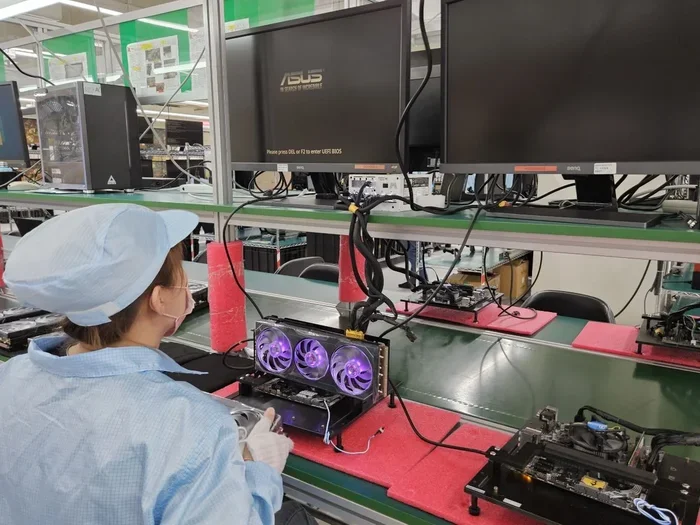
GPU factory testing is the quality control process that checks every graphics card before it reaches your laptop. This rigorous testing validates performance, temperature stability, and visual output to catch defects early. Understanding this process helps you buy with confidence and troubleshoot issues faster.
Every time you power on your laptop and see a crisp, smooth display, a lot of behind-the-scenes work has already happened. One of the most important steps happens long before your laptop reaches your hands. GPU factory testing is the process that checks every graphics card for quality, performance, and reliability.
If you have ever wondered how manufacturers make sure your laptop GPU works perfectly, this article breaks it all down. You will learn what happens during gpu testing, why it matters, and what it means for your daily computing experience. Let us dive in.
Key Takeaways
- Factory testing ensures every GPU meets manufacturer standards before shipping to consumers.
- Stress tests and thermal validation are core parts of the GPU testing process.
- Visual artifact detection helps catch display output problems before they reach users.
- Knowing your GPU was factory tested gives you peace of mind about long-term reliability.
- Failed GPUs are either repaired, re-tested, or recycled during the quality control process.
- Factory testing does not guarantee zero issues, but it significantly reduces defect rates.
📑 Table of Contents
- What Is GPU Factory Testing?
- What Happens During GPU Factory Testing?
- Why GPU Factory Testing Matters for Laptops Specifically
- Common Issues Found During GPU Factory Testing
- How to Know If Your GPU Has Been Factory Tested
- What to Do If Your GPU Fails Testing
- Expert Tips for Maintaining Your GPU After Factory Testing
- How GPU Factory Testing Compares to Consumer-Level Testing
- The Role of GPU Factory Testing in Building Consumer Trust
- Final Thoughts
What Is GPU Factory Testing?
GPU factory testing is a quality control procedure that every graphics card goes through before it gets packaged and shipped. Think of it as a final exam for your graphics processor. The goal is simple: make sure every GPU works exactly as it should.
During this process, technicians run a series of checks on the graphics card. They test the core clock speeds, memory performance, thermal behavior, and visual output. The entire process is designed to catch any defects or inconsistencies before the product ever reaches a customer.
Modern laptops use integrated or discrete GPUs from major manufacturers like NVIDIA and AMD. Each one of these chips goes through graphics card quality check procedures at the factory. This ensures that the laptop gpu performance you experience is backed by thorough validation.
The testing is not just about making sure the GPU turns on. It goes much deeper than that. Engineers verify that the card can handle sustained workloads without crashing, overheating, or producing visual errors. This level of hardware quality assurance is what separates reliable laptops from ones that cause headaches.
Why Does Factory Testing Matter?
You might wonder why factory testing is so important. The answer is straightforward: it protects both the manufacturer and the consumer. Without rigorous testing, defective GPUs would reach customers, leading to returns, complaints, and damaged reputations.
For laptop buyers, factory testing means you get a product that has already been validated. You do not have to worry about whether your GPU will work properly out of the box. This is especially important for people who use their laptops for GPU-intensive games or demanding creative work.
Factory testing also helps manufacturers maintain consistent standards across production batches. Even chips from the same manufacturing line can have slight variations. Testing catches these differences and ensures only the best units make it to market.
What Happens During GPU Factory Testing?
The GPU factory testing process involves several steps. Each step targets a different aspect of the graphics card’s performance. Let us walk through what typically happens.
1. Visual Inspection
Before any software tests run, technicians perform a physical inspection. They look for visible defects like scratches, misaligned components, or solder issues. This step is quick but essential. A physically damaged GPU will fail further testing anyway.
2. Power-On Self Test (POST)
Every GPU must pass a basic power-on self test. This confirms the card receives power and initializes correctly. If the GPU does not POST, it gets flagged for further investigation or rejection.
3. Benchmark and Stress Testing
This is the heart of the testing process. Technicians run GPU stress test benchmarks that push the card to its limits. These tests measure frame rates, rendering accuracy, and stability under heavy load. Popular benchmarking tools simulate real-world workloads to see how the GPU performs.
Factory burn-in test procedures are also common during this phase. The GPU runs at elevated temperatures and clock speeds for extended periods. This helps identify early-life failures that might not show up during a quick check.
4. Thermal Validation
Temperature management is critical for GPU longevity. During factory testing, engineers monitor gpu temperature testing results closely. They check how the card handles heat under load and verify that cooling solutions work as designed.
A GPU that runs too hot will throttle performance or suffer long-term damage. Thermal validation ensures your laptop’s graphics card stays within safe operating temperatures from day one.
5. VRAM and Memory Testing
The video RAM on a GPU handles all the texture and frame data. During factory testing, each GPU undergoes vram testing to confirm memory modules work correctly. Bad memory cells can cause crashes, artifacts, or corrupted visuals.
6. Visual Output Verification
Technicians connect the GPU to display outputs and verify the image quality. They check for color accuracy, resolution support, and any visual artifacts. This step ensures the GPU delivers clean, artifact-free visuals to your screen.
Why GPU Factory Testing Matters for Laptops Specifically
Laptops face unique challenges compared to desktop computers. The compact design means GPUs share limited space with other components. Cooling systems are smaller, and thermal constraints are tighter. This makes factory testing even more critical for mobile graphics cards.
When a GPU is installed in a laptop, it must work within strict thermal and power limits. Factory gpu calibration ensures the card is tuned to perform optimally within these constraints. The testing process accounts for the specific laptop chassis and cooling design.
Another reason factory testing matters for laptops is portability. A desktop GPU can be swapped out if it fails. A laptop GPU is often soldered to the motherboard. This means a defective GPU can ruin the entire laptop. Thorough testing before assembly prevents this costly scenario.
If you are shopping for a new laptop, knowing that the GPU has undergone rigorous manufacturer gpu standards testing gives you confidence. You are getting a product that has been pushed to its limits before you ever open the box.
Common Issues Found During GPU Factory Testing
Not every GPU passes factory testing on the first try. In fact, a significant percentage of chips have minor issues that need attention. Here are the most common problems that testing catches.
- Visual artifacts: These are strange lines, dots, or colors that appear on screen. They indicate problems with the GPU’s rendering pipeline.
- Thermal throttling: A GPU that overheats too quickly fails thermal benchmarks. This points to cooling or thermal paste application issues.
- Memory errors: Faulty VRAM modules cause crashes during memory-intensive tasks. These are caught during dedicated vram testing.
- Clock instability: If the GPU cannot maintain stable clock speeds under load, it gets flagged for rework or rejection.
- Power delivery problems: Irregular power consumption or voltage fluctuations indicate issues with the GPU’s power circuitry.
Each of these issues is caught during the testing process. Defective GPUs either get repaired, re-tested, or recycled. This quality control step is what keeps bad GPUs from reaching consumers.
How to Know If Your GPU Has Been Factory Tested
You might be wondering how you can tell if your laptop GPU has been factory tested. The good news is that virtually all modern GPUs go through some form of factory testing. Major manufacturers like NVIDIA and AMD have strict quality control processes in place.
When you buy a new laptop from a reputable brand, you can be confident that the GPU has been tested. Brands like Dell, HP, Lenovo, and ASUS all follow industry standards for hardware defect detection. They would not ship a laptop without validating the graphics hardware.
You can also run your own gpu benchmark testing at home to verify performance. Tools like FurMark, 3DMark, and Unigine Heaven simulate the kind of stress tests performed at the factory. Running these tests gives you peace of mind about your GPU’s health.
If you have recently installed a new GPU or upgraded your laptop, you should verify its performance. Running a quick benchmark test confirms everything is working as expected. This is especially important if you notice any visual glitches or performance drops.
What to Do If Your GPU Fails Testing
Sometimes a GPU fails factory testing and gets sent back for rework. But what if your GPU fails after you have already bought your laptop? Here is what you should do.
- Run diagnostic tests: Use tools like GPU-Z or HWiNFO to monitor your GPU’s temperatures, clock speeds, and error rates. These tools give you detailed information about your card’s health.
- Check your warranty: Most laptops come with a warranty that covers GPU defects. If your GPU is failing, contact the manufacturer for support.
- Update drivers: Sometimes GPU issues are caused by outdated or corrupted drivers. A fresh driver install can resolve many problems.
- Monitor temperatures: If your GPU is running hot, check your laptop’s cooling system. Clean the vents and fans to improve airflow. You can also learn more about what temperature does gpu fan turn on to understand your thermal thresholds better.
- Contact support: If none of the above steps work, reach out to the laptop manufacturer. They can arrange repairs or replacements under warranty.
Understanding the testing process helps you troubleshoot more effectively. When you know what factory tests look for, you can pinpoint issues faster and communicate better with support teams.
Expert Tips for Maintaining Your GPU After Factory Testing
Factory testing gives your GPU a strong start, but ongoing care keeps it performing well for years. Here are some tips to protect your graphics card.
- Keep your laptop cool: Use a cooling pad in hot environments. Avoid blocking vents during intensive tasks. Good airflow extends GPU lifespan significantly.
- Update drivers regularly: Manufacturers release driver updates that improve performance and fix bugs. Keeping your drivers current ensures optimal laptop gpu performance.
- Monitor temperatures: Use monitoring software to track your GPU’s heat levels. If temperatures spike unexpectedly, investigate the cause right away.
- Avoid overclocking without proper cooling: Overclocking can push your GPU beyond safe limits. Make sure your cooling solution can handle the extra heat before attempting any overclocking.
- Run occasional stress tests: Periodically running a gpu stress test helps you catch potential issues early. This is similar to what happens during factory testing and keeps you informed about your card’s health.
Taking care of your GPU after purchase ensures you get the most out of the factory testing investment. A well-maintained graphics card lasts longer and performs better over time.
How GPU Factory Testing Compares to Consumer-Level Testing
You might have heard of consumer-level GPU testing tools like FurMark or 3DMark. These are great for home users, but how do they compare to factory testing? The differences are significant.
Factory testing is far more comprehensive. While consumer tools focus on basic benchmarks, factory tests run for hours under controlled conditions. Technicians monitor every parameter in real time and log detailed data for analysis.
Consumer-level testing also lacks the specialized equipment used in factory environments. Thermal cameras, precision power monitors, and automated test suites give manufacturers an advantage that home users simply do not have.
That said, consumer testing still has value. Running your own tests periodically helps you catch issues that might develop over time. Think of it as a complement to factory testing, not a replacement.
If you want to learn more about what temperatures are normal for your GPU, check out our guide on what is a good idle GPU temperature. Understanding your GPU’s thermal behavior helps you maintain peak performance.
The Role of GPU Factory Testing in Building Consumer Trust
Trust is a huge factor in the tech industry. Consumers want to know that the products they buy have been thoroughly tested. GPU factory testing plays a vital role in building that trust.
When a manufacturer invests in rigorous testing, it sends a clear message: quality matters. Brands that are known for thorough factory testing earn loyal customers and positive reviews. This competitive advantage drives the industry forward.
For gamers and professionals alike, a tested GPU means fewer surprises. You can focus on your work or your game without worrying about hardware failures. That peace of mind is invaluable.
If you are curious about how your GPU handles specific workloads, our article on is Fortnite a CPU or GPU game explores how different tasks stress your graphics card differently.
Final Thoughts
GPU factory testing is an essential process that ensures every graphics card works as intended before it reaches your laptop. From visual inspections to thermal validation, each step is designed to catch defects and deliver a reliable product. Understanding this process empowers you as a consumer and helps you make informed purchasing decisions.
Next time you power on your laptop and enjoy smooth graphics performance, remember the testing journey your GPU has been through. It has been validated, stressed, and certified to meet the highest standards. That is the power of thorough factory testing.
Take care of your GPU, keep your drivers updated, and monitor your temperatures. Your graphics card will reward you with years of reliable performance. And if you ever suspect an issue, the knowledge you have gained from this article will help you take the right steps to address it.
For more tips on keeping your GPU running smoothly, check out our guide on what to do after installing a new GPU. It covers essential post-installation steps that complement the factory testing process.
Frequently Asked Questions
What does GPU factory testing involve?
GPU factory testing involves visual inspection, power-on self tests, benchmark and stress testing, thermal validation, VRAM testing, and visual output verification. Each step ensures the graphics card meets manufacturer standards before shipping to consumers.
Does every laptop GPU go through factory testing?
Yes, virtually all modern laptop GPUs from major manufacturers undergo factory testing. This includes GPUs from NVIDIA, AMD, and Intel. Reputable brands follow strict quality control processes to validate every graphics card.
Can factory testing catch all GPU defects?
Factory testing catches the vast majority of defects, but it cannot guarantee zero issues. Some problems may develop over time due to usage patterns, environmental factors, or wear and tear. This is why ongoing monitoring and maintenance are important.
How long does GPU factory testing take?
The duration varies depending on the manufacturer and the complexity of the GPU. Typically, factory testing takes anywhere from a few hours to a full day per unit. Stress tests and burn-in procedures require extended run times to be thorough.
What should I do if my GPU shows issues after purchase?
Start by running diagnostic tools like GPU-Z or HWiNFO to monitor temperatures and performance. Update your GPU drivers and check your warranty coverage. If issues persist, contact the laptop manufacturer for support or repairs.
Is it worth running my own GPU stress tests at home?
Absolutely. Running stress tests at home complements factory testing and helps you catch potential issues early. Tools like FurMark and 3DMark simulate heavy workloads and give you valuable insights into your GPU’s health and stability.