What Is Hp Sure Start
Hp Sure Start is a built-in security feature that guards your laptop’s BIOS against unauthorized changes and attacks. It automatically detects and repairs firmware damage, keeping your system safe every time you boot up. This tool is part of HP’s broader HP Wolf Security suite designed for business and personal laptop protection.
If you own an HP laptop, you might have noticed a security feature called Hp Sure Start running in the background. But what exactly does it do? Why should you care? In this article, we break down everything you need to know about this powerful laptop protection tool.
Hp Sure Start is a BIOS-level security feature built into many HP laptops. It protects your system from firmware attacks by monitoring and recovering your BIOS automatically. Think of it as a safety net for the most critical part of your laptop’s software.
Firmware attacks are real and growing. Hackers often target the BIOS because it sits below the operating system. Traditional antivirus software cannot reach it. That is where Hp Sure Start steps in. It fills this security gap and keeps your laptop safe from the ground up.
Key Takeaways
- Automatic BIOS Recovery: Hp Sure Start can detect and fix BIOS issues without user intervention, saving you time and hassle.
- Firmware Protection: It blocks unauthorized changes to your laptop’s firmware, preventing malware from taking root at the lowest system level.
- Part of HP Wolf Security: This tool works alongside other HP security features to give your laptop layered protection.
- Business and Consumer Use: While aimed at business laptops, many consumer HP laptops also include this feature.
- Easy to Use: The tool runs in the background and requires minimal setup or maintenance from the user.
- Tamper Detection: It alerts you if someone tries to modify your BIOS settings without permission.
📑 Table of Contents
What Is Hp Sure Start and How Does It Work?
At its core, Hp Sure Start is a self-healing BIOS protection tool. It works by creating a backup of your BIOS firmware. Every time your laptop starts, it checks the current BIOS against that backup. If something looks wrong, it restores the clean version automatically.
The BIOS Recovery Process
Here is how the recovery process works in simple terms:
- Step 1: The tool checks your BIOS during startup.
- Step 2: It compares the current BIOS to the trusted backup copy.
- Step 3: If there is a mismatch, it automatically restores the correct version.
- Step 4: You get a notification that the system has been repaired.
This entire process happens in seconds. You do not need to do anything. The tool runs silently in the background, making it one of the most effortless security features you will ever use.
Why BIOS Security Matters
Your BIOS is the first software that runs when you turn on your laptop. It initializes hardware and loads the operating system. If a hacker gains access to your BIOS, they can control your entire system. They can steal data, install deep-rooted malware, or even brick your laptop.
Most users never think about BIOS security. They focus on antivirus and firewalls. But those tools cannot protect firmware-level attacks. Hp Sure Start fills this critical gap. It ensures that even if someone tries to tamper with your BIOS, your system can heal itself.
Key Features of Hp Sure Start
Hp Sure Start comes packed with features designed to keep your laptop secure. Let us look at the most important ones.
Automatic Recovery
The standout feature is automatic recovery. If your BIOS gets corrupted or tampered with, the tool fixes it without any input from you. This is especially useful if you are not a tech-savvy user. You do not need to know how to flash a BIOS or use recovery tools.
Tamper Detection
Hp Sure Start includes tamper detection capabilities. It can sense when someone tries to modify your BIOS settings or firmware. When it detects unauthorized changes, it triggers an alert and restores the original settings. This feature is a strong deterrent against physical attacks on your laptop.
Trusted Platform Module Integration
Many HP laptops come with a Trusted Platform Module (TPM) chip. Hp Sure Start works hand in hand with TPM to provide hardware-level security. Together, they create a secure environment for your laptop’s most sensitive operations.
Rollback Protection
This feature prevents your BIOS from being rolled back to an older, potentially vulnerable version. Hackers sometimes try to downgrade firmware to exploit known weaknesses. Rollback protection stops this in its tracks.
Who Should Use Hp Sure Start?
While Hp Sure Start is available on many HP laptops, it is especially valuable for certain groups of users.
Business Professionals
If you use your laptop for work, you handle sensitive data every day. Corporate laptops are prime targets for firmware attacks. Hp Sure Start adds a strong layer of defense that complements your company’s overall security strategy.
HP designed many of its business laptops with features like HP Wolf Security to protect enterprise users. Hp Sure Start is a key part of this ecosystem. It works alongside other tools like HP BIOS protection and HP Sure Click to provide comprehensive security.
Students and Educators
Students carry their laptops everywhere. They connect to public Wi-Fi networks at cafes, libraries, and campuses. This increases the risk of firmware attacks. Having Hp Sure Start on a student laptop adds peace of mind without requiring any extra effort.
Everyday Users
Even if you just use your laptop for browsing, streaming, and casual tasks, firmware security matters. Malware can sneak into your system through the BIOS without you ever knowing. Hp Sure Start helps prevent this silently and effectively.
Hp Sure Start vs. Traditional Antivirus Software
It is important to understand that Hp Sure Start is not a replacement for antivirus software. It serves a different purpose. Here is a quick comparison.
- Hp Sure Start: Protects BIOS firmware. Operates at the hardware level. Runs automatically in the background.
- Antivirus Software: Protects the operating system and files. Detects and removes malware. Requires regular updates and scans.
The best approach is to use both. Antivirus software handles file-level threats, while Hp Sure Start guards the firmware layer. Together, they provide much stronger protection than either tool alone.
Also, if you want to keep your laptop running smoothly alongside these security tools, consider checking out what is good RAM for your laptop. Having enough memory helps your security tools run without slowing down your system.
How to Check if Your Laptop Has Hp Sure Start
Not all HP laptops include Hp Sure Start. Here is how you can check if your laptop has it.
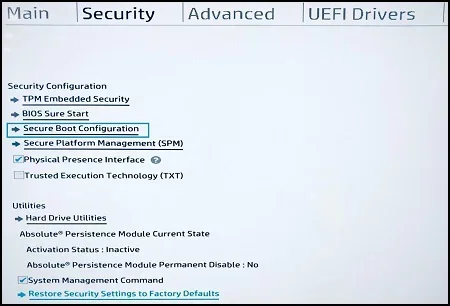
- Restart your laptop and press F10 to enter the BIOS setup.
- Look for a security tab or section.
- Search for “HP Sure Start” or “BIOS Protection.”
- If you see it listed, your laptop supports this feature.
You can also check your laptop model on the HP support website. Enter your serial number or product number to view the full specifications. If your laptop is a business model from the ProBook, EliteBook, or ZBook lineup, there is a good chance it includes Hp Sure Start.
For general users, having the right RAM size for your laptop also contributes to overall system performance, which supports the smooth operation of security features like Hp Sure Start.
Common Issues and Troubleshooting
While Hp Sure Start is designed to work seamlessly, you might occasionally run into issues. Here are some common problems and how to fix them.
Recovery Keeps Triggering
If your laptop keeps recovering the BIOS on every startup, there might be a deeper issue. This could indicate a failing motherboard or a persistent firmware corruption. In this case, contact HP support for assistance.
Feature Not Available
Some older HP laptops do not support Hp Sure Start. If you do not see the option in your BIOS, your model may not include this feature. You can always update your BIOS through HP’s support site to get the latest security patches.
False Positives
Rarely, the tool might flag a legitimate BIOS update as a threat. If you have just updated your BIOS and see a recovery alert, check the update log. In most cases, a simple restart will resolve the issue.
Tips to Maximize Laptop Security with Hp Sure Start
Getting the most out of Hp Sure Start is easy. Follow these simple tips to boost your laptop’s security.
- Keep your BIOS updated: Regular updates patch known vulnerabilities and improve performance.
- Use strong passwords: Protect your BIOS setup with a password so no one can change settings without your permission.
- Enable TPM: Make sure your Trusted Platform Module is turned on for hardware-level encryption.
- Pair with antivirus: Use a reputable antivirus program alongside Hp Sure Start for full-spectrum protection.
- Invest in your laptop’s lifespan: Regular maintenance and security features like Hp Sure Start help your laptop last longer. Check out what is the best investment for the lifespan of your PC to learn more.
These small steps make a big difference. They ensure your laptop stays secure, fast, and reliable for years to come.
Final Thoughts
Hp Sure Start is a powerful yet simple security tool that every HP laptop user should know about. It protects your system at the firmware level, where most other security tools cannot reach. With automatic recovery, tamper detection, and rollback protection, it gives you peace of mind without any extra effort.
Whether you are a business professional, a student, or a casual user, Hp Sure Start adds an essential layer of defense to your laptop. It works silently in the background, keeping you safe from firmware attacks that traditional antivirus software simply cannot detect.
If you own an HP laptop, take a moment to check if this feature is enabled. It could be one of the best investments you make for your laptop’s long-term security and performance.
Frequently Asked Questions
What does Hp Sure Start do?
Hp Sure Start protects your laptop’s BIOS firmware from unauthorized changes and attacks. It automatically detects and repairs BIOS damage during startup, ensuring your system remains secure and functional without any user intervention.
Is Hp Sure Start available on all HP laptops?
No, Hp Sure Start is primarily available on HP business and select consumer laptops. Models in the ProBook, EliteBook, and ZBook lines commonly include this feature. You can check your specific model on the HP support website to confirm availability.
Do I need to install anything to use Hp Sure Start?
No, Hp Sure Start comes pre-installed on supported HP laptops. It is built into the BIOS and requires no additional software or setup. It runs automatically every time you start your laptop.
Can Hp Sure Start protect against all types of malware?
Hp Sure Start specifically targets firmware-level threats and BIOS attacks. It does not replace traditional antivirus software. For full protection, pair it with a reputable antivirus program that handles file-level and operating system threats.
How do I know if Hp Sure Start has recovered my BIOS?
You will receive a notification on your screen after the BIOS recovery process completes. The notification will let you know that the system detected and fixed an issue. You can also check the BIOS recovery log for detailed information.
Can I disable Hp Sure Start?
Yes, you can disable Hp Sure Start through your BIOS settings. However, it is not recommended. Disabling it removes an important layer of firmware protection and leaves your laptop more vulnerable to BIOS-level attacks.