What Is Modular Plug Termination
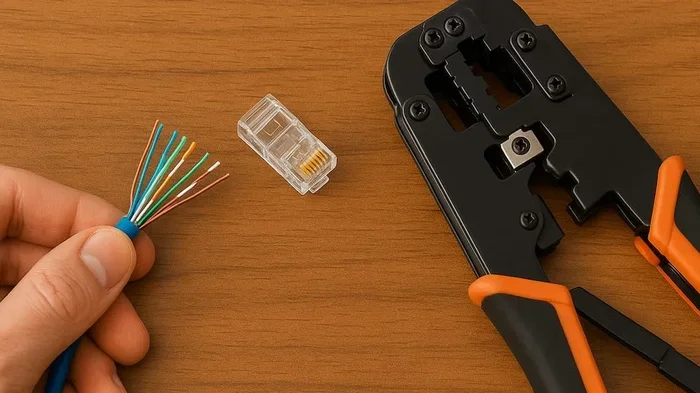
Modular plug termination is the process of attaching a modular connector to a cable end for reliable network connectivity. This guide covers tools, techniques, wiring standards, and common mistakes to help you terminate cables like a professional. By the end, you will feel confident creating your own Ethernet cables for any laptop setup.
Modular plug termination is the process of attaching a modular connector to the end of a cable to create a reliable network connection. It is a fundamental skill for anyone who works with Ethernet cables, laptop setups, or home networking. Understanding modular plug termination empowers you to make custom cables, replace damaged connectors, and troubleshoot connectivity issues with confidence. This guide covers everything from the basic tools you need to a full step-by-step walkthrough of the termination process. You will also learn about common mistakes and expert tips that ensure professional-quality results every time.
When you plug an Ethernet cable into your laptop, the little plug at the end is not just a simple piece of plastic. It is a carefully designed modular plug that needs to be attached correctly for your network connectivity to work. A poorly terminated cable can cause slow speeds, dropped connections, and frustrating troubleshooting sessions. On the other hand, a well-terminated cable delivers consistent performance you can count on.
Whether you are setting up a home office, building a LAN setup for gaming, or just trying to get a stable internet connection on your laptop, knowing how cable termination works makes a huge difference. Think of it as a wiring skill that pairs well with choosing quality hardware. Just like having good RAM for a laptop keeps your system running smoothly, a properly terminated cable keeps your network running without interruptions.
Key Takeaways
- Modular plug termination is the process of attaching a modular plug to a cable end to create a reliable network connection.
- You need basic tools like a crimping tool, wire stripper, and cable tester to get the job done right.
- T568A and T568B are the two wiring standards you must follow for proper termination.
- Practice makes perfect even if your first few attempts are not flawless.
- Cable management plays a big role in keeping your laptop setup clean and functional.
- Common mistakes include wrong wire order, untrimmed cables, and using the wrong plug type.
📑 Table of Contents
What Is Modular Plug Termination?
Modular plug termination is the process of attaching a modular connector to the end of a cable. This connector, often called an RJ45 plug, locks into a port and creates a physical and electrical connection. The term termination simply means finishing off the cable end with a proper connector so it can transmit data reliably.
In the world of networking, modular connectors are the most common type of plug you will encounter. They are used in Ethernet cables, phone lines, and various other communication cables. The modular plug has several small copper pins inside that press against the wires in the cable. When these pins make proper contact, data flows from one device to another through the network cable.
The process involves stripping the outer jacket of the cable, arranging the individual wires in a specific order, trimming them neatly, inserting them into the plug, and then using a crimping tool to secure everything in place. Each step matters. Skip or rush any step, and the connection may fail. That is why understanding the full process before you start is so important.
Why It Matters for Laptop Users
Laptops are portable by design, but that does not mean they cannot benefit from wired connections. A network cable terminated correctly gives you faster and more stable internet than Wi-Fi in many situations. This is especially true for tasks like video calls, large file transfers, and online gaming where every millisecond counts.
When you understand modular plug termination, you can make your own cables in any length you need. You are not stuck with the short cable that came in the box. You can also replace damaged connectors without buying a whole new cable. This saves money and reduces electronic waste. It is a small skill that makes a big difference in your daily use of laptop network connectivity.
Types of Modular Plugs and Connectors
Not all modular plugs are the same. Different types serve different purposes, and choosing the right one is the first step in successful wire termination. Here are the most common types you will encounter in laptop and desktop networking setups.
RJ45 Connectors
The RJ45 is the standard plug for Ethernet cables. You have seen it a hundred times. It is the square-shaped plug that goes into your laptop, router, or modem. RJ45 connectors come in different designs, including standard, shielded, and slim versions. For most laptop networking needs, a standard RJ45 plug works perfectly. Shielded plugs add extra protection against electromagnetic interference, which can be useful in busy office environments with lots of electronic devices.
Keystone Jacks
A keystone jack is a wall plate connector that accepts a modular plug. You will often find these in offices and structured cabling setups. They provide a clean, flush connection point on a wall or patch panel. Punch down termination is another method used with keystone jacks in permanent installations, but the modular plug approach is more common for laptop and desktop use. When setting up a home office, a keystone jack paired with a properly terminated patch cable creates a professional look and reliable performance.
Solid vs Stranded Wire Plugs
One important detail many people overlook is the difference between solid and stranded wire. Solid wire is a single thick conductor, commonly used in fixed installations like wall runs and data center wiring. Stranded wire consists of multiple thin strands, making it flexible and ideal for patch cables you plug and unplug often. Using the wrong plug type for your wire kind leads to poor connections. Always match your plug to your cable type. A plug designed for stranded wire will not grip solid wire properly, and vice versa.
Tools You Need for Cable Termination
Getting the right tools makes modular plug termination much easier and more reliable. You do not need a lot of equipment, but each piece plays an important role in producing a clean and lasting connection.
Crimping Tool
A crimping tool is the most essential piece of equipment. It presses the modular plug onto the cable, securing the wires against the copper pins inside. Quality crimping tools have a ratchet mechanism that prevents over-crimping, which can damage the cable or fail to make proper contact. Look for a crimping tool that supports multiple plug types, including RJ45. Some models also include a built-in wire stripper, which saves time and reduces the number of tools you need to carry.
Wire Stripper
A wire stripper removes the outer jacket of the cable without nicking the inner wires. A nick can break a conductor over time, leading to intermittent connection issues. A proper wire stripper makes clean, even cuts every time. Avoid using scissors or knives for this step, as they are imprecise and can damage the delicate inner wires. A dedicated wire stripper is a small investment that pays off quickly.
Cable Tester
A cable tester verifies that all pins are making proper contact. After you finish cable termination, plug the cable into the tester to confirm every wire is connected correctly. This simple step catches mistakes before they become problems in real use. Think of a cable tester as the quality check step. Just as you would check that the RAM on a laptop is properly seated before closing the case, testing your terminated cable ensures everything works before you rely on it.
Trim Tool or Scissors
You need something clean and sharp to trim the wires to the correct length before inserting them into the plug. A dedicated trim tool works best, but sharp scissors or flush cutters also do the job. The goal is a flat, even cut that allows all wires to reach the pins inside the modular plug. Take your time with this step, because uneven wires are the leading cause of failed terminations.
Step-by-Step Guide to Modular Plug Termination
Now let us walk through the actual process. Follow these steps carefully, and you will produce a clean, reliable termination every time. Have your tools ready and a scrap piece of cable for practice before working on your final cable.
Step 1: Choose the Wiring Standard
There are two wiring standards for Ethernet cables: T568A and T568B. Both work equally well, but you must use the same standard on both ends of the cable for a standard patch cable. The T568B standard is more common in the United States, so most people start there. The wire order for T568B from left to right (looking at the tab side of the plug) is: orange-white, orange, green-white, blue, blue-white, green, brown-white, brown. Memorize this order or keep a reference chart nearby until it becomes second nature.
Step 2: Strip the Cable Jacket
Use your wire stripper to remove about one inch of the outer jacket from the cable end. Be careful not to cut into the inner wires. The jacket protects the twisted pairs inside, and exposing too much or too little cable causes problems later. A clean, even strip sets the foundation for everything that follows.
Step 3: Untwist and Arrange the Wires
Gently untwist each pair and arrange the eight wires in the correct order. Keep the twists as close to the plug as possible. Untwisting too much wire weakens the cable ability to reduce interference, which can degrade network connectivity. Hold the wires flat and together in your fingers as you move to the next step.
Step 4: Trim the Wires Evenly
Line up all eight wires flat and trim them evenly so they extend about half an inch into the plug. Straight, even cuts are essential for proper contact with the copper pins inside the modular plug. Use your trim tool or sharp scissors to make this cut clean and precise.
Step 5: Insert Wires into the Plug
Hold the wires in the correct order and push them firmly into the plug. Make sure the outer jacket enters the plug as well. The jacket helps hold the wires in place and provides strain relief. All wires should reach the front of the plug where the pins are. Take your time with this step to avoid any wires being misaligned.
Step 6: Crimp the Plug
Place the plug into the crimping tool and squeeze firmly until the tool ratchets open. The crimper pushes the copper contacts down onto each wire, creating a secure electrical connection. Do not release early or try to re-crimp, as this can damage the plug and the cable. A single, firm crimp is all you need for a solid modular plug termination.
Step 7: Test the Connection
Plug the terminated cable into a cable tester or directly into your laptop and router. Check for link lights and stable network connectivity. If the connection works, you have successfully completed modular plug termination. If not, check the wire order and try again. With practice, this process becomes quick and second nature.
Common Mistakes and How to Avoid Them
Even experienced technicians make mistakes sometimes. Knowing what goes wrong helps you avoid the same errors. Here are the most common pitfalls in modular plug termination and how to prevent them.
Wrong Wire Order
The most frequent mistake is arranging the wires in the wrong order. This seems obvious, but it happens to everyone, especially when working quickly. Always double-check the wire order before crimping. A quick glance at your reference chart can save you from redoing the entire plug. Some people even tape the wires in place after arranging them to prevent shifting during insertion.
Untrimmed or Uneven Wires
If the wires are not trimmed evenly, some pins will not make contact. This causes intermittent connectivity or a complete failure. Take your time with the trimming step. A clean cut makes all the difference in the quality of your cable termination. Uneven wires are one of the top reasons beginners experience failed connections.
Too Much Untwisting
Twisted pairs in Ethernet cables reduce electromagnetic interference. When you untwist the wires too far back from the plug, you lose this benefit. Keep untwisting to a minimum, ideally less than half an inch. This preserves the cable ability to maintain clean signal transmission and supports strong network connectivity.
Not Securing the Jacket
The outer jacket must enter the plug. Without it, the wires can pull out under tension. Always check that the jacket is inside the plug before crimping. This small detail makes your termination much more durable and reliable. A termination that holds up over months of use is the goal of every cable termination project.
Using the Wrong Plug for the Cable Type
As mentioned earlier, solid wire and stranded wire require different plug designs. Using the wrong type leads to loose connections. Always check your cable specifications before choosing a plug. When in doubt, check the packaging or consult the manufacturer. The right plug paired with the right cable is the foundation of a reliable wiring connection.
Expert Tips for Better Termination
Once you master the basics, these expert tips will help you achieve professional-quality results every time. These small details separate a quick fix from a lasting, reliable connection.
Pre-Terminated Cables Are Fine Too
Not everyone needs to terminate their own cables. Pre-terminated patch cables save time and come with a warranty. They are a great option if you do not plan to make cables regularly. Just make sure the cable length and type match your needs. For most laptop users, buying a pre-made cable is perfectly fine and practical.
Label Your Cables
When you have multiple cables in a setup, labeling them prevents confusion. Use a simple label maker or color-coded ties. This practice is part of good cable management and makes troubleshooting much faster. When you have five cables running to different devices, knowing which is which saves valuable time.
Invest in Quality Plugs
Cheap plugs may save a few cents but often lead to poor connections and frequent replacements. Quality modular plugs have gold-plated contacts that resist corrosion and ensure reliable network connectivity over time. Think of it as an investment, similar to choosing a good amount of RAM for a laptop to ensure long-term performance. Good plugs cost a little more but last much longer.
Practice on Scrap Cable
Before working on an important cable, practice on a spare piece of cable. This lets you get comfortable with the process without the pressure of a finished product. After a few practice runs, the steps will feel natural and quick. Keep scrap cable on hand for ongoing practice and experimentation with different plug types.
Keep Your Tools Clean and Sharp
Dull wire strippers or dirty crimping tools produce inconsistent results. Clean your tools regularly and replace worn parts. Sharp, well-maintained tools make every step of the termination tool process smoother and more reliable. A few minutes of tool maintenance before each session goes a long way toward clean, professional-quality modular plug termination.
Conclusion
Modular plug termination is a practical and valuable skill for anyone who works with cables and laptops. Whether you are a home user setting up a wired connection or a professional managing network infrastructure, knowing how to properly terminate a cable gives you control over your connectivity. From basic home setups to complex data center wiring projects, the principles remain the same.
The process is straightforward once you understand the steps and avoid common mistakes. With the right tools, the correct wiring standard, and a little practice, you can terminate cables quickly and confidently. The result is a reliable connection that supports everything from casual browsing to intensive online work.
Remember that cable termination is just one part of a well-functioning laptop setup. Combine it with quality hardware choices and proper cable management for the best experience. Now that you know how modular plug termination works, you have the knowledge to build better, more reliable connections for your laptop and beyond. Start with a practice cable, follow the steps, and enjoy the satisfaction of a job well done.
Frequently Asked Questions
Can I use any modular plug for my Ethernet cable?
No, you need to match the plug to your cable type. Solid wire cables need plugs designed for solid conductors, and stranded wire cables need plugs for stranded conductors. Using the wrong type leads to unreliable connections. Always check the cable specifications before choosing a plug to ensure compatibility and a strong network connectivity result.
What is the difference between T568A and T568B wiring?
The main difference is the order of the green and orange wire pairs. T568A swaps the green and orange positions compared to T568B. Both standards work fine, but you must use the same standard on both ends of a patch cable. T568B is more common in the United States and is a safe default for most LAN setup projects.
Do I need a special crimping tool for modular plugs?
Yes, a dedicated crimping tool designed for RJ45 plugs gives the best results. Generic tools may not apply even pressure, leading to weak connections. A quality crimping tool with a ratchet mechanism ensures consistent, professional terminations every time. It is one of the most important termination tool investments you can make.
How can I test if my terminated cable works?
The easiest way is to use a cable tester, which checks each pin for proper contact. You can also plug the cable directly into your laptop and router and look for link lights. A stable link light means the termination was successful and your network connectivity is working. Testing takes only a few seconds and prevents a lot of frustration later.
Is modular plug termination hard to learn?
Not at all. With basic tools and a little practice, most people can learn it within a few attempts. Start with scrap cable and follow the steps carefully. After a few tries, the process becomes fast and intuitive. It is one of the most useful basic IT skills you can develop, especially if you work with network cable setups regularly.
Can I terminate a cable that is already connected to a device?
No, you need to detach the cable from both ends before terminating. The process requires access to the bare cable end, which is impossible if the cable is already plugged in. Always work with a free cable end for clean and safe cable termination. This ensures you can see the wires clearly and make proper connections without damaging your device.