What Is Motherboard Mounting Tolerance
Motherboard mounting tolerance is the acceptable range of deviation in hole placement, dimensions, and alignment between your motherboard and PC case. Getting this right ensures a secure, stable build that avoids short circuits, flexing, and long-term damage. Whether you are building a desktop or upgrading a laptop motherboard, understanding tolerance specs saves you time, money, and frustration.
Motherboard mounting tolerance is one of those topics that sounds boring until it becomes a real problem. If you have ever built a PC and found that the motherboard does not quite line up with the case, or that the screws feel forced into place, you have already experienced tolerance issues firsthand. Understanding what motherboard mounting tolerance means and how it affects your build can save you from costly mistakes, damaged components, and a lot of headaches down the road.
In simple terms, mounting tolerance is the acceptable range of variation in the physical dimensions and hole positions of a motherboard compared to the mounting points inside a PC case. Every motherboard has a specific pattern of screw holes, and every case has corresponding standoff positions. When those patterns match within the allowed tolerance, everything fits snugly and securely. When they do not, you are left with a board that flexes, bends, or worse, makes contact with the case in ways it should not.
This guide breaks down everything you need to know about motherboard mounting tolerance. We will cover what it is, why it matters, how different form factors handle it, and practical tips to make sure your next build goes smoothly. Whether you are a first-time builder or a seasoned enthusiast, this information will help you avoid the most common and frustrating compatibility issues.
Key Takeaways
- Mounting tolerance defines how much wiggle room exists between motherboard holes and case standoff positions.
- Incorrect tolerance can cause bent boards, cracked solder joints, and short circuits.
- Standard form factors like ATX, Micro-ATX, and Mini-ITX have defined tolerance ranges set by industry groups.
- Always verify clearance before purchasing a motherboard or case to avoid compatibility headaches.
- Using the right standoffs and mounting screws is just as important as the tolerance specs themselves.
- Thermal expansion and vibration over time can worsen tolerance issues if the board is mounted too tightly or too loosely.
📑 Table of Contents
- What Does Motherboard Mounting Tolerance Mean?
- Why Motherboard Mounting Tolerance Matters
- Common Form Factors and Their Tolerance Specifications
- How to Check Motherboard Mounting Tolerance Before Buying
- Common Mounting Tolerance Problems and How to Fix Them
- Tips for Ensuring Perfect Motherboard Fitment
- How Mounting Tolerance Affects Long-Term Reliability
- Final Thoughts
What Does Motherboard Mounting Tolerance Mean?
At its core, motherboard mounting tolerance refers to the permitted deviation in the physical specifications of a motherboard relative to its mounting points. Every motherboard manufacturer follows industry standards that define exactly where the screw holes should be, how far apart they should be, and what the overall board dimensions should be. But no manufacturing process is perfect. There is always a small margin of error, and that margin is the tolerance.
Think of it like a lock and key. The key (motherboard) must fit into the lock (case) within a very specific range. If the key is slightly too wide, it will not go in. If it is slightly too narrow, it will wobble. Tolerance defines how much variation is acceptable before the fit becomes problematic. For most standard desktop motherboards, the tolerance for hole placement is measured in fractions of a millimeter, but even tiny deviations can cause real issues during installation.
Why Small Deviations Matter
You might wonder why such tiny deviations matter so much. The answer lies in what happens when a motherboard does not sit flat inside a case. A board that is slightly off-center or has holes that do not align with standoffs will flex when you press down on it. Over time, this flexing can crack solder joints, loosen components, and create intermittent connection problems. In extreme cases, the board can warp enough to touch the case, causing a short circuit that fries your CPU, RAM, or other sensitive parts.
When you are working with compact builds, such as small form factor PCs or laptop motherboard assemblies, the tolerance margins are even tighter. There is less room for error, which makes precision even more critical. This is why checking the mounting tolerance before you buy is one of the smartest steps you can take.
Why Motherboard Mounting Tolerance Matters
The importance of mounting tolerance goes far beyond just making sure the board fits inside the case. Proper tolerance ensures electrical safety, structural integrity, thermal performance, and long-term reliability. Let us break down each of these areas so you can see exactly why this topic deserves your attention.
Electrical Safety
The most immediate danger of poor mounting tolerance is electrical damage. When a motherboard flexes or shifts inside a case, the traces on the bottom of the board can come into contact with the metal case. This creates a short circuit that can permanently damage the motherboard and any components connected to it. Standoffs exist to prevent this, but they only work when the board is properly aligned and the holes match up within the acceptable tolerance range.
Using the wrong number of standoffs or placing them in the wrong positions can be just as dangerous as poor tolerance. Extra standoffs that touch the back of the board can create unintended contact points, leading to shorts. This is why many motherboard manufacturers include a motherboard tray or backplate with clearly marked standoff positions that match the board’s mounting hole pattern.
Structural Integrity
A motherboard that is mounted with correct tolerance sits firmly in place without excessive pressure. The screws hold the board snugly against the standoffs, providing a stable base for all the components soldered onto it. When tolerance is off, you may end up overtightening screws to force the board into place, which puts uneven stress on the PCB. Over months and years of use, this stress can cause micro-fractures in the board material, leading to failure.
This is especially true for boards that experience vibration, such as those in servers or workstations that run 24/7. Even in a home PC, daily use involves some level of vibration from cooling fans and mechanical drives. Proper mounting tolerance absorbs these forces without transferring them directly to the board.
Thermal Performance
Mounting tolerance also affects how well your motherboard dissipates heat. A board that sits unevenly in a case may not make proper contact with the I/O shield or the backplate, which can trap heat. Additionally, if the board flexes, the CPU socket and VRM areas can develop micro-gaps that reduce heat transfer to the heatsink. Over time, this can lead to thermal throttling and reduced component lifespan.
For builders who prioritize cooling performance, choosing a case with well-designed motherboard trays and proper standoff placement is just as important as selecting a best CPU cooler. The two work together to keep your system running at safe temperatures.
Common Form Factors and Their Tolerance Specifications
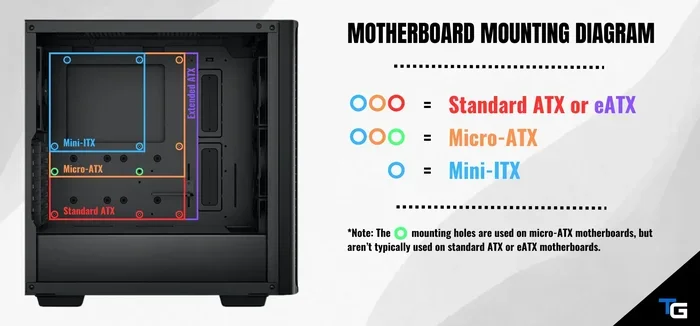
Motherboards come in several standard sizes, known as form factors. Each form factor has its own set of mounting hole patterns and tolerance specifications defined by industry organizations. Understanding these differences helps you choose the right motherboard for your case and avoid fitment issues.
ATX Motherboards
The ATX form factor is the most common desktop motherboard size, measuring 305mm by 244mm. The ATX specification defines exact positions for nine mounting holes, and cases designed for ATX boards include standoff positions that match these holes within the standard tolerance range. Because ATX is so widely used, most case manufacturers adhere closely to the specification, making compatibility relatively straightforward.
However, even within the ATX standard, there can be slight variations between manufacturers. Some cases use slightly different standoff placements, and some motherboards have holes drilled at the edge of the tolerance range. This is why it is always a good idea to check the specifications of both your motherboard and case before purchasing.
Micro-ATX and Mini-ITX
Smaller form factors like Micro-ATX and Mini-ITX have fewer mounting holes and tighter tolerances. Micro-ATX boards measure 244mm by 244mm and typically use four or six mounting holes. Mini-ITX boards are even smaller at 170mm by 170mm and use only four mounting holes. Because the boards are smaller, any deviation in hole placement has a proportionally larger effect on alignment.
Mini-ITX boards are particularly sensitive to tolerance issues because the four mounting holes bear the entire load of the board. If even one hole is slightly off, the board can rock or flex, leading to the problems described earlier. This is why Mini-ITX cases are often built with very precise mounting tolerances, and why builders should be extra careful when selecting components for small form factor builds.
E-ATX and Other Extended Sizes
Extended ATX (E-ATX) boards are larger than standard ATX, typically measuring 305mm by 330mm. These boards are used in high-end workstations and enthusiast builds. Because they are larger, they have more mounting holes, which provides more flexibility in alignment. However, the larger size also means more surface area that can flex, making proper support and tolerance even more important.
How to Check Motherboard Mounting Tolerance Before Buying
Preventing tolerance issues starts before you even open the box. By taking a few simple steps during the research phase, you can avoid the frustration of a board that does not fit properly. Here is a practical checklist to follow.
Step 1: Compare Specifications
Every motherboard comes with a specification sheet that lists the board dimensions, mounting hole positions, and supported form factors. Compare these specifications against the case specifications to ensure compatibility. Look for the mounting hole pattern, which is usually expressed as a grid of coordinates or a diagram showing the hole positions relative to the board edges.
Most case manufacturers also provide a list of compatible motherboard form factors. If the case supports ATX, Micro-ATX, and Mini-ITX, it should work with boards of those sizes. However, always double-check the specific dimensions, as some cases have tighter clearance limits than others.
Step 2: Check Standoff Placement
The standoff positions inside the case should match the mounting holes on your motherboard. Most modern cases come with a removable motherboard tray that has pre-installed standoffs at standard positions. If you are using an older case or a non-standard build, you may need to install standoffs yourself. Make sure you only use the standoffs that correspond to the holes on your board.
Using extra standoffs that do not correspond to any holes on the motherboard is a common mistake that can cause short circuits. If a standoff touches the back of the board where there is no hole, it creates a conductive bridge between the board and the case. Always remove any standoffs that do not align with your motherboard’s mounting holes.
Step 3: Measure Clearances
Beyond the mounting holes, you also need to consider clearance around the edges of the board. Components like capacitors, VRM heatsinks, and M.2 SSDs can extend beyond the board’s edge and may interfere with the case if the clearance is too tight. Measure the tallest component on your motherboard and compare it to the clearance provided by the case.
This is especially important when installing a good RAM for a laptop or desktop system with tall memory heatsinks. High-profile RAM modules can interfere with large CPU coolers, so plan your component layout carefully to avoid clearance conflicts.
Common Mounting Tolerance Problems and How to Fix Them
Even with careful planning, tolerance issues can still arise. Here are the most common problems and practical solutions for each.
Board Does Not Line Up with Standoffs
This is the most frequent tolerance-related issue. If the mounting holes on your motherboard do not align with the standoffs in the case, do not force the board. Forcing it can crack the PCB or bend the standoffs. Instead, check whether your board uses a different form factor than what the case supports, or whether the standoffs are in the wrong positions. Some cases allow you to adjust standoff placement, which can resolve the issue.
Board Feels Loose or Rattles
If the motherboard moves around inside the case after mounting, the tolerance may be too loose, or the standoffs may be too short. A loose board can vibrate during operation, which over time can damage solder joints. Adding rubber standoff washers or using standoffs with a larger diameter can help tighten the fit without applying excessive pressure to the board.
Screws Feel Overly Tight
When screws feel like they are being forced in, the tolerance is likely too tight, or the standoffs are too tall. Overtightening screws can crack the PCB or strip the mounting holes. If you encounter this issue, remove the board and check whether the correct standoffs are being used. Sometimes, a case comes with standoffs of the wrong height, which pushes the board too close to the screws.
Board Touches the Case
If the bottom of the motherboard touches the metal case anywhere, there is a serious tolerance or clearance problem. This can cause short circuits and should be fixed immediately. Check for extra standoffs, misplaced components, or a board that is larger than the case supports. Removing the offending standoff or using a different case is usually the solution.
Tips for Ensuring Perfect Motherboard Fitment
Getting the perfect fit comes down to preparation, patience, and attention to detail. Here are some practical tips that will help you achieve a clean, secure mount every time.
- Read the manuals. Both your motherboard manual and case manual contain detailed diagrams of mounting hole positions and standoff layouts. Refer to these before you start building.
- Use the included standoffs. Most cases come with a set of standoffs designed for the supported form factors. Using these ensures the best possible fit.
- Do not overtighten screws. Hand-tighten each screw until it is snug, then give it a quarter turn with a screwdriver. Over-torquing is one of the fastest ways to damage a motherboard.
- Check for bent standoffs. Before installing the board, inspect each standoff to make sure it is straight and secure. A bent standoff can push the board out of alignment.
- Consider using a motherboard tray. A quality tray with pre-installed standoffs simplifies the mounting process and improves tolerance alignment.
- Take your time. Rushing through the installation process is the number one cause of tolerance-related mistakes. Work carefully and double-check each step before moving on.
Following these tips will help you avoid the most common mounting issues and ensure that your motherboard sits securely and safely inside the case. A proper mount protects your investment and extends the lifespan of your entire system.
How Mounting Tolerance Affects Long-Term Reliability
Mounting tolerance is not just a concern during installation. Over the life of your PC, tolerance issues can slowly develop and worsen. Thermal cycling, vibration, and dust accumulation all put stress on the motherboard-to-case interface, and poor tolerance magnifies these effects.
When a board is mounted correctly within the specified tolerance, it has room to expand and contract with temperature changes without being constrained. This natural movement prevents stress buildup that can lead to cracked traces or lifted components. On the other hand, a board mounted too tightly has no room to breathe, and the constant stress eventually leads to failure.
Vibration from fans and mechanical drives is another factor. A properly mounted motherboard absorbs vibration through its slight flex, but a board with poor tolerance transmits that vibration directly to components. Over time, this can loosen sockets, crack solder joints, and degrade connections. This is why investing in quality components and proper mounting practices is one of the smartest best investment for the lifespan of a PC decisions you can make.
Final Thoughts
Motherboard mounting tolerance is a topic that does not get enough attention, but it plays a critical role in the safety, performance, and longevity of your PC build. Understanding what tolerance means, how it varies across form factors, and how to check for proper fitment before you buy can save you from a world of frustration. The small effort of verifying specifications and matching standoff positions pays off in a build that is secure, stable, and built to last.
Whether you are assembling a high-performance desktop or upgrading the RAM on a laptop, the principles of proper mounting tolerance apply. Take the time to plan your build, check your components, and mount your motherboard with care. Your system will thank you with years of reliable, trouble-free operation.
Frequently Asked Questions
What happens if motherboard mounting holes do not align with case standoffs?
Do not force the board into place. Misaligned holes mean the board does not match the case’s standoff pattern, which can cause flexing, cracked solder joints, or short circuits. Check whether your board and case support the same form factor, and verify that the standoffs are installed in the correct positions before proceeding.
Can I use extra standoffs to fix a loose motherboard?
No. Extra standoffs that do not correspond to a mounting hole on the motherboard can touch the back of the board and create a short circuit. If your board feels loose, use rubber standoff washers or replace the standoffs with ones that provide a tighter fit without adding extra contact points.
What is the standard tolerance for ATX motherboard mounting holes?
The ATX specification allows a small deviation in hole placement, typically within fractions of a millimeter. While exact tolerance values vary by manufacturer, most ATX motherboards and cases are designed to work together with minimal variation. Always check the specifications of both components if you are unsure.
Does mounting tolerance matter for Mini-ITX builds?
Yes, it matters even more for Mini-ITX builds. Because Mini-ITX boards are small and use only four mounting holes, any deviation in hole placement has a proportionally larger effect on alignment and stability. Precision is critical when working with this form factor.
How do I know if my motherboard is compatible with my case?
Check the form factor listed on both the motherboard and the case. If both support the same form factor (such as ATX, Micro-ATX, or Mini-ITX), they should be compatible. Additionally, compare the mounting hole pattern and clearance dimensions from the manufacturer specifications to confirm a proper fit.
Can poor mounting tolerance cause overheating?
Yes, indirectly. A motherboard that is mounted unevenly or too tightly can develop micro-gaps between the board and the I/O shield or backplate. These gaps can trap heat and reduce the effectiveness of passive cooling. Proper mounting ensures good contact and helps maintain safe operating temperatures across all components.