What Is the Rtx Remix Runtime Architecture
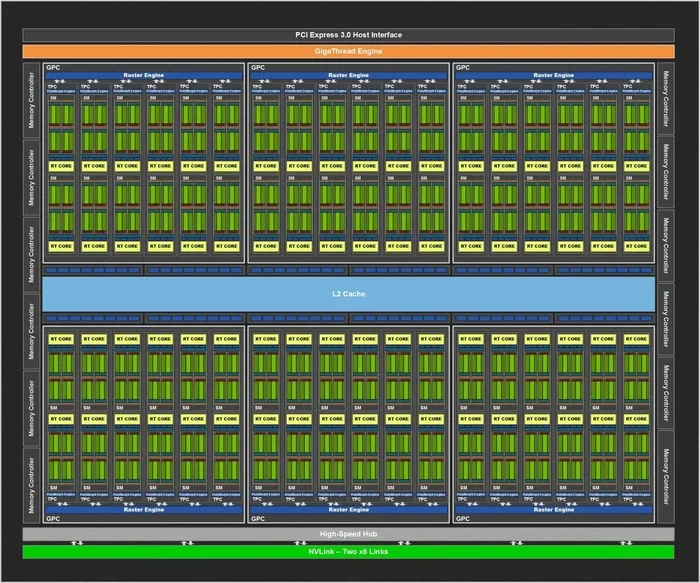
The RTX Remix Runtime Architecture is NVIDIA’s underlying framework that powers the RTX Remix tool, enabling gamers and creators to remaster classic games with modern ray tracing, DLSS, and real-time lighting. It works by intercepting a game’s graphics pipeline and rebuilding it with path tracing and advanced shader compilation. Whether you are a modder or a laptop gamer, understanding this architecture helps you get the most out of your hardware.
If you have ever wanted to bring classic games into the modern era with stunning lighting and realistic reflections, RTX Remix is the tool that makes it possible. But what exactly is the RTX Remix Runtime Architecture that makes all of this work?
At its core, this architecture is the engine behind the scenes. It is the technical framework that allows NVIDIA’s RTX Remix tool to take older games and rebuild their visuals using ray tracing, DLSS, and real-time global illumination. Think of it as a bridge between old game engines and modern laptop GPU hardware.
If you are a modder, a gamer, or someone who just loves seeing classic titles get a second life, this article breaks everything down. We will explore how the runtime works, why it matters, and what you need on your laptop to use it effectively.
Key Takeaways
- RTX Remix Runtime Architecture is NVIDIA’s framework for remastering classic games with modern graphics.
- Ray tracing and DLSS are core features that the runtime leverages for realistic lighting and frame generation.
- The architecture intercepts and rebuilds the original game’s graphics pipeline in real time.
- Shader compilation and texture streaming are key technical processes under the hood.
- Hardware acceleration through NVIDIA drivers ensures smooth performance during modding.
- Backward compatibility with older game engines makes RTX Remix a powerful tool for the modding community.
📑 Table of Contents
What Is RTX Remix?
RTX Remix is a free tool from NVIDIA that lets you create full mod remasters of classic games. You can add ray tracing, replace old textures with high-definition ones, and even rebuild lighting from scratch. The tool was first announced in 2023 and has already been used to remaster games like Quake II and Portal.
The RTX Remix Runtime Architecture is what makes this possible. It is not just a plugin or a simple overlay. It is a full runtime environment that sits between the game and your GPU. It captures everything the original game does and then reprocesses it using modern NVIDIA rendering techniques.
How the Runtime Intercepts Game Data
Here is where it gets interesting. When you launch a game through RTX Remix, the runtime intercepts the graphics calls that the game sends to your GPU. It reads the geometry, textures, and lighting data in real time. Then it reconstructs the scene using its own rendering pipeline.
This interception happens at a very low level. The runtime works directly with the graphics pipeline of the game engine. It does not modify the original game files. Instead, it layers modern rendering on top of the existing game logic. This is why backward compatibility is such a big deal for this tool.
Why This Matters for Modders
Before RTX Remix, remastering a classic game required deep knowledge of the original game engine. You had to decompile code, edit binary files, and hope nothing broke. The RTX Remix Runtime Architecture removes all of that complexity.
Now, modders can focus on creativity. You do not need to be a programmer to add real-time lighting or path tracing to a game. The runtime handles the heavy lifting. It compiles shaders, manages texture streaming, and optimizes the frame output on the fly.
The Core Components of the RTX Remix Runtime
The RTX Remix Runtime Architecture is made up of several key components. Each one plays a specific role in delivering the final remastered experience. Let us break them down.
Ray Tracing Engine
The ray tracing engine is the centerpiece of the runtime. It calculates how light bounces off surfaces in real time. This is what gives remastered games that cinematic look. Shadows are accurate. Reflections are crisp. Global illumination feels natural.
On a laptop GPU, this engine uses dedicated RT cores found in NVIDIA’s RTX lineup. These cores are designed specifically for ray tracing calculations. Without them, the runtime would not be able to deliver real-time lighting at playable frame rates.
DLSS and Frame Generation
DLSS stands for Deep Learning Super Sampling. It is another critical component of the RTX Remix Runtime Architecture. DLSS uses AI-powered frame generation to upscale your game’s resolution while maintaining smooth performance.
This is especially important for laptop gaming. Laptops have limited GPU power compared to desktop rigs. DLSS helps bridge that gap by rendering the game at a lower resolution and then using AI to upscale it. The result is a game that looks great and runs smoothly even on mobile hardware.
Shader Compiler
A shader compiler is a program that translates visual instructions into code your GPU can understand. The RTX Remix runtime includes its own shader compilation system. When you add new materials or lighting effects, the compiler generates the necessary shaders on the spot.
This process happens in the background. You do not need to wait for manual compilation. The runtime handles it automatically, which makes the modding workflow much faster and more intuitive.
Texture and Asset Manager
The texture streaming and asset management system is responsible for loading and organizing all the visual data. When you replace old textures with high-resolution ones, this manager handles the storage and delivery of those assets.
It also manages VRAM usage on your laptop GPU. This is crucial because laptops have limited video memory. The asset manager ensures that textures are loaded efficiently, preventing crashes and stuttering during gameplay.
How RTX Remix Works on Laptops
Running RTX Remix on a laptop is different from running it on a desktop. Laptops have thermal constraints, limited power budgets, and shared memory architectures. The RTX Remix Runtime Architecture accounts for these differences through several optimizations.
GPU Requirements
To use RTX Remix on a laptop, you need an NVIDIA RTX GPU. This means RTX 30-series, 40-series, or newer mobile GPUs. These chips include the RT cores and Tensor cores required for ray tracing and DLSS.
What Is A Good Idle Gpu Temperature is also worth checking before you start modding. Under heavy workloads like RTX Remix rendering, your laptop GPU will run hot. Keeping temperatures in check helps maintain performance and longevity.
RAM and Memory Considerations
RTX Remix is memory-hungry. The runtime needs to store game assets, textures, and rendering data simultaneously. What Is The Ram On A Laptop matters a lot here. Most experts recommend at least 16GB of laptop RAM for smooth RTX Remix operation.
What Is Good Ram For Laptop modding and remastering tasks includes fast DDR5 modules with high bandwidth. The more RAM you have, the more textures and assets you can load without performance drops.
Thermal Management
Laptops heat up under sustained workloads. RTX Remix rendering puts a heavy load on both the GPU and CPU. If your laptop does not cool properly, you will experience thermal throttling. This reduces performance and can ruin the modding experience.
Using a cooling pad, elevating the laptop, or cleaning the fans can help. Also, checking What Is A Good Idle Gpu Temperature gives you a baseline for what normal performance looks like.
Technical Deep Dive: The Rendering Pipeline
The RTX Remix Runtime Architecture uses a multi-stage rendering pipeline to deliver its results. Understanding this pipeline helps you troubleshoot issues and optimize your mods.
Stage 1: Game Capture
The runtime first captures the raw output of the original game. It records geometry data, material properties, and lighting information. This capture happens in real time and does not alter the original game.
Stage 2: Scene Reconstruction
Next, the runtime reconstructs the captured scene using its own rendering engine. It applies new materials, adds ray-traced lighting, and calculates reflections and shadows. This is where the magic happens.
Stage 3: Upscaling and Optimization
The final stage uses DLSS to upscale the rendered frame. It also applies frame generation to increase the frame rate. The output is then sent to your display, giving you a smooth and visually stunning experience.
Stage 4: Asset Streaming
Throughout this process, the texture streaming system continuously loads and unloads assets. It manages VRAM usage to ensure that your laptop GPU does not run out of memory.
Common Mistakes When Using RTX Remix on Laptops
Even with a powerful setup, mistakes can happen. Here are some common pitfalls to avoid.
- Ignoring thermal limits. Laptops are not desktops. Pushing the GPU too hard without proper cooling leads to throttling.
- Running too many mods at once. Each mod adds to the rendering pipeline load. Start small and add mods gradually.
- Using incompatible GPU drivers. Always update your NVIDIA drivers before launching RTX Remix. Outdated drivers cause crashes and visual glitches.
- Overlooking RAM requirements. Insufficient laptop RAM leads to crashes and stuttering. Make sure you have enough memory before starting.
- Not checking What Is Best Investment For Lifespan Of Pc before modding. RTX Remix can push your hardware hard. Investing in better cooling or more RAM extends your laptop’s lifespan.
Expert Tips for Getting the Best Results
Here are some practical tips from experienced modders and laptop gamers who use RTX Remix regularly.
- Start with well-supported games. Games like Quake II and Portal have the best community support and pre-built mods.
- Monitor your GPU temperature. Use tools like What Is A Good Idle Gpu Temperature guides to understand your baseline before and during modding sessions.
- Upgrade your RAM if needed. Check What Is Good Ram On A Laptop guides to find the best memory for your setup.
- Keep your drivers updated. NVIDIA releases regular driver updates that improve RTX Remix compatibility and performance.
- Use an external monitor. Laptops with high-refresh-rate displays benefit greatly from DLSS frame generation when running RTX Remix mods.
Why RTX Remix Runtime Architecture Is a Game Changer
The RTX Remix Runtime Architecture represents a major shift in how we approach game modding. It democratizes the process of remastering classic titles. You do not need a team of developers or millions of dollars. A laptop with an RTX GPU and enough RAM is all you need.
This architecture also opens the door for emulation and modding communities. Tools like What Is The Best Emulator For Pc 2026 complement RTX Remix by allowing you to run classic games in modern environments. Together, these technologies give old games a vibrant new future.
The impact extends beyond just visuals. RTX Remix preserves gaming history. It ensures that classic titles remain playable and visually relevant for years to come. For laptop gamers, it means you can experience these remasters on the go, without needing a desktop setup.
Conclusion
The RTX Remix Runtime Architecture is a powerful and accessible framework that brings modern ray tracing, DLSS, and real-time lighting to classic games. It intercepts and rebuilds the original graphics pipeline using advanced shader compilation, texture streaming, and hardware acceleration. For laptop users, it offers an incredible way to experience remastered classics on the go.
To get the best results, make sure your laptop GPU is up to the task, your RAM is sufficient, and your cooling is adequate. With the right setup, RTX Remix transforms old games into visually stunning experiences that rival modern titles.
The RTX Remix Runtime Architecture is not just a technical achievement. It is a gift to the gaming community. It gives creators the tools to reimagine classics and gives players the chance to experience them in a whole new light.
Frequently Asked Questions
What is the RTX Remix Runtime Architecture?
The RTX Remix Runtime Architecture is NVIDIA’s underlying framework that powers the RTX Remix tool. It intercepts a game’s graphics pipeline and rebuilds it with modern ray tracing, DLSS, and real-time lighting. It allows modders to remaster classic games without modifying the original game files.
Can RTX Remix run on a laptop?
Yes, RTX Remix can run on a laptop with an NVIDIA RTX GPU. Mobile RTX 30-series, 40-series, and newer GPUs support the runtime. However, you need sufficient RAM and good thermal management for the best experience.
What GPUs are compatible with RTX Remix?
NVIDIA RTX 30-series, 40-series, and 50-series GPUs are compatible. These include both desktop and mobile variants. The GPU must support ray tracing and DLSS for full functionality.
How much RAM do you need for RTX Remix?
At least 16GB of RAM is recommended for smooth operation. RTX Remix is memory-intensive because it stores game assets, textures, and rendering data simultaneously. Check guides on What Is Good Ram For Laptop to find the best memory for your setup.
Does RTX Remix modify the original game files?
No, the runtime does not modify original game files. It intercepts graphics calls and layers modern rendering on top of the existing game logic. This ensures backward compatibility and makes it safe to experiment with mods.
What games work best with RTX Remix?
Games with well-documented engines work best. Quake II, Portal, and other classic titles have strong community support. The runtime is also expanding to support more game engines over time.