What Is a Gpu Decoupling Capacitor
A GPU decoupling capacitor is a tiny electronic component that stabilizes power delivery to your graphics card. It filters out electrical noise and voltage spikes, keeping your GPU running smoothly. Without it, your laptop’s graphics performance can suffer from instability, crashes, and reduced lifespan. This guide explains what it does, why it matters, and how it affects your device.
If you have ever wondered what keeps your laptop’s graphics card running without hiccups, the answer might surprise you. It is not just the GPU chip itself. A small, often overlooked component called the GPU decoupling capacitor does a lot of the heavy lifting behind the scenes.
This tiny part sits right on or near the graphics card’s circuit board. Its job is simple but vital. It keeps the electrical power flowing cleanly and steadily to your GPU. Think of it like a water filter for your graphics card. Just as a filter removes impurities from water, a decoupling capacitor removes electrical noise from the power supply. The result is a smoother, more stable experience every time you use your laptop.
In this article, we will break down everything you need to know about GPU decoupling capacitors. We will cover what they are, how they work, why they matter, and what happens when they fail. By the end, you will understand why this small component packs such a big punch.
Key Takeaways
- Power Stability: A GPU decoupling capacitor ensures a steady power supply to your graphics card, preventing voltage fluctuations.
- Noise Reduction: It filters out high-frequency electrical noise that can interfere with GPU performance and signal quality.
- Performance Boost: Clean power delivery helps your GPU maintain peak performance, especially under heavy loads.
- Component Longevity: By protecting against power surges, decoupling capacitors extend the life of your laptop’s GPU.
- Small But Mighty: Despite its tiny size, this component plays a critical role in overall system stability.
- Easy to Overlook: Most users never think about capacitors, but they are essential for reliable GPU operation.
📑 Table of Contents
- What Is a GPU Decoupling Capacitor?
- Why Does a GPU Decoupling Capacitor Matter?
- Types of Decoupling Capacitors Used in GPUs
- Common Signs of a Failing GPU Decoupling Capacitor
- How to Maintain Your GPU Decoupling Capacitor
- What Temperature Does a GPU Fan Turn On and How Does It Relate?
- Expert Insights on GPU Decoupling Capacitors
- Quick Tips for GPU Capacitor Health
- Conclusion
What Is a GPU Decoupling Capacitor?
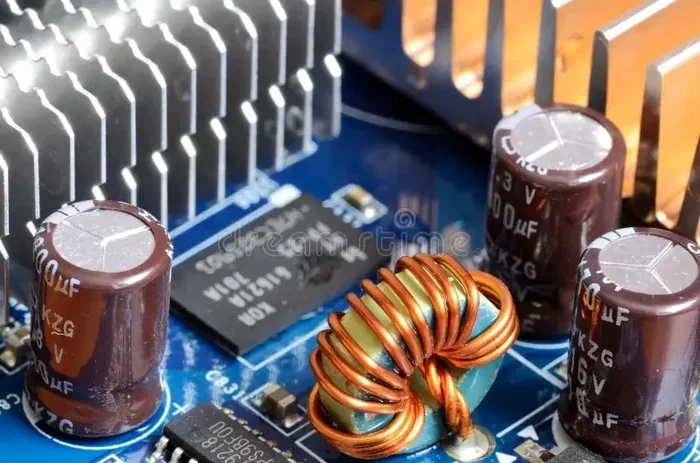
A GPU decoupling capacitor is a small electronic component placed near the graphics processing unit on a laptop’s motherboard. Its main job is to store electrical energy and release it quickly when the GPU needs a sudden burst of power. It also smooths out any fluctuations or noise in the power supply.
Capacitors come in many shapes and sizes. But the ones used for GPU decoupling are usually very small. They sit close to the GPU chip because the shorter the distance, the better the performance. This proximity ensures that the capacitor can respond almost instantly to changes in power demand.
How Does It Work?
Here is how a decoupling capacitor works in simple terms. Your laptop’s power supply sends electricity to the GPU. But that electricity is not always perfectly clean. There can be tiny fluctuations, spikes, or noise in the signal. These irregularities are called power supply noise. A decoupling capacitor acts like a buffer. It absorbs the clean energy and releases it when needed, smoothing out any bumps in the power flow.
When the GPU suddenly needs more power, such as when you open a heavy game or run a demanding application, the capacitor kicks in. It provides that extra burst of energy almost instantly. Without it, the GPU might experience a brief power drop, causing stutters, crashes, or even permanent damage over time.
Why Does a GPU Decoupling Capacitor Matter?
You might be thinking, “Does this tiny component really make a difference?” The answer is a strong yes. A GPU decoupling capacitor plays a critical role in several areas of your laptop’s performance and longevity.
1. Stable Voltage Delivery
GPUs are very sensitive to voltage changes. Even a tiny drop or spike can cause problems. A decoupling capacitor keeps the voltage steady. This means your graphics card gets the consistent power it needs to function properly. Stable voltage delivery is one of the most important factors in GPU stability.
2. Reduced Electrical Noise
Electrical noise is like static on a radio signal. It can interfere with how your GPU processes data. A decoupling capacitor filters out this noise, ensuring clean power reaches the graphics card. Less noise means fewer errors and smoother performance.
3. Better Performance Under Load
When you push your laptop hard, the GPU draws more power. A decoupling capacitor helps meet that demand without delay. This is especially important for laptop GPU performance during gaming, video editing, or 3D rendering tasks. The capacitor ensures the GPU never has to wait for power.
4. Longer Component Lifespan
Power surges and voltage spikes can damage electronic components over time. A decoupling capacitor absorbs these surges before they reach the GPU. This protective function helps extend the life of your graphics card and other components on the motherboard.
Types of Decoupling Capacitors Used in GPUs
Not all capacitors are the same. Different types serve different purposes in GPU power management. Here is a quick look at the most common types you will find near a GPU on a laptop motherboard.
Ceramic Capacitors
Ceramic capacitors are the most common type used for GPU decoupling. They are small, affordable, and very effective at filtering high-frequency noise. Most modern laptops use ceramic capacitors placed as close to the GPU as possible for the best results.
Tantalum Capacitors
Tantalum capacitors offer higher capacitance values in a smaller package. They are often used when more energy storage is needed near the GPU. These capacitors are reliable but can be more expensive than ceramic ones.
Polymer Capacitors
Polymer capacitors combine the benefits of both ceramic and tantalum types. They offer good capacitance, low resistance, and excellent durability. Some high-end laptops use polymer capacitors for enhanced power delivery to the GPU.
| Capacitor Type | Best For | Pros | Cons |
|---|---|---|---|
| Ceramic | High-frequency noise filtering | Small, affordable, fast response | Lower capacitance values |
| Tantalum | Energy storage and stability | High capacitance, reliable | More expensive, sensitive to voltage spikes |
| Polymer | Balanced performance and durability | Low resistance, long lifespan | Higher cost, larger size |
Common Signs of a Failing GPU Decoupling Capacitor
Like all electronic components, decoupling capacitors can wear out over time. When they do, your GPU may start showing warning signs. Here are the most common symptoms to watch for.
Screen Artifacts and Glitches
If you notice strange colors, lines, or flickering on your screen, a failing capacitor could be the cause. Unstable power delivery often leads to visual artifacts on the display.
Random Crashes and Freezes
A GPU that loses power suddenly can cause your laptop to crash or freeze. If this happens during graphics-heavy tasks, the decoupling capacitor might not be providing enough stable energy.
Overheating Issues
When a capacitor fails, it can cause the GPU to draw inconsistent power. This inconsistency can lead to overheating, which may also affect your GPU idle temperature and overall thermal performance. If you notice your GPU running hotter than usual, a capacitor issue could be contributing.
Failure to Boot
In severe cases, a damaged decoupling capacitor can prevent your laptop from turning on at all. The GPU simply cannot get the power it needs to start up.
How to Maintain Your GPU Decoupling Capacitor
Good news. You do not need to be an electronics expert to take care of your GPU’s decoupling capacitor. Simple maintenance habits can go a long way in keeping this component healthy.
Keep Your Laptop Cool
Heat is the enemy of all electronic components, including capacitors. Use a cooling pad when gaming, and make sure your laptop’s vents are not blocked. Keeping temperatures in check helps protect the capacitor and the GPU it supports.
Use a Surge Protector
Power surges from your electrical outlet can damage sensitive components. Plug your laptop into a surge protector to guard against sudden voltage spikes that could harm the decoupling capacitor.
Avoid Overclocking Without Proper Cooling
Overclocking your GPU increases its power demand. If your cooling system is not up to the task, the extra heat can stress the capacitors. If you do overclock, make sure your laptop can handle the extra thermal load.
Regular Cleaning
Dust buildup inside your laptop can block airflow and cause components to overheat. Clean your laptop’s fans and vents regularly to keep everything running at safe temperatures.
If you ever need to replace a GPU or upgrade your setup, knowing what to do after installing a new GPU can help you avoid capacitor-related issues down the road. Proper installation and monitoring go hand in hand.
What Temperature Does a GPU Fan Turn On and How Does It Relate?
GPU thermal management and power delivery go hand in hand. The GPU fan typically turns on when the temperature reaches a certain threshold. This thermal management system works alongside the decoupling capacitor to keep your GPU healthy. When your GPU runs hot, the fan kicks in to cool things down. But if the capacitor is failing, the GPU may draw inconsistent power, generating more heat than usual. This creates a cycle where poor power delivery leads to higher temperatures, which then stresses the capacitor further.
Monitoring your GPU temperature is a great habit. If you want to know what a healthy temperature looks like when your laptop is not under load, check out our guide on what is a good idle GPU temperature. Understanding normal temperature ranges helps you spot problems early.
Expert Insights on GPU Decoupling Capacitors
Hardware engineers consistently emphasize the importance of decoupling capacitors in GPU design. According to industry experts, the placement and quality of these capacitors can significantly impact GPU performance and reliability. In high-end laptops, manufacturers often use multiple capacitors of different types to handle a wide range of power demands. This layered approach ensures that the GPU always has clean, stable power no matter what task it is handling.
One key insight from experts is that not all capacitors age the same way. Ceramic capacitors tend to be very durable, but they can develop cracks over time due to thermal cycling. Tantalum capacitors are reliable but can be sensitive to voltage spikes. This is why quality manufacturing and proper circuit design are so important in modern laptops.
Another expert tip is to pay attention to your laptop’s power settings. Using a balanced power profile instead of maximum performance can reduce stress on the GPU and its decoupling capacitor. This simple adjustment can extend the life of your components and improve long-term stability.
Quick Tips for GPU Capacitor Health
- Monitor temperatures regularly using built-in tools or third-party software.
- Keep your laptop on a hard, flat surface to ensure proper airflow.
- Update your GPU drivers to ensure optimal power management.
- Avoid plugging in too many USB devices that draw power from the same circuit.
- Use manufacturer-approved power adapters to ensure clean power delivery.
- Replace your laptop battery when it degrades, as a failing battery can cause power inconsistencies.
Conclusion
The GPU decoupling capacitor may be small, but its role in your laptop’s graphics performance is enormous. It keeps your GPU powered cleanly, filters out electrical noise, and protects your graphics card from damaging voltage spikes. Without it, your laptop’s graphics capabilities would be far less reliable and far less impressive.
Taking care of this component is straightforward. Keep your laptop cool, use surge protection, and avoid pushing your GPU too hard without proper cooling. These simple steps will help your decoupling capacitor and your entire GPU run smoothly for years to come. If you ever notice screen glitches, random crashes, or unusual heat, consider the possibility that your decoupling capacitor may need attention. A little awareness goes a long way in protecting your investment.
Remember, every part of your laptop matters, even the ones you cannot see. The GPU decoupling capacitor is a perfect example of how small components make a big difference. Treat your hardware well, and it will reward you with stable, high-quality performance every single day.
For more tips on keeping your GPU and laptop in top shape, explore our other resources. Whether you are troubleshooting thermal issues or learning about component compatibility, our guides are designed to help you get the most out of your device.
Frequently Asked Questions
What does a GPU decoupling capacitor do?
A GPU decoupling capacitor stabilizes the power supply to your graphics card. It filters out electrical noise and provides a steady flow of energy, preventing voltage spikes and drops that could harm the GPU or cause performance issues.
Can a failing decoupling capacitor damage my GPU?
Yes, a failing capacitor can cause unstable power delivery, which may lead to GPU crashes, screen artifacts, or even permanent damage over time. It is important to address capacitor issues early to protect your graphics card.
How do I know if my GPU decoupling capacitor is failing?
Common signs include screen flickering, random crashes during graphics-heavy tasks, unusual overheating, and in severe cases, the laptop may fail to boot. If you notice these symptoms, it is worth having your laptop inspected by a professional.
Is it expensive to replace a GPU decoupling capacitor?
The capacitor itself is usually inexpensive. However, the cost of replacement depends on the laptop model and whether the repair requires professional microsoldering. In many cases, the repair cost is reasonable compared to replacing the entire GPU or motherboard.
Do all laptops have GPU decoupling capacitors?
Yes, virtually all modern laptops that include a dedicated or integrated GPU have decoupling capacitors on the motherboard. They are a standard part of GPU power delivery design in every modern laptop.
Can overheating affect the lifespan of a GPU decoupling capacitor?
Absolutely. Heat is one of the biggest enemies of capacitors. Prolonged exposure to high temperatures can cause capacitors to degrade faster, reducing their effectiveness and potentially leading to failure. Keeping your laptop cool is one of the best ways to protect this component.