What Is Unified Memory Architecture
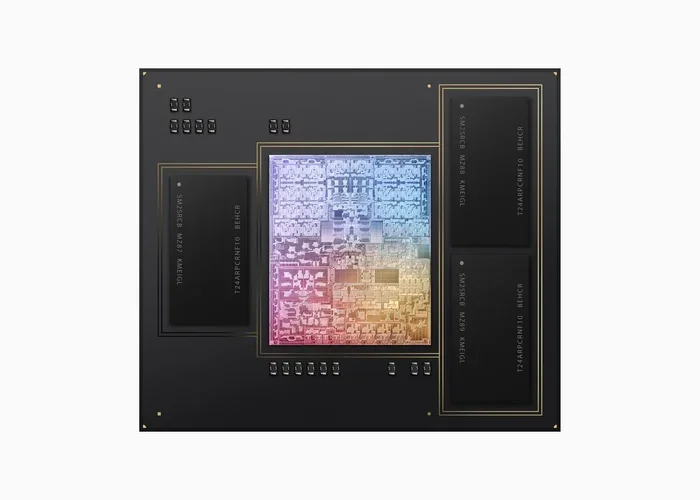
Unified Memory Architecture is a design where the CPU and GPU share a single memory pool, eliminating the need for separate memory modules. This approach improves data transfer speed, reduces power consumption, and enhances overall laptop performance. It is a key feature in modern chips like Apple M-series processors and is changing how laptops handle memory tasks.
Unified memory architecture is changing the way laptops handle data. If you have been shopping for a new laptop, especially one with an Apple M1, M2, or M3 chip, you have probably seen the term “unified memory” thrown around. But what does it actually mean? And why should you care?
In simple terms, unified memory means the CPU and GPU share the same pool of memory. Instead of having separate memory for each component, everything accesses one shared space. This design leads to faster performance, lower power usage, and a smarter way to manage data. In this guide, we will break down everything you need to know about unified memory architecture in plain language.
Key Takeaways
- Shared Memory Pool: CPU and GPU access the same memory, reducing data duplication and improving efficiency.
- Faster Data Transfer: Unified memory allows rapid communication between processing units, boosting performance.
- Lower Power Consumption: Sharing memory uses less energy than running separate memory systems.
- Apple Silicon Adoption: Apple M1, M2, and M3 chips use unified memory to deliver exceptional laptop performance.
- Better for Creative Work: Video editing, 3D rendering, and machine learning tasks benefit greatly from unified memory.
- Trade-Offs Exist: Unified memory is not upgradeable on most laptops, so choosing the right size matters.
📑 Table of Contents
What Is Unified Memory Architecture?
Unified memory architecture is a system design where the central processing unit and the graphics processing unit share a single memory resource. Traditional computers use separate memory for the CPU and GPU. The CPU has system RAM, and the GPU has its own dedicated VRAM. This separation means data has to move back and forth between two different memory pools.
Unified memory removes this barrier. Both the CPU and GPU access the same memory pool at the same time. Think of it like a shared kitchen where both chefs can grab ingredients without waiting for each other. In a traditional setup, it is more like each chef has their own kitchen and has to run back and forth to share supplies.
This architecture is not entirely new. It has been used in game consoles and high-performance computing for years. But recently, it has become a major feature in consumer laptops, especially with Apple Silicon chips. The shift toward unified memory in everyday laptops is making a real difference in performance and efficiency.
How Is It Different from Traditional Memory?
In a traditional laptop, the CPU uses system RAM while the GPU uses dedicated VRAM. These two types of memory do not talk to each other directly. Data has to be copied from one to the other, which takes time and uses extra power. This creates a bottleneck, especially during heavy tasks like video editing or gaming.
With unified memory, there is no copying. The CPU and GPU both see the same data in the same place. This means faster processing, less lag, and smoother multitasking. If you are into laptop performance heavy tasks, unified memory makes a noticeable difference.
How Does Unified Memory Work?
Understanding how unified memory works is easier than you might think. At its core, the system allocates a single block of memory that both the CPU and GPU can access. The operating system and the chip’s hardware manage how memory is divided between tasks.
When the CPU needs to process a task, it pulls data from the shared pool. When the GPU needs to render graphics, it accesses the same pool. There is no separate VRAM module. Everything lives in one place. This design is possible because modern chip architectures integrate the CPU and GPU onto the same silicon package.
For example, Apple M-series chips use a unified memory architecture that allows the CPU, GPU, and Neural Engine to all share the same memory. This means machine learning tasks, graphics rendering, and general computing all run off one memory pool. The result is a laptop that feels fast and responsive across all types of workloads.
The Role of Memory Bandwidth
One of the biggest advantages of unified memory is higher memory bandwidth. Bandwidth is how fast data can move between the memory and the processing units. In traditional setups, the GPU’s VRAM has its own bandwidth, but it still has to wait for data from the CPU’s RAM.
With unified memory, the bandwidth is shared and fully utilized by both the CPU and GPU. This leads to much faster data transfer speeds. For tasks like video editing, 3D rendering, or running AI models, this extra bandwidth can be a game-changer.
Benefits of Unified Memory Architecture
There are several reasons why unified memory is becoming the standard in modern laptops. Let us look at the key benefits.
1. Faster Performance
Because the CPU and GPU share the same memory, there is no delay copying data between pools. This means tasks complete faster. Whether you are editing photos, compiling code, or playing games, you will notice the speed improvement.
2. Lower Power Consumption
Running two separate memory systems takes more energy. Unified memory uses one system, which draws less power. This is a big reason why Apple Silicon laptops can deliver such strong performance while maintaining excellent battery life. For anyone who cares about laptop battery life, this is a huge win.
3. More Efficient Memory Usage
In traditional setups, VRAM sits idle when the GPU is not working hard. Unified memory eliminates this waste. The memory is allocated dynamically based on what the system needs at any given moment. If the GPU needs more memory for a heavy render, it can pull from the shared pool instantly.
4. Better Multitasking
With a shared memory pool, switching between apps and heavy tasks feels smoother. Your laptop can handle more open applications without slowing down. This is especially helpful if you run multiple creative apps at once.
5. Improved Machine Learning and AI Tasks
Modern laptops are increasingly used for AI and machine learning. Unified memory allows the Neural Engine, CPU, and GPU to access the same data quickly. This makes on-device AI processing much more practical and efficient.
Unified Memory vs Traditional Memory
To really understand the value of unified memory, it helps to compare it side by side with traditional memory setups. Here is a quick comparison.
| Feature | Unified Memory | Traditional Memory |
|---|---|---|
| Memory Pool | Single shared pool for CPU and GPU | Separate RAM for CPU, separate VRAM for GPU |
| Data Transfer Speed | Very fast, no copying needed | Slower, requires data copying between pools |
| Power Consumption | Lower, one memory system | Higher, two memory systems |
| Memory Efficiency | Dynamic allocation, no wasted VRAM | Fixed VRAM, can be underutilized |
| Upgradeability | Usually not upgradeable | RAM sometimes upgradeable, VRAM fixed |
| Best For | Creative work, AI, gaming, multitasking | General computing, budget laptops |
As you can see, unified memory offers clear advantages in speed, efficiency, and performance. The main trade-off is that it is not easily upgradeable. When you buy a laptop with unified memory, the amount of RAM is set at the time of purchase. This is why choosing the right RAM size for a laptop is so important.
If you are considering a laptop with unified memory, you should think about your needs carefully. For most users, 16GB is a solid starting point. Creative professionals and developers may want to look at 24GB or 32GB options. You can learn more about choosing the right amount of RAM in our guide on what is a good amount of RAM for a laptop. Understanding your memory needs before buying will save you from future frustration.
Who Uses Unified Memory Architecture?
Unified memory is not just for Apple users anymore. Several major companies are adopting this technology in their laptop processors.
Apple Silicon is the most well-known example. The M1, M2, and M3 chips all use unified memory. These chips power MacBook Air, MacBook Pro, Mac Mini, and iPad Pro models. Apple has been a pioneer in bringing unified memory to consumer devices, and the results speak for themselves.
Qualcomm is also moving in this direction with its Snapdragon X Elite and Snapdragon X Plus chips for Windows laptops. These processors use a unified memory architecture to compete with Apple Silicon in the premium laptop market.
Even some AMD and Intel processors are starting to incorporate unified memory concepts, especially in integrated GPU setups. While they do not always use a fully unified architecture like Apple Silicon, the trend is moving in that direction.
If you are shopping for a new laptop, you will likely encounter unified memory in many modern options. It is worth understanding how it fits into your workflow. For tips on how much RAM you really need, check out our article on what is good RAM for a laptop.
Unified Memory in Creative Workflows
Creative professionals benefit the most from unified memory. Video editors working with 4K or 8K footage need fast memory access to scrub timelines smoothly. 3D artists rendering complex scenes need the GPU and CPU to share data without bottlenecks. Music producers running multiple virtual instruments need low-latency memory access.
Unified memory handles all of these tasks more efficiently than traditional memory setups. The shared pool means no waiting for data to transfer between separate memory modules. This is why many creative professionals are switching to laptops with unified memory architecture.
Is Unified Memory Right for Your Laptop?
The answer depends on what you use your laptop for. For general tasks like browsing, email, and office work, unified memory may not feel dramatically different. But for anything that pushes your laptop hard, the benefits are clear.
If you do any of the following, unified memory is worth considering:
- Video editing and color grading
- 3D modeling and rendering
- Machine learning and AI development
- Gaming at higher settings
- Music production with large sample libraries
- Running multiple heavy apps at once
One thing to keep in mind is that unified memory is not upgradeable on most laptops. Unlike traditional setups where you can swap out RAM sticks, unified memory is soldered onto the chip. This makes your initial choice of memory size critical. If you want to learn more about choosing the right memory configuration, our guide on what is the RAM on a laptop can help you make an informed decision.
Another consideration is cost. Laptops with unified memory, especially those with larger memory configurations, tend to cost more upfront. But the performance gains and energy savings can justify the investment over time. Think of it as a long-term investment in your workflow.
When comparing laptops, pay attention to how much unified memory is available. More memory means more headroom for demanding tasks. If you are unsure about what size to pick, check out our article on what is a good RAM size for a laptop for practical guidance on choosing the right configuration for your needs.
The Future of Unified Memory in Laptops
Unified memory architecture is here to stay. As chip manufacturers continue to integrate CPU, GPU, and AI engines onto single chips, shared memory becomes the natural choice. The trend toward smaller, more efficient laptops demands designs that maximize performance while minimizing power draw.
We can expect to see more Windows laptops adopt unified memory designs in the coming years. Qualcomm’s Snapdragon X series is just the beginning. Intel and AMD are also exploring ways to bring unified memory benefits to their laptop processors.
For consumers, this means better-performing laptops that last longer on a single charge. It also means that creative professionals and developers will have more powerful tools in a portable form factor. The future of laptop memory is unified, and the benefits are already visible in today’s top-performing machines.
When you are ready to upgrade your laptop, keep unified memory on your checklist. It is one of the most important features to consider for long-term performance and value. And remember, choosing the right memory configuration at purchase is the best way to future-proof your investment.
Conclusion
Unified memory architecture is a smart, efficient design that brings the CPU and GPU together on a shared memory pool. It delivers faster performance, lower power consumption, and better multitasking capabilities. Whether you are a creative professional, a developer, or a power user, unified memory can make a real difference in your daily workflow.
While it comes with the trade-off of limited upgradeability, the benefits far outweigh the drawbacks for most users. As more laptop manufacturers adopt this technology, unified memory is becoming a standard feature worth looking for in your next purchase. Choose the right memory size, invest in a laptop that fits your needs, and enjoy the speed and efficiency that unified memory architecture delivers.
Frequently Asked Questions
What is the difference between unified memory and VRAM?
Unified memory is a shared pool that both the CPU and GPU can access. VRAM is dedicated memory reserved only for the GPU. Unified memory eliminates the need for separate VRAM by letting both processors use the same memory space.
Can you upgrade unified memory on a laptop?
No, unified memory is typically soldered onto the processor and cannot be upgraded after purchase. This is why it is important to choose the right memory size when you buy your laptop.
Is unified memory better for gaming?
Yes, unified memory can improve gaming performance by allowing the CPU and GPU to share data faster. This reduces bottlenecks and leads to smoother gameplay, especially on laptops with integrated graphics.
Which laptops use unified memory architecture?
Apple MacBook laptops with M-series chips use unified memory. Some Windows laptops with Qualcomm Snapdragon X processors also use this architecture. It is becoming more common across the laptop industry.
How much unified memory do I need for video editing?
For basic video editing, 16GB of unified memory is a good starting point. For 4K or 8K editing, 24GB or 32GB is recommended. The more memory you have, the smoother your editing experience will be.
Does unified memory improve battery life?
Yes, unified memory can improve battery life because it uses a single memory system instead of two separate ones. This reduces power consumption and helps laptops last longer on a single charge.