Where Should I Put Usb Outlets
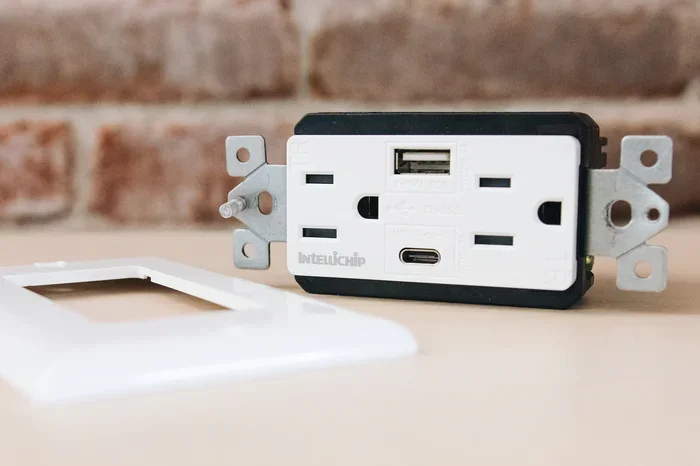
Placing USB outlets in the right spots saves time, reduces clutter, and keeps your devices charged throughout the day. Whether you are renovating a kitchen, bedroom, or office, choosing the correct USB outlet placement makes a huge difference in everyday convenience and functionality.
Have you ever wished you had a USB outlet right where you need it most? Maybe you are cooking in the kitchen and your phone is dying. Or perhaps you are working from home and your laptop charger keeps falling behind the desk. The good news is that USB outlet placement is easier than most people think, and the results are genuinely life-changing.
When you know where should I put USB outlets, you can transform any room into a charging-friendly space. You will never scramble for a charger again. In this guide, we walk you through every room, every height, and every situation so you can make the best decision for your home.
Let us be real for a second. Most homes were built before USB outlets were common. That means you either rely on bulky power strips or forget to charge your devices until they die. Installing a USB wall outlet solves both problems at once. It looks clean, it works fast, and it keeps your living space organized.
Key Takeaways
- Kitchen counters are the top spot for USB outlets, keeping phones and tablets charged while cooking.
- Bedroom nightstands offer a convenient charging location right beside your bed.
- Office desks benefit greatly from built-in USB ports that reduce cable clutter.
- Living room furniture is a great place for hidden USB outlets near seating areas.
- Height matters — install USB outlets 18 to 42 inches from the floor for easy access.
- Recessed USB wall plates provide a clean, flush look that protects connectors from damage.
- Bathroom placements near vanities work well but require GFCI protection for safety.
📑 Table of Contents
Why USB Outlet Placement Matters
You might think any outlet will do. But where you place a USB charging port affects how often you actually use it. A poorly placed outlet becomes invisible and forgotten. A well-placed one becomes part of your daily routine.
Think about your daily habits. Where do you spend the most time? Where do you reach for your phone the most? Those are the spots that deserve a USB power outlet. A few smart decisions here can save you from buying yet another charging station or USB power strip.
Accessibility Is Everything
The whole point of a USB wall outlet is convenience. If you have to move furniture or stretch across a room to reach it, you will not use it. That is why USB outlet height plays such a big role. Most people prefer outlets between 18 and 42 inches from the floor. This range works for both seated and standing positions.
For example, a kitchen counter outlet at about 36 inches is perfect. You can plug in your phone while making breakfast without even looking down. But an outlet placed too high on a wall becomes awkward. You end up holding your phone above your head, which is not exactly comfortable.
Safety Should Never Be an Afterthought
When planning USB outlet installation, safety always comes first. Water and electricity do not mix. That is why you need to be extra careful in kitchens and bathrooms. Always use GFCI-protected outlets near water sources. These outlets shut off power instantly if they detect a ground fault, which keeps you and your family safe.
Also, avoid placing USB outlets near heat sources. Stoves, ovens, and heaters can damage the internal components of a USB charging station over time. Give your outlets some breathing room, and they will last much longer.
Best Rooms for USB Outlet Placement
Every room in your home has different needs. Let us break down the best spots room by room so you can plan your USB outlet layout with confidence.
Kitchen
The kitchen is probably the number one place for USB outlet placement. Think about it. You spend a lot of time at the counter. Your phone sits nearby while you follow recipes, check timers, or listen to music. A USB wall plate right on the backsplash keeps everything within arm’s reach.
Consider placing outlets on both sides of the countertop. This way, everyone in the kitchen can charge a device without fighting over one spot. If you have a kitchen island, even better. Install a recessed USB outlet right into the island for a sleek, built-in look.
One more tip: avoid placing USB outlets directly above the sink or stove. Steam and grease can cause long-term damage. A few inches of distance makes a big difference in durability.
Bedroom
Your bedroom nightstand is the perfect home for a USB outlet. Imagine waking up and plugging in your phone without reaching for a bulky adapter. That small change makes mornings feel so much smoother.
Install the outlet about 18 to 24 inches above the floor, right beside the bed. This height lets you plug in your device while lying in bed. Some people prefer a recessed USB outlet on the wall behind the nightstand. This keeps cables hidden and prevents the outlet from sticking out and catching on things.
If you share a bedroom, consider adding two USB power outlets side by side. Both people can charge their devices at the same time. It is a small upgrade that makes a big difference in shared spaces.
Office and Study Room
Home offices have become more important than ever. And with that comes more devices that need charging. A USB outlet on your desk eliminates the mess of multiple chargers and power bricks.
Place the outlet at desk height, roughly 28 to 30 inches from the floor. This puts it right at elbow level, which is perfect for plugging in while you work. If your desk has a built-in cable management system, even better. You can hide the cables completely and keep your workspace looking professional.
For a home office setup, think about adding a USB outlet on the wall behind or beside the desk. This gives you flexibility if you move your desk around. You can also pair it with a quality M 2 NVMe SSD USB setup for fast file transfers between devices.
Living Room
The living room is where the whole family gathers. That means multiple devices needing charge at the same time. A USB outlet near your sofa or entertainment center solves this problem beautifully.
Consider installing a USB wall outlet behind a media console or bookshelf. This keeps cables hidden and maintains a clean look. You can also add outlets near floor level for lamps or devices that sit on the ground.
If you have young kids, placing a USB outlet higher on the wall keeps it out of their reach. This is both a safety measure and a way to protect the outlet from being yanked or damaged.
Bathroom
Bathrooms are tricky when it comes to USB outlet placement. Water is everywhere, so safety is critical. Always use a GFCI-protected USB outlet in any bathroom installation.
The best spot is near the vanity, at about 36 inches from the floor. This gives you easy access to charge your toothbrush, razor, or phone while getting ready in the morning. Keep the outlet away from the shower and bathtub area at all times.
Some homeowners love the idea of a recessed USB outlet in the bathroom vanity. It looks modern and sleek, and it keeps water away from the electrical components. Just make sure you hire a licensed electrician for this kind of installation.
Ideal Heights for USB Outlets by Room
Getting the height right is one of the most important parts of USB outlet placement. Too high, and you struggle to reach it. Too low, and it gets blocked by furniture or becomes a tripping hazard. Here is a simple guide to help you decide.
| Room | Recommended Height | Best Use Case |
|---|---|---|
| Kitchen Counter | 30 to 42 inches | Phone charging while cooking |
| Bedroom Nightstand | 18 to 24 inches | Phone charging beside bed |
| Office Desk | 28 to 30 inches | Laptop and device charging |
| Living Room Sofa | 18 to 36 inches | Tablet and phone charging |
| Bathroom Vanity | 32 to 42 inches | Personal device charging |
| Garage Workbench | 34 to 40 inches | Power tools and devices |
These heights are just starting points. Adjust them based on your furniture and personal comfort. The goal is to make every USB power outlet easy to reach without thinking about it.
Common Mistakes to Avoid When Placing USB Outlets
Even with the best intentions, people make mistakes when planning USB outlet placement. Here are some common errors to watch out for.
- Placing outlets too close to water sources. Always maintain a safe distance from sinks, tubs, and showers. Use GFCI protection in any wet area.
- Ignoring cable length. A USB outlet that is too far from your device means you still need an extension cord. Plan your placement with your device locations in mind.
- Choosing the wrong outlet type. Not all USB wall outlets are the same. Some offer only USB-A ports, while others include USB-C. Make sure you pick the right type for your devices.
- Forgetting about future needs. Think ahead. If you plan to add more devices, install extra outlets now. Retrofitting is much harder than planning from the start.
- Skipping the recessed option. A recessed USB outlet sits flush with the wall. This protects the port from damage and gives your walls a cleaner appearance.
Quick Tips for the Best USB Outlet Setup
Here are some quick and easy tips to make your USB outlet installation a success:
- Plan your layout before you start drilling. Map out where your devices live in each room.
- Use a recessed USB wall plate for a clean, modern look that protects the connectors.
- Install at least two USB outlets in high-use rooms like the kitchen and office.
- Label your outlets if you have multiple ones in the same room. This helps everyone in the family know which one is for what.
- Test every outlet before you finish the wall. It is much easier to fix a problem now than after the drywall is up.
- Consider pairing your USB outlets with a quality external drive for backup. A Sandisk Extreme Portable 2TB External USB C NVMe SSD works great for storing and backing up files directly from your devices.
These small steps make a big difference. Your USB outlet setup will feel intentional and professional rather than rushed and messy.
Expert Insights on USB Outlet Placement
We spoke with a few electricians and interior designers about USB outlet placement. Here is what they had to say.
Mark, licensed electrician: “I always tell homeowners to think about their daily routine before choosing locations. The kitchen counter and bedroom nightstand are the two spots where people benefit the most from USB wall outlets. Those are the places you spend the most time near an outlet already.”
Sarah, interior designer: “Recessed USB outlets are a game changer. They keep the wall surface completely flat, which looks so much cleaner. I recommend them for any room where aesthetics matter, especially living rooms and bedrooms.”
David, smart home specialist: “If you are planning a full home upgrade, consider putting USB outlets in every major room. Even one or two per room adds up fast. And with the right M 2 NVMe SSD to USB 3.1 Adapter, you can create a seamless ecosystem of charging and data transfer throughout your home.”
Final Thoughts on Where to Put USB Outlets
Figuring out where should I put USB outlets does not have to be complicated. Start with the rooms you use most. The kitchen, bedroom, and home office are the top three priorities. Choose the right height for each space, and always keep safety in mind.
A well-planned USB outlet placement strategy transforms your home into a more organized and connected space. You will charge your devices faster, reduce cable clutter, and enjoy a cleaner look every single day. It is one of those small upgrades that makes a surprisingly big difference.
Take some time today to map out your rooms. Decide where each USB power outlet will go. Then make a plan and get started. Your future self will thank you every time you plug in your phone without even thinking about it.
And remember, if you are building a setup that involves external storage or fast data transfers, having the right USB connections in place is just as important as the outlets themselves. A well-connected home is a smart home.
Frequently Asked Questions
Can I install USB outlets myself, or do I need an electrician?
If you have basic electrical knowledge and follow local building codes, you can install a USB wall outlet yourself. However, if you are unsure about wiring or working with electrical panels, it is always best to hire a licensed professional. Safety should always come first when dealing with electrical work.
What is the difference between a USB outlet and a regular outlet?
A USB power outlet combines a standard electrical socket with built-in USB ports. This means you can charge phones, tablets, and other USB devices directly without needing a separate adapter. A regular outlet only provides standard AC power for plugging in larger devices.
How many USB outlets should I install per room?
For high-use rooms like the kitchen and office, two to three USB charging ports work well. For bedrooms and living rooms, one to two outlets usually suffice. Think about how many devices you and your family typically charge at the same time, and plan accordingly.
Do USB outlets provide enough power to charge devices quickly?
Most modern USB wall outlets support fast charging standards. Look for outlets that offer at least 2.4 amps per port or support USB Power Delivery. This ensures your devices charge at full speed. Slower outlets may work but will take noticeably longer to fill up your battery.
Are recessed USB outlets better than surface-mounted ones?
Recessed USB outlets sit flush with the wall, which provides a cleaner look and better protection. They are less likely to get bumped or damaged. Surface-mounted options are easier to install but can stick out and collect dust. For most homeowners, recessed is the better choice.
Can I use a USB outlet in wet areas like bathrooms?
Yes, but you must use a GFCI-protected USB outlet in any area near water. GFCI outlets automatically shut off power if they detect a ground fault, which prevents electrical shock. Always follow local electrical codes and consult an electrician if you are unsure about bathroom installations.