Where To Buy External SSD And Find The Best Deals Today
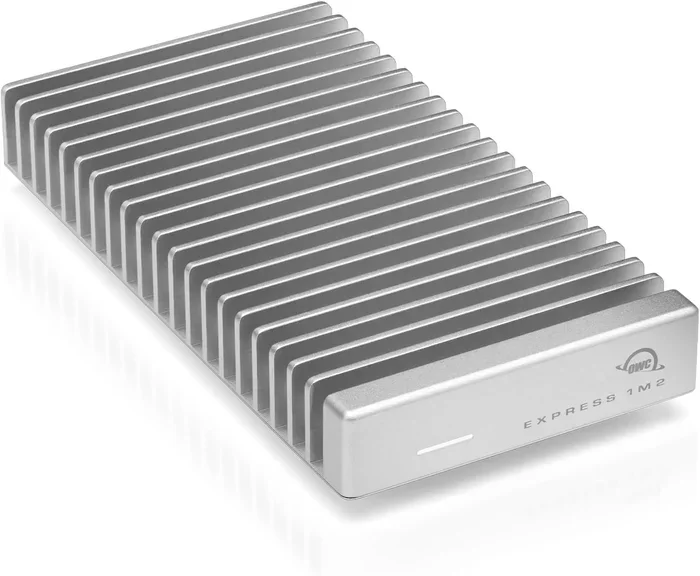
Shopping for an external SSD? This guide covers the best places to buy external SSDs online and in-store, top brands to consider, and smart tips to help you find the best deals. You will learn how to choose the right drive for your needs and avoid common buying mistakes.
Need a portable external drive that keeps up with your fast-paced digital life? An external SSD is the answer. Whether you want to back up important files, expand your laptop storage, or carry a massive game library wherever you go, the right drive makes all the difference.
But here is the tricky part. There are so many places to buy one, and prices vary wildly. Some stores charge way too much, while others offer deals that seem almost too good to be true. This guide walks you through the best places to buy an external SSD, what to look for, and how to grab the best deal without wasting time or money.
We will cover online stores, trusted brands, key features to compare, and practical tips that real people use to save money. By the end, you will know exactly where to shop and what to buy.
Key Takeaways
- Online retailers offer the widest selection and best prices for external SSDs, making them the go-to option for most buyers.
- Top brands like Samsung, SanDisk, and WD deliver reliable performance and strong warranties for peace of mind.
- USB-C and NVMe-based drives provide the fastest transfer speeds for demanding tasks like video editing and gaming.
- Timing your purchase around sales events like Black Friday and Amazon Prime Day can save you significant money.
- Always check return policies and warranties before buying to protect your investment.
- An external SSD is a great alternative to an external hard drive for faster and more durable portable storage.
📑 Table of Contents
- Why You Need an External SSD
- Best Places to Buy External SSDs Online
- Top External SSD Brands Worth Considering
- How to Choose the Right External SSD
- Tips for Finding the Best Deals on External SSDs
- Common Mistakes to Avoid When Buying an External SSD
- External SSD vs External Hard Drive: Which Should You Choose?
- Final Thoughts
Why You Need an External SSD
External hard drives have been around for years. They work fine for basic storage. But an external solid state drive is a completely different experience. There are no moving parts, so they are faster, quieter, and much more durable.
Here are some reasons an external SSD is worth every penny:
- Blazing fast speeds. A USB-C NVMe external drive can transfer files at speeds over 1,000 MB per second. That is way faster than any traditional hard drive.
- Compact and portable. Most external SSDs are smaller than a credit card. You can toss one in your bag without noticing it is there.
- No noise or vibration. Unlike old-school drives, SSDs run completely silent.
- Shock resistant. Drop it on the floor, and it will likely keep working fine. Traditional drives can fail from a simple bump.
- Great for gaming and video work. Loading large games or editing 4K video is much smoother with an external SSD.
If you have been using a slow external hard drive, upgrading to an external SSD will feel like a whole new computer. The speed difference is night and day.
Best Places to Buy External SSDs Online
Online shopping gives you the most options and the easiest way to compare prices. But not all online stores are equal. Some carry better deals, better return policies, and better customer service than others.
Amazon
Amazon is the most popular place to buy an external SSD. The selection is huge, prices are competitive, and Prime members get fast free shipping. You can also read thousands of verified reviews to help you decide.
One thing to watch out for is third-party sellers. Stick with sellers that have high ratings and official store badges. This reduces the risk of getting a counterfeit or refurbished product sold as new.
Best Buy
Best Buy is another solid option. They often run exclusive deals and have a generous return policy. Their website also shows which items are in stock at your local store, so you can pick one up the same day.
Newegg
Newegg has long been a favorite among PC builders. They carry a wide range of storage devices and frequently offer coupons and combo deals. If you are already comfortable shopping for PC parts, Newegg is a great choice.
For a reliable starting point when shopping for PC components, check out best website to buy PC parts to find trusted retailers.
B&H Photo and Adorama
These stores are especially good if you also need cameras, audio gear, or other tech accessories. They carry high-end external SSDs and often have competitive pricing with excellent customer support.
Top External SSD Brands Worth Considering
Not all external SSDs are created equal. Some brands deliver better performance, better build quality, and better support than others. Here are the top brands you should look at.
SanDisk Extreme Portable
The SanDisk Extreme Portable 2TB is one of the most popular external SSDs on the market. It offers fast NVMe speeds, a rugged metal design, and a USB-C connection. It works great for photographers, videographers, and gamers who need portable speed.
Samsung T7 and T9 Series
Samsung makes some of the most reliable external SSDs available. The T7 and T9 series offer excellent read speeds, compact designs, and strong encryption features. They are a bit pricier than some competitors, but the build quality and performance are top-notch.
WD (Western Digital)
WD offers a wide range of external drives at various price points. Their portable SSDs are well-built and consistently perform well. If you want a balance of price and quality, WD is a brand you can trust.
Crucial and Seagate
Crucial is backed by Micron, one of the biggest memory manufacturers in the world. Their external SSDs offer solid performance at fair prices. Seagate, while more known for traditional hard drives, has also entered the external SSD market with competitive options.
How to Choose the Right External SSD
Buying an external SSD is not just about picking the cheapest option. There are a few key factors you should consider to make sure you get the right drive for your needs.
Connection Type
Most modern external SSDs use USB-C. This is the fastest and most versatile connection. Older drives may use USB-A, which is slower. If your computer or laptop has a USB-C port, always go for a USB-C drive.
Some older laptops only have USB-A ports. In that case, you can use an NVMe SSD to USB adapter to connect a faster drive. This is a budget-friendly way to get NVMe speed without buying a pre-built external enclosure.
Speed and Performance
Look for drives that use NVMe technology rather than SATA. NVMe drives are significantly faster. A good NVMe external SSD will deliver read speeds of 1,000 MB per second or more. SATA-based external drives top out around 500 MB per second.
If you need the absolute fastest speeds, consider a M.2 NVMe SSD to USB-C SSD enclosure. These let you put a bare NVMe drive inside a portable enclosure. The result is a custom external SSD that is faster and often cheaper than pre-built options.
Capacity
External SSDs come in sizes from 256GB to 4TB and beyond. Here is a quick guide to help you decide:
- 256GB to 500GB: Good for documents, photos, and a few games. Budget-friendly and compact.
- 1TB to 2TB: The sweet spot for most users. Enough for a full game library, video projects, or a complete backup.
- 4TB and above: Best for professionals who work with large files, such as video editors and designers.
Build Quality and Durability
If you plan to carry your drive around a lot, look for one with a rugged metal or rubberized shell. Some drives are rated for shock and water resistance, which adds peace of mind for travel and outdoor use.
Tips for Finding the Best Deals on External SSDs
Saving money on an external SSD is totally doable if you know when and where to shop. Here are some proven strategies.
Shop During Major Sales Events
The best time to buy tech is during big sales events. Black Friday, Cyber Monday, Amazon Prime Day, and back-to-school sales often bring significant discounts on external storage devices. Prices can drop 20 to 40 percent during these events.
Set price alerts on sites like CamelCamelCamel or Keepa so you get notified when a drive hits your target price.
Compare Prices Across Multiple Retailers
Never buy from the first store you see. Spend five minutes comparing prices on Amazon, Best Buy, Newegg, and B&H Photo. Price differences for the same drive can be surprisingly large.
Consider Open-Box and Refurbished Options
Open-box and refurbished drives can save you a lot of money. These are products that were returned or displayed in stores but are still fully functional. Just make sure you buy from a reputable seller with a solid warranty.
Check for Bundle Deals
Some retailers bundle an external SSD with a USB cable, carrying case, or other accessories at a discount. These bundles can add real value, especially if you need the extras anyway.
Sign Up for Newsletters and Deal Alerts
Many tech retailers send exclusive coupon codes to their email subscribers. Signing up takes two minutes and can save you money on your next purchase.
Common Mistakes to Avoid When Buying an External SSD
Even savvy shoppers sometimes make mistakes. Here are the most common ones and how to avoid them.
Buying the Wrong Connection Type
This is the number one mistake. If your computer only has USB-A ports and you buy a USB-C drive, you will need an adapter. Check your ports before you buy.
Ignoring the Warranty
A good warranty tells you a lot about a product. Most quality external SSDs come with a 3- to 5-year warranty. Avoid drives with no warranty or very short coverage periods.
Focusing Only on Price
The cheapest drive is not always the best deal. A slightly more expensive drive from a trusted brand will usually last longer and perform better. Saving ten dollars now is not worth a drive that fails in six months.
Overlooking Speed Ratings
Not all external SSDs are equally fast. Some cheap drives use older technology that bottlenecks the speed. Always check the read and write speeds before purchasing.
Forgetting to Check the Return Policy
If the drive does not work with your setup or does not meet your expectations, you want to be able to return it easily. Always review the return policy before you buy.
External SSD vs External Hard Drive: Which Should You Choose?
Many people wonder whether they should buy an external SSD or a traditional external hard drive. Here is a quick comparison.
| Feature | External SSD | External Hard Drive |
|---|---|---|
| Speed | Very fast (500-2000 MB/s) | Slow (100-150 MB/s) |
| Durability | Shock resistant, no moving parts | Fragile, has spinning parts |
| Size | Very compact and light | Larger and heavier |
| Price per TB | Higher | Lower |
| Noise | Silent | Can be audible |
| Best For | Speed, portability, gaming | Bulk storage, backups |
If speed, durability, and portability matter to you, go with an external SSD. If you need a lot of storage for the lowest possible price, an external hard drive still has its place.
Final Thoughts
Buying an external SSD does not have to be complicated or expensive. The key is to know where to look, what to compare, and when to pull the trigger on a deal. Stick with trusted brands, compare prices across multiple stores, and always read the return policy before you buy.
Whether you need a fast portable drive for gaming, a reliable backup solution for your creative work, or extra storage for your laptop, there is an external SSD out there that fits your needs and budget. Use the tips in this guide to make a smart, confident purchase.
Start by browsing the major online retailers we covered. Check for sales, compare a few models, and you will find the perfect drive in no time. Happy shopping.
Frequently Asked Questions
What is the best place to buy an external SSD?
Amazon offers the widest selection and competitive prices, making it the top choice for most buyers. Best Buy and Newegg are also excellent options with reliable service and frequent deals. For the best overall experience, compare prices across all three before purchasing.
How much should I spend on an external SSD?
Most quality 1TB external SSDs cost between $80 and $150. Prices vary based on brand, speed, and capacity. A 2TB model typically ranges from $150 to $250. Spending a little more on a trusted brand usually means better performance and a longer lifespan.
Can I use an external SSD for gaming?
Yes, external SSDs are excellent for gaming. They dramatically reduce game load times compared to traditional hard drives. Many modern games require an SSD to run smoothly. A USB-C NVMe external drive is the best choice for the fastest gaming experience.
Is an external SSD faster than an external hard drive?
Absolutely. External SSDs use flash memory with no moving parts, which makes them much faster. A good external SSD can be 5 to 10 times faster than a traditional external hard drive. The speed difference is especially noticeable when transferring large files or loading games.
How do I know if an external SSD is compatible with my computer?
Check what ports your computer has. Most modern laptops and desktops support USB-C, which works with the latest external SSDs. If your computer only has USB-A ports, you can still use a USB-C drive with a simple adapter. Always verify the connection type before buying.
How long do external SSDs last?
A quality external SSD can last 5 to 10 years or more with normal use. They have no moving parts, so there is less wear and tear compared to traditional drives. Most reputable brands offer warranties of 3 to 5 years, which gives you extra peace of mind.
=== CONCLUSION ===
Finding the right place to buy an external SSD is the first step toward faster, more reliable portable storage. Whether you shop on Amazon, Best Buy, Newegg, or another trusted retailer, the tips in this guide will help you make a smart choice. Focus on connection type, speed, capacity, and brand reputation to find a drive that lasts.
Take advantage of sales events, compare prices, and never ignore the return policy. A little research goes a long way toward saving money and getting the perfect drive. Now that you know where to buy an external SSD and how to spot a great deal, you are ready to make your purchase with confidence.