Wix Logo Generator
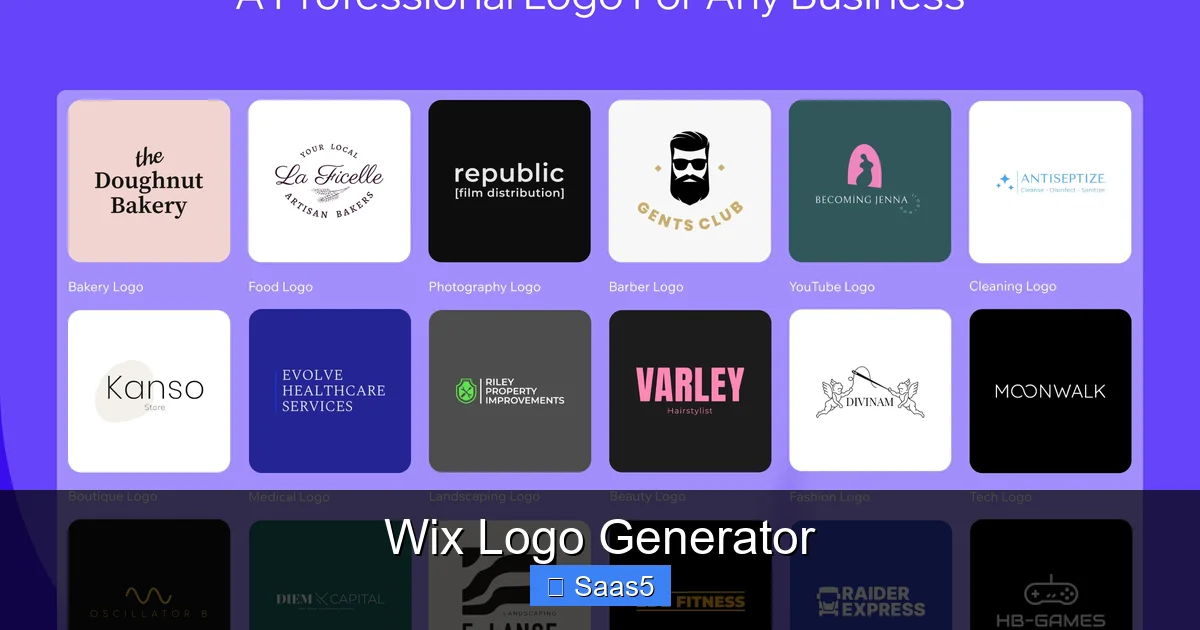
Wix Logo Generator is a free, AI‑powered tool that lets anyone craft a professional‑looking logo in minutes. It guides you through style quizzes, offers endless icon choices, and integrates seamlessly with Wix website builder. This review covers features, pricing, step‑by‑step usage, and real‑world tips so you can decide if it’s the right fit for your brand.
Key Takeaways
- Free to start: You can design and download a low‑resolution logo at no cost; premium files require a small purchase.
- AI‑driven suggestions: The generator asks simple questions and instantly produces dozens of custom concepts.
- Full brand kit: Paid plans include vector files, social media assets, and a brand guide.
- Wix ecosystem integration: Logos sync directly to Wix websites, email campaigns, and marketing tools.
- Limitations on uniqueness: Because many users share the same icon library, some designs may feel generic.
- Easy editing: Drag‑and‑drop, color swaps, and font tweaks are possible without any design experience.
- Good for startups: Small budgets and quick timelines make it a solid choice for new businesses.
📑 Table of Contents
- Introduction: Why a Logo Still Matters in 2024
- How Wix Logo Generator Works: Step‑by‑Step Walkthrough
- Features That Set Wix Logo Generator Apart
- Who Should Use Wix Logo Generator?
- Practical Tips to Get the Most Out of Wix Logo Generator
- Pricing Breakdown and Value Comparison
- Real‑World Example: From Idea to Launch in 20 Minutes
- Conclusion: Is Wix Logo Generator Right for You?
Introduction: Why a Logo Still Matters in 2024
Even in a world where TikTok videos and AI avatars dominate attention, a logo remains the visual handshake of your brand. It appears on your website header, social profiles, business cards, and merchandise. A strong logo tells a story, builds trust, and makes you memorable.
If you’ve ever stared at a blank canvas, wondering whether to hire a designer or learn Illustrator, you’re not alone. The good news is that you don’t need a design degree to get a decent logo. Wix Logo Generator, launched in 2020, promises a “design‑in‑minutes” experience powered by artificial intelligence. In this article we’ll dig deep into how it works, who should use it, and whether the free version truly lives up to the hype.
How Wix Logo Generator Works: Step‑by‑Step Walkthrough
1. The Quick Quiz That Sets the Tone
When you first open the tool, Wix asks you four simple questions:

Visual guide about Wix Logo Generator
Image source: bkimg.cdn.bcebos.com
- What’s your business name?
- What’s your tagline (optional)?
- Which industry best describes you?
- What style do you prefer – modern, classic, playful, or elegant?
These answers guide the AI to pull relevant icons, color palettes, and font families from Wix’s extensive library. The quiz takes less than a minute, and you can always go back and tweak answers later.
2. Browsing the Auto‑Generated Concepts
Within seconds, the generator shows 6‑12 logo concepts on the screen. Each concept combines an icon, your business name, and a suggested font. You can click any concept to expand it, swap the icon, change the color scheme, or try a different font style. The interface feels like a slide‑show mixed with a simple drag‑and‑drop editor.
3. Fine‑Tuning Your Favorite Design
Once you settle on a concept, the editor unlocks more controls:
- Icon library: Search by keyword, filter by style, or browse categories such as “technology,” “food,” or “fitness.”
- Color picker: Choose from preset palettes or enter a hex code for brand consistency.
- Typography: Wix offers over 500 fonts; you can toggle between serif, sans‑serif, script, and display options.
- Layout options: Move the icon left, right, or above the text; adjust spacing; add a background shape.
The changes are applied in real time, so you instantly see how the logo looks on a mock‑up of a business card or a website header.
4. Downloading or Upgrading
After you’re happy with the design, you have two paths:
- Free download: A low‑resolution PNG (transparent background) is available at zero cost. Perfect for testing or social media.
- Premium package: For $39 (one‑time) you receive high‑resolution PNG, SVG vector, EPS, PDF, and a brand kit with color codes, font files, and social media templates. This package also includes a 30‑day money‑back guarantee.
Because the premium files are vector‑based, you can scale the logo to any size without losing quality – essential for print materials.
Features That Set Wix Logo Generator Apart
AI‑Powered Design Engine
The core advantage is the AI algorithm that matches your quiz answers with millions of icon vectors. It reduces the endless scrolling you’d face on generic stock‑icon sites. The AI also suggests complementary fonts and colors, a feature that many free logo makers lack.
Visual guide about Wix Logo Generator
Image source: pngimg.com
Seamless Integration with Wix Ecosystem
If you already host your site on Wix, the logo can be pushed directly into your website editor with one click. It also syncs with Wix Email Marketing, Wix Stores, and Wix Ascend, ensuring that your brand looks consistent across all touchpoints.
Brand Kit and Social Templates
When you purchase the premium option, you receive a downloadable brand kit. It includes:
- Primary and secondary color codes (HEX, RGB, CMYK)
- Font files and usage guidelines
- Pre‑made social media profile and cover images sized for Facebook, Instagram, and Twitter
- Business card and letterhead templates in Canva format
This saves small businesses hours of design work and keeps branding cohesive.
Affordability Compared to Traditional Design Services
Hiring a freelance designer can cost $150‑$500 for a simple logo, while a design agency may charge $1,000 or more. Wix’s $39 premium package is a fraction of that cost, making it attractive for bootstrapped startups.
Limitations to Keep in Mind
- Icon reuse: Because the same icon library is shared with all users, some logos may look similar to competitors.
- Advanced customization: The editor lacks vector‑path manipulation, so you can’t reshape an icon the way you could in Illustrator.
- Trademark concerns: Wix does not guarantee exclusive rights to the icons; you may need a separate trademark search if you plan a large‑scale rollout.
Who Should Use Wix Logo Generator?
Start‑ups and Solopreneurs
If you’re launching a SaaS product, a local bakery, or a personal blog, speed and cost are priority #1. Wix lets you create a presentable logo in under 15 minutes, freeing you to focus on product development.
Visual guide about Wix Logo Generator
Image source: sports-pctr.c.yimg.jp
Small Businesses on a Tight Budget
Many small firms already use Wix for web hosting. Adding a logo from the same platform reduces the learning curve and eliminates the need for multiple subscriptions.
Non‑Designers Who Want Control
People who dislike “designer speak” will appreciate the visual, click‑based interface. You don’t need to learn design terminology; everything is explained in plain English.
Marketers Looking for Quick Variations
Because you can generate multiple concepts from a single quiz, marketers can A/B test different logo versions on landing pages to see which resonates best with the audience.
Practical Tips to Get the Most Out of Wix Logo Generator
1. Do a Mini‑Brand Audit Before Starting
Write down your brand values, target audience, and preferred colors. This will guide your quiz answers and help you spot the best AI suggestions.
2. Keep It Simple
Research shows that logos with fewer than three elements perform better in recall tests. After the AI presents options, trim any extra icons or decorative lines that don’t add meaning.
3. Test Color Blindness
Use online simulators to see how your logo looks for people with common forms of color blindness. Adjust the palette if contrast is low.
4. Export Both PNG and SVG
Even if you only need a PNG for web use, download the SVG vector as a backup. It’s useful for future print projects without having to redesign.
5. Combine With Other Free Tools
For a truly free workflow, pair Wix’s free PNG with a free background remover like Is Wix Logo Maker Free to clean up any edge artifacts. Then use a site like Create A Professional Logo For Business Online Free to add a tagline in a different font if needed.
6. Protect Your Design
Before you start using the logo commercially, run a quick Google image search to see if the same icon appears elsewhere. If you find duplicates, consider swapping the icon or purchasing a custom vector from a marketplace.
Pricing Breakdown and Value Comparison
Free Tier
The free tier gives you a 500 × 500 px PNG with a transparent background. It’s perfectly fine for a YouTube watermark or a low‑resolution website favicon.
Premium One‑Time Purchase – $39
Includes:
- High‑resolution PNG (up to 2000 px wide)
- Scalable SVG and EPS files
- Full brand kit (colors, fonts, social templates)
- 30‑day money‑back guarantee
Compared to a typical freelance logo package ($150‑$300), you save roughly 75 % while still receiving professional‑grade assets.
Enterprise Options
Wix does not currently offer a subscription model for logos, but businesses needing multiple brand assets can purchase the premium package for each logo variation. For larger teams, the cost still remains modest.
Real‑World Example: From Idea to Launch in 20 Minutes
Meet Maya, a yoga instructor launching an online class platform called “ZenFlow.” She needed a logo fast to put on her booking site, Instagram, and merch.
- Quiz: Maya typed “ZenFlow,” added the tagline “Find Your Balance,” selected “Health & Wellness,” and chose “Elegant.”
- AI Output: The generator produced 8 concepts featuring lotus icons, sleek sans‑serif fonts, and pastel palettes.
- Refinement: She swapped the default lotus for a minimal wave icon, changed the teal to a muted lavender, and moved the icon above the text.
- Download: Maya downloaded the free PNG for her Instagram profile and upgraded for $39 to get the SVG for her website header and printable flyers.
- Launch: Within 20 minutes, Maya had a cohesive brand kit ready for social posts, email newsletters, and a Wix website—all without hiring a designer.
This story illustrates how the tool can accelerate brand rollout for solo entrepreneurs.
Conclusion: Is Wix Logo Generator Right for You?
Wix Logo Generator delivers on its promise of quick, affordable, and decent‑quality logo creation. Its AI engine, tight integration with Wix, and low‑cost premium package make it a viable option for startups, small businesses, and anyone who needs a professional look without a big budget.
If you value absolute uniqueness, need intricate vector editing, or want exclusive trademark rights, you may still want to invest in a custom designer. However, for most SaaS founders, local retailers, and content creators, Wix provides a solid middle ground between “DIY free” and “high‑end agency.” Give the free version a spin, experiment with a few concepts, and decide whether the $39 upgrade is worth the extra polish for your brand.
Frequently Asked Questions
Is Wix Logo Generator really free?
Yes, you can design and download a low‑resolution PNG at no cost. Premium assets like SVG files and a full brand kit require a one‑time purchase of $39.
Can I use the logo for commercial purposes?
Absolutely. The premium package grants you commercial rights to the logo files. The free PNG is also usable commercially, but keep in mind that it may be less unique.
How does Wix Logo Generator differ from other free logo makers?
Wix combines AI‑driven suggestions with a massive icon library and seamless Wix website integration, whereas many free tools only offer static templates without brand‑kit extras.
Do I need a Wix website to use the logo generator?
No. The logo maker is a standalone tool, but if you already host on Wix you’ll enjoy one‑click syncing of the logo to your site and marketing tools.
What file formats are included in the premium download?
The premium bundle provides PNG, SVG, EPS, and PDF files, plus a brand kit with color codes, font files, and ready‑made social media templates.
Can I edit the logo after I’ve downloaded it?
Yes. SVG files can be opened in vector editors like Adobe Illustrator or the free Inkscape. For minor tweaks, Wix’s own editor lets you adjust colors and layout even after download.