Difference Between Saas and Paas

SaaS (Software as a Service) delivers complete, ready-to-use applications over the internet, like Google Workspace or Salesforce. PaaS (Platform as a Service) provides a development platform and tools for building custom applications, such as Heroku or AWS Elastic Beanstalk. The core difference lies in control and responsibility: SaaS offers minimal control but maximum convenience, while PaaS offers more control and flexibility but requires technical expertise to manage and build upon the provided platform.
Key Takeaways
- SaaS is end-user focused: It provides a finished application for immediate use, handling all maintenance, updates, and infrastructure.
- PaaS is developer focused: It provides a toolkit and environment for building, testing, and deploying custom applications.
- Control vs. Convenience Trade-off: SaaS offers low control/high convenience; PaaS offers higher control/moderate convenience (for developers).
- Technical Skill Requirement: SaaS requires no coding skills; PaaS requires software development and DevOps knowledge.
- Customization Depth: SaaS customization is typically limited to configuration; PaaS allows deep, code-level customization.
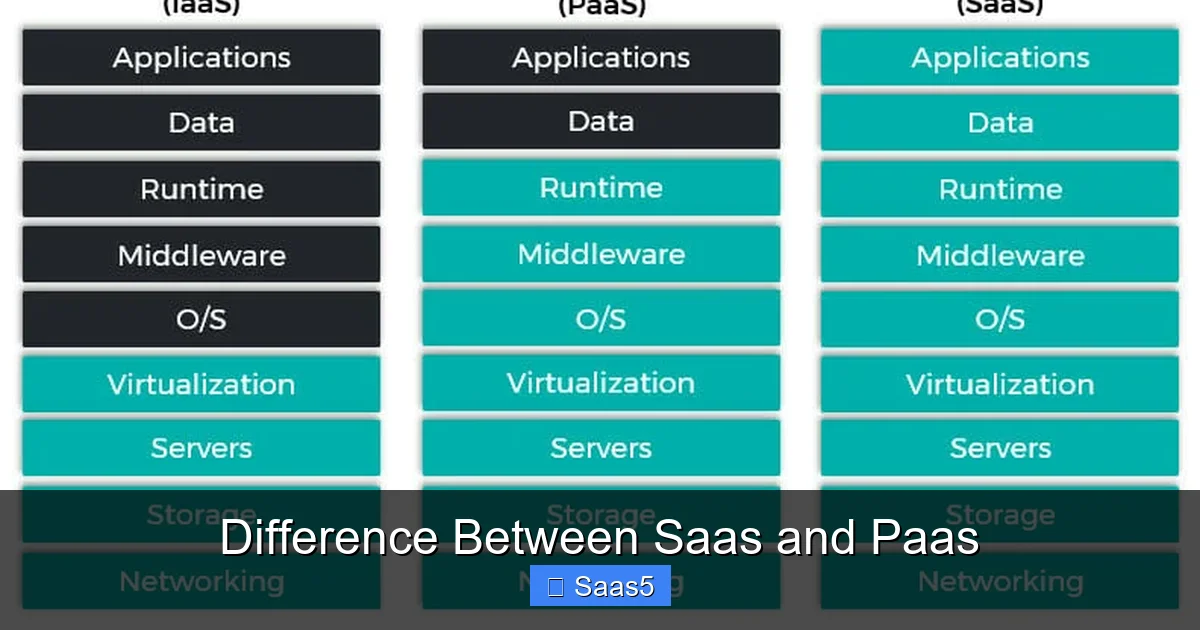
- Responsibility Shift: In SaaS, the provider manages everything. In PaaS, the user manages their apps and data, while the provider manages the runtime, middleware, and OS.
- Cost Structure: SaaS usually has predictable subscription fees; PaaS often uses a pay-for-what-you-use model based on resources consumed.
📑 Table of Contents
- Introduction: Navigating the Cloud Service Models
- Core Definitions: What Exactly Are SaaS and PaaS?
- The Key Differences: A Detailed Comparison
- Real-World Scenarios: When to Choose Which?
- Deep Dive: Cost Structures and Total Cost of Ownership (TCO)
- Security, Compliance, and Vendor Lock-In
- Conclusion: Making the Right Choice for Your Journey
Introduction: Navigating the Cloud Service Models
Ever felt confused by the alphabet soup of cloud computing? You’re not alone. SaaS, PaaS, IaaS—they all sound similar but represent fundamentally different ways to use the cloud. Understanding the difference between SaaS and PaaS is crucial for any business leader, IT manager, or startup founder making decisions about technology. Get it wrong, and you might overpay, under-deliver, or frustrate your team. Get it right, and you unlock agility, efficiency, and innovation.
Let’s clear the fog. Imagine you need to solve a problem. Do you want a ready-made tool you can use immediately (SaaS)? Or do you need a workshop full of tools and materials to build your own custom solution (PaaS)? This isn’t about which is “better”—it’s about which is right for the job at hand. In this deep dive, we’ll break down these two dominant cloud models, compare them side-by-side, and give you the clarity to choose confidently.
Core Definitions: What Exactly Are SaaS and PaaS?
Before we compare, we must define. The difference between SaaS and PaaS starts at their foundational purpose and delivery model.
Visual guide about Difference Between Saas and Paas
Image source: founderjar.com
Software as a Service (SaaS): The Finished Apartment
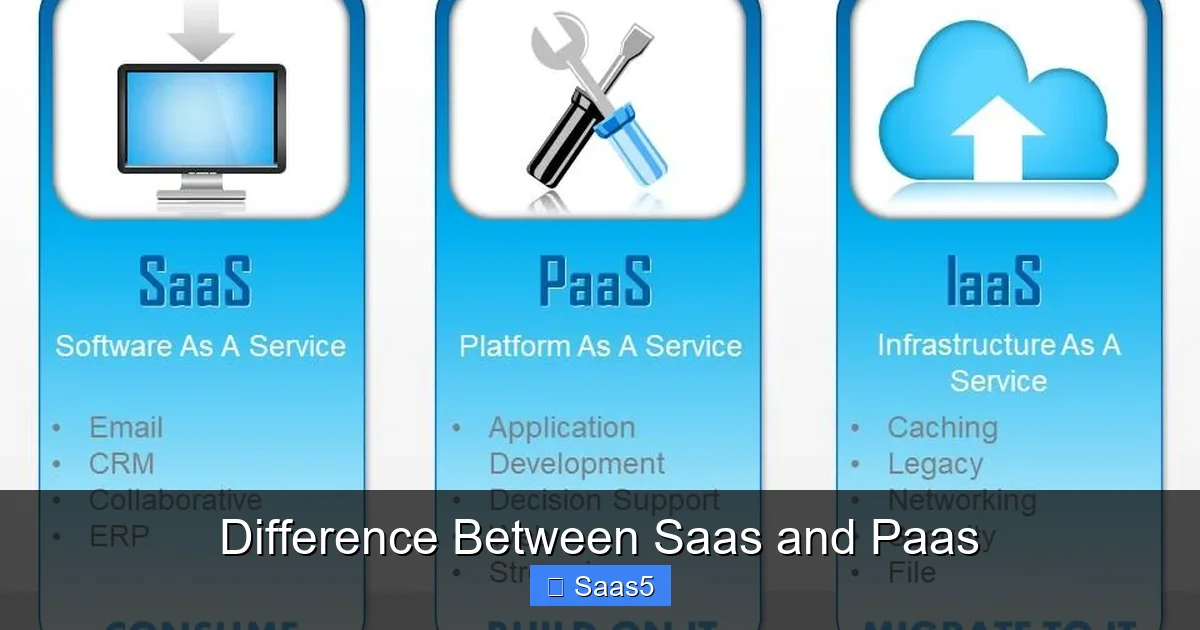
SaaS is the most consumer-facing and widely adopted cloud model. It delivers a complete, functional software application directly to your browser or desktop app. You don’t install anything on your local servers (beyond maybe a thin client). You simply log in and start working. The provider hosts everything: the application code, the data, the runtime, the middleware, the operating system, the servers, the storage, and the networking. It’s a fully managed, turnkey solution.
Practical Examples: Google Workspace (Gmail, Docs), Microsoft 365, Salesforce (CRM), Slack, Zoom, Dropbox, Shopify (for store owners). If you’re using a web-based tool for email, project management, or accounting, you’re almost certainly using SaaS.
Platform as a Service (PaaS): The Fully-Equipped Workshop
PaaS sits a layer deeper. It provides a platform—a pre-configured environment with tools, libraries, databases, and infrastructure—specifically designed for developers to build, test, deploy, and manage custom applications. You don’t manage the underlying servers, storage, or networking. You don’t even manage the operating system or middleware. Your team’s responsibility starts with the application code and data. The PaaS provider handles the complex, time-consuming plumbing.
Practical Examples: Heroku, Google App Engine, AWS Elastic Beanstalk, Microsoft Azure App Services, Red Hat OpenShift. These platforms let developers push code (often via Git) and have it automatically built, scaled, and run without touching the server configuration.
The Key Differences: A Detailed Comparison
Now, let’s dissect the core difference between SaaS and PaaS across several critical dimensions. This is where you decide which model aligns with your needs.
Visual guide about Difference Between Saas and Paas
Image source: i.pinimg.com
1. Target User & Primary Use Case
This is the most fundamental distinction. SaaS is built for end-users and business departments. The marketing team uses HubSpot; the sales team uses Salesforce; the HR team uses Workday. The user’s goal is to accomplish a business task, not to build software. PaaS is built for software developers and DevOps engineers. Their goal is to create, deploy, and scale proprietary applications. A startup building a unique AI-powered analytics tool would use PaaS. An accountant using QuickBooks Online is using SaaS.
2. Level of Control & Customization
Control is a spectrum. With SaaS, control is intentionally limited. You can usually configure settings, customize workflows within the vendor’s framework, and sometimes add approved third-party integrations via APIs or marketplaces. But you cannot change the core application code. You are a tenant in the vendor’s software. With PaaS, you have immense control. You write the application code. You choose the specific runtime versions, middleware components, and database schemas. You can integrate any compatible library or service. You own the application’s logic and architecture, built on the provider’s solid foundation.
3. Management Responsibility (The Shared Responsibility Model)
Cloud models follow a shared responsibility framework. The difference between SaaS and PaaS is where the line is drawn.
- SaaS Responsibility (User): Primarily user management (creating accounts, setting permissions), data entry and integrity, and configuration within the app’s allowed parameters. Everything else is the provider’s job.
- PaaS Responsibility (User): Application development, code, data, and runtime configuration. You are responsible for the security and performance of your application layer.
- PaaS Responsibility (Provider): The physical infrastructure, virtualization, servers, storage, networking, and the operating system. They also typically manage the core middleware, runtime environments, and development tools.
This is a critical point for security and compliance audits. In SaaS, you rely heavily on the vendor’s certifications (like SOC 2, ISO 27001). In PaaS, you are responsible for securing your application code and data, but can lean on the platform’s secure infrastructure. Always review the provider’s terms and conditions and Service Level Agreements (SLAs) to understand exact responsibilities.
4. Technical Skill Requirement
This is a non-negotiable filter. SaaS requires zero coding or infrastructure skills. Its value is in democratizing powerful software. A sales rep can use Salesforce; a teacher can use Google Classroom. PaaS requires a skilled development team. You need programmers familiar with the supported languages (Python, Java, Node.js, etc.), understanding of APIs, databases, and often basic DevOps practices for deployment and monitoring. If you don’t have these skills in-house, PaaS is not the right starting point.
5. Time to Value & Deployment Speed
SaaS is instantaneous. Sign up, log in, and you’re productive in minutes or hours. It’s the fastest path to solving a business problem. PaaS is fast for developers, slow for business outcomes. Setting up a development environment on PaaS is quick compared to buying and configuring physical servers. But building, testing, and deploying a robust application still takes weeks, months, or years. The time-to-value is for the development process, not for a finished business tool.
6. Scalability and Integration
Both scale, but in different ways. SaaS scalability is typically “vertical” and vendor-controlled. You often upgrade your subscription tier to get more storage, users, or features. The scaling is automatic but within the bounds of the vendor’s product. PaaS scalability is “horizontal” and often more granular. You can configure auto-scaling rules for your specific application components, scaling compute resources independently based on real-time demand. It’s more powerful for unpredictable, spiky workloads unique to your app. Integration is also different: SaaS integrates via pre-built connectors and APIs to other SaaS tools. PaaS allows you to build integrations with virtually any service (SaaS or otherwise) directly into your application code.
Real-World Scenarios: When to Choose Which?
Theory is great, but let’s make it practical. The difference between SaaS and PaaS becomes clear in decision-making.
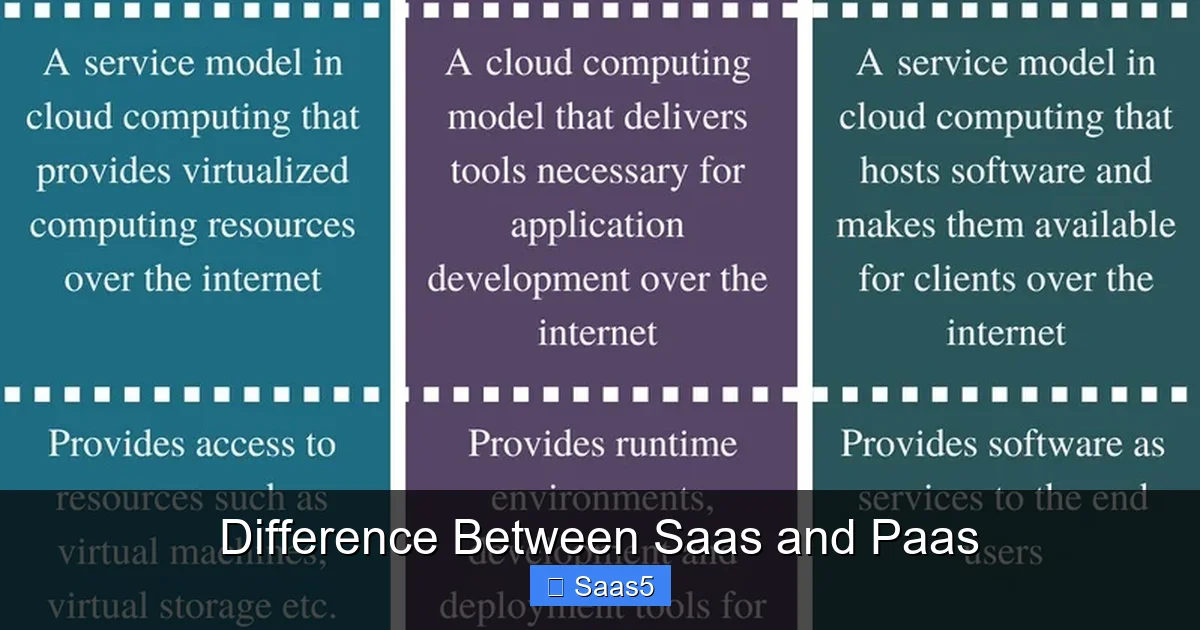
Visual guide about Difference Between Saas and Paas
Image source: pediaa.com
Choose SaaS When:
- You need a standard business function. Email, CRM, ERP, accounting, project management. These are solved problems. Use the best-in-class SaaS (e.g., NetSuite for ERP, Jira for project management).
- You lack technical staff. No developers? SaaS is your only viable cloud option.
- Speed and predictability are paramount. You need a solution live last quarter, not next year. Subscription pricing is simple and predictable.
- You want minimal IT overhead. No patches, no server maintenance, no security updates for the application layer.
Choose PaaS When:
- You are building a custom, proprietary application. Your business logic is unique and provides a competitive advantage. A generic SaaS won’t fit.
- You have a development team. You have or can hire software engineers.
- You need deep integration and customization. Your app must talk to legacy systems, hardware, or other services in a very specific way.
- You want to control your application’s roadmap and data model. You don’t want to be constrained by a vendor’s update cycle or feature limitations.
- You are a startup or digital-native company. Your product is a custom software application. PaaS is your factory floor.
The Hybrid Reality: They Often Work Together
The lines aren’t always pure. A company building a custom app on PaaS (e.g., a custom inventory management system) will very likely use dozens of SaaS tools (Slack for comms, G Suite for docs, GitHub for code, Zendesk for support). The custom app might even integrate with a SaaS CRM like Salesforce via its API. Understanding the difference between SaaS and PaaS helps you architect a ecosystem where each model plays to its strength. The PaaS-built app becomes the “specialized tool” that connects and enhances the “off-the-shelf tools” from SaaS.
Deep Dive: Cost Structures and Total Cost of Ownership (TCO)
Money talks. The pricing models reveal another key difference between SaaS and PaaS.
SaaS Pricing: Almost always subscription-based (monthly/annual per user or per tier). It’s an operating expense (OpEx). You know the cost upfront, making budgeting easy. However, costs can scale linearly with user growth, and large enterprises can face significant bills. There’s often little correlation between your actual usage and your cost.
PaaS Pricing: Typically consumption-based or resource-based. You pay for compute hours, memory, database storage, network egress, and sometimes specific service calls. It’s also OpEx, but more variable. It can be extremely cost-effective for variable workloads but requires diligent monitoring to avoid surprise bills (“cloud bill shock”). This model aligns cost directly with resource consumption, which can be fairer but less predictable.
TCO Consideration: SaaS TCO is mostly the subscription fee plus internal training/change management. PaaS TCO includes developer salaries, platform consumption costs, and potentially higher operational overhead for managing the application lifecycle. For a simple business tool, SaaS TCO is almost always lower. For a complex, core differentiator application, PaaS TCO can be justified by the value of the custom-built solution.
Security, Compliance, and Vendor Lock-In
These are the hidden dragons in the cloud. The difference between SaaS and PaaS changes how you approach them.
Security
In SaaS, you inherit the vendor’s security posture for the application itself. Your main responsibilities are user access control (strong passwords, MFA), data classification, and ensuring your users don’t introduce risk. You must trust the vendor’s security audits. In PaaS, the provider secures the platform infrastructure, but you are responsible for securing your application code. This includes fixing vulnerabilities in your libraries, implementing secure authentication/authorization in your app, and protecting your data within the app. This is a heavier lift but gives you more control over your security stack.
Compliance
Both models can support compliance (GDPR, HIPAA, PCI-DSS). SaaS vendors often get certified for broad standards and list them on their websites. You must ensure their certifications cover your required scope. With PaaS, the provider (e.g., AWS, Azure, GCP) has extensive compliance certifications for their infrastructure. However, you are responsible for configuring your application and data handling on that platform to meet compliance. This means more work but also more granular control over how compliance is implemented.
Vendor Lock-In
This is a major strategic consideration. SaaS lock-in is severe. Your business processes, data, and user training are all inside one vendor’s proprietary system. Extracting data (in a useful format) and migrating to another SaaS is often difficult, expensive, and disruptive. PaaS lock-in is also real but different. Your application code may rely on proprietary PaaS APIs, services, or data stores. Migrating a complex app from Heroku to AWS EC2 or Google Cloud Run requires significant re-architecture. However, because you own the code, the migration is *possible* with effort. Using open-source frameworks and containerization (Docker) on PaaS can mitigate this risk. The lesson? With both models, choose wisely and plan for portability from day one.
Conclusion: Making the Right Choice for Your Journey
The difference between SaaS and PaaS is not a competition; it’s a spectrum of control and responsibility. SaaS is your ready-to-wear suit—perfect for standard occasions, instantly available, and requiring no tailoring. PaaS is your bespoke tailoring workshop—giving you complete freedom to create a perfect fit, but requiring a skilled tailor and more time.
Your decision should be driven by your core need: Do you need to *use* software, or do you need to *build* software? For 80% of standard business operations—communication, collaboration, CRM, finance—SaaS is the clear, efficient winner. For the 20% of activities that are your true competitive moat—your unique product, your proprietary algorithm, your custom operational engine—PaaS (or IaaS) is the necessary engine of innovation.
Most modern businesses operate in a hybrid world, leveraging SaaS for productivity and PaaS for innovation. The key is to understand this fundamental distinction, communicate it clearly across your organization, and architect your technology stack with intention. Don’t try to build a custom solution for a generic problem (avoiding PaaS when SaaS suffices). And don’t force a square peg into a round hole by trying to configure a SaaS tool to do something it was never designed for (avoiding SaaS when PaaS is required). Master this difference, and you master the first step of a sound cloud strategy.
Frequently Asked Questions
Can a startup use both SaaS and PaaS together?
Absolutely, and most do. A startup might use SaaS for Gmail, Slack, QuickBooks, and Salesforce, while building its core product application on a PaaS like Heroku or Vercel. This is a common and efficient hybrid model.
Is PaaS more expensive than SaaS?
Not necessarily. SaaS has a predictable per-user cost. PaaS costs are based on resource consumption and can scale with your app’s usage. For a small user base, PaaS can be cheaper. For a large, complex app, PaaS costs can exceed SaaS subscriptions, but you’re paying for a unique, custom asset. The comparison is not apples-to-apples.
What is an example of a company that switched from SaaS to PaaS?
A company might start with a SaaS CRM like Salesforce. As it grows, it may find its sales process is too unique for standard configuration. It might then build a custom CRM application on a PaaS to have complete control over its lead-scoring algorithms and workflow integrations.
Does using PaaS mean I don’t need system administrators?
It reduces but doesn’t eliminate the need. You no longer need admins to manage physical servers, hypervisors, or OS patches (the provider does that). However, you still need DevOps engineers or developers who understand platform configuration, deployment pipelines, monitoring, and application security—roles that blend traditional sysadmin and development skills.
Can I migrate my existing on-premise application directly to SaaS?
Generally, no. SaaS applications are specific products. To use SaaS, you typically adopt the vendor’s application and migrate your *data* into it, adapting your processes to the SaaS’s workflow. To move an existing custom application to the cloud, you would typically refactor it to run on a PaaS or IaaS, not a SaaS.
Which is more secure, SaaS or PaaS?
It depends on your expertise. A top-tier SaaS vendor (like Microsoft or Google) has immense security resources and often provides a more secure application out-of-the-box than a small company could build itself. However, with PaaS, you have control to implement security exactly as you need, but the burden is on your team to do it correctly. For most organizations without deep security expertise, a reputable SaaS is the more secure *practical* choice for standard functions.