16 Gb Ddr4 Ram Laptop
A 16 GB DDR4 RAM laptop is the sweet spot for most users, offering smooth multitasking, fast performance, and great value. Whether you work, game, or create content, this amount of memory strikes the perfect balance. In this guide, we cover everything you need to know.
Key Takeaways
- 16 GB DDR4 RAM is ideal: It handles everyday tasks, light gaming, and professional workloads with ease.
- Speed matters: DDR4-3200 outperforms DDR4-2666 in benchmark tests and real-world use.
- Dual-channel configuration: Two 8 GB sticks perform better than one 16 GB stick in most scenarios.
- Upgradeability varies: Some laptops allow RAM upgrades while others have soldered memory.
- Brand and quality count: Trusted brands offer better reliability and compatibility guarantees.
- DDR4 remains relevant: Even with DDR5 available, DDR4 laptops still deliver excellent value.
- Check compatibility: Always verify your laptop’s specifications before buying or upgrading RAM.
📑 Table of Contents
- 16 GB DDR4 RAM Laptop
- What Makes 16 GB DDR4 RAM the Sweet Spot
- Who Needs a 16 GB DDR4 RAM Laptop
- Key Features to Look For
- Best Use Cases for 16 GB DDR4 RAM
- Comparing 16 GB DDR4 Laptops Across Brands
- How to Upgrade or Optimize Your 16 GB DDR4 RAM Laptop
- Common Mistakes When Buying a 16 GB DDR4 RAM Laptop
- Expert Insights on 16 GB DDR4 RAM Laptops
- Quick Tips for Buyers
- Conclusion
16 GB DDR4 RAM Laptop
A 16 GB DDR4 RAM laptop hits the sweet spot between performance and price. It gives you enough memory to run multiple apps, browse dozens of tabs, and even play modern games without breaking a sweat. Whether you are a student, professional, or casual gamer, this configuration covers your needs without overspending.
In this guide, we break down everything about 16 GB DDR4 memory laptops. You will learn how DDR4 technology works, which tasks benefit most, and how to pick the right model. We also share tips on upgrading and avoiding common pitfalls.
What Makes 16 GB DDR4 RAM the Sweet Spot
Memory requirements have grown over the years. Back in the day, 8 GB felt generous. Today, software demands more. A 16 GB DDR4 laptop keeps you ahead of the curve without paying for more than you need.
Why 16 GB Beats 8 GB
With only 8 GB, your laptop struggles under heavy loads. Web browsers eat memory quickly. Creative apps like Photoshop or Premiere Pro demand even more. A 16 GB DDR4 RAM notebook handles these tasks comfortably and leaves room for background processes.
Why 16 GB Beats 32 GB for Most Users
Thirty-two GB sounds impressive, but most people never use that much. Heavy video editors, 3D artists, and data scientists need it. For everyone else, 16 GB of DDR4 memory delivers 90% of the performance at half the cost.
DDR4 Technology Explained
DDR4 stands for Double Data Rate Fourth Generation. It transfers data twice per clock cycle, making it faster than older DDR3. DDR4 also runs at a lower voltage, which means better battery life and less heat. Most 16 GB DDR4 RAM laptop models use speeds between 2666 MHz and 3200 MHz.
Who Needs a 16 GB DDR4 RAM Laptop
Not sure if this amount of memory fits your lifestyle? Let us break it down by user type.
Students and Professionals
Students juggle browsers, note-taking apps, video calls, and research tools. A 16 GB DDR4 memory laptop keeps everything running smoothly. Professionals who use Excel, databases, or design software also benefit greatly.
- Smooth multitasking between office apps
- Fast data processing in spreadsheets
- Reliable video conferencing while working
Casual and Mid-Range Gamers
Modern games love memory. Titles like Cyberpunk 2077 and Hogwarts Legacy recommend 16 GB. A 16 GB DDR4 gaming laptop delivers frame rates that stay consistent even during intense scenes.
Content Creators
You do not need 32 GB to edit videos or produce music. 16 GB handles 1080p video editing, graphic design, and audio production beautifully. It also works well for streaming while gaming.
Remote Workers
Remote work means running Slack, Zoom, Chrome, and project tools all at once. A 16 GB DDR4 RAM notebook prevents lag and keeps your workflow uninterrupted.
Key Features to Look For
Not all 16 GB DDR4 laptops are created equal. Here are the specs that matter most.
RAM Speed
DDR4 comes in different speeds. DDR4-2666 works fine for basic tasks. DDR4-3200 gives noticeable gains in gaming and heavy workloads. When shopping for a 16 GB DDR4 memory laptop, always check the speed rating.
Single vs Dual Channel
Dual channel means two sticks of memory working together. A laptop with 2 x 8 GB DDR4 outperforms one with a single 16 GB stick. This setup improves bandwidth and boosts performance by 10-20% in memory-heavy tasks.
Brand and Quality
Brands like Samsung, SK Hynix, and Crucial dominate the memory market. Laptops from trusted manufacturers also ensure better compatibility and longer lifespans.
Upgrade Options
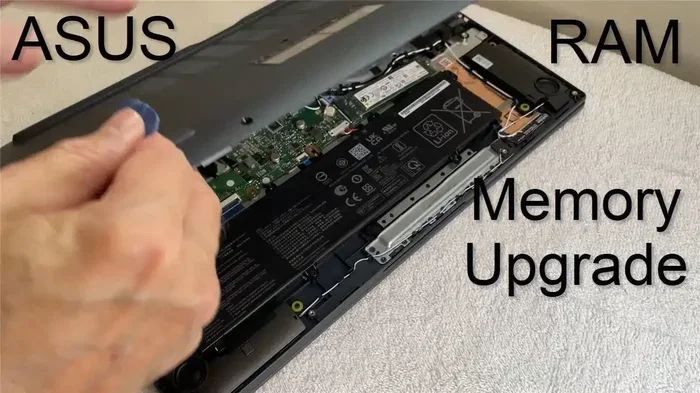
Some laptops let you swap or add RAM sticks later. Others solder memory directly to the motherboard. If future upgrades matter to you, pick a model with accessible RAM slots.
Best Use Cases for 16 GB DDR4 RAM
Everyday Computing
For browsing, streaming, email, and document editing, 16 GB DDR4 provides plenty of headroom. Your system stays responsive even after hours of use.
Gaming Performance
Gaming benefits enormously from adequate memory. A 16 GB DDR4 RAM laptop runs most modern titles at high settings. You avoid stuttering and long loading screens that plague systems with less RAM.
Professional Software
Applications like AutoCAD, Visual Studio, and DaVinci Resolve run efficiently with 16 GB. Creative suites from Adobe also perform well, especially when handling large files.
Light Server and Development Tasks
Developers running local servers, Docker containers, or virtual machines find 16 GB sufficient. It handles multiple environments without slowdowns.
Comparing 16 GB DDR4 Laptops Across Brands
Different brands offer different strengths. Here is a quick comparison of popular options.
| Brand | Best For | Typical Price Range | RAM Configuration |
|---|---|---|---|
| Lenovo | Business and productivity | $600 – $1,200 | 2 x 8 GB DDR4-3200 |
| HP | Mixed-use and gaming | $650 – $1,300 | 1 x 16 GB DDR4-2666 or 2 x 8 GB |
| Acer | Budget-friendly performance | $550 – $1,000 | 2 x 8 GB DDR4-2666 |
| ASUS | Gaming and creativity | $700 – $1,500 | 2 x 8 GB DDR4-3200 |
| Dell | Professional and enterprise | $700 – $1,400 | 2 x 8 GB DDR4-3200 |
Each brand targets a slightly different audience. Your choice depends on priorities like build quality, display, keyboard comfort, and price. Always compare models within your budget before committing.
How to Upgrade or Optimize Your 16 GB DDR4 RAM Laptop
Already own a laptop with 16 GB DDR4? Great choice. Here is how to squeeze out every bit of performance.
Check Your Current Setup
Open Task Manager on Windows or Activity Monitor on Mac. Look at memory usage while running your typical apps. If you regularly hit 90% usage, consider upgrading or optimizing.
Enable XMP Profiles
Some laptops ship with conservative memory settings. Enter BIOS and enable XMP (Extreme Memory Profile). This unlocks the rated speed of your DDR4 modules. A 16 GB DDR4 RAM laptop running DDR4-3200 with XMP enabled feels noticeably snappier.
Keep Drivers Updated
Chipset and memory drivers affect performance. Check your laptop manufacturer website for the latest updates. Outdated drivers can limit RAM speeds and cause instability.
Manage Background Apps
Even with 16 GB, unnecessary background processes waste memory. Disable startup apps you do not need. Use tools like Autoruns or Windows Startup settings to control what launches at boot.
Consider Dual-Channel Upgrades
If your laptop has a single 16 GB stick, adding a matching 16 GB stick enables dual channel. This upgrade dramatically improves performance in memory-sensitive applications.
Common Mistakes When Buying a 16 GB DDR4 RAM Laptop
Ignoring RAM Speed
Many buyers focus only on capacity. Speed matters too. DDR4-2666 and DDR4-3200 differ in real-world performance. Always check the rated speed before purchasing.
Overlooking Dual-Channel Configuration
A single 16 GB stick is convenient but slower than two 8 GB sticks. If performance matters, choose models with dual-channel memory already configured.
Buying Without Checking Compatibility
Not all laptops accept the same DDR4 modules. Some use SO-DIMM slots, others solder memory. Verify upgrade options before buying if you plan to expand later.
Skipping Build Quality
Cheap laptops with 16 GB DDR4 may save money upfront. Poor cooling, flimsy keyboards, and low-resolution screens ruin the experience. Balance memory specs with overall build quality.
Expert Insights on 16 GB DDR4 RAM Laptops
Industry experts consistently recommend 16 GB DDR4 as the baseline for modern computing. Tech reviewers at AnandTech and Notebookcheck emphasize that DDR4-3200 dual-channel setups offer the best value. They note that DDR5, while faster, still carries a premium price that most users do not justify.
Professional PC builders also stress thermal management. High-speed DDR4 modules can generate heat. Laptops with adequate cooling sustain performance longer during intensive tasks. When hunting for a 16 GB DDR4 memory laptop, check reviews for thermal performance specifically.
Quick Tips for Buyers
- Prioritize DDR4-3200: It offers better performance than DDR4-2666 at similar prices.
- Choose dual-channel: Two 8 GB sticks beat one 16 GB stick every time.
- Check return policies: Some retailers allow 30-day returns if the laptop underperforms.
- Read user reviews: Real-world experiences reveal issues that spec sheets hide.
- Compare prices across stores: The same laptop model often varies by $50-$100 between retailers.
Conclusion
A 16 GB DDR4 RAM laptop stands as the most practical choice for the majority of users today. It balances cost, performance, and future-proofing in a way that few other configurations match. Whether you game, create content, work remotely, or study, this amount of memory keeps your system responsive and capable.
Focus on speed, dual-channel configuration, and build quality when shopping. Avoid common mistakes like ignoring RAM specifications or overlooking thermal performance. With the right approach, your 16 GB DDR4 laptop will serve you reliably for years to come.
Take your time, compare models, and invest in a laptop that fits your actual needs. The perfect 16 GB DDR4 RAM laptop is out there, and now you know exactly how to find it.
Frequently Asked Questions
Is 16 GB DDR4 RAM enough for gaming?
Yes, 16 GB DDR4 RAM handles most modern games at high settings. Titles like Fortnite, GTA V, and Elden Ring run smoothly with this amount. Only the most demanding AAA games with ultra settings might benefit from 32 GB.
Can I upgrade from 8 GB to 16 GB DDR4 RAM myself?
Most laptops allow RAM upgrades if they have open SO-DIMM slots. You just need to match the DDR4 generation and form factor. However, some thinner laptops have soldered memory, so check your model before attempting any upgrade.
What is the difference between DDR4-2666 and DDR4-3200?
DDR4-3200 transfers data faster than DDR4-2666. The real-world difference shows up in memory-heavy tasks like video editing, gaming, and running virtual machines. For everyday use, the gap is smaller but still noticeable in responsiveness.
Does 16 GB DDR4 RAM support Windows 11?
Absolutely. Windows 11 runs very well on 16 GB DDR4 laptops. Microsoft recommends 4 GB minimum, so 16 GB provides plenty of headroom for all features and updates.
Are 16 GB DDR4 laptops future-proof?
16 GB DDR4 remains relevant and well-supported in 2024 and beyond. While DDR5 is emerging, DDR4 will stay common for several more years. This configuration handles current software demands comfortably and should last 4-5 years without issues.
Should I choose a 16 GB DDR4 laptop or wait for DDR5?
If you need a laptop now, DDR4 models offer excellent value and performance. DDR5 laptops are still pricier and have limited software advantage today. Waiting makes sense only if you want bleeding-edge specs and have a flexible budget.