1tb M.2 Pcie Nvme Ssd
A 1TB M.2 PCIe NVMe SSD delivers blazing-fast storage speeds that transform any computer into a high-performance machine. This guide covers everything you need to know, from understanding the technology to picking the right drive for your needs. Whether you are upgrading a laptop or desktop, this solid state drive offers massive storage and incredible speed.
A 1TB M.2 PCIe NVMe SSD is one of the best upgrades you can make to any computer. If your system feels slow, or if you need more space that also loads files quickly, this type of drive is the answer. Unlike old spinning hard drives, a solid state drive uses flash memory to deliver near-instant access to your data.
The M.2 form factor is tiny and sleek. It plugs directly into your motherboard, so there are no messy cables to manage. The PCIe interface connected to the NVMe protocol makes this drive incredibly fast. You get read speeds that can reach 7000 MB/s or more, depending on the generation.
If you have been wondering whether a 1TB M.2 PCIe NVMe SSD is worth the investment, the answer is a strong yes. This guide will walk you through everything you need to know. We will cover how the technology works, why it matters, and how to pick the right drive for your setup.
Key Takeaways
- Blazing Speed: A 1TB M.2 PCIe NVMe SSD offers read speeds up to 7000 MB/s, far outpacing traditional hard drives and SATA SSDs.
- Compact Form Factor: The M.2 stick design saves space and fits directly into your motherboard without extra cables.
- Great for Gaming and Work: Faster load times and smooth multitasking make this drive ideal for gamers and professionals alike.
- Easy to Install: Most modern systems support M.2 slots, making installation straightforward even for beginners.
- Affordable Now: Prices for a 1TB NVMe M.2 SSD have dropped significantly, making high-speed storage accessible to everyone.
- Multiple Generations Available: PCIe Gen4 and Gen5 options give you choices based on your budget and motherboard support.
📑 Table of Contents
What Is a 1TB M.2 PCIe NVMe SSD?
Let us break this down piece by piece. The “1TB” part means the drive holds one terabyte of data. That is roughly one million megabytes. You can store hundreds of games, thousands of photos, and hours of video on a single drive.
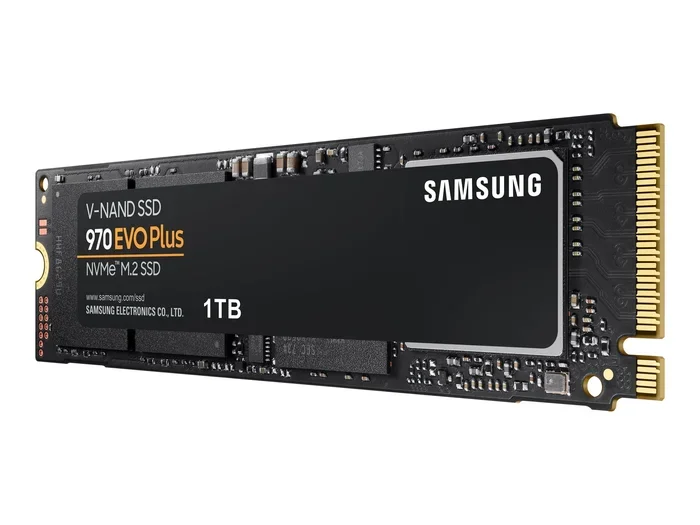
The “M.2” refers to the physical shape and size of the drive. It is a small rectangular stick, about the size of a stick of gum. The “PCIe” part stands for Peripheral Component Interconnect Express. This is the pathway the drive uses to communicate with your computer’s processor.
Finally, “NVMe” stands for Non-Volatile Memory Express. It is a communication protocol designed specifically for flash storage. Traditional SSDs use AHCI, which was built for slower spinning disks. NVMe removes those bottlenecks and unlocks the full potential of modern flash memory.
How Does It Work?
A 1TB M.2 PCIe NVMe SSD uses NAND flash memory to store data. This is the same type of memory found in USB drives and phones, but much faster and more reliable. The drive connects through the PCIe lanes on your motherboard, which provide a direct highway to your CPU.
Most current drives use TLC NAND flash, which stands for Triple-Level Cell. This means each memory cell stores three bits of data. TLC offers a great balance of speed, endurance, and cost. It is the sweet spot for most users who want performance without paying a premium price.
Why Choose a 1TB M.2 PCIe NVMe SSD?
The benefits of choosing this type of drive are hard to ignore. Speed is the most obvious advantage. A traditional hard drive might give you 100 to 150 MB/s. A SATA SSD gets you around 550 MB/s. A 1TB M.2 PCIe NVMe SSD can push 5000 to 7000 MB/s on the latest PCIe Gen4 standards.
Here is what that speed means in real life. Your operating system boots in seconds instead of minutes. Games load almost instantly. Large files copy in a fraction of the time. Video editing software can scrub through timelines without stuttering. The difference is night and day.
Space Savings
The M.2 form factor is incredibly compact. It takes up no more than a stick of gum on your motherboard. This is a huge advantage in small form factor PCs and laptops where every millimeter counts. There are no cables, no drive bays, and no extra power connectors needed.
Your computer case stays clean and airflow improves. For builders who care about aesthetics and efficiency, the M.2 SSD form factor is a dream come true. You can also free up drive bays for other storage needs if you pair this with a larger hard drive.
Energy Efficiency
NVMe drives consume less power than traditional hard drives. They also use less energy than older SATA SSDs in many cases. This can lead to slightly better battery life on laptops. For desktop users, it means less heat output and a quieter system overall.
How to Choose the Right 1TB M.2 PCIe NVMe SSD
Not all NVMe M.2 SSDs are created equal. There are several factors you should consider before buying. Let us walk through the most important ones.
PCIe Generation
The PCIe generation determines the maximum bandwidth available. PCIe Gen3 is the older standard but still very capable. It offers speeds up to about 3500 MB/s. PCIe Gen4 is the current mainstream standard, reaching speeds of 7000 MB/s. PCIe Gen5 is the newest, offering up to 14000 MB/s.
For most users, a Gen4 NVMe M.2 SSD is the best choice. It offers excellent speed at a reasonable price. Gen5 drives are great but still premium-priced. Gen3 drives work fine for everyday tasks and budget builds.
Motherboard Compatibility
Before you buy, check your motherboard manual. Make sure it has an M.2 slot that supports NVMe. Some older M.2 slots only support SATA SSDs. Using a PCIe NVMe drive in a SATA-only slot will not work.
Also check how many M.2 slots your board has. Some boards have three or four, giving you room to expand. If you are building a new system, look for a board with at least two M.2 slots. This gives you flexibility for future upgrades.
Brand and Reliability
Stick with trusted brands when buying a 1TB M.2 PCIe NVMe SSD. Look for drives that include warranty coverage and good endurance ratings. Endurance is measured in TBW, or Terabytes Written. A higher TBW number means the drive can handle more data over its lifetime.
Popular choices include Crucial, Samsung, Kingston, and WD. Each brand offers reliable options at various price points. Read reviews and compare performance benchmarks before making your final decision.
Installation Tips for Your 1TB M.2 PCIe NVMe SSD
Installing an M.2 NVMe SSD is one of the easiest upgrades you can do. Most modern motherboards have a dedicated slot. Here is a quick overview of the process.
- Turn off your computer and unplug it from the power source.
- Open your case and locate the M.2 slot on the motherboard.
- Remove the small screw that secures the slot’s heatsink or bracket.
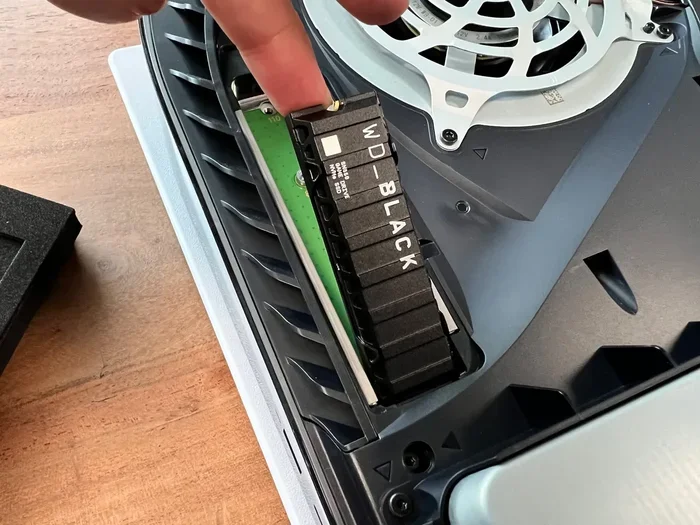
- Insert the drive at a 30-degree angle into the slot.
- Press the drive down gently and secure it with the screw.
- Close your case and boot up your computer.
That is it. No cables to connect. No drive bays to mount. If your system does not recognize the drive right away, you may need to enter your BIOS and enable the M.2 slot. Check your motherboard manual for specific instructions.
Once the drive is recognized, you can format it and start using it. For best results, install your operating system on the NVMe M.2 SSD to enjoy the full speed benefits. You can also use it as a secondary drive for games and large applications.
Common Installation Mistakes to Avoid
- Forgetting to remove the protective cover from the M.2 slot.
- Inserting the drive at the wrong angle.
- Overtightening the securing screw, which can damage the drive.
- Not enabling the NVMe mode in BIOS on older systems.
How a 1TB M.2 PCIe NVMe SSD Compares to Other Drives
Understanding how this drive stacks up against alternatives helps you make an informed decision. Let us compare the main types of storage available today.
| Drive Type | Typical Read Speed | Form Factor | Best For |
|---|---|---|---|
| HDD | 100-150 MB/s | 3.5″ or 2.5″ | Bulk storage on a budget |
| SATA SSD | 500-550 MB/s | 2.5″ | Reliable upgrade from HDD |
| M.2 SATA SSD | 500-550 MB/s | M.2 | Compact SATA upgrade |
| M.2 PCIe NVMe SSD | 3500-7000 MB/s | M.2 | Maximum speed and compact size |
The M.2 PCIe NVMe SSD clearly wins on speed. It also wins on size compared to traditional SSDs. The only area where HDDs still have an edge is cost per gigabyte for very large storage needs. But for most users, the speed and convenience of an NVMe drive far outweigh the small cost difference.
When a SATA SSD Still Makes Sense
If your motherboard does not have an M.2 slot that supports NVMe, a SATA SSD is still a great choice. It will still be much faster than a hard drive. However, if you are building or upgrading a modern system, there is no reason not to go with a PCIe NVMe drive.
Who Should Upgrade to a 1TB M.2 PCIe NVMe SSD?
This drive is a fantastic upgrade for a wide range of users. Gamers will love the near-instant load times. Content creators will appreciate the fast file transfers and smooth editing experience. Professionals who work with large datasets will benefit from the speed and capacity.
For laptop users, an M.2 solid state drive upgrade can breathe new life into an older machine. The compact size and low power draw make it ideal for portable devices. If your laptop has an M.2 slot, this is one of the easiest and most impactful upgrades you can perform.
Even casual users will notice the difference. Boot times shrink dramatically. Applications open faster. File copies happen in seconds instead of minutes. The 1TB storage capacity gives you plenty of room for your operating system, programs, and personal files all in one place.
If you are still running a traditional hard drive, upgrading to a 1TB M.2 PCIe NVMe SSD is the single biggest performance improvement you can make to your computer. It is affordable, easy to install, and delivers results you will notice every single day.
Final Thoughts
A 1TB M.2 PCIe NVMe SSD is a game-changer for any computer user. The combination of massive storage, compact design, and blazing speed makes it the go-to choice for modern systems. Whether you are building a new PC or upgrading an existing one, this drive delivers outstanding value.
Take the time to check your motherboard compatibility, choose a trusted brand, and enjoy the benefits of NVMe speed. Your computer will feel faster, more responsive, and ready to handle whatever tasks you throw at it. Make the upgrade today and experience the difference for yourself.
Frequently Asked Questions
What is the difference between M.2 SATA and M.2 PCIe NVMe SSDs?
The main difference is the interface. M.2 SATA SSDs use the same SATA protocol as traditional 2.5-inch SSDs, capping speeds around 550 MB/s. M.2 PCIe NVMe SSDs use the PCIe interface and NVMe protocol, reaching speeds of 3500 MB/s or higher. For most users, the NVMe option is the clear winner in terms of performance.
Can I use a 1TB M.2 PCIe NVMe SSD as my boot drive?
Absolutely. In fact, using an NVMe SSD as your boot drive is one of the best ways to speed up your system. Your operating system, applications, and frequently used files will load much faster. Most modern operating systems are optimized to take full advantage of NVMe storage speeds.
Do I need a special heatsink for my M.2 NVMe SSD?
It depends on your workload and motherboard. Many modern motherboards come with M.2 heatsinks built in. For heavy gaming or sustained workloads, a heatsink can help maintain peak performance by preventing thermal throttling. Light everyday use typically does not require extra cooling.
Is a 1TB NVMe M.2 SSD enough storage for gaming?
For most gamers, 1TB is a solid starting point. It can hold around 10 to 15 large modern games depending on their size. If you have a large game library, you may want to pair the NVMe drive with a larger HDD or SATA SSD for additional storage. Keep your most-played games on the NVMe drive for the fastest load times.
How long does a 1TB M.2 PCIe NVMe SSD last?
Modern NVMe SSDs are built to last many years under normal use. Endurance is measured in TBW, and most quality 1TB drives are rated for 300 to 600 TBW. For an average user, this translates to many years of daily use before the drive shows signs of wear. Always buy from reputable brands with solid warranty coverage.
Can I upgrade from a SATA SSD to a 1TB M.2 PCIe NVMe SSD easily?
Yes, this is one of the simplest upgrades you can perform. If your motherboard has an M.2 slot that supports NVMe, you just need to install the new drive and migrate your data. Many software tools make the cloning process straightforward. You will notice a significant speed improvement in everyday tasks and boot times.