Crucial P310 500gb Pcie Gen4 Nvme 2280 M.2 Ssd

The Crucial P310 500GB PCIe Gen4 NVMe M.2 SSD delivers fast storage speeds at a budget-friendly price. With Gen4 speeds, a compact M.2 design, and solid everyday performance, this drive is a great pick for gamers, creators, and general users looking to upgrade their system.
Key Takeaways
- Blazing Gen4 Speeds: The Crucial P310 leverages PCIe Gen4 bandwidth for significantly faster data transfer rates compared to Gen3 drives.
- Compact M.2 Form Factor: Its 2280 M.2 shape fits easily into laptops, desktops, and workstations without taking up much space.
- Budget-Friendly Performance: This 500GB model offers excellent value, making high-speed NVMe storage accessible without breaking the bank.
- Great for Mixed Workloads: It handles gaming, content creation, and everyday computing tasks with ease.
- Easy Installation: Installing this drive is straightforward, and it works with most modern motherboards and systems.
- Solid Build Quality: Crucial is a trusted brand with a long track record in reliable storage solutions.
- Consider Your Needs: If you need more storage, the 1TB version of the P310 may be a better fit for larger libraries.
📑 Table of Contents
Introduction
Storage speed can make or break your computing experience. Whether you are loading a massive game, editing a 4K video, or simply booting up your laptop, the drive you use matters more than most people realize. That is exactly why the Crucial P310 500GB PCIe Gen4 NVMe M.2 SSD deserves your attention.
This drive packs next-generation PCIe Gen4 speeds into a tiny M.2 form factor. It delivers the performance you need without the premium price tag. In this review, we will break down everything you need to know. We will cover speeds, design, real-world performance, compatibility, and more.
By the end, you will know exactly whether this drive fits your setup. Let us dive in.
What Makes the Crucial P310 Stand Out
The Crucial P310 is built for users who want serious speed without spending a fortune. It sits in a sweet spot between budget drives and high-end flagship SSDs. But what actually sets it apart?
PCIe Gen4 Technology
The biggest selling point here is the PCIe Gen4 connection. Older drives use PCIe Gen3, which maxes out around 3,500 MB/s for sequential reads. The P310 pushes well beyond that thanks to Gen4 bandwidth. You get faster file transfers, quicker game loads, and snappier system responses overall.
Think of it this way. If PCIe Gen3 is a two-lane road, PCIe Gen4 is a four-lane highway. More bandwidth means more data flowing at the same time, and that translates to real-world speed gains.
Compact M.2 2280 Design
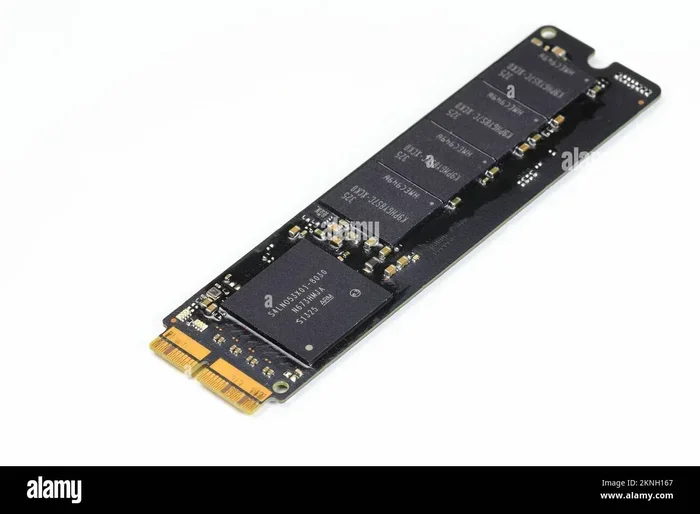
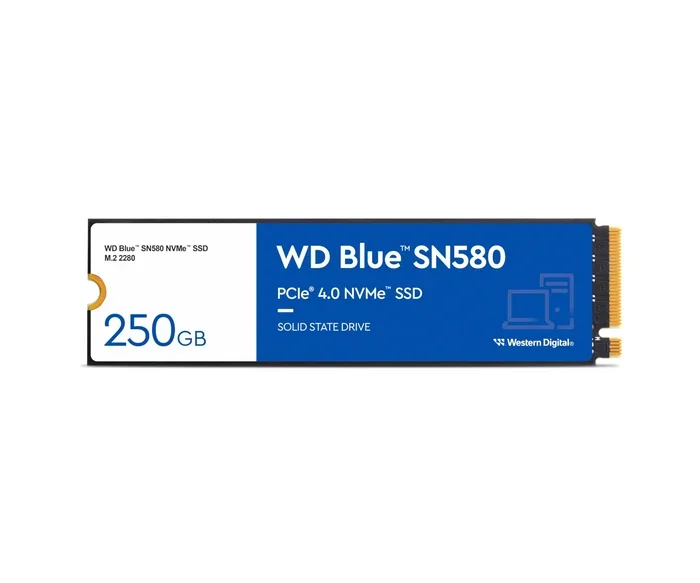
The M.2 2280 form factor is the most popular SSD shape today. It measures roughly 22mm wide by 80mm long. This makes it small enough for ultra-thin laptops yet powerful enough for gaming desktops. The P310 uses this standard size, so it fits virtually anywhere.
You can also check out the Crucial P310 1TB version if you need more space. Both versions share the same design and performance characteristics, just with different storage capacities.
Trusted Crucial Brand
Crucial has been making storage drives for decades. They are known for reliability, solid warranties, and quality components. When you buy a Crucial drive, you are not gambling with some no-name brand. You are getting a product backed by real engineering and customer support.
Performance Benchmarks and Real-World Speeds
Specs on paper look great. But how does the Crucial P310 500GB PCIe Gen4 NVMe M.2 SSD perform in everyday use? Let us look at the numbers and practical scenarios.
Sequential Read and Write Speeds
The P310 delivers impressive sequential speeds. While exact numbers can vary slightly depending on the test conditions, you can generally expect:
- Sequential Read: Up to 5,000 MB/s
- Sequential Write: Up to 4,800 MB/s
These numbers put it well ahead of most Gen3 drives. Copying a 50GB file takes just a few seconds instead of over a minute. That kind of difference is something you actually feel in daily use.
Random 4K Performance
Sequential speeds get the headlines, but random 4K performance is what really makes a drive feel snappy. This is the measure of how well the drive handles lots of small, scattered read and write operations. It affects things like launching apps, loading save files, and multitasking.
The P310 handles random 4K workloads very well. You will notice quicker app launches and smoother multitasking compared to older SATA SSDs or Gen3 NVMe drives.
Real-World Gaming Performance
Gamers care about one thing above all else: how fast do games load? The P310 cuts down load times significantly. Open-world games with massive textures benefit the most. You will spend less time staring at loading screens and more time playing.
It is worth noting that the 512GB NVMe M.2 SSD category is highly competitive. The P310 at 500GB holds its own nicely against similarly sized drives in this range.
Workstation and Content Creation
If you edit photos, cut video, or work with large design files, the P310 helps. Importing large video files happens faster. Scrubbing through timelines feels smoother. It is not quite the level of a top-tier professional drive, but for creative work on a budget, it hits the mark.
Design, Build Quality, and Thermal Performance
Performance matters, but so does how the drive looks and feels. Let us talk about the physical side of things.
Build and Durability
The Crucial P310 uses a standard M.2 2280 stick design. It does not have a heatsink attached, but that is actually fine for most setups. The drive runs cool under normal loads. Crucial uses quality NAND flash and a controller that balances performance with heat management.
For users who do worry about heat, a simple M.2 heatsink or a motherboard with built-in M.2 cooling can help. You can learn more about proper storage setups by reading about SSD NVMe PCIe M.2 configurations and best practices.
Thermal Throttling
One concern with high-speed NVMe drives is thermal throttling. When a drive gets too hot, it slows down to protect itself. The P310 manages heat reasonably well for its class. Under sustained heavy workloads, speeds may dip slightly, but everyday use stays consistent. In a well-ventilated case or laptop, you should not notice any throttling at all.
No DRAM Cache
The P310 does not include a dedicated DRAM cache. This is common in budget-friendly NVMe drives. Instead, it uses Host Memory Buffer (HMB) technology, which borrows a small amount of your system RAM for mapping. For most users, this has no noticeable impact. Heavy workloads with constant data shuffling might show minor differences, but day-to-day use remains fast and responsive.
Who Is This SSD Best For?
Not every drive is perfect for every person. Let us break down who benefits most from the Crucial P310 500GB PCIe Gen4 NVMe M.2 SSD.
Gamers
If you game on a PC, this drive delivers faster load times and smooth performance. The 500GB capacity fits most modern games well. You can store several large titles and still have room to spare.
Laptop Users
Laptops benefit hugely from NVMe upgrades. The small M.2 size fits perfectly into slim designs. You get a speed boost without adding bulk or weight. Upgrading an older laptop with this drive can make it feel like new again.
General Users and Home Builders
For everyday tasks like browsing, streaming, and office work, this drive is overkill in the best way. Your system will boot in seconds. Apps will open almost instantly. It is a simple upgrade that makes the whole experience better.
Budget-Conscious Builders
If you are putting together a PC on a budget, the P310 gives you Gen4 speeds without the Gen4 price. You can spend your savings on a better GPU or more RAM while still getting top-tier storage performance.
How It Compares to Other SSDs
Choosing a storage drive means weighing options. Here is a quick look at how the P310 stacks up against alternatives.
Versus the Crucial P3 Plus
The Crucial P3 Plus NVMe SSD is another popular option from the same brand. The P3 Plus also offers PCIe Gen4 speeds but often targets slightly different performance profiles. The P310 tends to focus on a balanced approach between speed and value. Both are solid choices, so it really comes down to specific needs and current pricing.
Versus Samsung and Other Brands
Brands like Samsung, Western Digital, and SK Hynix offer similar PCIe Gen4 drives. Those often come with DRAM caches and better sustained performance. However, they also cost more. The P310 gives you roughly 80 to 90 percent of the performance at a much lower price. For most users, that trade-off makes sense.
Quick Comparison Table
| Feature | Crucial P310 500GB | High-End Gen4 SSD | Gen3 NVMe SSD |
|---|---|---|---|
| Interface | PCIe Gen4 | PCIe Gen4 | PCIe Gen3 |
| Sequential Read | ~5,000 MB/s | ~7,000 MB/s | ~3,500 MB/s |
| DRAM Cache | No (HMB) | Yes | Sometimes |
| Price | Budget-Friendly | Premium | Low |
| Best For | Value Performance | Heavy Workloads | Older Systems |
Installation Tips and Compatibility
Installing the Crucial P310 500GB PCIe Gen4 NVMe M.2 SSD is usually straightforward. But there are a few things worth knowing before you start.
Motherboard Compatibility
You need a motherboard with an M.2 slot that supports PCIe Gen4. Most modern motherboards from AMD and Intel support this. If your motherboard only has Gen3 slots, the drive will still work but at Gen3 speeds. Always check your motherboard manual before buying.
Installation Steps
- Power off your system and unplug it.
- Locate the M.2 slot on your motherboard.
- Remove the M.2 mounting screw.
- Insert the P310 at a 30-degree angle into the slot.
- Press it down flat and secure with the screw.
- Boot up your system and initialize the drive.
If you need help with the process, you can also look into external NVMe M.2 enclosures for easier management or dual-purpose use.
Operating System Considerations
Windows 10 and 11 fully support PCIe Gen4 drives out of the box. Linux also works well. You may need to update your chipset drivers to get the best performance. Check your system manufacturer website for the latest drivers.
Quick Tips for Best Results
- Always update your motherboard BIOS to the latest version.
- Install chipset drivers from AMD or Intel directly.
- Use the correct M.2 slot, especially if your board has multiple slots with different speeds.
- Enable the drive in BIOS if it does not show up automatically.
- Consider pairing the P310 as a boot drive and adding a larger HDD or SATA SSD for mass storage.
Conclusion
The Crucial P310 500GB PCIe Gen4 NVMe M.2 SSD is a strong choice for anyone looking to upgrade their storage. It delivers Gen4 speeds in a compact M.2 package. It runs cool, installs easily, and comes from a brand you can trust. The lack of a DRAM cache is the only real compromise, and most users will never notice.
At its price point, this drive punches well above its weight. Gamers get faster load times. Creators get better workflow speeds. Everyday users get a system that simply feels faster. If you have been looking for an affordable way to jump into PCIe Gen4 storage, the P310 is one of the best options on the market.
Grab one, install it, and enjoy the speed. Your system will thank you.
Frequently Asked Questions
Is the Crucial P310 500GB good for gaming?
Absolutely. The P310 delivers fast PCIe Gen4 speeds that significantly reduce game load times. It handles modern AAA titles with large file sizes very well, making it a solid boot drive for any gaming rig.
Does the Crucial P310 need a heatsink?
For most users, no. The P310 manages heat well under normal workloads. However, if you are doing sustained heavy transfers or have a poorly ventilated case, adding a small M.2 heatsink can help maintain peak performance.
Can I use this drive in a laptop?
Yes. The 2280 M.2 form factor is standard for both laptops and desktops. The compact size and low power consumption make it an excellent upgrade for laptop storage.
What is the difference between the 500GB and 1TB Crucial P310?
Both versions share the same speeds, design, and components. The only difference is storage capacity. If you plan to install many large games or work with big files, the 1TB version gives you more room. You can read more about the 1TB P310 here.
Will this drive work in a system with only PCIe Gen3 slots?
Yes, it will work. However, it will operate at PCIe Gen3 speeds instead of Gen4. You will still get the benefits of NVMe, but you will not unlock the full Gen4 bandwidth. Make sure your system supports Gen4 for the best experience.
How reliable is Crucial as a storage brand?
Crucial is one of the most trusted names in storage. They offer solid warranties, reliable components, and a long history in the industry. The P310 carries the same quality standards that Crucial is known for.