2tb Pcie Nvme Gen4 M.2 Ssd
A 2TB PCIe NVMe Gen4 M.2 SSD delivers incredibly fast storage for gaming, creative work, and everyday use. These drives offer read speeds up to 7,000 MB/s and massive 2TB capacity. This guide covers everything you need to know about choosing, installing, and getting the most from a 2TB PCIe NVMe Gen4 M.2 SSD.
A 2TB PCIe NVMe Gen4 M.2 SSD is one of the best upgrades you can make to any modern computer. Whether you are a gamer, a video editor, or someone who simply needs fast and reliable storage, this type of drive changes everything. You get massive capacity combined with lightning-fast speeds that make your whole system feel snappier.
If you have been wondering whether a 2TB PCIe NVMe Gen4 M.2 SSD is right for you, you are in the right place. This guide breaks down everything you need to know. We cover speed, compatibility, top picks, installation tips, and common mistakes to avoid. By the end, you will feel confident choosing the perfect drive for your needs.
The world of solid state drives has evolved fast. SATA SSDs were great for their time, but PCIe NVMe Gen4 drives leave them in the dust. With read speeds that can hit 7,000 MB/s and write speeds above 5,000 MB/s, these drives handle heavy workloads with ease. A 2TB capacity means you can store dozens of AAA games, hours of 4K video, or thousands of high-resolution photos without breaking a sweat.
Key Takeaways
- Blazing Speed: PCIe Gen4 NVMe M.2 SSDs offer read speeds up to 7,000 MB/s, far faster than SATA drives.
- 2TB Capacity: Plenty of space for games, videos, and large files without constant storage management.
- Easy Installation: M.2 2280 form factor fits most modern desktops and laptops with a single M.2 slot.
- Best for Gaming and Creators: These drives excel at loading games, editing video, and multitasking with large files.
- Check Compatibility: Ensure your motherboard supports PCIe Gen4 and M.2 NVMe before buying.
- Heatsinks Matter: Many Gen4 drives run hot, so a heatsink or thermal pad helps maintain peak performance.
📑 Table of Contents
What Is a 2TB PCIe NVMe Gen4 M.2 SSD?
Let us break this down piece by piece. 2TB refers to the storage capacity, which is 2,000 gigabytes of space. That is enough room for a huge library of files, games, or media projects. PCIe stands for Peripheral Component Interconnect Express, which is the interface the drive uses to communicate with your motherboard. Gen4 means it uses the fourth generation of this interface, which doubles the bandwidth of Gen3.
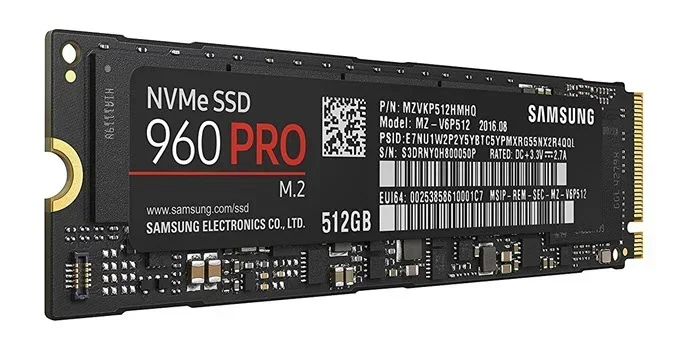
NVMe stands for Non-Volatile Memory Express. It is a protocol designed specifically for flash storage, making it much faster than older AHCI protocols used by SATA drives. M.2 is the physical form factor, a small stick-shaped module that plugs directly into your motherboard. The most common size is the M.2 2280, which is 22mm wide and 80mm long.
Together, all these terms describe a drive that is fast, compact, and packed with storage. A 2TB PCIe NVMe Gen4 M.2 SSD gives you the best of all worlds. You get the speed of NVMe, the bandwidth of PCIe Gen4, the compact M.2 design, and a generous 2TB of space.
How Does It Compare to Other SSDs?
To understand why a 2TB PCIe NVMe Gen4 M.2 SSD stands out, it helps to compare it to other options. SATA SSDs max out around 550 MB/s. That is fast for everyday tasks but slow compared to NVMe. A 2TB SSD M.2 NVMe drive on PCIe Gen3 typically hits around 3,500 MB/s read speed. A Gen4 drive nearly doubles that to around 7,000 MB/s.
The jump in speed matters most when you are loading large games, editing video, or moving massive files. For example, a 100GB game might load in 15 seconds on a Gen4 drive versus 30 seconds on a SATA SSD. For content creators working with 4K footage, the faster write speeds mean less time waiting on exports and renders.
If you want even faster speeds, the next step up is PCIe Gen5. The Crucial T705 2TB PCIe Gen5 NVMe M.2 SSD offers even higher throughput, but Gen4 drives remain the sweet spot for most users. They deliver incredible performance at a more affordable price point.
Top Benefits of a 2TB PCIe NVMe Gen4 M.2 SSD
There are many reasons to choose a 2TB PCIe NVMe Gen4 M.2 SSD for your system. Here are the biggest advantages that make these drives worth every penny.
Blazing Fast Read and Write Speeds
The most obvious benefit is speed. PCIe Gen4 NVMe drives offer sequential read speeds of up to 7,000 MB/s and write speeds of 5,000 MB/s or more. This means your operating system boots in seconds, applications launch instantly, and large files transfer in a flash. For gamers, this translates to faster level loads and smoother gameplay. For professionals, it means quicker file transfers and more efficient workflows.
Compared to traditional hard drives or even SATA SSDs, the difference is night and day. You will notice the speed improvement every single time you turn on your PC or open a heavy application.
Massive 2TB Storage Capacity
Two terabytes is a generous amount of storage. The average AAA game takes up 50 to 100GB of space. With 2TB, you can comfortably store 20 to 40 large games without worrying about running out of room. For video editors and photographers, 2TB holds hours of raw footage or thousands of high-resolution images.
Having a large capacity also means you do not need to constantly delete files or manage storage. You can keep everything on your SSD NVMe PCIe M.2 drive and access it instantly whenever you need it.
Compact and Easy to Install
The M.2 form factor is incredibly small, about the size of a stick of gum. It plugs directly into an M.2 slot on your motherboard with a single screw. There are no cables to manage, no drive bays to worry about, and no extra power connectors needed. Installation takes just a few minutes, even if you are not very technical.
This compact design also helps with airflow inside your case. Without bulky 2.5-inch drives or cables taking up space, your system stays cooler and cleaner.
Key Features to Look For
Not all 2TB PCIe NVMe Gen4 M.2 SSD drives are created equal. Here are the important features you should check before buying.
Read and Write Speeds
Look for drives with sequential read speeds of at least 5,000 MB/s and write speeds of 3,500 MB/s or higher. The best Gen4 drives push past 7,000 MB/s read. Keep in mind that real-world speeds can vary depending on your system and workload.
NAND Flash Type
Most high-quality NVMe drives use TLC (Triple-Level Cell) NAND flash. TLC offers a great balance of speed, endurance, and price. Some drives use QLC (Quad-Level Cell), which is cheaper but tends to be slower and less durable over time. For a 2TB PCIe NVMe Gen4 M.2 SSD, TLC NAND is the way to go.
DRAM Cache
Drives with a DRAM cache buffer perform better during sustained workloads. The DRAM stores frequently accessed data, reducing latency and improving responsiveness. If you work with large files or run multiple applications at once, a DRAM-equipped drive makes a noticeable difference.
Thermal Management
PCIe Gen4 drives can generate significant heat, especially under heavy loads. Many drives come with a heatsink or a thermal pad to keep temperatures in check. If your drive runs too hot, it may throttle its speeds to protect itself. A good heatsink or a motherboard with built-in M.2 heatsinks solves this problem.
Endurance and Warranty
Check the TBW (Terabytes Written) rating, which tells you how much data you can write to the drive over its lifetime. A higher TBW means better durability. Most quality drives come with a 5-year warranty, giving you peace of mind against defects.
Best 2TB PCIe NVMe Gen4 M.2 SSD Picks
Choosing the right drive can feel overwhelming with so many options. Here are some of the top 2TB PCIe NVMe Gen4 M.2 SSD options worth considering.
Crucial P310 1TB PCIe Gen4 NVMe M.2 SSD
The Crucial P310 1TB PCIe Gen4 NVMe M.2 SSD is a solid entry-level Gen4 drive. It offers reliable speeds and a trustworthy brand at an affordable price. While it comes in 1TB, it is a great budget option if you do not need the full 2TB right away.
Crucial T705 2TB PCIe Gen5 NVMe M.2 SSD
If you want to future-proof your system, the Crucial T705 2TB PCIe Gen5 NVMe M.2 SSD is worth a look. It uses the newer PCIe Gen5 interface for even faster speeds. While it is technically Gen5, it is backward compatible with Gen4 slots and delivers outstanding performance for demanding workloads.
Samsung 970 Evo Plus NVMe M.2 SSD
The Samsung 970 Evo Plus NVMe M.2 SSD is a well-known name in the SSD world. While it is technically a Gen3 drive, it still delivers excellent real-world performance and is highly reliable. It is a great choice if your motherboard does not support Gen4.
| Feature | Crucial P310 | Crucial T705 | Samsung 970 Evo Plus |
|---|---|---|---|
| Interface | PCIe Gen4 NVMe | PCIe Gen5 NVMe | PCIe Gen3 NVMe |
| Capacity | 1TB | 2TB | 1TB / 2TB |
| Read Speed | Up to 5,000 MB/s | Up to 12,400 MB/s | Up to 3,500 MB/s |
| Write Speed | Up to 2,000 MB/s | Up to 11,800 MB/s | Up to 3,200 MB/s |
| DRAM Cache | No | Yes | Yes |
| Warranty | 5 years | 5 years | 5 years |
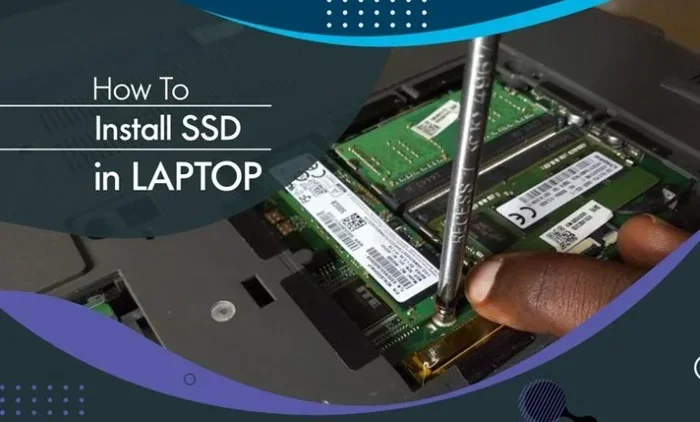
How to Install a 2TB PCIe NVMe Gen4 M.2 SSD
Installing a 2TB PCIe NVMe Gen4 M.2 SSD is straightforward. You do not need any special tools or technical skills. Here is a quick walkthrough.
- Check Compatibility: Make sure your motherboard has an M.2 slot that supports PCIe NVMe and Gen4 speeds. Check your motherboard manual for details.
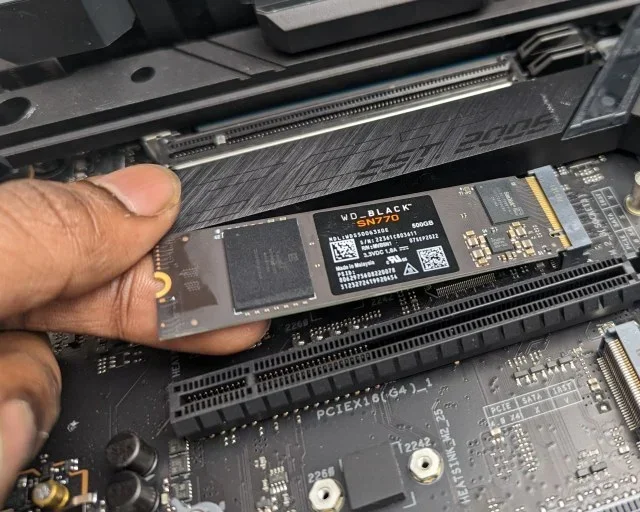
- Locate the M.2 Slot: Find the M.2 slot on your motherboard. It is usually labeled and may already have a heatsink attached.
- Remove the Heatsink (if needed): If there is a heatsink, gently unscrew it. Set it aside for later.
- Insert the SSD: Hold the drive at a 30-degree angle and gently push it into the slot. The notch on the drive should align with the key on the slot.
- Secure the Drive: Press the drive down flat and screw the mounting screw into place. Do not overtighten.
- Reattach the Heatsink: If you removed it, put the heatsink back on and secure it with screws.
- Boot and Format: Power on your PC, enter BIOS to confirm the drive is detected, then format it through your operating system.
For more detailed guidance on M.2 SSD installation and enclosure options, check out our 2TB SSD M.2 NVMe guide.
Quick Installation Tips
- Always handle the SSD by the edges to avoid touching the contacts.
- Use the screwdriver that came with your case or motherboard. It is usually a small Phillips head.
- If your motherboard has multiple M.2 slots, check which one supports Gen4 speeds for the best performance.
- Some motherboards have M.2 slots that share bandwidth with SATA ports. Make sure you are not disabling a SATA port by using a specific M.2 slot.
Common Mistakes to Avoid
Even with a simple installation, there are a few mistakes people make with their 2TB PCIe NVMe Gen4 M.2 SSD. Avoiding these will save you time and frustration.
Buying Without Checking Compatibility
The most common mistake is buying a drive without checking if your system supports it. Some older motherboards only support PCIe Gen3 or SATA M.2 drives. Always verify your motherboard specifications before purchasing.
Ignoring Thermal Management
PCIe Gen4 drives can get hot under sustained loads. Without proper cooling, they may throttle their speeds and perform worse than expected. A heatsink or thermal pad is a small investment that pays off in long-term performance.
Skipping Firmware Updates
SSD manufacturers release firmware updates that improve performance and fix bugs. After installing your drive, check the manufacturer’s website for the latest firmware and apply it. This simple step can make a big difference.
Using the Wrong Benchmark Tool
Not all benchmark tools accurately measure NVMe drive speeds. Use trusted tools like CrystalDiskMark or AS SSD Benchmark for reliable results. Some older tools may not support PCIe Gen4 speeds properly.
Who Should Get a 2TB PCIe NVMe Gen4 M.2 SSD?
These drives are perfect for a wide range of users. Here is a quick look at who benefits most.
- Gamers: Fast load times and plenty of space for large game libraries make Gen4 NVMe drives a gamer’s dream.
- Content Creators: Video editors and photographers need fast read/write speeds and large capacity for project files.
- Professionals: Engineers, architects, and data analysts work with massive files that benefit from NVMe speeds.
- Everyday Users: Even for basic tasks, a 2TB PCIe NVMe Gen4 M.2 SSD makes your system feel faster and more responsive.
- Upgrade Seekers: Anyone tired of slow boot times and sluggish performance will notice an immediate improvement.
If you want to explore more options for different capacities, our 2TB NVMe M.2 SSD article covers a broader range of 2TB NVMe drives across different interfaces and brands.
Final Thoughts
A 2TB PCIe NVMe Gen4 M.2 SSD is a fantastic upgrade for almost any computer user. The combination of blazing speed, generous capacity, and compact design makes it one of the best value upgrades you can make. Whether you are gaming, creating content, or just want a faster everyday computer, these drives deliver outstanding results.
Remember to check your motherboard compatibility, consider thermal management, and choose a drive with TLC NAND and DRAM cache for the best experience. With the right 2TB PCIe NVMe Gen4 M.2 SSD, your system will feel like new. The days of slow load times and storage headaches are over.
Take your time, compare your options, and pick the drive that fits your needs and budget. You will not regret making the switch to NVMe Gen4 storage.
Frequently Asked Questions
Is a 2TB PCIe NVMe Gen4 M.2 SSD worth it?
Absolutely. The combination of fast speeds, large 2TB capacity, and compact design makes it one of the best storage upgrades available. You will notice faster boot times, quicker game loads, and smoother multitasking every single day.
Can I use a PCIe Gen4 M.2 SSD in a Gen3 slot?
Yes, PCIe Gen4 drives are backward compatible with Gen3 slots. However, they will run at Gen3 speeds, which are slower. You will still get the benefits of NVMe over SATA, but you will not get the full Gen4 performance.
Do I need a heatsink for a 2TB PCIe NVMe Gen4 M.2 SSD?
It depends on your workload and airflow. For light everyday use, a heatsink may not be necessary. But for heavy tasks like video editing or extended gaming sessions, a heatsink helps prevent thermal throttling and maintains consistent speeds.
How long does a 2TB NVMe SSD last?
Most quality 2TB PCIe NVMe Gen4 M.2 SSD drives have a TBW rating of 1,200 TB or more, which translates to several years of heavy use. With a typical 5-year warranty, you can expect reliable performance for a long time.
What is the difference between M.2 SATA and M.2 NVMe?
M.2 SATA uses the older AHCI protocol and maxes out around 550 MB/s. M.2 NVMe uses the NVMe protocol over PCIe, offering speeds up to 7,000 MB/s or more on Gen4. NVMe is significantly faster for both sequential and random workloads.
Can I use a 2TB PCIe NVMe Gen4 M.2 SSD as a boot drive?
Yes, these drives make excellent boot drives. The fast read speeds mean your operating system loads quickly, applications launch instantly, and your entire system feels more responsive from the moment you power on.
=== CONCLUSION ===
A 2TB PCIe NVMe Gen4 M.2 SSD brings together speed, capacity, and convenience in one compact package. Whether you are upgrading a gaming rig, a creative workstation, or a daily driver, these drives deliver real-world performance that is hard to match. From blazing-fast load times to effortless file transfers, the benefits are clear and immediate.
Take the time to choose the right drive for your needs, install it properly, and enjoy a faster, more responsive computer. The world of NVMe storage is here, and a 2TB Gen4 M.2 SSD is the perfect way to jump in.