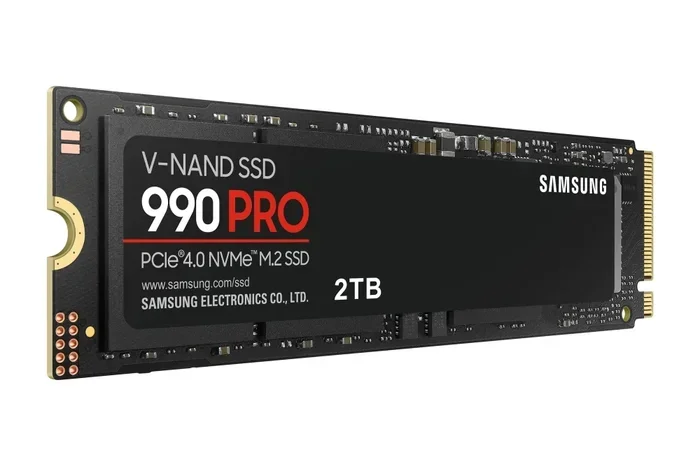
2tb Nvme M.2 Ssd
A 2TB NVMe M.2 SSD delivers blazing-fast storage with read speeds up to 7,000 MB/s. It is the ideal upgrade for gamers, creators, and professionals who need massive capacity and top-tier performance. 2TB NVMe M.2 SSD drives are compact, power-efficient, and easy to install.
A 2TB NVMe M.2 SSD is one of the best upgrades you can make to your computer. Whether you are a gamer, a video editor, or someone who simply needs more storage, this type of drive changes everything. It loads games in seconds, copies files at incredible speeds, and fits inside your machine without taking up much space. In this guide, we will break down everything you need to know about choosing and using a 2TB NVMe M.2 SSD.
If you have ever waited minutes for a game to load or watched your storage bar stay stubbornly full, you know the frustration of slow or outdated storage. A 2TB NVMe M.2 SSD solves both problems at once. You get 2 terabytes of space and NVMe-level speed in a tiny stick that slides right into your motherboard. Let us dive into what makes these drives so special.
Key Takeaways
- Blazing Speeds: A 2TB NVMe M.2 SSD offers sequential read speeds up to 7,000 MB/s, far outpacing traditional SATA drives.
- Compact Form Factor: The M.2 2280 size fits most modern laptops and desktops without extra cables.
- Great Value: Prices for a 2TB NVMe M.2 SSD have dropped significantly, making high-capacity storage more affordable than ever.
- Perfect for Gaming and Creative Work: Large game libraries, video projects, and datasets benefit greatly from NVMe speeds.
- Easy Installation: Most systems support M.2 slots, and swapping in a new drive takes just minutes.
- PCIe Gen4 and Gen5 Options: Newer drives like the Crucial T705 and Corsair MP600 Core XT offer next-generation performance.
📑 Table of Contents
What Is a 2TB NVMe M.2 SSD?
A 2TB NVMe M.2 SSD is a solid-state drive that uses the NVMe protocol over a PCIe connection. It comes in the M.2 2280 form factor, which means it is 22 millimeters wide and 80 millimeters long. This small size packs a huge punch. Unlike traditional hard drives or even SATA SSDs, NVMe drives communicate directly with the CPU through the PCIe bus. This means much faster data transfer and lower latency.
The “2TB” part means you get 2,000 gigabytes of storage. That is enough room for hundreds of games, thousands of photos, or entire video editing projects. A 2TB NVMe M.2 SSD is the sweet spot between capacity and price for most users today.
How NVMe Differs from SATA
SATA SSDs max out around 550 MB/s. A 2TB NVMe M.2 SSD can reach speeds of 5,000 to 7,000 MB/s or more. That is roughly 10 to 12 times faster. The difference is most noticeable when booting your system, launching large applications, or moving big files. If you have ever used a SATA drive and then switched to NVMe, you will never want to go back.
Why Choose a 2TB NVMe M.2 SSD?
There are many reasons to pick a 2TB NVMe M.2 SSD for your next upgrade. Let us look at the biggest benefits.
Blazing-Fast Speeds
Speed is the number one reason people choose NVMe. A 2TB NVMe M.2 SSD can boot Windows in under 10 seconds. Games load almost instantly. Video editing software scrubs through timelines smoothly. If you work with large files or run demanding applications, the speed difference is night and day.
Massive Storage Capacity
Two terabytes gives you plenty of breathing room. You can store an entire Steam library, keep your video footage organized, and still have space left over. A 2TB NVMe M.2 SSD means you do not have to constantly delete files to make room.
Compact and Clean Build
The M.2 form factor is tiny. There are no cables to manage. The drive simply plugs into a slot on your motherboard. This makes your build cleaner and your airflow better. A 2TB NVMe M.2 SSD is perfect for small form factor PCs and slim laptops alike.
Energy Efficiency
NVMe SSDs use less power than spinning hard drives. This can lead to slightly better battery life on laptops and lower heat output overall. A 2TB NVMe M.2 SSD runs cool and quiet, which is a big plus for any system.
Top Brands and Models to Consider
Not all 2TB NVMe M.2 SSD drives are created equal. Here are some of the best options on the market right now.
Crucial T705 2TB PCIe Gen5 NVMe M.2 SSD
The Crucial T705 2TB PCIe Gen5 NVMe M.2 SSD is one of the fastest consumer drives available. It uses the latest PCIe Gen5 interface and delivers sequential read speeds up to 12,400 MB/s. If you want cutting-edge performance and do not mind spending a bit more, the T705 is an excellent choice. It also comes with a generous warranty and strong endurance ratings.
Corsair MP600 Core XT M.2 NVMe SSD
The Corsair MP600 Core XT M.2 NVMe SSD is another top contender in the 2TB space. It offers PCIe Gen4 speeds with reads up to 7,000 MB/s. The drive runs cool thanks to a built-in heatsink design. It is a reliable and affordable option for most users who want a 2TB NVMe M.2 SSD without breaking the bank.
Other Notable Options
Beyond these two, several other brands offer excellent 2TB NVMe M.2 SSD drives. Samsung, WD, and Kingston all have strong entries in this space. When comparing models, look at sequential read and write speeds, TBW (terabytes written) ratings, and warranty length. These factors tell you how fast the drive is and how long it will last.
How to Choose the Right 2TB NVMe M.2 SSD
Buying a 2TB NVMe M.2 SSD is straightforward, but a few details matter. Here is what to check before you buy.
Check Your Motherboard Compatibility
Not all motherboards support the same NVMe speeds. Older boards may only support PCIe Gen3, which caps your speeds. Make sure your board has an M.2 slot that supports PCIe Gen4 or Gen5 if you want the full performance of a modern 2TB NVMe M.2 SSD. You can usually find this info in your motherboard manual or on the manufacturer’s website.
Consider the Form Factor
Most 2TB NVMe M.2 SSD drives use the 2280 size. But some laptops only support shorter M.2 modules like the 2242. Always double-check your device’s specifications before purchasing. A drive that is too long simply will not fit.
Look at Endurance Ratings
TBW stands for terabytes written. It tells you how much data you can write to the drive over its lifetime before it might fail. A higher TBW means better durability. For a 2TB NVMe M.2 SSD, look for at least 1,200 TBW for peace of mind. This is especially important if you do heavy video editing or constant file transfers.
Price vs. Performance
PCIe Gen5 drives like the Crucial T705 cost more than Gen4 options. But for most users, Gen4 speeds are already more than enough. A 2TB NVMe M.2 SSD in the Gen4 range offers the best balance of speed and value. You will not notice a real-world difference between Gen4 and Gen5 for everyday tasks.
Installation and Setup Guide
Installing a 2TB NVMe M.2 SSD is one of the easiest upgrades you can do. You do not need to be a tech expert. Here is a quick walkthrough.
- Turn off your PC and unplug it from the wall.
- Open your case and locate the M.2 slot on your motherboard.
- Remove the heatsink or retention bracket if needed.
- Insert the SSD at a 30-degree angle into the slot.
- Press it down gently and secure it with the screw.
- Close your case and power on your PC.
- Initialize the drive in Disk Management (Windows) or Disk Utility (Mac).
That is it. Your new 2TB NVMe M.2 SSD is ready to use. You can clone your existing drive or install it as a fresh boot drive. The entire process takes less than 15 minutes for most people.
Quick Tips for a Smooth Setup
- Make sure your BIOS is updated to the latest version for best NVMe support.
- Use a screwdriver that fits the M.2 screw snugly but do not overtighten.
- If your drive does not show up, try reseating it or checking the slot for dust.
- Enable NVMe mode in BIOS if your system has a legacy SATA-only setting.
Common Mistakes to Avoid
Even with a simple upgrade, some mistakes can cause problems. Here are a few to watch out for.
- Buying the wrong form factor: An M.2 2242 drive will not fit a 2280 slot. Always match the size.
- Ignoring PCIe generation: A Gen5 drive in a Gen3 slot will run at Gen3 speeds. Know your board’s limits.
- Skipping the BIOS update: Older motherboards may need a firmware update to properly recognize NVMe drives.
- Not enabling the NVMe mode: Some boards default to SATA mode. Check your BIOS settings.
- Forgetting to back up data: Always back up your files before swapping drives, even during a clean install.
Is a 2TB NVMe M.2 SSD Worth It?
Absolutely. A 2TB NVMe M.2 SSD is one of the best investments you can make for your PC or laptop. The combination of speed, capacity, and compact size is hard to beat. Whether you are building a new gaming rig, upgrading a workstations, or refreshing an old laptop, this type of drive delivers real-world results you can feel every day.
Prices for a 2TB NVMe M.2 SSD continue to drop as technology improves. What once cost a fortune is now within reach for most budgets. With brands like Crucial, Corsair, Samsung, and WD offering reliable options, there has never been a better time to upgrade.
If you are still using a slow hard drive or a smaller SSD, the difference after installing a 2TB NVMe M.2 SSD will be dramatic. Your system will feel faster, more responsive, and ready for whatever you throw at it. Do not wait — make the switch today and experience storage the way it was meant to be.
Frequently Asked Questions
How fast is a 2TB NVMe M.2 SSD?
A 2TB NVMe M.2 SSD typically delivers sequential read speeds between 5,000 and 7,000 MB/s on PCIe Gen4. The latest Gen5 drives can reach speeds of 12,000 MB/s or more. These speeds are significantly faster than any traditional hard drive or SATA SSD.
Is a 2TB NVMe M.2 SSD compatible with my laptop?
Most modern laptops with M.2 slots support NVMe SSDs. However, you should check your laptop’s manual to confirm the slot supports NVMe and the correct form factor (usually 2280). Some older or thinner laptops may only support SATA M.2 drives.
How much does a 2TB NVMe M.2 SSD cost?
Prices for a 2TB NVMe M.2 SSD range from around $120 to $250 depending on the brand and generation. PCIe Gen5 drives tend to cost more, while Gen4 options offer excellent value. Prices continue to drop as the market becomes more competitive.
Can I use a 2TB NVMe M.2 SSD as a boot drive?
Yes, a 2TB NVMe M.2 SSD makes an excellent boot drive. The fast read speeds mean your operating system loads in seconds. You can install Windows or macOS directly onto the drive and enjoy a noticeably snappier experience from the moment you power on.
Do I need a heatsink for a 2TB NVMe M.2 SSD?
Some drives, especially Gen5 models, run warm under heavy load. Many motherboards come with M.2 heatsinks built in. If yours does not, a standalone M.2 heatsink is a cheap and easy way to keep your 2TB NVMe M.2 SSD running cool and maintain peak performance.
How long does a 2TB NVMe M.2 SSD last?
A quality 2TB NVMe M.2 SSD can last many years under normal use. Endurance is measured in TBW (terabytes written). Most 2TB drives have ratings between 1,200 and 2,400 TBW, which is more than enough for everyday use. Even with heavy workloads, these drives are built to last.