M.2 2230 Nvme Ssd
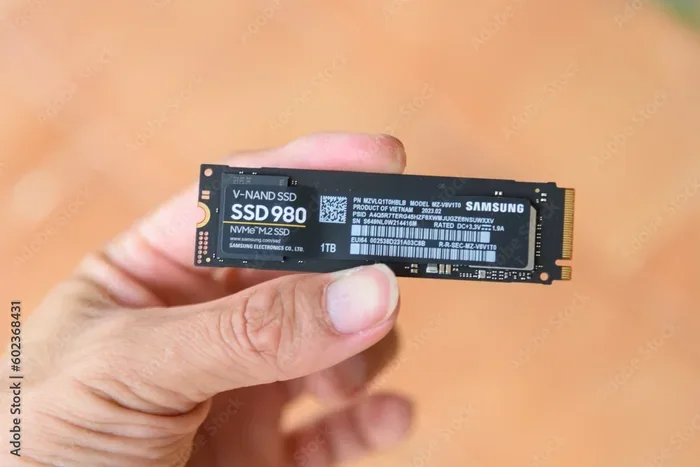
The M.2 2230 NVMe SSD is a compact storage drive designed for modern ultrabooks, tablets, and mini PCs. It offers blazing fast speeds in a tiny footprint that is smaller than the standard M.2 2280 drive. If you need high performance in a small device, this is the storage solution you should consider.
If you have been shopping for a M.2 2230 NVMe SSD, you might wonder what makes it different from the regular M.2 drives you see everywhere. The truth is, this smaller form factor is quietly becoming one of the most exciting developments in portable storage. It packs the same powerful NVMe technology into a tiny package that fits devices where space is at a premium.
Whether you own a sleek ultrabook, a compact tablet, or a mini desktop PC, the M.2 2230 NVMe SSD can transform your storage experience. In this guide, we will cover everything you need to know. From understanding the basics to choosing the right drive for your needs, this article has you covered.
The M.2 2230 NVMe SSD is not just a trend. It represents a real shift in how manufacturers design thin and lightweight devices. As laptops get thinner and tablets get more powerful, the demand for smaller, faster storage solutions has never been higher. Let us dive into the details.
Key Takeaways
- Smaller Form Factor: The M.2 2230 NVMe SSD is only 30mm long, making it ideal for ultra-thin and compact devices.
- Blazing Speeds: It uses the NVMe protocol over PCIe lanes, delivering read and write speeds that far exceed traditional SATA SSDs.
- Growing Compatibility: More laptops and mini PCs now support the M.2 2230 slot, especially in premium ultrabook models.
- Great for Portable Devices: Tablets, 2-in-1 laptops, and mini desktops benefit hugely from the small size and fast performance.
- Easy to Install: Installation is straightforward if your device has an M.2 2230 slot and the right mounting hardware.
- Affordable Options Available: Brands like Crucial, Kingston, and WD Blue offer M.2 2230 NVMe SSDs at competitive prices.
📑 Table of Contents
- What Is an M.2 2230 NVMe SSD?
- M.2 2230 vs M.2 2280: What Is the Difference?
- Speed and Performance of the M.2 2230 NVMe SSD
- Best Use Cases for the M.2 2230 NVMe SSD
- How to Choose the Right M.2 2230 NVMe SSD
- Installation and Setup Tips for M.2 2230 NVMe SSD
- Common Mistakes to Avoid with M.2 2230 NVMe SSDs
- Expert Insights: Why the M.2 2230 NVMe SSD Matters
- Conclusion
What Is an M.2 2230 NVMe SSD?
The M.2 2230 NVMe SSD is a type of solid state drive that uses the M.2 form factor with dimensions of 22mm wide and 30mm long. The number “2230” tells you the size. The first two digits represent the width, and the last two represent the length. This is significantly smaller than the more common M.2 2280, which measures 22mm wide and 80mm long.
NVMe stands for Non-Volatile Memory Express. It is a communication protocol designed specifically for flash storage. Unlike older SATA SSDs, an NVMe drive connects directly to the motherboard through PCIe lanes. This means much faster data transfer speeds and lower latency.
Here are some key facts about the M.2 2230 NVMe SSD:
- Size: 22mm x 30mm x 3.5mm (typical)
- Interface: PCIe NVMe protocol
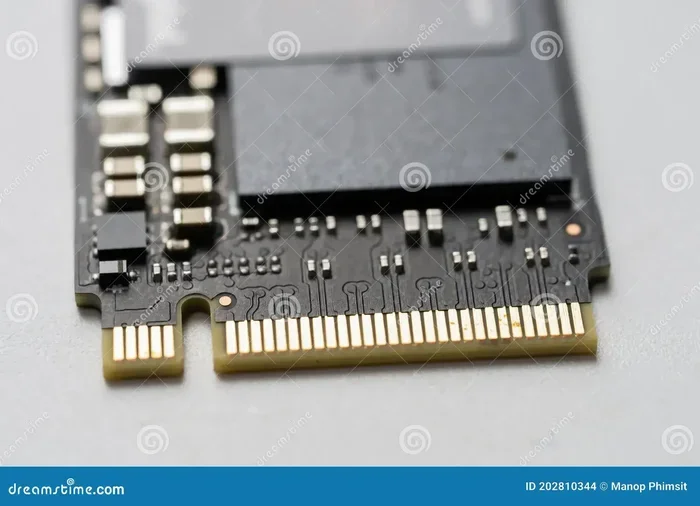
- Connector: M.2 Key M or Key B+M depending on the model
- Capacity Range: Typically 256GB to 2TB
- Speed: Read speeds up to 7,000 MB/s and write speeds up to 5,000 MB/s on PCIe Gen 4 models
The compact size makes it perfect for devices where every millimeter matters. You will find these drives in premium ultrabooks, gaming handhelds, and even some smartphones that support external storage expansion.
M.2 2230 vs M.2 2280: What Is the Difference?
The most common question people ask is how the M.2 2230 NVMe SSD compares to the M.2 2280. Both are M.2 drives, but the difference comes down to length. The 2230 is 30mm long, while the 2280 is 80mm long. That is a big difference in a small space.
Physical Size Comparison
The shorter length of the M.2 2230 means it takes up much less room inside your device. This allows manufacturers to build thinner laptops and smaller tablets without sacrificing storage capacity. The M.2 2280 is the standard size found in most desktops and full-sized laptops.
Here is a quick side-by-side look:
- M.2 2230: 22mm x 30mm. Best for ultra-thin devices and compact systems.
- M.2 2280: 22mm x 80mm. The most common size for desktops and standard laptops.
- M.2 2242: 22mm x 42mm. A middle ground, often used in mini PCs and some tablets.
Performance Differences
In terms of raw performance, there is no difference between the M.2 2230 and M.2 2280 NVMe SSDs of the same generation. A PCIe Gen 4 M.2 2230 drive will perform just as fast as a PCIe Gen 4 M.2 2280 drive. The speed depends on the NAND flash, controller, and PCIe generation, not the physical length of the drive.
However, the smaller size of the M.2 2230 can sometimes mean fewer NAND chips stacked inside. This may affect sustained write speeds under heavy workloads. But for everyday use like booting Windows, opening apps, and loading games, the difference is negligible.
If you are upgrading a device, always check whether your system supports the M.2 2230 form factor. Not all motherboards and laptops accept this shorter drive. You may need an adapter or a different slot configuration.
Speed and Performance of the M.2 2230 NVMe SSD
One of the biggest reasons to choose a M.2 2230 NVMe SSD is the speed. These drives use the PCIe interface, which is much faster than the older SATA III interface. Let us look at what you can expect in real-world performance.
Read and Write Speeds
Modern M.2 2230 NVMe SSDs offer impressive sequential read speeds. On PCIe Gen 4 models, you can expect read speeds between 5,000 and 7,000 MB/s. Write speeds typically range from 4,000 to 5,000 MB/s. Even PCIe Gen 3 models deliver speeds of 3,500 MB/s read and 3,000 MB/s write.
For comparison, a standard SATA SSD tops out at around 550 MB/s. That means an NVMe M.2 2230 drive can be up to 15 times faster. The difference is most noticeable when you are transferring large files, booting your operating system, or loading heavy applications.
Real-World Performance
In everyday use, you will notice faster boot times, quicker app launches, and smoother multitasking. Here are some practical examples:
- Booting Windows: A M.2 2230 NVMe SSD can boot your system in under 10 seconds.
- Game Loading: Modern games load significantly faster on NVMe drives compared to SATA SSDs.
- File Transfers: Moving a 50GB folder takes seconds instead of minutes.
- Video Editing: Scrubbing through 4K video timelines is much smoother on NVMe storage.
The NVMe protocol also handles queue depths much better than SATA. This means the drive stays responsive even when you are running multiple demanding tasks at once.
Best Use Cases for the M.2 2230 NVMe SSD
The M.2 2230 NVMe SSD shines in specific scenarios where space is limited but performance matters. Let us explore the best use cases for this compact drive.
Ultrabooks and Thin Laptops
Premium ultrabooks like the Dell XPS, Lenovo ThinkPad X1, and Apple MacBook Air (older models) often use the M.2 2230 form factor. These laptops have very limited internal space, so a smaller SSD is essential. The M.2 2230 NVMe SSD delivers the speed you need without taking up precious room inside the chassis.
Tablets and 2-in-1 Devices
Many modern tablets and 2-in-1 convertibles now support NVMe storage. The M.2 2230 size fits perfectly inside these slim devices. It gives you fast storage for running apps, storing media, and handling creative workloads on the go.
Mini PCs and Barebone Systems
Mini PCs like Intel NUC, Lenovo ThinkCentre Tiny, and ASUS mini desktops often use M.2 2230 slots. These compact machines are popular for home theater setups, office work, and light gaming. A M.2 2230 NVMe SSD provides the storage performance these systems need without taking up extra space.
Portable External Storage
You can also use a M.2 2230 NVMe SSD in an external enclosure. This turns it into a super fast portable drive for backing up files or transferring data between computers. Make sure to choose a high-quality NVMe M.2 SSD enclosure that supports the 2230 size and PCIe speeds.
How to Choose the Right M.2 2230 NVMe SSD
Not all M.2 2230 NVMe SSDs are created equal. There are several factors to consider before making a purchase. Here is what you should look for.
Capacity Options
M.2 2230 NVMe SSDs come in various capacities. The most common options are 256GB, 512GB, and 1TB. If you plan to use the drive as a boot drive with a few applications, 256GB may be enough. For storing games, videos, and large files, go for 1TB or higher. You can also find a 1TB NVMe M.2 SSD that fits the 2230 form factor for a great balance of speed and storage.
PCIe Generation
The PCIe generation matters a lot for performance. PCIe Gen 4 is the current mainstream standard and offers excellent speeds. PCIe Gen 5 is the newest and fastest, but it comes at a premium price. For most users, PCIe Gen 4 provides more than enough speed. Here is a quick comparison:
- PCIe Gen 3: Up to 3,500 MB/s read. Budget-friendly and reliable.
- PCIe Gen 4: Up to 7,000 MB/s read. The sweet spot for performance and price.
- PCIe Gen 5: Up to 14,000 MB/s read. Cutting edge but expensive.
Brand and Reliability
Stick with reputable brands when buying a M.2 2230 NVMe SSD. Brands like Crucial, Kingston, Samsung, and WD Blue have proven track records. Look for drives with good warranty coverage and endurance ratings (TBW – Total Bytes Written). Higher TBW means the drive can handle more data over its lifetime before wearing out.
Compatibility Check
Before buying, confirm that your device supports the M.2 2230 form factor. Check your laptop or motherboard manual for the supported M.2 sizes. Some devices only accept M.2 2280 drives, while others can accommodate both 2230 and 2280 with a mounting bracket. Also verify that your system supports NVMe SSDs, as some older M.2 slots only support SATA SSDs.
Installation and Setup Tips for M.2 2230 NVMe SSD
Installing a M.2 2230 NVMe SSD is straightforward if you follow the right steps. Here is a practical guide to help you get started.
What You Will Need
- M.2 2230 NVMe SSD
- Small Phillips head screwdriver
- Mounting bracket or spacer (if required by your device)
- Anti-static wrist strap (optional but recommended)
Step-by-Step Installation
- Power off your device: Shut down completely and unplug the power cable.
- Open the chassis: Remove the bottom panel or access cover of your laptop or mini PC.
- Locate the M.2 slot: Find the M.2 2230 slot on the motherboard. It will have a small retention screw.
- Insert the SSD: Align the notch on the SSD with the key in the slot. Insert at a 30-degree angle and press down gently.
- Secure the drive: Use the retention screw or bracket to hold the SSD in place.
- Close up and boot: Reassemble the device and power on. Enter BIOS to confirm the drive is detected.
Setting Up the Drive
After installation, you may need to initialize the drive in Windows. Open Disk Management, find the new drive, and format it with NTFS. You can also clone your existing drive to the M.2 2230 NVMe SSD for a seamless upgrade without reinstalling your operating system.
For the best performance, make sure your motherboard BIOS is up to date. Some older BIOS versions may not properly recognize newer NVMe SSDs. Also enable NVMe support in the BIOS settings if it is not enabled by default.
Common Mistakes to Avoid with M.2 2230 NVMe SSDs
Even though installing an M.2 2230 NVMe SSD is relatively simple, there are a few common mistakes to watch out for.
- Buying the wrong form factor: Always double-check that your device supports the 2230 size. Buying a 2280 drive for a 2230 slot will not work.
- Ignoring the PCIe generation: A PCIe Gen 4 drive in a Gen 3 slot will work but run at Gen 3 speeds. Know your system’s capabilities.
- Forgetting the mounting bracket: Some devices require a spacer or bracket to hold the shorter 2230 drive securely. Check before installation.
- Not updating BIOS: An outdated BIOS can cause compatibility issues or prevent the drive from reaching its full speed.
- Skipping the backup: Always back up your data before swapping drives. Even a simple upgrade can go wrong.
Expert Insights: Why the M.2 2230 NVMe SSD Matters
The M.2 2230 NVMe SSD represents an important step forward in storage technology for compact devices. As manufacturers continue to push the boundaries of thin design, the demand for smaller, faster storage will only grow. This form factor bridges the gap between performance and portability perfectly.
Industry experts agree that NVMe storage is the future. The M.2 PCIe NVMe SSD format has already become the standard for high-performance laptops and mini PCs. The 2230 variant extends this standard to even smaller devices, giving manufacturers more design freedom.
One thing to keep in mind is that the M.2 2230 NVMe SSD market is still evolving. New capacities, faster PCIe generations, and improved NAND technologies are constantly emerging. When shopping, focus on your specific needs rather than chasing the latest and greatest. A reliable PCIe Gen 4 M.2 2230 drive from a trusted brand will serve you well for years.
Also consider the total cost of ownership. A slightly more expensive drive with higher endurance and better warranty can save you money in the long run. Look at the TBW rating, warranty length, and brand reputation when making your decision.
Conclusion
The M.2 2230 NVMe SSD is a fantastic storage solution for anyone who needs speed in a compact package. Whether you are upgrading an ultrabook, building a mini PC, or adding portable storage, this small drive delivers big performance. Its tiny size does not compromise speed, reliability, or capacity.
By understanding the form factor, comparing it to other M.2 sizes, and choosing the right capacity and PCIe generation, you can make a confident purchase. Follow the installation tips, avoid common mistakes, and enjoy the benefits of NVMe speed in your compact device.
If you are ready to upgrade, explore the available options for a M.2 2230 NVMe SSD and find the perfect fit for your needs. Your device will thank you with faster boot times, quicker app launches, and a much smoother overall experience.
Frequently Asked Questions
What devices use M.2 2230 NVMe SSDs?
The M.2 2230 NVMe SSD is commonly found in ultra-thin laptops, tablets, 2-in-1 convertibles, and mini desktop PCs. Many premium ultrabook models from brands like Dell, Lenovo, and ASUS use this form factor. Always check your device manual to confirm compatibility before purchasing.
Can I use an M.2 2280 SSD in an M.2 2230 slot?
No, you cannot use an M.2 2280 SSD in an M.2 2230 slot. The 2280 drive is 80mm long and will not fit properly in a 30mm slot. Always match the form factor to your device’s specifications to avoid compatibility issues.
Is a M.2 2230 NVMe SSD faster than a SATA SSD?
Yes, a M.2 2230 NVMe SSD is significantly faster than a SATA SSD. NVMe drives use the PCIe interface, which can deliver speeds up to 7,000 MB/s or more. SATA SSDs max out at around 550 MB/s. The difference is very noticeable in everyday tasks like booting and loading applications.
How much does a M.2 2230 NVMe SSD cost?
Prices vary based on capacity and brand. A 512GB M.2 2230 NVMe SSD typically costs between $40 and $70. A 1TB model ranges from $70 to $120. PCIe Gen 5 models are more expensive but offer the fastest speeds available today.
Do I need a special enclosure for a M.2 2230 NVMe SSD?
Yes, if you want to use the drive externally, you need an enclosure that specifically supports the M.2 2230 form factor. Not all enclosures support this shorter size. Make sure the enclosure supports NVMe protocol and PCIe speeds for the best performance.
Can I upgrade my laptop with a M.2 2230 NVMe SSD?
You can upgrade your laptop if it has an M.2 2230 slot. Check your laptop’s specifications or manual to confirm the supported form factors. Some laptops only accept M.2 2280 drives, so compatibility is key before purchasing any SSD.
=== CONCLUSION ===
The M.2 2230 NVMe SSD is a powerful and compact storage solution that is perfect for modern thin and lightweight devices. It combines the speed of NVMe technology with a small form factor that fits where larger drives cannot. Whether you are a student, a professional, or a tech enthusiast, this drive offers the performance boost your device needs.
Remember to check compatibility, choose the right capacity, and follow proper installation steps. With the right M.2 2230 NVMe SSD, you will enjoy faster boot times, quicker file transfers, and a much more responsive computing experience. Upgrade today and feel the difference that NVMe speed can make in a compact package.