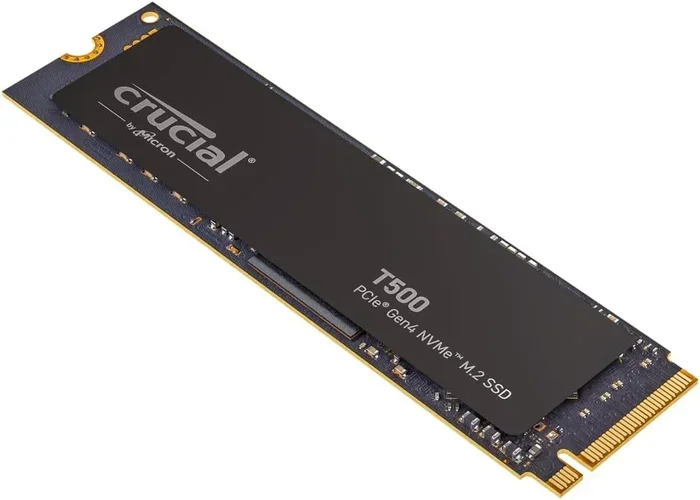
2tb Pcie Gen4 Nvme M 2 Ssd
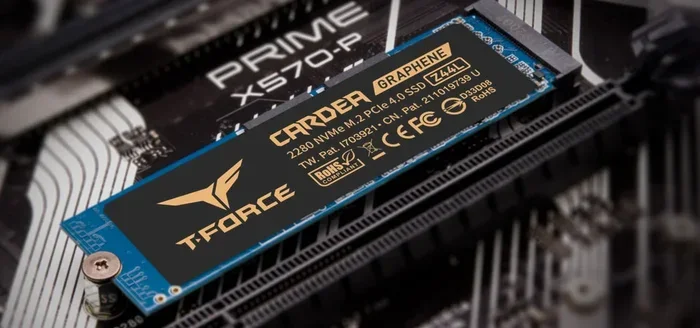
The 2TB PCIe Gen4 NVMe M.2 SSD delivers blazing-fast storage speeds up to 7000 MB/s read, making it a game-changer for gamers, creators, and professionals. This guide covers everything you need to know, from how it works to the best options available. You will learn about performance benchmarks, compatibility, setup tips, and whether a Gen4 drive is worth the investment over Gen3 or Gen5 alternatives.
A 2TB PCIe Gen4 NVMe M.2 SSD is one of the best upgrades you can make to any modern computer. Whether you are building a new rig or upgrading an existing machine, this type of solid state drive transforms how fast your system boots, loads games, and handles large files. In this guide, we break down everything you need to know in simple, easy-to-understand terms.
If you have been hearing about NVMe drives and wondering what all the fuss is about, you are in the right place. We will walk through the basics, compare performance, discuss compatibility, and help you decide if a 2TB Gen4 drive is the right move for your setup. No jargon, no fluff, just practical advice you can use.
Key Takeaways
- Speed Boost: PCIe Gen4 NVMe M.2 SSDs offer up to 7000 MB/s sequential read speeds, doubling Gen3 performance.
- 2TB Capacity: Plenty of space for large game libraries, video projects, and professional workloads.
- Easy Installation: M.2 form factor fits directly into compatible motherboards with no cables needed.
- Thermal Management Matters: Gen4 drives run hot; a heatsink or thermal pad helps maintain peak speeds.
- Backward Compatible: PCIe Gen4 SSDs work in Gen3 and Gen5 slots, though speeds adjust accordingly.
- Great Value: Prices have dropped significantly, making 2TB Gen4 drives affordable for most users.
📑 Table of Contents
- What Is a 2TB PCIe Gen4 NVMe M.2 SSD?
- Why Choose a 2TB PCIe Gen4 NVMe M.2 SSD?
- How Does PCIe Gen4 Compare to Other Generations?
- Top Use Cases for a 2TB Gen4 NVMe Drive
- How to Choose the Right 2TB Gen4 NVMe M.2 SSD
- Quick Tips for Installing Your 2TB Gen4 NVMe M.2 SSD
- Common Mistakes to Avoid
- Expert Insight: Is a 2TB Gen4 NVMe SSD Worth It?
- Final Thoughts
What Is a 2TB PCIe Gen4 NVMe M.2 SSD?
Let us start with the basics. NVMe stands for Non-Volatile Memory Express. It is a communication protocol designed specifically for flash storage. Unlike older SATA drives, NVMe uses the PCIe (Peripheral Component Interconnect Express) interface to transfer data. This means much faster speeds and lower latency.
The “M.2” part refers to the physical shape and size of the drive. M.2 SSDs are small, flat sticks that slot directly into your motherboard. There are no cables, no mounting brackets, and no fuss. The “2TB” tells you the storage capacity. Two terabytes equals roughly 2000 gigabytes, which is enough room for hundreds of games, thousands of photos, or massive video editing projects.
The “PCIe Gen4” part is where the real magic happens. PCIe stands for Peripheral Component Interconnect Express, and the “Gen4” means it is the fourth generation of this interface. Each new generation doubles the bandwidth available. Gen4 offers up to 16 GT/s per lane, which translates to sequential read speeds around 7000 MB/s on a 2TB NVMe M.2 SSD. That is incredibly fast compared to older SATA drives that top out around 550 MB/s.
Why Choose a 2TB PCIe Gen4 NVMe M.2 SSD?
There are many reasons to pick up a 2TB PCIe Gen4 NVMe M.2 SSD for your system. Let us look at the biggest benefits that make these drives so popular right now.
Blazing Fast Load Times
One of the most noticeable improvements is load time. Games that took minutes to load on a hard drive or even a SATA SSD load in seconds on a Gen4 NVMe drive. For example, open-world games with massive textures benefit enormously from the high sequential read speeds. You will spend less time staring at loading screens and more time playing.
Massive Storage Capacity
Two terabytes gives you a generous amount of space. You can store an entire game library, including titles that now exceed 100GB each, without constantly worrying about running out of room. Creators working with 4K video files or high-resolution photo archives also benefit from the extra space. A 2TB NVMe M.2 SSD keeps your most demanding files within arm’s reach.
Future-Proof Your System
PCIe Gen4 is the current mainstream standard for high-performance storage. It is supported by modern Intel and AMD platforms, and it will remain relevant for years to come. Investing in a Gen4 drive now means your system stays competitive without needing another upgrade anytime soon.
Energy Efficient
Despite their speed, NVMe M.2 SSDs are surprisingly efficient. They consume less power than traditional hard drives, which can help improve laptop battery life. This makes them a smart choice for both desktop and portable systems.
How Does PCIe Gen4 Compare to Other Generations?
Understanding the differences between PCIe generations helps you make an informed decision. Here is a simple breakdown of how Gen4 stacks up against Gen3 and Gen5.
| Feature | PCIe Gen3 | PCIe Gen4 | PCIe Gen5 |
|---|---|---|---|
| Max Bandwidth per Lane | 8 GT/s | 16 GT/s | 32 GT/s |
| Typical Read Speed (2TB) | ~3500 MB/s | ~7000 MB/s | ~10000+ MB/s |
| Typical Write Speed (2TB) | ~3000 MB/s | ~5000 MB/s | ~8000+ MB/s |
| Availability | Older, fading out | Widely available | Early adoption phase |
| Price (2TB) | Budget-friendly | Mid-range | Premium pricing |
As you can see, PCIe Gen4 hits a sweet spot. It offers speeds that are roughly double what Gen3 provides, but at a much more reasonable price than Gen5. For most users, a 2TB PCIe Gen4 NVMe M.2 SSD delivers the best balance of performance and value.
If you are curious about what Gen5 has to offer, the Crucial T705 2TB PCIe Gen5 NVMe M.2 SSD is a great example of next-generation speed. However, for everyday use, Gen4 is more than enough and widely supported across motherboards and systems.
Top Use Cases for a 2TB Gen4 NVMe Drive
So, what can you actually do with all that speed and space? Here are the most common and practical use cases.
Gaming
Gamers benefit the most from Gen4 NVMe speeds. Modern games are huge and load complex assets on the fly. A 2TB drive can hold 10 to 15 AAA titles without breaking a sweat. You will notice faster level transitions, quicker asset loading, and smoother overall performance in open-world games.
Content Creation
Video editors, photographers, and graphic designers need fast read and write speeds to handle large project files. A Gen4 NVMe drive drastically reduces export and render times. The 2TB capacity also gives you room to store raw footage, project files, and final exports all in one place.
Professional Workstations
Engineers, architects, and data scientists working with large datasets or 3D models appreciate the bandwidth of PCIe Gen4. The low latency of NVMe means applications open faster and simulations run more smoothly. A 2TB SSD M.2 NVMe drive in a workstation can be a productivity game-changer.
Laptop Upgrades
If your laptop has an M.2 slot, upgrading to a Gen4 NVMe drive is one of the easiest and most impactful improvements you can make. Laptops with 1TB or 512GB drives often slow down as storage fills up. Swapping in a 2TB NVMe drive gives you more space and faster performance in one simple upgrade.
How to Choose the Right 2TB Gen4 NVMe M.2 SSD
Not all Gen4 NVMe drives are created equal. Here are the key factors to consider before you buy.
Read and Write Speeds
Look for a drive that advertises sequential read speeds close to 7000 MB/s and write speeds around 5000 MB/s. These are the sweet spots for PCIe Gen4. Some drives may fall slightly below these numbers, which is still perfectly fine for most users. The Crucial P310 1TB PCIe Gen4 NVMe M.2 SSD is a solid entry-level option if you want to test the waters before committing to 2TB.
NAND Flash Type
Most high-performance Gen4 drives use TLC (Triple-Level Cell) NAND flash. TLC stores three bits per cell, offering a great balance of speed, endurance, and cost. Some budget options use QLC (Quad-Level Cell), which stores four bits per cell but tends to be slower and less durable over time. For a 2TB drive you plan to use daily, TLC is the way to go.
Thermal Management
PCIe Gen4 drives generate more heat than their Gen3 predecessors. Without proper cooling, they may throttle speeds during sustained workloads. Many Gen4 M.2 SSDs come with built-in heatsinks. If your motherboard does not have one, you can buy a separate M.2 NVMe SSD heatsink for a few dollars. This simple addition keeps your drive cool and maintains top performance.
Warranty and Endurance
Check the warranty and TBW (Terabytes Written) rating. A good 2TB Gen4 NVMe drive should have at least a 5-year warranty and a TBW rating of 1200 or higher. This tells you the drive can handle heavy daily use for years without wearing out.
Brand Reputation and Support
Stick with well-known brands that have proven track records in the SSD market. Brands like Samsung, Crucial, WD, and Kingston offer reliable products backed by strong customer support. Reading user reviews and expert benchmarks helps you make a confident choice.
Quick Tips for Installing Your 2TB Gen4 NVMe M.2 SSD
Installing an M.2 NVMe drive is straightforward, even if you are not a tech expert. Here are some quick tips to make the process smooth.
- Check compatibility first. Make sure your motherboard supports PCIe Gen4 and has an M.2 slot. Most modern boards from 2020 onward do.
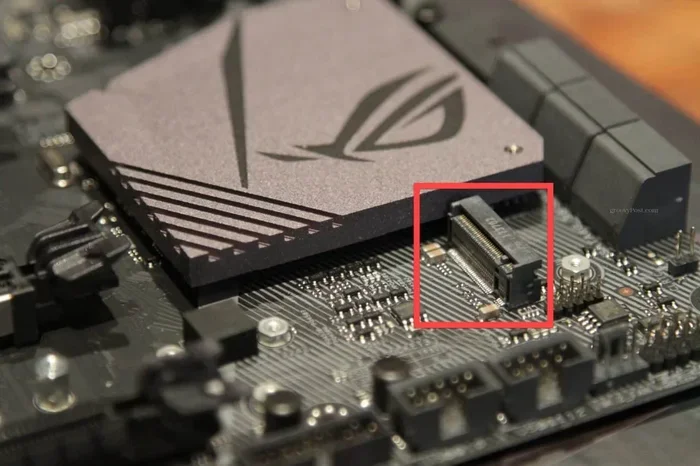
- Locate the M.2 slot. It is usually near the CPU socket on desktop motherboards. Laptops often have a dedicated access panel on the bottom.
- Use the included mounting screw. M.2 drives come with a small screw. Do not overtighten it, as this can damage the board.
- Insert at a 30-degree angle. Gently push the drive into the slot at an angle, then press it down flat and secure the screw.
- Enable NVMe in BIOS. After installation, restart your PC and enter BIOS to ensure the drive is detected and NVMe mode is enabled.
- Add a heatsink if needed. If your motherboard does not have a built-in M.2 heatsink, consider adding one to prevent thermal throttling.
Once installed, you can format the drive and start using it right away. It works as a boot drive, a game library storage, or a dedicated workspace for creative projects.
Common Mistakes to Avoid
Here are a few common pitfalls that people run into when buying or installing a 2TB Gen4 NVMe M.2 SSD.
- Buying a Gen4 drive for a Gen3 motherboard. The drive will still work, but it will run at Gen3 speeds. You will not get the full performance benefit.
- Skipping thermal protection. Gen4 drives run hot. Without a heatsink, sustained writes can cause throttling, which slows you down.
- Not checking the M.2 key type. Most NVMe M.2 SSDs use the B+M key or M key. Make sure your slot matches the drive.
- Ignoring firmware updates. SSD manufacturers release firmware updates that improve performance and fix bugs. Check for updates after installation.
- Overfilling the drive. Keeping at least 10 to 15 percent of the drive free helps maintain optimal performance and longevity.
Expert Insight: Is a 2TB Gen4 NVMe SSD Worth It?
Based on current pricing and performance benchmarks, a 2TB PCIe Gen4 NVMe M.2 SSD is absolutely worth it for most users. The prices have come down significantly over the past couple of years, and the performance gains over Gen3 are dramatic. You get fast load times, plenty of storage, and a drive that will remain relevant for years.
If you are a casual user who mainly browses the web and does light document work, a smaller SSD or even a Gen3 drive might suffice. But if you are a gamer, a content creator, or a professional who works with large files, the speed and capacity of a 2TB Gen4 NVMe drive is a worthwhile investment. It is one of those upgrades where you will immediately feel the difference every single day.
For those considering the latest technology, the Crucial T705 4TB PCIe Gen5 NVMe M.2 SSD represents the cutting edge, but for most practical purposes, Gen4 delivers everything you need at a fantastic price point.
Final Thoughts
A 2TB PCIe Gen4 NVMe M.2 SSD is a powerful and practical upgrade for almost any computer. It brings together massive storage, blazing speeds, and easy installation in a compact form factor. Whether you are upgrading a gaming PC, a creative workstation, or a laptop, this type of drive delivers real, noticeable improvements in everyday performance.
The technology is mature, prices are competitive, and the benefits are immediate. If you have been putting off a storage upgrade, now is the perfect time. A 2TB Gen4 NVMe M.2 SSD gives you the speed, space, and future-proofing you need to get the most out of your system. Take the leap, and your computer will thank you every time you boot up or launch your favorite game.
Frequently Asked Questions
Can I use a PCIe Gen4 NVMe M.2 SSD in a Gen3 motherboard?
Yes, you can. The drive will work, but it will operate at Gen3 speeds, which means lower read and write speeds. You will still get a big upgrade over a traditional hard drive or SATA SSD, but you will not unlock the full Gen4 potential.
Do I need a heatsink for a 2TB Gen4 NVMe SSD?
It depends on your workload. For light gaming and everyday use, the built-in thermal design on most drives is enough. But if you do heavy video editing, large file transfers, or sustained workloads for long periods, a heatsink helps prevent throttling and keeps speeds consistent.
How much faster is PCIe Gen4 compared to Gen3?
PCIe Gen4 roughly doubles the bandwidth of Gen3. In real-world terms, Gen4 NVMe drives read at around 7000 MB/s compared to Gen3’s typical 3500 MB/s. That means games load faster, files transfer quicker, and overall system responsiveness improves noticeably.
Can I use a 2TB NVMe M.2 SSD as my boot drive?
Absolutely. In fact, using an NVMe M.2 SSD as your boot drive is one of the best things you can do for system responsiveness. Windows, applications, and games boot and load much faster when installed on a Gen4 NVMe drive compared to a traditional hard drive.
What is the difference between NVMe and SATA M.2 SSDs?
NVMe M.2 SSDs use the PCIe interface and are much faster than SATA M.2 SSDs. A SATA M.2 drive maxes out around 550 MB/s, while a Gen4 NVMe M.2 drive can reach 7000 MB/s or more. If your motherboard supports NVMe, always choose it over SATA for the best performance.
How long does a 2TB Gen4 NVMe SSD last?
Most quality 2TB Gen4 NVMe SSDs come with a 5-year warranty and a TBW rating of 1200 or higher. For an average user, this means the drive should last many years of daily use. TLC NAND, which most Gen4 drives use, offers excellent durability and endurance for long-term reliability.
=== CONCLUSION ===
A 2TB PCIe Gen4 NVMe M.2 SSD is a fantastic storage upgrade that delivers real-world speed, generous capacity, and easy installation. It fits the needs of gamers, creators, and professionals alike. With prices continuing to drop and Gen4 technology widely supported, there has never been a better time to make the switch. Upgrade your storage today and experience the difference that fast NVMe performance brings to your daily computing.