Gen 5 M 2 Nvme Ssd

A Gen 5 M 2 NVMe SSD delivers blazing-fast speeds using the latest PCIe Gen 5 interface. It offers double the bandwidth of Gen 4, making it perfect for gamers, creators, and professionals. In this guide, we break down everything you need to know about Gen 5 NVMe SSD performance, pricing, and whether it is right for you.
Let us talk about something that is changing how we store and access data. The Gen 5 M 2 NVMe SSD is the latest evolution in solid state storage. If you have been hearing buzz about these drives and wondering if they are worth the hype, you are in the right place.
This guide covers everything from raw speed numbers to real-world performance. We will look at what makes Gen 5 NVMe SSD technology different from older generations. By the end, you will know exactly whether upgrading to a Gen 5 drive makes sense for your setup.
The world of SSD storage moves fast. Just when you got comfortable with Gen 4, along comes Gen 5 with even faster speeds and better efficiency. But faster does not always mean better for everyone. Let us dive into the details and find out what these drives bring to the table.
Key Takeaways
- Double the Bandwidth: Gen 5 M 2 NVMe SSDs offer up to 14 GB/s sequential read speeds, which is twice as fast as Gen 4.
- Best for Heavy Workloads: These drives shine in video editing, gaming, and large data transfers.
- Price Is Dropping: Gen 5 NVMe SSDs are becoming more affordable, with 2TB models now accessible to most users.
- Backward Compatible: You can use a Gen 5 drive in a Gen 4 or Gen 3 slot, but speeds will be limited.
- Thermal Management Matters: Gen 5 drives run hot, so proper cooling is essential for sustained performance.
- Real-World Gains Vary: Everyday tasks show modest improvements, but specialized workloads see huge boosts.
📑 Table of Contents
What Is a Gen 5 M 2 NVMe SSD?
A Gen 5 M 2 NVMe SSD is a solid state drive that uses the PCIe Gen 5 interface. The M 2 form factor means it plugs directly into your motherboard. NVMe stands for Non-Volatile Memory Express, which is the communication protocol these drives use.
Here is what makes Gen 5 special. The PCIe Gen 5 interface doubles the bandwidth of Gen 4. While Gen 4 maxes out around 7 GB/s per lane, Gen 5 pushes that to about 14 GB/s per lane. With four lanes, that is a massive jump in potential throughput.
The M 2 2280 form factor is the standard size for these drives. It measures 22mm wide and 80mm long. This compact size fits into most modern desktops and laptops without any adapters. You get enterprise-grade performance in a tiny package.
How Does PCIe Gen 5 Compare to Previous Generations?
Understanding the generations helps you see why Gen 5 matters. Here is a quick look at the progression.
- PCIe Gen 3: Introduced around 2010. Max bandwidth of about 3.5 GB/s per lane. Still used in budget SSDs.
- PCIe Gen 4: Launched with AMD Ryzen 3000 series. Max bandwidth of about 7 GB/s per lane. Currently the mainstream standard.
- PCIe Gen 5: The newest standard. Max bandwidth of about 14 GB/s per lane. Found in the latest Intel and AMD platforms.
The jump from Gen 4 to Gen 5 is significant. But in everyday use, you might not notice a huge difference. The real gains show up in heavy workloads like 4K video editing, massive file transfers, and running multiple drives simultaneously.
Gen 5 NVMe SSD Performance and Speed
Speed is where Gen 5 NVMe M 2 SSD drives really shine. Let us break down the numbers and what they mean for you.
Sequential read speeds on the best Gen 5 drives reach up to 14,000 MB/s. Write speeds are not far behind, hitting around 12,000 MB/s on some models. These numbers are mind-blowing compared to Gen 4 drives that top out around 7,000 MB/s reads.
But raw numbers do not tell the whole story. Random read and write performance also matter a lot. This is what affects how fast your system boots, how quickly apps open, and how smoothly games load.
Real-World Speed Tests
Here is what you can expect in everyday scenarios.
- Game Load Times: Gen 5 drives reduce load screens by 20-30% compared to Gen 4. Games built on DirectStorage benefit the most.
- Video Editing: Scrubbing through 4K footage becomes buttery smooth. Large file exports finish noticeably faster.
- System Boot: Windows boots in seconds. The difference between Gen 4 and Gen 5 here is small but noticeable.
- File Transfers: Moving a 50GB folder takes seconds instead of minutes. This is a game-changer for content creators.
The Gen 5 M 2 NVMe SSD also handles sustained workloads better than previous generations. Newer controllers and NAND flash technology reduce performance drops during long transfer sessions.
Top Gen 5 NVMe SSD Drives Available
The market for Gen 5 NVMe SSD drives is growing fast. Several brands have released excellent options. Let us look at some of the top contenders.
The Crucial T705 PCIe Gen5 NVMe M.2 SSD is one of the most popular choices right now. It delivers incredible speeds at a competitive price point. The 2TB model is especially popular among gamers and creators who need both speed and capacity.
For those who need even more space, the Crucial T705 2TB PCIe Gen5 NVMe M.2 SSD offers a perfect balance of performance and storage. It handles large media libraries and game collections with ease. The 2TB capacity is often the sweet spot for most users.
Other brands are entering the Gen 5 space too. Samsung, WD, and Seagate all have plans for Gen 5 drives. This competition is driving prices down and pushing performance higher.
What to Look for When Buying
Not all Gen 5 SSDs are created equal. Here are key factors to consider.
- Controller Chip: This is the brain of the drive. Better controllers mean better performance and efficiency.
- NAND Type: TLC (Triple-Level Cell) NAND offers the best balance of speed, endurance, and price.
- DRAM Cache: Drives with DRAM cache handle sustained workloads much better than DRAM-less models.
- Thermal Solution: A heatsink or good thermal pad prevents throttling during intense tasks.
- Warranty: Look for at least a 5-year warranty for peace of mind.
Gen 5 M 2 NVMe SSD Use Cases
Who actually needs a Gen 5 drive? The answer depends on what you do with your computer. Let us explore the best use cases.
Gaming
Gamers will love the Gen 5 M 2 NVMe SSD. Modern games are getting larger and more detailed. The faster load times reduce waiting and improve immersion. Games that use Microsoft DirectStorage benefit the most from Gen 5 speeds. You get faster texture streaming and shorter loading screens.
However, if you mostly play casual games or older titles, the difference between Gen 4 and Gen 5 is minimal. Save your money and stick with a Gen 4 drive.
Content Creation and Video Editing
For video editors and content creators, Gen 5 is a no-brainer. Working with large 4K and 8K video files demands fast storage. The increased bandwidth of Gen 5 means smoother timeline scrubbing and faster exports.
Photographers with massive RAW libraries also benefit. Importing hundreds of high-resolution photos happens in a fraction of the time. Designers working with large files in Photoshop or Illustrator notice the difference too.
Professional Workstations
Engineers, architects, and data scientists work with enormous datasets. A Gen 5 NVMe M 2 SSD can dramatically reduce processing times. 3D rendering, simulation work, and machine learning tasks all run faster on Gen 5 storage.
Database administrators also see real gains. Faster read and write speeds mean queries return results quicker. This adds up to significant time savings over a full workday.
Gen 5 NVMe SSD Compatibility and Setup
Before you buy a Gen 5 drive, make sure your system supports it. Not every motherboard or laptop can handle PCIe Gen 5.
Motherboard Requirements
You need a motherboard with a PCIe Gen 5 M 2 slot. Intel 12th and 13th Gen Core processors support Gen 5. AMD Ryzen 7000 series also includes Gen 5 support. Check your motherboard manual to confirm which M 2 slots run at Gen 5 speeds.
Here is a quick tip. Even if your motherboard has a Gen 5 slot, the CPU must support Gen 5 too. Some motherboards have both Gen 4 and Gen 5 slots. The one closest to the CPU is usually the Gen 5 slot.
Can You Use a Gen 5 SSD in an Older System?
Yes, you can. A Gen 5 M 2 PCIe NVMe SSD is backward compatible with Gen 4 and Gen 3 slots. However, the drive will operate at the speed of the older generation. So a Gen 5 drive in a Gen 3 slot will run at Gen 3 speeds. You still get the reliability and features of the Gen 5 drive, just not the top-end performance.
Installation Tips
Installing a Gen 5 M 2 SSD is straightforward. Here are some tips.
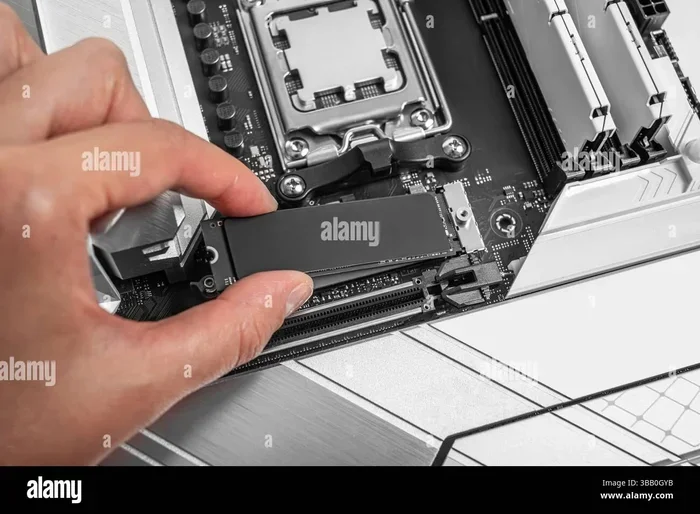
- Find the M 2 slot on your motherboard. Look for the one labeled PCIe 5.0 if available.
- Screw in the standoff if your slot does not have one built in.
- Insert the drive at a 30-degree angle and press it down flat.
- Secure it with the small M 2 screw.
- Enable XMP or DOCP in BIOS for best performance.
Always update your motherboard BIOS before installing a new Gen 5 drive. Firmware updates often improve compatibility and stability with the latest hardware.
Gen 5 M 2 NVMe SSD Pricing and Value
Price is always a factor when choosing storage. Gen 5 drives used to be very expensive. But prices have come down significantly in recent months.
A 1TB Gen 5 NVMe SSD now costs around $80 to $110. The 2TB models range from $140 to $180. The 4TB options are still premium, often costing $300 or more. Compare this to Gen 4 drives, which are still cheaper but closing the gap.
Is Gen 5 worth the extra cost? For most users, the answer depends on your workload. If you do heavy video editing or game development, the speed boost justifies the price. For casual gaming or general use, a Gen 4 drive still offers excellent value.
Keep an eye on prices during sales events. Gen 5 SSDs often drop 15-20% during Black Friday and other promotions. Patience can save you a nice chunk of money.
Common Mistakes and Expert Tips
Mistakes to Avoid
- Ignoring Thermals: Gen 5 drives run hotter than Gen 4. Without proper cooling, they throttle and lose speed.
- Skipping BIOS Updates: Outdated BIOS can cause compatibility issues or prevent the drive from running at full speed.
- Buying DRAM-Less for Heavy Use: DRAM-less Gen 5 drives are cheap but struggle with sustained workloads.
- Overestimating Real-World Gains: Gen 5 is fast, but not every task benefits equally from the extra bandwidth.
Expert Tips for Getting the Most Out of Your Gen 5 SSD
- Enable NVMe Driver Optimization: Make sure your OS uses the latest NVMe drivers for best performance.
- Keep Firmware Updated: Drive manufacturers release firmware updates that improve speed and fix bugs.
- Use a Quality Heatsink: Even a basic M 2 heatsink makes a big difference in sustained workloads.
- Pair with Fast RAM: Gen 5 NVMe speeds work best when paired with fast system memory.
Conclusion
The Gen 5 M 2 NVMe SSD represents a big leap forward in storage technology. It offers incredible speeds, excellent capacity options, and growing affordability. Whether you are a gamer, creator, or professional, Gen 5 NVMe storage delivers real-world benefits that you can feel.
If your system supports PCIe Gen 5, upgrading to a Gen 5 drive is one of the best ways to breathe new life into your setup. The faster load times, smoother multitasking, and quicker file transfers make a noticeable difference every single day.
Start by evaluating your needs and budget. Pick a drive from a reputable brand with good reviews. And do not forget the basics like proper cooling and updated firmware. With the right Gen 5 M 2 NVMe SSD, your system will feel faster and more responsive than ever before.
Frequently Asked Questions
What makes a Gen 5 M 2 NVMe SSD faster than Gen 4?
A Gen 5 M 2 NVMe SSD uses the PCIe Gen 5 interface, which doubles the bandwidth of Gen 4. This means up to 14 GB/s per lane compared to 7 GB/s on Gen 4. The result is faster sequential reads, quicker file transfers, and smoother performance in demanding workloads like video editing and gaming.
Do I need a special motherboard for a Gen 5 NVMe SSD?
Yes, your motherboard must have a PCIe Gen 5 M 2 slot. Intel 12th and 13th Gen Core processors and AMD Ryzen 7000 series support Gen 5. Check your motherboard manual to confirm which slots run at Gen 5 speeds. Some boards have both Gen 4 and Gen 5 slots, so placement matters.
Is a Gen 5 NVMe SSD worth it for gaming?
For most gamers, a Gen 5 SSD is worth it if you play modern titles that use DirectStorage. The faster load times and texture streaming make a real difference. However, if you mostly play older or casual games, the upgrade from Gen 4 may not be noticeable enough to justify the cost.
Can I use a Gen 5 M 2 NVMe SSD in a Gen 4 slot?
Yes, Gen 5 SSDs are backward compatible with Gen 4 and Gen 3 slots. The drive will work, but it will operate at the speed of the older generation. You still get the benefits of the Gen 5 controller and NAND, just not the top-end bandwidth speeds.
How hot do Gen 5 NVMe SSDs get?
Gen 5 NVMe SSDs run significantly hotter than Gen 4 drives under heavy workloads. Temperatures can reach 70-80°C during sustained transfers. This is why most Gen 5 drives come with heatsinks or thermal pads. Adding a quality M 2 heatsink helps maintain peak performance and prevents throttling.
What capacity should I choose for a Gen 5 NVMe SSD?
For most users, 1TB or 2TB is the sweet spot. Gamers and content creators should aim for 2TB or more to accommodate large game libraries and media files. If you need bulk storage for archives, consider a 4TB model. Always match your capacity to your workload and budget.