2tb Nvme Ssd Pcie 4.0
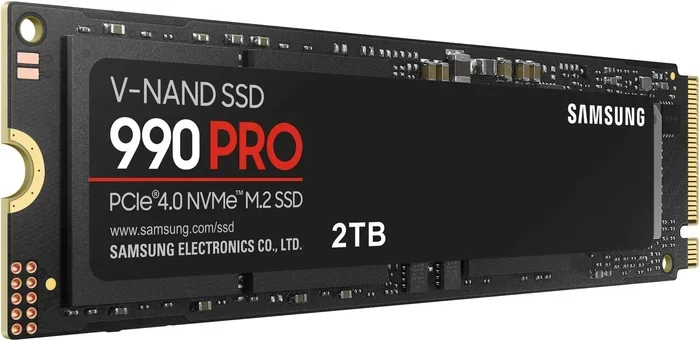
A 2TB NVMe SSD PCIe 4.0 delivers incredible speeds up to 7,000 MB/s read and 5,000 MB/s write. This guide covers everything you need to know about choosing, installing, and getting the most out of your next high-capacity NVMe drive.
If you have been shopping for a new storage drive lately, you have probably noticed the term 2TB NVMe SSD PCIe 4.0 everywhere. And for good reason. These drives are incredibly fast, offer plenty of space, and have become the go-to choice for gamers, creators, and anyone who wants their computer to feel snappy.
But what exactly makes a PCIe 4.0 NVMe drive so special? And is a 2TB capacity the right choice for you? In this guide, we will break it all down in simple terms. You will learn how these drives work, why they matter, and what to look for when shopping.
Whether you are upgrading a laptop, building a new desktop, or just curious about the latest in storage technology, this article has you covered. Let us dive in.
Key Takeaways
- Blazing Speeds: PCIe 4.0 NVMe SSDs offer read speeds up to 7,000 MB/s, making them the fastest consumer storage available.
- Massive Capacity: A 2TB capacity gives you plenty of room for games, videos, and professional workloads without breaking the bank.
- Easy Installation: Most modern motherboards support NVMe M.2 slots, making the upgrade process simple and straightforward.
- Cooling Matters: High-speed drives generate heat, so a heatsink or thermal pad can help maintain peak performance.
- Backward Compatible: PCIe 4.0 drives work in PCIe 3.0 slots too, though you will get slightly lower speeds.
- Great Value: Prices for 2TB NVMe SSDs have dropped significantly, making them an excellent choice for everyday users and professionals alike.
📑 Table of Contents
What Is a 2TB NVMe SSD PCIe 4.0?
Let us start with the basics. NVMe stands for Non-Volatile Memory Express. It is a protocol designed specifically for flash storage. Think of it as a super-fast highway that lets your SSD communicate with your computer at remarkable speeds.
PCIe 4.0 is the fourth generation of the PCI Express interface. Each new generation doubles the bandwidth of the previous one. So PCIe 4.0 offers twice the speed of PCIe 3.0. When you combine NVMe with PCIe 4.0 and a 2TB capacity, you get a drive that can handle almost anything you throw at it.
A 2TB NVMe SSD PCIe 4.0 typically delivers sequential read speeds of 5,000 to 7,000 MB/s and write speeds of 4,000 to 5,000 MB/s. To put that in perspective, a standard SATA SSD tops out around 550 MB/s. That means a PCIe 4.0 drive can be over ten times faster.
Why Does This Matter for Everyday Use?
You might wonder if those blazing speeds actually matter in daily use. The answer is yes. Here are a few real-world benefits:
- Faster boot times: Your operating system loads in seconds instead of minutes.
- Quick game launches: Open heavy games almost instantly.
- Fast file transfers: Move large files like video projects or photo libraries in a fraction of the time.
- Smoother multitasking: Run multiple apps and browser tabs without slowdowns.
If you are interested in other NVMe options, check out our guide on NVMe PCIe M.2 SSDs for more details on different form factors and configurations.
How PCIe 4.0 Compares to Previous Generations
Understanding the differences between PCIe generations helps you appreciate what a PCIe 4.0 drive brings to the table. Let us compare them side by side.
PCIe 3.0 vs PCIe 4.0
PCIe 3.0 was the standard for several years. It offered a maximum bandwidth of about 1 GB/s per lane. PCIe 4.0 doubles that to roughly 2 GB/s per lane. For a typical NVMe SSD with four lanes, that means a massive jump from 3,500 MB/s to 7,000 MB/s in sequential read speeds.
However, real-world performance gains are sometimes more modest. For sequential reads and large file transfers, the difference is significant. For everyday tasks like browsing or office work, you might not notice a huge change. But for professionals working with large datasets or video editors handling 4K footage, the upgrade can be transformative.
PCIe 5.0: What Is Coming Next?
PCIe 5.0 is already on the horizon. It promises speeds up to 14,000 MB/s in sequential reads. But for most users, PCIe 4.0 is more than enough. The technology is mature, drives are affordable, and the real-world benefits are clear. If you want to learn more about the latest in high-capacity drives, our article on 2TB NVMe M.2 SSDs covers some excellent options worth exploring.
Benefits of a 2TB Capacity Drive
Choosing a 2TB drive hits a sweet spot between price and storage space. Here is why this capacity makes so much sense:
Perfect for Gaming
Modern PC games are getting huge. Titles like Call of Duty, Cyberpunk 2077, and Starfield can easily take up 100 GB to 150 GB each. With a 2TB drive, you can comfortably store 10 to 15 large games without constantly deleting and reinstalling.
Great for Content Creators
Video editors, photographers, and designers need fast storage with plenty of room. A 2TB NVMe drive gives you the speed to edit 4K footage smoothly and the capacity to store raw footage, project files, and exports.
Ideal as a Boot and Application Drive
Many users choose a smaller SSD for their operating system and apps, then add a larger hard drive for storage. But with prices dropping, a single 2TB NVMe drive can handle both roles beautifully. You get fast boot times, quick app launches, and ample space for all your files.
How to Choose the Right 2TB NVMe SSD PCIe 4.0
Not all NVMe drives are created equal. Here are the key factors to consider when shopping.
Read and Write Speeds
Look for drives that advertise sequential read speeds of at least 5,000 MB/s. Write speeds of 4,000 MB/s or higher are also important. These numbers tell you how fast the drive can move data in and out. For most users, any PCIe 4.0 NVMe drive in this range will feel lightning fast.
DRAM Cache
DRAM cache is a small memory chip on the drive that helps manage data. Drives with DRAM tend to be more consistent in performance, especially during heavy workloads. If you plan to use the drive for professional tasks, prioritize models with a DRAM cache.
Endurance and Warranty
Endurance is measured in TBW (Terabytes Written). A higher TBW means the drive can handle more data over its lifetime. Most quality 2TB NVMe drives come with warranties of five years or more. Look for a TBW rating of at least 1,200 TBW for peace of mind.
Form Factor and Compatibility
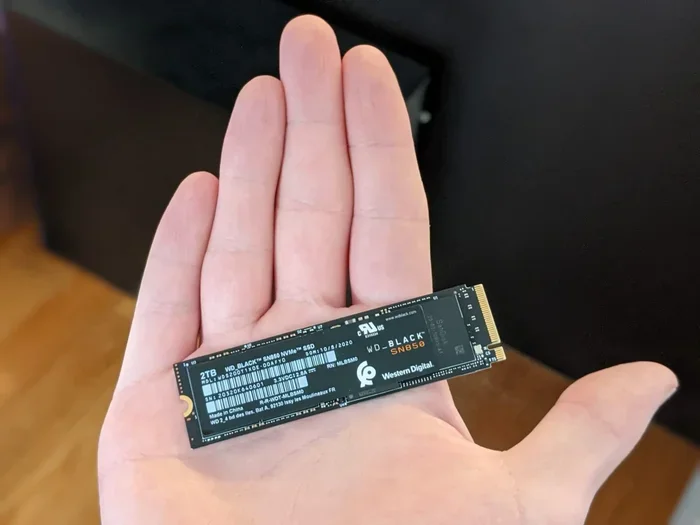
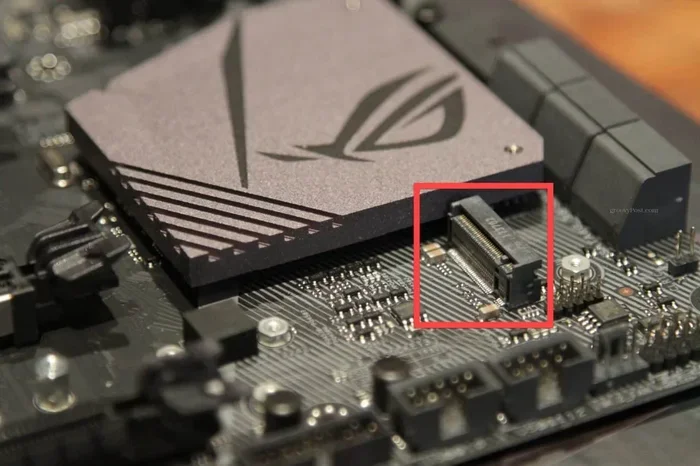
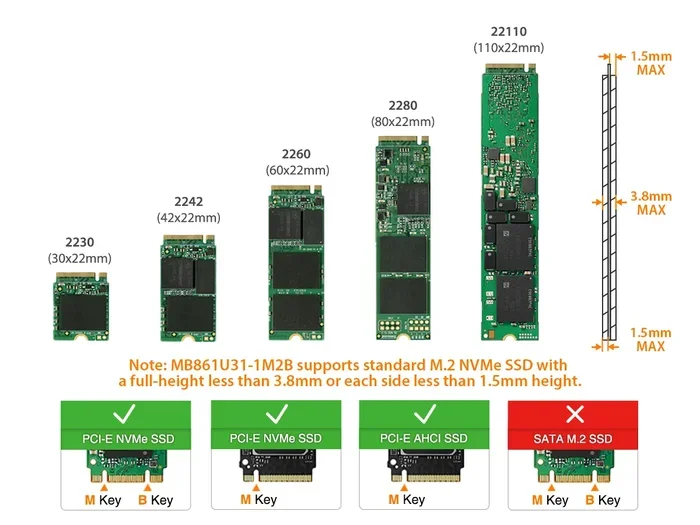
Most NVMe SSDs come in the M.2 2280 form factor. This is a small stick that plugs directly into your motherboard. Before buying, check that your system has an M.2 slot that supports PCIe 4.0 NVMe. You can find this information in your motherboard manual or on the manufacturer’s website.
If you want to explore more about different M.2 NVMe options, our piece on PCIe NVMe M.2 SSD drives provides a deeper look at compatible models and configurations.
Heatsink and Thermal Management
High-speed NVMe drives can get hot under heavy load. Many drives come with a heatsink included, or you can add one separately. A good heatsink keeps temperatures in check, which helps maintain consistent performance over long workloads.
Installation and Setup Tips
Installing a 2TB NVMe SSD is easier than you might think. Here is a quick overview of the process.
Step-by-Step Installation
- Turn off your PC and unplug it from the power outlet.
- Open your case and locate an available M.2 slot on your motherboard.
- Remove the heatsink or protective cover from the M.2 slot if needed.
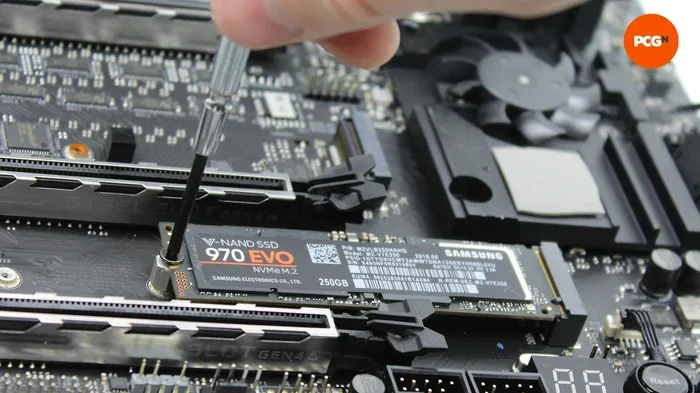
- Insert the SSD at a 30-degree angle and press it down firmly.
- Secure the drive with the small screw that came with your motherboard.
- Reattach the heatsink if your drive or motherboard includes one.
- Close the case, plug in your PC, and power it on.
Initial Setup
Once your PC boots up, you may need to initialize the drive through Disk Management (Windows) or Disk Utility (Mac). Format the drive and assign a drive letter, and you are good to go.
For users who want to optimize their setup further, consider pairing your NVMe drive with a larger secondary storage drive. This way, you get the speed of NVMe for your most demanding tasks and the capacity of a larger drive for bulk storage.
Common Mistakes to Avoid
Even with a great drive, a few common mistakes can hurt your experience. Here are some pitfalls to watch out for:
- Buying a PCIe 4.0 drive for a PCIe 3.0 motherboard: It will still work, but you will not get the full speed benefit. Make sure your motherboard supports PCIe 4.0 before buying.
- Skipping the heatsink: Without proper cooling, your drive may throttle under heavy loads and slow down.
- Not checking BIOS settings: Some motherboards need NVMe support enabled in the BIOS. Check this before installing.
- Ignoring firmware updates: Drive manufacturers often release firmware updates that improve performance and fix bugs. Check for updates after installation.
Top Use Cases for a 2TB NVMe SSD PCIe 4.0
Let us look at who benefits most from this type of drive.
Gamers
A 2TB NVMe drive is a dream for gamers. Fast load times, plenty of space for a growing library, and smooth performance make it an essential upgrade for any gaming PC.
Video Editors and Designers
Working with large video files and high-resolution images demands both speed and capacity. A PCIe 4.0 NVMe drive handles these workloads with ease.
Professionals and Students
From running virtual machines to storing research data, a 2TB NVMe drive provides the performance and space needed for demanding academic and professional tasks.
General Users
Even if you just browse the web, stream videos, and play casual games, a 2TB NVMe drive makes your entire system feel faster and more responsive.
Final Thoughts
A 2TB NVMe SSD PCIe 4.0 is one of the best upgrades you can make to your computer. The combination of massive capacity and blistering speeds transforms how you use your PC. Whether you are a gamer, a creator, or just someone who wants a faster machine, this type of drive delivers real, noticeable improvements.
Prices have come down significantly, making now a great time to upgrade. Just remember to check your motherboard compatibility, consider a heatsink, and pick a drive with solid endurance ratings. With the right choice, your 2TB NVMe SSD PCIe 4.0 will serve you well for years to come.
Ready to upgrade? Explore our 2TB M.2 NVMe SSD options to find the perfect drive for your needs.
Frequently Asked Questions
Is a PCIe 4.0 NVMe SSD worth it over PCIe 3.0?
Yes, if your motherboard supports it. PCIe 4.0 offers roughly double the bandwidth of PCIe 3.0, which translates to faster file transfers and quicker load times. For gaming and content creation, the difference is very noticeable.
Can I use a PCIe 4.0 NVMe SSD in a PCIe 3.0 slot?
Absolutely. PCIe 4.0 drives are backward compatible with PCIe 3.0 slots. However, the drive will run at PCIe 3.0 speeds, which are slower than the full PCIe 4.0 potential.
Do I need a heatsink for my NVMe SSD?
It depends on your workload. For casual use, the drive may stay cool on its own. But for heavy tasks like video editing or extended gaming sessions, a heatsink helps maintain consistent speeds by preventing thermal throttling.
How long does a 2TB NVMe SSD last?
Most quality 2TB NVMe drives have a lifespan of 5 to 10 years under normal use. Endurance is measured in TBW, and a typical 2TB PCIe 4.0 drive can handle 1,200 TBW or more, which is more than enough for most users.
What is the difference between NVMe and SATA SSDs?
NVMe SSDs use the PCIe interface and are significantly faster than SATA SSDs. A PCIe 4.0 NVMe drive can reach speeds up to 7,000 MB/s, while a SATA SSD maxes out around 550 MB/s. NVMe also has lower latency and better efficiency.
Can I install a 2TB NVMe SSD myself?
Yes, installing an NVMe M.2 SSD is one of the easiest PC upgrades. You just need an available M.2 slot on your motherboard, a screwdriver, and a few minutes. Most drives come with screws and instructions included.