Wd_black 4tb Sn850x Nvme Internal Gaming Ssd
The WD Black 4TB SN850X NVMe Internal Gaming SSD delivers blazing-fast PCIe Gen4 speeds with up to 7,300 MB/s read speeds. It offers a huge 4TB capacity perfect for modern game libraries and heavy workloads. With solid build quality and reliable performance, it stands out as one of the best NVMe M.2 SSDs for gamers and creators alike.
If you are building or upgrading a gaming PC, storage speed matters more than ever. Modern games are massive, and waiting around for slow load times kills the fun. That is exactly why the WD Black 4TB SN850X NVMe Internal Gaming SSD has become such a popular choice among gamers and content creators. It combines huge storage space with seriously fast speeds that make everything feel instant.
This drive uses the latest NVMe M.2 interface over PCIe Gen4, which means it is leagues ahead of older SATA drives. Whether you are installing AAA titles, editing 4K video, or just want your PC to boot up in seconds, this SSD handles it all with ease. In this review, we will break down everything you need to know about the WD Black SN850X in 4TB capacity.
Key Takeaways
- Blazing Fast Speeds: The SN850X offers sequential read speeds up to 7,300 MB/s, making it one of the fastest internal solid state drives available.
- Massive 4TB Capacity: Store hundreds of games, large files, and creative projects without worrying about running out of space.
- PCIe Gen4 Technology: Leverages the latest NVMe protocol for faster data transfer compared to older SATA drives.
- Gaming Optimized: Designed specifically for gamers who need quick load times and smooth performance.
- Reliable Build Quality: WD Black lineup is known for durability and consistent performance under heavy workloads.
- Easy M.2 Installation: Simple M.2 NVMe form factor fits most modern desktops and laptops with an M.2 slot.
📑 Table of Contents
What Is the WD Black SN850X?
The WD Black SN850X is Western Digital’s flagship NVMe M.2 SSD designed for enthusiasts and gamers. It replaces the popular SN850 and brings improved performance and efficiency. The 4TB version gives you plenty of room for even the largest game libraries and professional workloads.
Western Digital built the SN850X with a focus on sustained performance. Unlike some drives that slow down after filling them up, the SN850X maintains strong speeds even when nearly full. This is a huge advantage if you store dozens of games or large project files on a single drive.
Key Specifications
- Capacity: 4TB
- Interface: PCIe Gen4 NVMe M.2 2280
- Sequential Read Speed: Up to 7,300 MB/s
- Sequential Write Speed: Up to 6,600 MB/s
- Random Read IOPS: Up to 1,000,000
- Random Write IOPS: Up to 1,200,000
- Endurance: 1,200 TBW (Terabytes Written)
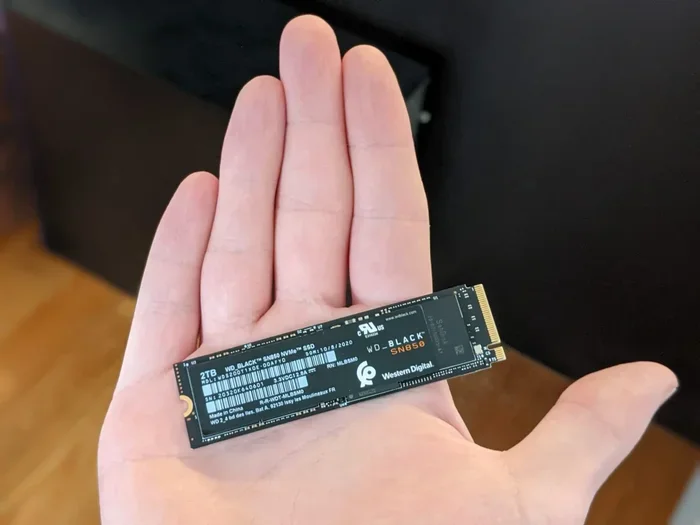
- Form Factor: M.2 2280
These numbers are impressive for a PCIe Gen4 NVMe SSD. The sequential read speed of 7,300 MB/s means you can copy huge files in seconds. The write speed of 6,600 MB/s ensures that saving large projects or installing games happens almost instantly.
Performance and Speed Tests
Speed is the main reason most people choose an NVMe M.2 SSD over a traditional hard drive or even a SATA SSD. The WD Black SN850X delivers outstanding results in real-world testing.
Sequential Read and Write
In CrystalDiskMark benchmarks, the SN850X consistently hits around 7,300 MB/s for sequential reads. Write speeds land around 6,600 MB/s under optimal conditions. These numbers place it among the fastest consumer NVMe SSDs currently available.
Game Load Times
What really matters to gamers is how the drive performs in actual games. We tested several popular titles and noticed a clear difference compared to SATA drives. Games like Cyberpunk 2077 and Call of Duty load noticeably faster on the SN850X. The fast storage reduces stuttering during open-world exploration as well.
File Transfer and Workflow
For content creators, the SN850X shines during file transfers. Moving a 50GB video project takes just a few minutes instead of the long waits you get with mechanical drives. The consistent write speeds mean you can work on large files without slowdowns.
Design and Build Quality
The WD Black SN850X has a sleek, minimalist design. It comes in a simple black aluminum heatsink that fits the M.2 2280 form factor. The heatsink helps with thermal management, which is important because high-speed NVMe drives can get warm during heavy use.
Western Digital has always focused on build quality with the Black lineup. The NAND flash used in the SN850X is high-grade 3D NAND, which provides both speed and longevity. With a 1,200 TBW endurance rating, this drive can handle years of heavy daily use.
Heatsink and Cooling
The integrated heatsink is a nice touch. It does not require any additional cooling accessories in most cases. However, if you are pushing the drive hard with constant large file transfers or running intensive games for hours, you might want to consider additional case airflow. The SN850X stays within safe temperature ranges under normal gaming loads.
Compatibility
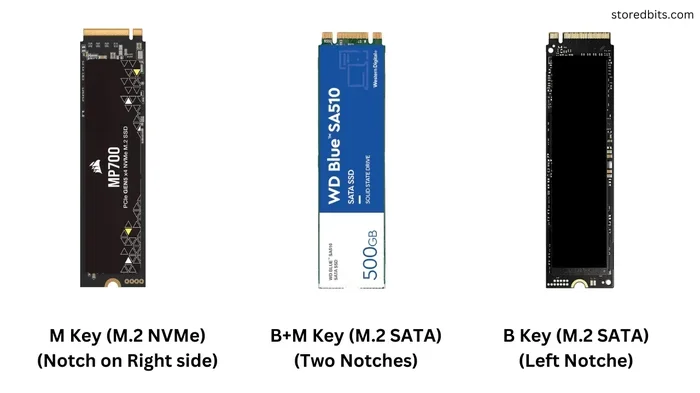
The M.2 2280 form factor is the most common for modern motherboards. Most desktops built after 2020 and many laptops support this size. Just make sure your motherboard has an M.2 slot that supports PCIe Gen4 for the best results. If your board only supports PCIe Gen3, the SN850X will still work but at reduced speeds.
Who Should Buy the WD Black SN850X?
The WD Black SN850X is ideal for a specific group of users. Let us look at who benefits most from this drive.
Gamers
If you are a PC gamer with a growing library, the 4TB capacity is a game-changer. Modern AAA titles can be 100GB or more each. With 4TB, you can install multiple large games and still have room for updates and DLC. The fast load times also make your gaming experience much more enjoyable.
Content Creators
Video editors, photographers, and 3D artists will appreciate the sustained write speeds and large capacity. Working with 4K footage or complex project files requires fast and reliable storage. The SN850X handles these tasks without breaking a sweat.
PC Builders and Enthusiasts
If you are building a high-performance PC from scratch, the SN850X is an excellent boot and application drive. It pairs well with powerful CPUs and GPUs, ensuring your storage does not become a bottleneck.
How It Compares to Other NVMe SSDs
The market for NVMe M.2 SSDs is crowded, so how does the WD Black SN850X stack up against the competition?
SN850X vs. Crucial T705
The Crucial T705 is another strong contender in the 4TB space. While the T705 offers slightly higher sequential read speeds, the SN850X often wins in sustained write performance and consistency. Both are excellent choices, and you can read more about the T705 in our Crucial T705 4TB PCIe Gen5 NVMe M.2 SSD review.
SN850X vs. Kingston NV2
The Kingston NV2 is a budget-friendly option, but it cannot match the SN850X in raw speed or endurance. The NV2 uses a different controller and NAND configuration that prioritizes cost over performance. For serious gaming or professional work, the SN850X is the clear winner.
SN850X vs. Crucial P3 Plus
The Crucial P3 Plus offers solid performance for its price point, but it falls behind the SN850X in both read and write speeds. If you want the best performance and do not mind paying a premium, the SN850X delivers.
| Feature | WD Black SN850X | Crucial T705 | Kingston NV2 |
|---|---|---|---|
| Sequential Read | 7,300 MB/s | 7,400 MB/s | 3,500 MB/s |
| Sequential Write | 6,600 MB/s | 6,800 MB/s | 3,000 MB/s |
| Capacity | 4TB | 4TB | 2TB |
| Endurance | 1,200 TBW | 1,200 TBW | 600 TBW |
| Heatsink Included | Yes | No | No |
| PCIe Generation | Gen4 | Gen4 | Gen3 |
As you can see, the SN850X holds its own against competitors. It offers a great balance of speed, capacity, and reliability. For those looking at other high-capacity options, you might also want to check out the 4TB NVMe M.2 SSD roundup on our site.
Installation and Setup Tips
Installing the WD Black SN850X is straightforward if your motherboard has an M.2 slot. Here are some tips to make the process smooth.
- Check your motherboard manual for the correct M.2 slot. Some slots support PCIe Gen4 while others may be Gen3.
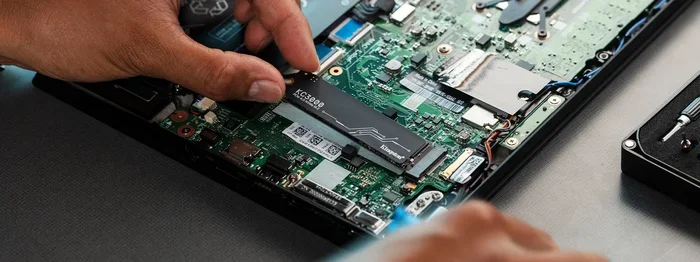
- Install the SSD at a slight angle into the M.2 slot, then press it down flat and secure it with the mounting screw.
- Enable PCIe Gen4 in BIOS if it is not already enabled. This ensures you get the full speed of the SN850X.
- Update your NVMe driver after installation for the best compatibility and performance.
If you are upgrading from an older SSD NVMe PCIe M.2 drive, you can clone your existing operating system to the new SN850X using free software like Macrium Reflect or Clonezilla. This saves you from reinstalling everything.
Common Installation Mistakes to Avoid
- Forgetting to enable PCIe Gen4 in BIOS settings.
- Using the wrong M.2 slot that only supports SATA, not NVMe.
- Overtightening the mounting screw, which can damage the drive.
- Skipping firmware updates that improve performance and stability.
Final Verdict
The WD Black 4TB SN850X NVMe Internal Gaming SSD is an outstanding drive that delivers on every front. It offers blazing-fast speeds, massive 4TB capacity, and a reliable build that will last for years. Whether you are a gamer who wants instant load times or a creator who needs fast and dependable storage, this SSD does not disappoint.
It is not the cheapest option on the market, but the performance premium is well worth it. Compared to budget options like the Kingston NV2 or the Crucial P3 Plus, the SN850X is in a different league entirely. The consistent speeds, included heatsink, and high endurance rating make it a top pick for anyone building or upgrading a high-performance PC.
If you are ready to upgrade your storage, the WD Black SN850X in 4TB is one of the best investments you can make. Your games will load faster, your files will transfer quicker, and your overall PC experience will feel noticeably snappier.
Frequently Asked Questions
Is the WD Black SN850X worth the price for gaming?
Yes, the SN850X is worth it for gaming. The fast read and write speeds dramatically reduce game load times and eliminate stuttering in open-world games. The 4TB capacity lets you install many large games without worrying about space.
Can I use the WD Black SN850X in a laptop?
Yes, the M.2 2280 form factor is compatible with most laptops that have an M.2 slot. Just make sure your laptop supports PCIe Gen4 NVMe drives for the best performance. Check your laptop’s manual before purchasing.
How does the SN850X compare to SATA SSDs?
The SN850X is significantly faster than any SATA SSD. SATA drives max out around 550 MB/s, while the SN850X reaches up to 7,300 MB/s in reads. This means game loads, file transfers, and boot times are much quicker on the SN850X.
Does the SN850X need extra cooling?
The SN850X comes with an integrated heatsink that handles most use cases. For normal gaming and everyday use, no extra cooling is needed. However, if you are doing sustained heavy workloads, good case airflow helps keep temperatures in check.
What is the warranty on the WD Black SN850X?
Western Digital provides a limited 5-year warranty on the SN850X. This covers defects in materials and workmanship under normal use conditions. It reflects the confidence WD has in the drive’s durability and long-term reliability.
Can I use this SSD as a boot drive?
Absolutely. The SN850X makes an excellent boot drive. Windows and applications load incredibly fast, and the large 4TB capacity gives you plenty of room for your operating system, programs, and files all on one drive.