Which Is Faster Usb C or Ethernet
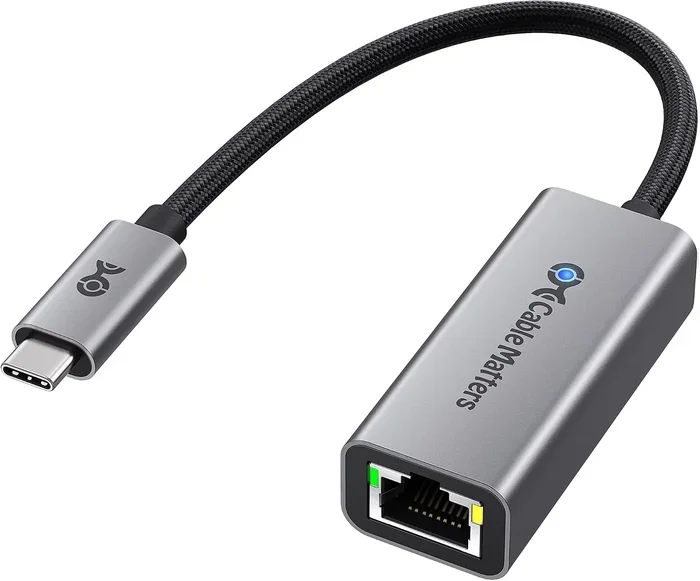
USB C and Ethernet each serve different purposes, and speed depends on the version and use case. USB-C can reach up to 40 Gbps with Thunderbolt 4, while standard Gigabit Ethernet maxes out at 1 Gbps. However, real-world speeds vary based on cables, adapters, and network conditions.
When you need to move files fast or get online quickly, the question of USB C vs Ethernet speed comes up a lot. Both connections have their strengths, and the answer is not always straightforward. USB-C has evolved into a powerhouse connector, while Ethernet remains the go-to for stable internet access. In this guide, we break down the speed differences, real-world performance, and help you decide which connection fits your needs best.
Whether you are a gamer, a content creator, or someone who just wants a fast and reliable connection, understanding the speed capabilities of each port matters. We will look at the technical specs, compare real-world performance, and share practical tips to get the most out of your setup.
Key Takeaways
- USB-C can be faster: Modern USB-C with Thunderbolt 4 supports speeds up to 40 Gbps, far exceeding standard Ethernet.
- Etherbeat Ethernet is reliable: Gigabit Ethernet offers a steady 1 Gbps connection with low latency for stable tasks.
- Cable quality matters: Both USB-C and Ethernet speeds depend heavily on the cable and adapter you use.
- Use cases differ: USB-C shines for device-to-device transfers, while Ethernet excels for consistent internet access.
- Adapters can bottleneck speed: Using a poor-quality USB adapter can limit your transfer speeds significantly.
- Thunderbolt changes the game: Thunderbolt over USB-C delivers the fastest possible connection available today.
📑 Table of Contents
Understanding USB-C Speed
USB-C is more than just a connector shape. It is a versatile port that supports different data transfer standards. The speed you get from USB-C depends on the version and protocol your device supports. Let us break this down.
USB 3.1 and USB 3.2 Speeds
USB 3.1 offers data transfer speeds of up to 10 Gbps. USB 3.2 pushes that to 20 Gbps. These speeds are great for external storage devices. For example, a SanDisk Extreme Portable 2TB External USB-C NVMe SSD can take advantage of these fast transfer rates to move large files in seconds.
Thunderbolt and USB4 Speeds
Thunderbolt 3 and Thunderbolt 4 use the USB-C connector and offer speeds up to 40 Gbps. USB4 also reaches 40 Gbps. These protocols are a game-changer for professionals who work with large video files or need to connect multiple high-speed devices through a single USB-C hub. The bandwidth available with Thunderbolt is massive and far outpaces most wired internet connections.
What Limits USB-C Speed?
Several factors can limit your USB-C speed:
- The cable quality and length
- The USB version your port supports
- The adapter or enclosure you use
- The device capabilities on both ends
For instance, if you use a cheap M.2 NVMe SSD to USB 3.1 adapter, your transfer speeds will cap at USB 3.1 limits even if your SSD is capable of much more.
Understanding Ethernet Speed
Ethernet has been the backbone of wired networking for decades. It provides a direct, stable connection to your network or internet. Let us look at the common Ethernet speeds.
Gigabit Ethernet
Standard Gigabit Ethernet delivers 1 Gbps speeds. This is the most common type found in homes and offices. It is reliable, consistent, and perfect for everyday internet use, video streaming, and online gaming. Latency on Gigabit Ethernet is typically very low, which matters for real-time applications.
Faster Ethernet Options
2.5 Gigabit Ethernet and 10 Gigabit Ethernet exist but are less common in home setups. They offer 2.5 Gbps and 10 Gbps respectively. These are mostly found in enterprise environments or advanced home networks with specialized equipment.
What Limits Ethernet Speed?
Your Ethernet speed depends on several factors:
- The Ethernet cable category (Cat5e, Cat6, Cat6a, Cat7)
- Your router and network card capabilities
- Internet service provider speed limits
- Network congestion
A standard Cat6 Ethernet cable can handle up to 10 Gbps at short distances. But if your internet plan only gives you 100 Mbps, the cable speed does not matter. The bottleneck is your ISP.
USB-C vs Ethernet: Head-to-Head Speed Comparison
Let us put the two side by side to see how they compare in different scenarios.
| Feature | USB-C (Thunderbolt 4) | Gigabit Ethernet |
|---|---|---|
| Max Speed | 40 Gbps | 1 Gbps |
| Typical Use | Device-to-device transfers | Internet and network access |
| Latency | Very low | Very low |
| Distance Limit | Short (cable length dependent) | Up to 100 meters |
| Stability | Good | Excellent |
| Versatility | High (data, video, power) | Network only |
As you can see, USB-C wins on raw speed by a wide margin. But Ethernet wins on stability and distance. The right choice depends on what you are trying to accomplish.
If you are transferring files between two devices, USB-C is the clear winner. A direct USB-C connection using a high-quality cable or an enclosure like the M.2 NVMe to USB-C SSD enclosure can deliver speeds that Ethernet simply cannot match for local transfers.
If you need a steady internet connection for browsing, streaming, or online gaming, Ethernet provides the consistency that USB-C cannot offer over a network.
Real-World Performance Differences
Theory is great, but real-world performance tells the real story. Let us look at how both connections perform in everyday situations.
File Transfer Speeds
When moving files between devices, USB-C is significantly faster. A Thunderbolt 4 connection can transfer a 100 GB file in under 30 seconds. The same file over a Gigabit Ethernet connection would take around 15 minutes. This difference is huge for video editors and anyone working with large datasets.
Internet Browsing and Streaming
For internet use, Ethernet holds a clear advantage. A direct Ethernet connection provides a stable 1 Gbps link to your router. USB-C can also connect to Ethernet through an adapter, but adding that extra step introduces potential points of failure.
Gaming
For online gaming, latency and stability matter more than raw bandwidth. Ethernet provides a dedicated, low-latency connection that is hard to beat. However, if your game does not require constant internet (like single-player titles), USB-C speeds for loading game assets from an external drive can be a huge benefit.
Video Conferencing
Both connections work well for video calls. Ethernet offers a more stable connection, which reduces the chance of drops. USB-C can handle video conferencing easily, especially when using a USB-C hub that connects your webcam, microphone, and display all at once.
When to Use USB-C vs Ethernet
Knowing when to use each connection helps you get the best performance. Here is a simple guide.
Choose USB-C When
- You are transferring large files between devices
- You need to connect multiple peripherals through a single port
- You are using external storage like an NVMe SSD via a USB-C adapter
- You need to charge your device while transferring data
- You want the fastest possible local data speeds
Choose Ethernet When
- You need a stable internet connection
- You are gaming online and need low latency
- You are streaming high-quality content
- You want a consistent connection without interference
- You are setting up a home or office network
Common Mistakes That Slow Down Your Speeds
Even with the best hardware, poor choices can bottleneck your connection. Here are mistakes to avoid.
Using Low-Quality Cables
A cheap USB-C cable may only support USB 2.0 speeds (480 Mbps). Always use certified cables that match the speed standard you need. The same goes for Ethernet cables. A Cat5 cable limits you to 100 Mbps, even if your network supports Gigabit speeds.
Ignoring Adapter Limitations
Adapters are often the weakest link. If you use a low-quality NVMe SSD to USB adapter, it may not support the full speed of your drive. Always check the adapter specifications before purchasing.
Assuming USB-C Means Maximum Speed
Not all USB-C ports are created equal. Some only support USB 2.0 or USB 3.0. Check your device specifications to know exactly what speed your USB-C port supports. The connector shape does not guarantee the speed.
Expert Tips for Getting the Best Speeds
Follow these tips to maximize your USB-C and Ethernet performance:
- Invest in certified cables. Look for USB-IF certification for USB-C cables and TIA/EIA standards for Ethernet cables.
- Keep cables short. Longer cables can reduce signal quality and speed. Keep USB-C cables under 2 meters for best results.
- Update your drivers. Outdated network or USB drivers can limit your speeds. Keep them up to date.
- Use a wired connection when possible. For critical tasks, Ethernet provides the most reliable performance.
- Check your network speed. Use tools like speedtest.net to verify you are getting the speeds you pay for from your ISP.
Conclusion
The answer to which is faster, USB-C or Ethernet depends on what you need. For raw data transfer speeds, USB-C wins hands down, especially with Thunderbolt 4 reaching 40 Gbps. For stable, consistent internet connectivity, Ethernet remains the gold standard with its low latency and reliable performance.
Most users benefit from having both options available. Use USB-C for fast file transfers and device connections, and rely on Ethernet for your internet needs. Understanding the strengths of each connection helps you build a faster, more efficient setup. Choose the right tool for the right job, and you will get the best performance every time.
Frequently Asked Questions
Is USB-C faster than Ethernet for internet?
USB-C itself does not provide internet access. However, USB-C can connect to Ethernet through an adapter. A direct Ethernet connection to your router is usually more stable and reliable than going through a USB-C adapter. For pure internet speed, a wired Ethernet connection is the better choice.
Can USB-C reach 10 Gbps speeds?
Yes, USB 3.1 and USB 3.2 Gen 2 support speeds up to 10 Gbps. Thunderbolt 3 and Thunderbolt 4 over USB-C can reach 40 Gbps. The speed you get depends on your cable, port, and device capabilities.
Do I need a special Ethernet cable for Gigabit speeds?
Yes, you need at least a Cat5e Ethernet cable for Gigabit speeds. Cat6 cables offer better performance and future-proofing. Using an older Cat5 cable will limit your speed to 100 Mbps.
Can I use USB-C to Ethernet adapters for gaming?
Yes, USB-C to Ethernet adapters work well for gaming. They provide a wired connection that reduces latency compared to Wi-Fi. However, a direct Ethernet connection to your router is slightly more stable and reliable.
Why is my USB-C transfer speed slower than expected?
Several factors can slow down USB-C transfers. These include using an incompatible cable, a USB 2.0 port, a slow adapter, or a device that does not support the speed standard you need. Always check your cable and port specifications.
Which is better for external SSDs, USB-C or Ethernet?
USB-C is the clear winner for external SSDs. Ethernet is designed for networking, not storage. A USB-C connection lets you access your external SSD at full speed, while Ethernet has no practical use for direct storage access.