Is There a Such Thing as Wireless Usb Headset
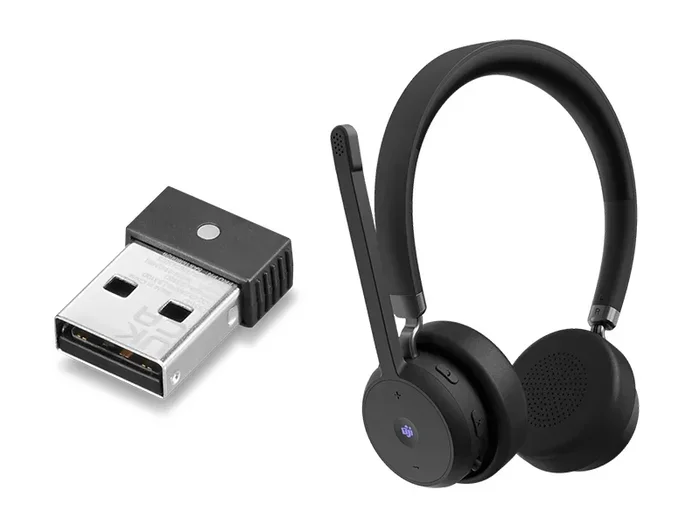
Yes, wireless USB headsets are real and widely available. These headsets use a USB dongle or adapter to connect wirelessly to your device, offering freedom of movement and solid audio quality. Whether you need one for gaming, work calls, or media, a wireless USB headset can be a great choice.
Have you ever wondered if a wireless USB headset is actually a real product? Maybe you have seen ads for them or heard friends talk about the freedom of going cord-free. The short answer is yes, they absolutely exist. A wireless USB headset connects to your computer or laptop through a small USB receiver, giving you wireless audio without the hassle of cords tangling around your desk.
These headsets have become popular for good reason. They combine the convenience of wireless freedom with the reliable connection of USB technology. Whether you are gaming, attending video calls, or just listening to music, a wireless USB headset can make your experience much better. In this guide, we will break down everything you need to know. We will cover how they work, what to look for, and whether one is right for you.
Key Takeaways
- A wireless USB headset exists: It uses a USB dongle or adapter to transmit audio wirelessly to your device.
- They work on multiple devices: Most models support plug-and-play connectivity with PCs, laptops, and consoles.
- Latency is low: USB wireless headsets offer faster response times than Bluetooth in many cases.
- Gaming and work both benefit: These headsets deliver clear mic quality and immersive sound.
- Battery life varies: Most last between 10 and 30 hours depending on usage and features.
- Range matters: Most USB wireless headsets work well within 10 to 30 feet of the receiver.
- They are easy to set up: Simply plug in the USB adapter and you are ready to go.
📑 Table of Contents
- What Is a Wireless USB Headset?
- Benefits of Using a Wireless USB Headset
- Wireless USB Headset vs Bluetooth Headset
- Who Should Use a Wireless USB Headset?
- What to Look for When Buying a Wireless USB Headset
- Common Mistakes to Avoid
- Quick Tips for Getting the Most Out of Your Wireless USB Headset
- Final Thoughts
What Is a Wireless USB Headset?
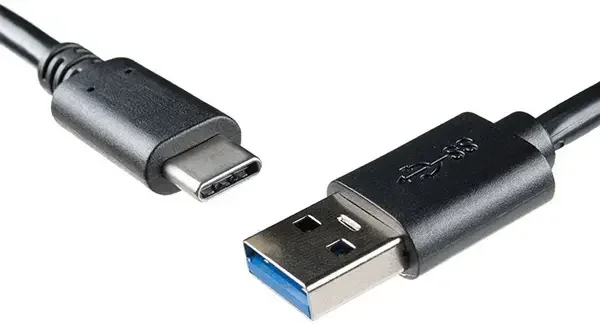
A wireless USB headset is a headset that connects to your device using a USB wireless adapter or dongle. Unlike traditional wired headsets, there is no cable running from the headset to your computer. Instead, a small USB receiver plugs into your device and sends audio signals to the headset wirelessly.
Do not confuse these with Bluetooth headsets. A USB wireless headset uses its own dedicated USB receiver, which is different from the Bluetooth protocol. This distinction matters because it affects connection stability, latency, and audio quality.
How Does It Work?
The USB dongle acts as the bridge between your device and the headset. Here is a simple breakdown of the process:
- The USB receiver plugs into your computer or laptop.
- The receiver sends a wireless signal to the headset.
- The headset receives the signal and plays the audio.
- The headset microphone sends audio back through the same wireless connection.
Most USB wireless headsets use a 2.4 GHz wireless band. This is the same frequency many wireless accessories use. It provides a stable connection with minimal interference from other devices.
Benefits of Using a Wireless USB Headset
There are many reasons people choose a wireless USB headset over a wired one. Let us look at the biggest advantages.
Freedom of Movement
With no cable attached, you can move around freely. You can get up, stretch, walk around your room, or even step away from your desk without losing your connection. This is especially helpful during long work meetings or gaming sessions.
Easy Setup
Most wireless USB headsets are plug and play. You do not need to install complicated software or pair devices. Just plug the USB receiver into an available port, and you are good to go. This makes them very beginner-friendly.
Stable Connection
Because the headset uses a dedicated USB receiver, the connection tends to be very stable. You will not experience the random dropouts that can happen with Bluetooth devices. This is a big plus for gamers and professionals who need a reliable connection.
Low Latency
Latency is the delay between when audio is sent and when you hear it. USB wireless headsets generally have lower latency than Bluetooth options. This means the audio stays in sync with what is happening on your screen. For gaming and video calls, this makes a noticeable difference.
Better Battery Life
Many wireless USB headsets offer impressive battery life. Depending on the model, you can get anywhere from 10 to 30 hours of use on a single charge. Some even come with quick-charge features, so a short charging session gives you hours of playback.
Wireless USB Headset vs Bluetooth Headset
People often ask about the difference between a wireless USB headset and a Bluetooth headset. Both are wireless, but they work differently. Understanding these differences can help you choose the right one.
| Feature | USB Wireless Headset | Bluetooth Headset |
|---|---|---|
| Connection | USB dongle/receiver | Bluetooth pairing |
| Latency | Very low | Slightly higher |
| Range | 10 to 30 feet | Up to 30 feet |
| Setup | Plug and play | Pairing required |
| Device Support | Mostly PCs and laptops | |
| Audio Quality | High and consistent | Good, can vary |
| Multipoint | Rare | Common |
As you can see, each type has its strengths. A USB wireless headset is ideal if you primarily use a desktop or laptop and want the best performance. Bluetooth is better if you need to switch between multiple devices like your phone and tablet.
For those who want the best of both worlds, some modern headsets offer both USB wireless and Bluetooth connectivity. This gives you flexibility to use the headset in different ways depending on your needs.
Who Should Use a Wireless USB Headset?
A wireless USB headset is not for everyone, but it is perfect for certain groups of people. Let us look at who benefits the most.
Gamers
If you are a PC gamer, a wireless USB headset is a fantastic choice. The low latency ensures that in-game audio and voice chat stay perfectly in sync. You can check out the best wireless headset for PC gaming to see what top options look like. You will not have to worry about a cable pulling on your headset during intense moments.
Remote Workers
For people working from home, a wireless headset makes video calls much more comfortable. You can walk around your home office while staying on a call. The clear microphone quality ensures your teammates hear you without background noise.
Students
Students who attend online classes or study with multimedia content benefit from the freedom a wireless USB headset provides. You can move around your room while listening to lectures or watching educational videos.
Content Creators
Streamers and video editors often need long hours of comfortable audio. A wireless headset reduces cable clutter on your desk and gives you the mobility to move around your setup easily.
What to Look for When Buying a Wireless USB Headset
Not all wireless USB headsets are created equal. Here are the key features to consider before making a purchase.
Battery Life
Look for a headset that offers at least 15 hours of battery life. This ensures you can use it for a full workday or a long gaming session without needing to recharge. Some premium models go beyond 30 hours.
Microphone Quality
If you use your headset for calls or voice chat, the microphone matters a lot. Look for headsets with noise-canceling microphones. These pick up your voice clearly while reducing background noise.
Comfort and Build
You might wear your headset for hours at a time. Choose one with padded ear cushions and an adjustable headband. Lightweight designs are especially important for long sessions.
Wireless Range
Most USB wireless headsets work well within 10 to 30 feet. If you need to move around a large room or office, look for a model with a longer range. Keep in mind that walls and obstacles can reduce the effective range.
Sound Quality
Audio quality varies between models. Look for headsets with good frequency response and clear highs and lows. For gaming, surround sound support can be a nice bonus. For music and calls, balanced audio is key.
Compatibility
Make sure the headset works with your device. Most wireless USB headsets are designed for Windows PCs and laptops. Some also work with Macs, and a few are compatible with gaming consoles like the PlayStation or Nintendo Switch.
Common Mistakes to Avoid
When buying or using a wireless USB headset, there are a few mistakes you should watch out for.
- Ignoring battery life: A headset that dies after two hours is frustrating. Always check the battery specs before buying.
- Skipping comfort: A headset that hurts after 30 minutes is not worth it. Try before you buy if possible.
- Not checking compatibility: Some USB dongles only work with specific operating systems. Make sure it supports yours.
- Overlooking microphone quality: If you use the headset for calls, a poor mic will ruin the experience.
- Choosing style over substance: A sleek design looks great, but sound quality and comfort matter more in the long run.
Avoiding these mistakes will help you pick a headset that actually delivers value. Take your time, read reviews, and choose a model that fits your specific needs.
Quick Tips for Getting the Most Out of Your Wireless USB Headset
Here are some practical tips to help you get the best experience from your wireless USB headset:
- Keep the USB receiver close to your headset for the strongest signal.
- Charge your headset fully before first use to calibrate the battery.
- Store the headset in its case when not in use to protect it.
- Update the firmware if the manufacturer offers updates for better performance.
- Turn off the headset when not in use to save battery life.
- Clean the ear cushions regularly to maintain sound quality and hygiene.
These simple habits can extend the life of your headset and keep it performing at its best. A little care goes a long way.
Final Thoughts
So, is there such a thing as a wireless USB headset? Absolutely. These headsets are real, widely available, and offer a great blend of convenience, performance, and ease of use. Whether you are gaming, working, or just enjoying your favorite music, a wireless USB headset can upgrade your experience in a meaningful way.
The key is to choose a model that fits your needs. Consider battery life, comfort, microphone quality, and sound performance before you buy. With the right headset, you will enjoy wireless freedom without sacrificing audio quality.
If you are looking for top recommendations, you can explore the best wireless gaming PC headset options available right now. There has never been a better time to go wireless with your audio setup.
Frequently Asked Questions
Can I use a wireless USB headset with a laptop?
Yes, most wireless USB headsets work perfectly with laptops. You simply plug the USB receiver into any available USB port, and the headset connects automatically. Make sure your laptop has enough battery life or is plugged in during use.
Is a wireless USB headset better than Bluetooth?
For most PC and laptop users, a USB wireless headset offers lower latency and a more stable connection than Bluetooth. However, Bluetooth is more versatile if you need to connect to multiple devices like phones and tablets.
How far can I move away from my computer with a wireless USB headset?
Most wireless USB headsets have a range of 10 to 30 feet. This is usually enough to move around a room or office comfortably. Walls and obstacles can reduce the range slightly.
Do wireless USB headsets need batteries?
Yes, all wireless headsets need a power source. Most wireless USB headsets use built-in rechargeable batteries. Charging times vary, but many models fully charge within two to three hours.
Can I use a wireless USB headset for gaming consoles?
Some models are compatible with gaming consoles, but not all. Check the product specifications before buying. USB wireless headsets designed for PC gaming may not work directly with consoles without an adapter.
Are wireless USB headsets easy to set up?
Yes, they are very easy. Most models are plug and play. You just insert the USB receiver, and the headset connects automatically. No drivers or software installation is usually needed.