Are Micro Usb Cables Universal
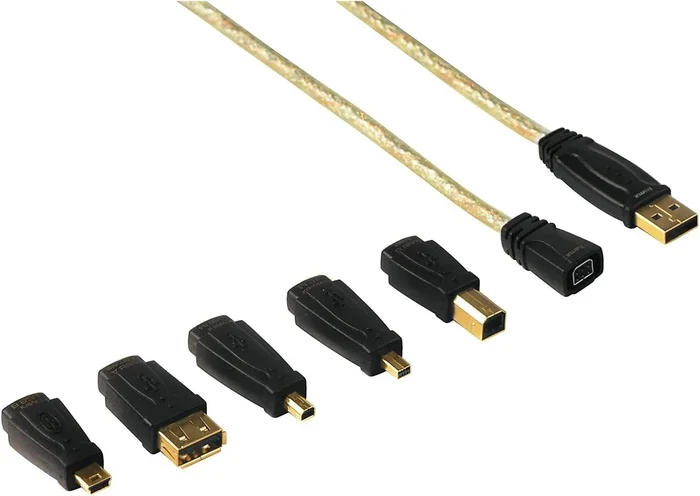
Micro USB cables are not entirely universal, even though the connector design was meant to be a standard across many devices. While the Micro USB shape fits most Android phones, tablets, and accessories, differences in wiring, power delivery, and data speeds mean not every Micro USB cable works the same way. Understanding the variations helps you avoid frustration and pick the right cable for your needs.
You have probably pulled a drawer full of cables and wondered if they all work with your phone or tablet. The Micro USB cable has been around for a long time. It became the go-to connector for Android phones, e-readers, Bluetooth speakers, and countless other gadgets. But here is the big question: are Micro USB cables universal? The short answer is no, not entirely. While the connector shape is the same, the cables inside are not all created equal. Different versions, wiring setups, and power standards mean that one Micro USB cable might not work the same way as another. In this guide, we break down everything you need to know so you never grab the wrong cable again.
The confusion around Micro USB compatibility is real. Many people assume that because a cable fits into a port, it will work perfectly. That is not always true. Some cables charge slowly. Others cannot transfer data at all. And then there are the physical differences between USB 2.0 and USB 3.0 Micro cables that can trip you up. We are going to walk through all of this in plain language so you feel confident the next time you need a cable.
Key Takeaways
- Micro USB is not fully universal: Different versions and wiring standards affect compatibility and performance.
- Micro USB Type-B is the most common: This is the standard shape found on most phones and devices.
- USB 2.0 and USB 3.0 Micro cables differ: USB 3.0 cables have extra pins and a different internal design.
- Charging-only cables lack data wires: Not all Micro USB cables support data transfer.
- USB-C is replacing Micro USB: Most modern devices now use USB-C instead.
- Adapters can bridge compatibility gaps: You can use USB adapters to connect older Micro USB devices to newer ports.
📑 Table of Contents
What Is a Micro USB Cable?
A Micro USB cable is a type of USB connector designed for smaller devices. It replaced the older Mini USB connector and became the standard for mobile devices around 2008. The Micro USB connector is tiny compared to a standard USB-A plug, which makes it perfect for smartphones and portable gadgets.
There are two main types of Micro USB connectors you will encounter:
- Micro USB Type-B: This is the standard connector found on most phones, tablets, and portable devices. It has a trapezoid-shaped plug that only fits one way.
- Micro USB Type-B Mini: A slightly smaller variant used on some older or niche devices. You rarely see this one today.
The USB Implementers Forum (USB-IF) designed Micro USB to be a universal connector for devices under 250 grams. The idea was simple: one cable type for all small electronics. In practice, that goal fell short for several reasons we will explore below.
Are Micro USB Cables Universal?
The idea behind Micro USB was universality. One cable to rule them all. But the reality is more complicated. While the physical connector is standardized, the internal wiring and capabilities vary. This means that a Micro USB cable from one device may not perform the same way as a cable from another device, even if they both fit the same port.
Why They Are Not Truly Universal
Several factors make Micro USB cables less than universal:
- USB 2.0 vs. USB 3.0: USB 3.0 Micro cables have an extra set of pins inside the connector. USB 2.0 cables do not. A USB 3.0 cable will not fit into a USB 2.0 port, and vice versa in some cases.
- Charging-only vs. data cables: Many cables that come with wall chargers only have power wires inside. They cannot transfer data between your device and a computer.
- Power delivery differences: Some cables are built to handle higher current loads. A thin, cheap cable might charge your device slowly or overheat.
- Brand and quality variations: Not all manufacturers build cables to the same standard. A cheap no-name cable might not follow the official wiring specifications.
So even though the plug looks the same, what happens inside the cable matters a lot. A USB adapter can sometimes help bridge compatibility gaps, but it cannot fix a poorly made cable. If you want reliable performance, always buy quality cables from trusted brands.
The Role of USB Standards
USB standards evolved over the years, and each version brought changes to how cables work. USB 2.0 was the first widely adopted standard for Micro USB cables. It supports data transfer speeds up to 480 Mbps. USB 3.0 bumped that up to 5 Gbps but required a different cable design with additional pins. USB 3.1 and later versions continued this trend. The point is, the cable you use needs to match the USB standard your device supports for the best results.
For example, if you plug a USB 2.0 Micro cable into a USB 3.0 port, it will usually work for charging. But you will not get the faster data speeds that USB 3.0 offers. Similarly, a USB 3.0 cable plugged into a USB 2.0 port will work but only at USB 2.0 speeds. This is why understanding your cable matters.
Types of Micro USB Cables
Not all Micro USB cables are the same. Here is a closer look at the main types you will come across:
USB 2.0 Micro USB Cables
These are the most common type. They have four pins inside the connector: two for power and two for data. Most Android phones, fitness trackers, and portable speakers use USB 2.0 Micro cables. They are affordable and widely available. However, they are slower for data transfer compared to newer standards.
USB 3.0 Micro USB Cables
USB 3.0 Micro cables look similar on the outside but have five extra pins inside the connector, bringing the total to nine pins. The extra pins enable much faster data transfer speeds. You will usually find USB 3.0 Micro connectors on external hard drives, cameras, and some older tablets. These cables often have a blue insert inside the USB Type-B plug to distinguish them from USB 2.0 cables.
Charging-Only Micro USB Cables
These cables only have the power pins wired inside. They are great for plugging your phone into a wall charger overnight. But they are useless if you want to transfer photos, sync contacts, or update your device firmware. Many cheap cables that come free with car chargers or power banks fall into this category.
High-Power Micro USB Cables
Some devices need more power than a standard Micro USB cable can deliver. High-power cables use thicker gauge wires to handle more current. These are common with portable battery packs and fast-charging accessories. Using a standard cable with a high-power device may result in slow charging or, in rare cases, cable damage.
Common Devices That Use Micro USB
Even though USB-C is taking over, millions of devices still rely on Micro USB. Here are some of the most common ones:
- Android smartphones: Many budget and mid-range phones still use Micro USB, especially older models and devices from certain manufacturers.
- Tablets and e-readers: Devices like older Kindle models and budget tablets often use Micro USB for charging and data.
- Portable Bluetooth speakers: Most portable speakers use Micro USB for charging because the connector is small and reliable.
- Fitness trackers and smartwatches: Many wearable devices use Micro USB cables for charging and syncing.
- External accessories: GPS units, handheld gaming devices, and digital cameras frequently use Micro USB.
- USB enclosures and adapters: External storage solutions like M.2 NVMe SSD enclosures sometimes use Micro USB or USB adapters to connect to computers, showing how USB standards continue to matter across device types.
If you own any of these devices, understanding Micro USB cable compatibility is essential. The right cable ensures fast charging, reliable data transfer, and longer device life.
Micro USB vs. USB-C: What Changed?
The tech world has largely moved on from Micro USB to USB-C. Here is why that shift happened and what it means for your cables:
| Feature | Micro USB | USB-C |
|---|---|---|
| Connector Shape | Rectangular, one-way insert | Oval, reversible |
| Data Speed (Max) | 480 Mbps (USB 2.0) / 5 Gbps (USB 3.0) | 10 Gbps (USB 3.1) / 20 Gbps (USB 3.2) / 40 Gbps (USB4) |
| Power Delivery | Up to 7.5W standard | Up to 100W with USB Power Delivery |
| Reversible? | No | Yes |
| Common On | Older Android phones, accessories | Modern phones, laptops, tablets |
| Universal? | Partially | Closer to universal |
USB-C is much closer to being truly universal. The reversible design, higher power delivery, and faster data speeds make it a better all-around connector. Many M.2 NVMe SSD to USB 3.1 adapters now use USB-C connectors, reflecting the industry shift. However, Micro USB cables are still widely used and perfectly functional for older devices. You will not need to throw them away anytime soon.
Can You Use a Micro USB to USB-C Adapter?
Yes, you can. Many adapters let you connect a Micro USB cable to a USB-C port. This is handy when you have a mix of old and new devices. Just keep in mind that the adapter will not upgrade the cable’s capabilities. If your Micro USB cable is USB 2.0, the data transfer will still be limited to USB 2.0 speeds even through the adapter.
Tips for Choosing the Right Micro USB Cable
Shopping for a Micro USB cable seems simple, but there are a few things to keep in mind:
- Check the USB standard: Make sure the cable matches your device’s USB version for the best performance.
- Look for data and power wires: If you need to transfer files, avoid charging-only cables.
- Buy from trusted brands: Quality cables last longer and charge faster. Cheap cables can damage your devices.
- Consider cable length: Longer cables can cause voltage drop, leading to slower charging. Keep cables under 6 feet for best results.
- Check the connector type: Some devices use Micro USB Type-B, while others use Micro USB Type-A. Make sure you get the right one.
- Read reviews: Other users often share their experiences with a cable’s charging speed and durability.
A good Micro USB cable is a small investment that pays off in convenience and device longevity. Do not settle for the cheapest option if you rely on your devices daily.
Common Mistakes People Make with Micro USB Cables
Here are some mistakes that can cause problems with your Micro USB cables:
- Using any cable that fits: Just because a cable plugs in does not mean it will work properly for data or fast charging.
- Ignoring cable quality: Thin, poorly made cables can overheat and damage your device’s charging port over time.
- Assuming all cables charge at the same speed: Power delivery depends on the cable’s wire gauge and the charger’s output.
- Bending or yanking cables: This damages the internal wires and leads to intermittent charging or data issues.
- Using damaged cables: Frayed or broken cables are a fire hazard and should be replaced immediately.
Avoiding these simple mistakes will keep your devices and cables in good shape for years.
Expert Insights
Industry experts agree that while Micro USB was a step forward in standardization, it was never truly universal. The different USB versions and cable types created confusion for consumers. According to tech reviewers and accessory manufacturers, the shift to USB-C has been the biggest improvement in cable universality in over a decade. USB-C’s reversible design, higher power limits, and widespread adoption across device types make it the closest thing to a truly universal cable standard we have seen.
However, experts also note that the massive number of Micro USB devices still in use means these cables are not going away anytime soon. The best approach is to keep a few quality Micro USB cables on hand for older devices while transitioning to USB-C for new purchases. If you need to connect older storage devices to modern computers, a high-quality USB adapter can be a lifesaver.
Conclusion
So, are Micro USB cables universal? The honest answer is no, not fully. While the Micro USB connector is standardized in shape, the cables differ in wiring, data speed, power delivery, and compatibility. A USB 2.0 cable is not the same as a USB 3.0 cable, and a charging-only cable is not the same as a data cable. Understanding these differences helps you make better purchasing decisions and avoid frustration.
Micro USB served the tech world well for many years. It connected millions of devices and became a household name. But the industry has moved on to USB-C, which offers a more truly universal experience. If you still use Micro USB devices, investing in quality cables and adapters is the best thing you can do. Keep a few reliable cables in your bag, at home, and at the office, and you will always be prepared.
The next time you reach for a cable, you will know exactly what to look for. That small bit of knowledge can save you time, money, and a lot of hassle. Stay powered up and connected, no matter what device you are using.
Frequently Asked Questions
Can any Micro USB cable be used for data transfer?
No, not all Micro USB cables support data transfer. Many cables that come with wall chargers or power banks are charging-only cables. They lack the data wires inside the cable. Always check the cable specifications if you need to transfer files between your device and a computer.
Why does my Micro USB cable charge slowly?
Several factors can cause slow charging. A thin or cheap cable may not handle enough current. A charging-only cable lacks the proper wiring for fast charging. Also, the charger’s output matters. Using a low-wattage charger with a high-quality cable will still result in slow charging.
Is Micro USB the same as USB-C?
No, Micro USB and USB-C are different connectors. Micro USB has a rectangular shape that only fits one way. USB-C is oval-shaped and reversible. USB-C also supports faster data speeds and higher power delivery than Micro USB.
Can I use a Micro USB cable with a USB 3.0 port?
Yes, you can plug a USB 2.0 Micro USB cable into a USB 3.0 port. It will work for charging and basic data transfer, but you will not get USB 3.0 speeds. The cable will operate at USB 2.0 speeds because that is its maximum capability.
Are all Micro USB cables the same size?
The connector size is standardized, so all Micro USB plugs fit the same port. However, the cable bodies and wire gauges can vary. Some cables are thinner and more flexible, while others are thicker and designed for higher power delivery.
When should I replace my Micro USB cable?
Replace your Micro USB cable if you notice fraying, exposed wires, slow charging, or intermittent connectivity. Damaged cables can be a safety hazard and may damage your device’s charging port. It is best to replace them as soon as you see signs of wear.