Do You Lose Quality with an Hdmi Extension
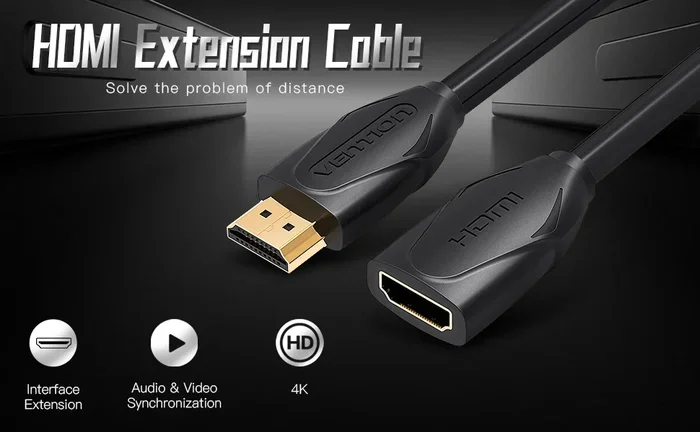
Using an HDMI extension cable can affect your signal quality, but the right choice prevents problems. Whether you need to stretch your connection across a room or through a wall, understanding how HDMI extensions work helps you keep your picture and sound sharp. HDMI extension cables come in passive and active types, and knowing the difference saves you from frustrating signal drops.
Have you ever needed to extend your HDMI cable but worried about losing picture or sound quality? You are not alone. Many people face this exact problem when their TV, projector, or monitor sits too far from their streaming box, gaming console, or computer.
The good news is that you can extend your HDMI connection without sacrificing quality. But it depends on a few key factors. In this guide, we break down everything you need to know about HDMI extension quality. You will learn how signal loss happens, which type of extension works best, and how to avoid common mistakes.
Whether you are setting up a home theater or connecting a workspace monitor, this article gives you practical answers. Let us dive in and make sure your setup delivers the best possible experience.
Key Takeaways
- Signal loss is real: Longer HDMI cables can degrade your picture and audio quality over distance.
- Active extensions boost signal: They use built-in electronics to amplify your HDMI signal over long runs.
- Passive extensions work short distances: Under 10 feet, a passive HDMI extension usually causes no issues.
- Cable quality matters: Cheap, poorly shielded cables introduce interference and reduce bandwidth.
- Version compatibility counts: Using the right HDMI version ensures 4K, HDR, and high refresh rates work properly.
- Placement tips help: Keeping your extension cable away from power cords reduces interference.
- Test before installing: Always test your setup before mounting cables permanently.
📑 Table of Contents
- What Is an HDMI Extension Cable?
- Does an HDMI Extension Affect Signal Quality?
- Active vs Passive HDMI Extensions
- Factors That Affect HDMI Extension Quality
- Tips to Maintain Quality with an HDMI Extension
- When to Replace Your HDMI Cable Instead of Extending
- Common HDMI Extension Mistakes to Avoid
- Final Thoughts
What Is an HDMI Extension Cable?
An HDMI extension cable is a simple device that lengthens your existing HDMI connection. It plugs into one end of your current cable and adds more length to reach your display. Think of it as a signal bridge that fills the gap between your source device and your screen.
These extensions come in different shapes and sizes. Some are small adapters that join two cables together. Others are single cables with HDMI plugs on both ends. You can find them in lengths ranging from a few feet to over 100 feet.
People use HDMI extensions for many reasons. Maybe your couch is far from the wall mount. Or perhaps your projector sits on the ceiling and the cable is too short. Whatever the reason, the goal is the same: reach your display without losing quality.
HDMI carries both video and audio through a single cable. That makes it incredibly convenient. But it also means any problem with the extension affects both picture and sound at the same time.
Does an HDMI Extension Affect Signal Quality?
This is the question most people ask, and the answer is: it depends. HDMI signal loss can happen, but it does not always mean your quality drops. Several factors determine whether your extension causes problems.
Digital signals work differently from analog ones. With analog signals, quality degrades gradually. But digital signals either work perfectly or they do not work at all. This means a short HDMI extension usually causes zero quality loss. Once the signal drops below a threshold, however, you get complete picture dropout or no sound.
The length of your extension plays the biggest role. Short extensions under 10 feet rarely cause issues. Beyond that, you start risking signal degradation. The quality of the cable matters too. A well-built extension with good shielding protects the signal better than a cheap one.
Another factor is the HDMI version. Older versions like HDMI 1.4 handle lower resolutions. Newer versions like HDMI 2.1 support 4K, 8K, and high refresh rates. If your extension cable does not match your version, you may lose features even if the signal stays strong.
So to answer directly: a good HDMI extension at the right length preserves your quality. A bad one at too long a distance kills it entirely.
How Digital HDMI Signals Work
HDMI sends data as ones and zeroes through the cable. Each bit arrives intact or it does not. This is called digital transmission. Unlike old RCA cables where you got fuzzy picture gradually, HDMI gives you crystal clear output or nothing at all.
This means you might not notice a problem until the extension is too long. Then suddenly your screen goes black or you get sparkles and artifacts. That is the digital cliff effect. Staying below the recommended length keeps you safely on the right side of that cliff.
Active vs Passive HDMI Extensions
Not all HDMI extensions are created equal. The two main types are active and passive extensions. They work very differently, and choosing the right one is critical for maintaining quality.
Passive HDMI Extensions
A passive extension is essentially a simple wire with HDMI plugs on both ends. It has no electronics inside. It just passes the signal through from one cable to the next. These work well for short distances, typically under 10 feet.
Passive extensions are affordable and easy to use. You plug them in and they work. No power source needed. But because they add even a small amount of resistance to the signal, they work best when the total cable length stays short.
If you already have a long HDMI cable and just need a little more reach, a passive extension does the job. For example, if your cable reaches almost to the TV but falls short by three feet, a passive extension solves the problem easily.
Active HDMI Extensions
An active extension contains built-in electronics that boost the signal. Think of it like a signal repeater. It receives the HDMI signal, amplifies it, and sends it down the next segment of cable. This allows much longer runs without quality loss.
Active extensions need power to work. Most draw power from the HDMI connection itself through a feature called 5V USB bus power. Some models include a USB cable that plugs into a wall adapter for reliable power.
These are the go-to choice for runs over 15 feet. If you need to send an HDMI signal across a room or through walls, an active extension keeps your picture and sound clean. Some active extenders can push signals 100 feet or more with no quality drop.
For setups where you need both video and audio over long distances, consider whether your HDMI extension cable supports Ethernet and audio return channels. These features matter for complex home theater setups.
Factors That Affect HDMI Extension Quality
Several things determine whether your extension preserves or ruins your signal. Understanding these factors helps you make smart buying decisions.
Cable Length
Length is the number one factor. The longer the extension, the weaker the signal becomes. Standard HDMI cables work reliably up to about 15 feet. Beyond that, you need an active extender or a higher-quality cable.
Here is a quick guide to HDMI length limits:
- Under 10 feet: Passive extension works fine. No quality loss.
- 10 to 25 feet: Passive may work, but active is safer. Good quality cables help.
- 25 to 50 feet: Active extension required for reliable performance.
- 50 to 100 feet: Active extender with power supply needed. Fiber optic cables also work here.
- Over 100 feet: Fiber optic HDMI cables or dedicated extenders are your best bet.
Cable Build Quality
Cheap HDMI cables often lack proper shielding. This leaves the signal exposed to interference from nearby power cables, routers, and electrical devices. Good quality extensions use double shielding and thicker copper conductors to protect the signal.
Look for cables with braided shielding and gold-plated connectors. These features reduce signal loss and prevent corrosion at the connection points. Spending a little extra on quality pays off in reliability.
HDMI Version Compatibility
Your extension must support the HDMI version you need. If you want 4K at 60Hz, you need at least HDMI 2.0. For 4K at 120Hz or 8K, you need HDMI 2.1. Using an extension that only supports HDMI 1.4 will cap your resolution and refresh rate.
Check the specifications before buying. Most quality extensions clearly state their supported version and bandwidth on the packaging or product listing.
Interference From Other Cables
Running your HDMI extension parallel to power cables causes electromagnetic interference. This can introduce noise, sparkles, or complete signal dropouts. Always keep HDMI cables at least 6 inches away from power cords.
If you must run them near power lines, use a shielded extension or route them through separate cable channels. This simple step makes a huge difference in signal integrity.
Tips to Maintain Quality with an HDMI Extension
Getting the best quality from your HDMI extension is not hard. Follow these practical tips and your setup will deliver sharp video and clear audio every time.
1. Keep Total Cable Length in Check
Add up the length of your original cable plus the extension. If the total exceeds 15 feet, consider an active extender. Staying within recommended limits keeps your signal strong and avoids the digital cliff effect.
2. Use Quality Connectors
Gold-plated connectors provide better contact and resist corrosion. Loose or corroded connections cause intermittent signal problems. If you notice sparkles or flickering, check your connectors first.
3. Avoid Bending and Kinking
Sharp bends in HDMI cables damage the internal wiring over time. Keep bends gentle and use cable clips to secure the route. Never pinch a cable behind furniture or close a door on it.
4. Power Your Active Extender Properly
If you use an active extension, make sure it gets reliable power. A weak power supply causes the extender to drop the signal intermittently. Use the included USB adapter or plug into a wall outlet for best results.
5. Test Before Permanent Installation
Always test your full setup before mounting cables or buying wall plates. Plug everything in, turn on your source, and check for any visual artifacts or audio issues. Fixing problems before installation saves a lot of headaches later.
6. Consider Fiber Optic for Long Runs
For distances over 50 feet, fiber optic HDMI cables or fiber extenders offer the best performance. They are immune to electromagnetic interference and can carry signals hundreds of feet without quality loss. They cost more but deliver professional-grade results.
When to Replace Your HDMI Cable Instead of Extending
Sometimes the best solution is not an extension at all. If your current cable is old or damaged, replacing it with a longer one often gives better results than adding an extension.
A single high-quality 25-foot cable usually performs better than a 15-foot cable plus a 10-foot extension. Fewer connections mean fewer points of signal loss. If you need more than 10 extra feet, replacing the entire cable is often the smarter choice.
Also, if you need features like Ethernet passthrough or Audio Return Channel, a single long cable handles these better than an extension setup. Extensions add connection points where these features can get interrupted.
Before buying an extension, check whether a longer cable solves your problem. In many cases, it does. If you also need audio amplification for your setup, you might want to check whether you do you need an amp for speakers to get the best sound alongside your extended video connection.
Similarly, if you are running audio and video to multiple displays, understanding your amplification needs becomes important. Knowing do I need an amplifier for my car speakers or home audio setup helps you plan the full picture of your entertainment system.
For complex setups involving bi-wiring or bi-amping your speakers alongside your HDMI video, techniques like how do you bi wire speakers can improve your overall audio quality without relying on HDMI audio alone.
Common HDMI Extension Mistakes to Avoid
Even with the best intentions, people make mistakes that hurt their HDMI quality. Here are the most common ones and how to avoid them.
- Buying the cheapest option: Ultra-cheap extensions often use thin wires and poor shielding. You get what you pay for.
- Ignoring HDMI version: Buying an HDMI 1.4 extension when you need HDMI 2.1 means you lose 4K and high refresh rate support.
- Daisy-chaining extensions: Connecting multiple extensions in a row adds up signal loss fast. Keep it to one extension maximum.
- Running alongside power cables: This is the fastest way to introduce interference and visual artifacts.
- Not checking for 4K support: Even if your source and display support 4K, a cheap extension may not pass the signal correctly.
- Forgetting about firmware: Some active extenders need firmware updates for full compatibility with newer devices.
Avoiding these simple mistakes keeps your HDMI extension working perfectly for years.
Final Thoughts
So do you lose quality with an HDMI extension? The short answer is: not if you choose the right one. A quality extension at the proper length preserves your picture and sound completely. The key is understanding your needs and picking the right type.
For short runs, a passive extension works great and costs little. For longer distances, invest in an active extender that boosts your signal. Always match your HDMI version and check for features like 4K and HDR support.
Your setup is only as strong as its weakest link. Take the time to choose the right extension, test it thoroughly, and enjoy a flawless viewing experience. A little knowledge goes a long way in protecting your signal quality.
Remember, the goal is simple: get your content from your source to your screen with zero compromise. With the right HDMI extension, that goal is absolutely within reach.
Frequently Asked Questions
Does an HDMI extension reduce picture quality?
Not necessarily. Short passive extensions under 10 feet usually cause no quality loss at all. Active extensions can carry signals over much longer distances without degradation. The key is choosing the right type and length for your setup.
How long can an HDMI extension cable be without losing quality?
Passive extensions work well up to about 10 feet. Active extenders can reliably push signals 50 feet or more. For runs over 100 feet, fiber optic HDMI cables deliver the best results with zero quality loss.
Do active HDMI extensions need power?
Yes, most active extensions need power to boost the signal. Many draw power from the HDMI connection itself through a 5V bus. Some models include a USB power cable that plugs into a wall adapter for consistent performance.
Can I chain multiple HDMI extensions together?
You can, but it is not recommended. Each connection adds a point of potential signal loss. If you need more length, use one high-quality extension or replace your cable with a longer one instead.
Why does my HDMI extension cause sparkles on screen?
Sparkles usually mean signal interference or a weak connection. Check that your connectors are clean and firmly seated. Move your HDMI cable away from power cords. If the problem persists, try an active extender or a higher-quality cable.
Is it better to buy a longer cable than use an extension?
In most cases, yes. A single long cable has fewer connection points and performs more reliably than a cable plus extension. If you need more than 10 extra feet, replacing the entire cable is often the better choice.