Does Hdmi Pass Through on Receiver When Receiver Is Off
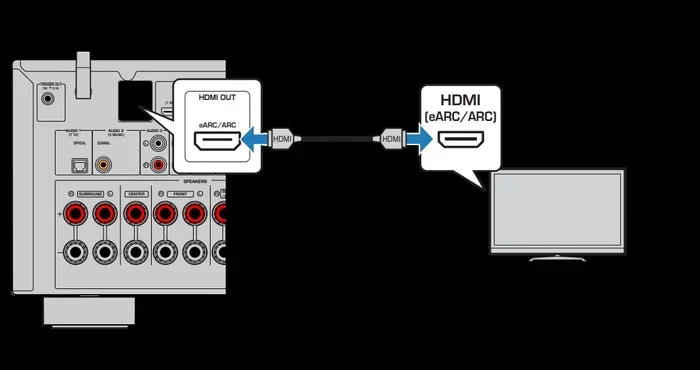
HDMI pass-through behavior depends entirely on your receiver model and its power state. Some receivers allow signals to flow even when powered off, while others block HDMI completely. Understanding this helps you troubleshoot display issues and plan your home theater setup.
This is a comprehensive guide about Does Hdmi Pass Through On Receiver When Receiver Is Off.
Key Takeaways
- HDMI pass-through may or may not work when a receiver is off: It depends on the make, model, and design of your receiver.
- Standby mode is different from being fully powered off: Many receivers pass HDMI signals in standby but block them when completely off.
- HDMI-CEC and ARC features can affect pass-through behavior: These settings change how your devices communicate when the receiver is not active.
- You can test your setup easily: Simply turn the receiver off and check if your TV or display still receives a signal from the source device.
- Some receivers have a dedicated passthrough mode: This bypasses the receiver entirely and sends signals directly to your display.
- Signal quality can degrade through multiple devices: Every connection in the chain adds potential points of failure.
[FEATURED_IMAGE_PLACEHOLDER]
What Is HDMI Pass-Through on a Receiver?
HDMI pass-through means your receiver sends an HDMI signal straight to your TV or display without changing it. Think of it like a hallway. The signal walks in one door and out the other without stopping to be processed.
This is really important for home theater setups. You want your display device to show the best picture possible. If your receiver blocks the signal when it is off, you lose your image. That can be really frustrating, especially late at night when you just want to watch something.
Not all receivers behave the same way. Some let the signal flow freely. Others cut it off completely. This depends on the design, the firmware, and sometimes even the age of the unit. Let us dig into why this happens and what you can do about it.
How HDMI Pass-Through Works When the Receiver Is Off
When your receiver is off, there are really only two states it can be in. It is either in standby mode or fully powered down. Each one handles HDMI pass-through differently.
Standby Mode vs. Fully Off
Standby mode is like sleep. The receiver uses very little power, but some circuits stay active. Many modern receivers pass HDMI signals in standby. This lets your TV show a picture from a connected source even when the receiver is not doing anything.
When the receiver is fully off, things change. The power supply cuts out. The HDMI chip goes dark. Most receivers will block the signal completely in this state. This is by design. The chip needs power to pass any signal through.
Think about it like a water pipe. If you turn off the pump, no water flows. That is basically what happens inside your receiver when it loses power. The signal chain breaks.
Why Some Receivers Still Pass Signals When Off
A few receivers are designed to keep a minimal power line live to the HDMI port. This is called always-on passthrough. It is more common in higher-end models. Brands like Denon, Marantz, and Yamaha sometimes include this feature in their newer receivers.
The idea is simple. You plug in your cable box, gaming console, or Blu-ray player. You want the TV to show something even if the receiver is off. This way, you are not hunting for the remote every time. It is a nice convenience feature that not everyone knows about.
Some users compare this to how do dash cameras work when the car is off. Certain dash cameras keep recording even when the vehicle is powered down. The concept is similar. Devices can maintain functionality in low-power states if the design supports it.
Why HDMI Pass-Through Matters for Your Setup
If you have a home theater system, HDMI pass-through affects your daily experience. Here is why it matters so much.
Keeping Your Display Active
Imagine you are watching TV. The receiver is off. You switch the input on your TV to the HDMI port connected to the receiver. If pass-through works, you see your cable box or streaming device on screen. If it does not, you get a black screen. That is a big difference in everyday use.
Some people use their receiver only for audio. They want the TV to handle the picture directly. In these cases, pass-through when the receiver is off is essential. It lets them switch between the receiver audio and TV speakers easily.
Signal Quality and HDCP Handshake
Every device in the chain talks to the next one. This is called the HDCP handshake. It is how devices confirm they are allowed to send protected content. When the receiver is off, the handshake may fail.
This can cause your screen to go black for a few seconds when you turn the receiver back on. It can also prevent you from watching certain streaming content. The audio video handshake gets disrupted when a device in the chain is powered down.
Here is a quick tip. If you notice signal drops, try turning on the receiver before switching inputs. This ensures the handshake completes properly before the source tries to send a signal.
Power Consumption and Energy Savings
Receivers that stay partially powered in standby use a small amount of electricity. This is called vampire power. It is not much, but it adds up over time. Some people prefer to fully power off their receivers to save energy.
The trade-off is clear. You save a little on your electricity bill but lose the convenience of pass-through. If you are someone who cares about power consumption, you might want to check your receiver settings before unplugging it completely.
For comparison, consider how much power a laptop uses when plugged in versus running on battery. The difference can be significant. Similarly, the power state of your receiver changes what it can do with HDMI signals.
How to Test If Your Receiver Passes HDMI When Off
Testing this is really simple. You do not need any special tools. Just follow these steps.
- Connect your source device to the receiver. Use an HDMI cable.
- Connect the receiver to your TV or display. Use another HDMI cable.
- Turn the source device on. Make sure it is sending a signal.
- Turn the receiver fully off. Not standby. Completely off.
- Check your TV screen. Do you see the source device output?
If you see the picture, your receiver supports pass-through when off. If the screen goes black, it does not. This test works for almost any receiver or amplifier setup.
You can also check your receiver manual. Look for terms like “passthrough,” “direct mode,” or “HDMI bypass.” These terms tell you exactly what to expect. Some manuals even have a setting you can toggle to enable or disable this feature.
Common Problems and How to Fix Them
Black Screen When Receiver Is Off
This is the most common issue. Your TV shows nothing when the receiver is off. The fix is usually simple. Check your HDMI cables. Make sure they are fully seated in each port. A loose cable can break the signal chain completely.
Next, try switching the TV input. Sometimes the TV forgets the source when the signal drops. Re-selecting the input forces it to look for a new signal. This often restores the picture right away.
No Audio When Receiver Is Off
If the picture works but the sound does not, that is normal. When the receiver is off, it cannot process audio. Your TV will use its built-in speakers instead. If you want audio through your sound system, the receiver needs to be on.
Some receivers have a feature called HDMI-CEC. This lets your TV control the receiver. When you turn on the TV, it can automatically power on the receiver too. This solves the audio problem without any extra steps.
Intermittent Signal Loss
If the signal comes and goes, your cables might be the culprit. Cheap HDMI cables often cause this problem. They cannot carry a stable signal over long distances. Try upgrading to a certified high-speed HDMI cable. It can make a huge difference.
Also check for firmware updates on your receiver. Manufacturers often release updates that fix signal handling issues. A simple update can resolve problems that have been bugging you for months.
Expert Tips for Getting the Best HDMI Pass-Through
Use High-Quality HDMI Cables
Not all cables are created equal. A good HDMI cable supports higher bandwidth and better signal integrity. Look for cables rated for HDMI 2.0 or 2.1 if your devices support it. These handle 4K and even 8K signals without issues.
Avoid running HDMI cables longer than 15 feet without a signal booster. Longer runs weaken the signal. A booster or active cable keeps the picture sharp and clear.
Keep Your Receiver Firmware Updated
Manufacturers fix bugs and improve performance with firmware updates. Check your receiver brand website regularly. The update process is usually simple. You download the file, put it on a USB drive, and plug it into the receiver. Follow the on-screen prompts and you are done.
Consider a Separate HDMI Splitter
If your receiver does not pass through when off, a splitter can help. An HDMI splitter takes one input and sends it to two outputs. One output goes to the receiver. The other goes directly to the TV. This way, your TV always gets a signal no matter what the receiver is doing.
This setup is great for people who want the best of both worlds. You get full receiver audio when it is on. You still get a picture on the TV when it is off. It is a simple and affordable solution.
Understand Your Receiver’s Input/Output Layout
Take a few minutes to learn the back panel of your receiver. Know which ports are inputs and which are outputs. This small step saves a lot of confusion later. When you troubleshoot, you will know exactly where to look.
Also, label your cables with small pieces of tape if you have many devices connected. It sounds simple, but it works. You will thank yourself the next time you need to unplug something quickly.
How Receiver Design Affects HDMI Pass-Through
Different types of receivers handle pass-through in different ways. Let us look at the main categories.
| Receiver Type | Pass-Through When Off | Typical Use Case |
|---|---|---|
| AV Receiver (Home Theater) | Usually blocks signal when fully off | Movies, music, gaming with surround sound |
| Stereo Receiver | Rarely supports HDMI at all | Music listening only |
| AV Receiver with Always-On Mode | Passes signal in standby or off | Multi-device setups where convenience matters |
| AV Receiver with Direct Mode | Bypasses processing when on | Pure audio or video path for best quality |
| Soundbar with HDMI Passthrough | Varies by model | Compact setups with TV and streaming devices |
As you can see, there is no one-size-fits-all answer. Your receiver type determines what happens when you power it down. Always check the specifications before buying. The manual will tell you exactly what to expect.
Some people wonder about the difference between a receiver and a simple switch. A switch just routes signals. A receiver processes them. When a receiver is off, it cannot process anything. So the pass-through feature becomes even more important for people who rely on their receiver as a central hub in the signal chain.
Think of your receiver like the control center of your home theater. When it is on, it does all the heavy lifting. It decodes audio, scales video, and manages multiple inputs. When it is off, that control center goes dark. The question is whether it leaves the door open for signals to still pass through or slams it shut.
Frequently Asked Questions
Does HDMI pass-through work when the receiver is completely powered off?
It depends on your receiver model. Most receivers block HDMI signals when fully powered off because the HDMI chip has no power. A few models support always-on pass-through, which keeps the signal flowing even when the unit is off. Check your receiver manual or test it yourself to find out.
Can I use HDMI-CEC to keep my signal active when the receiver is off?
HDMI-CEC helps devices communicate with each other, but it does not create pass-through where none exists. If your receiver does not support pass-through when off, CEC will not change that. CEC mainly helps with turning devices on and off together automatically.
Why does my TV show a black screen when the receiver is off?
This happens because the receiver is blocking the HDMI signal when it has no power. The signal chain is broken. Your TV cannot receive any input from the source device until the receiver is powered back on and the HDMI handshake completes again.
Is there a way to get video to my TV even when the receiver is off?
Yes. You can use an HDMI splitter. Connect the source to the splitter, then run one output to the receiver and another directly to the TV. This ensures your TV always receives a signal regardless of the receiver power state. It is a simple and affordable fix.
Do all AV receivers have HDMI pass-through?
Most modern AV receivers include HDMI pass-through when they are powered on. However, pass-through when the receiver is off is less common. It is usually found on higher-end models or units with a specific always-on feature. Always check the specs before purchasing.
Does the HDMI cable quality affect pass-through when the receiver is off?
No. The cable quality does not change whether a receiver passes signals when off. That behavior is determined by the receiver design. However, a good quality HDMI cable does ensure better signal quality when the receiver is on and actively passing the signal through.
Final Thoughts
HDMI pass-through when the receiver is off is a feature that not everyone thinks about until they need it. The truth is, it matters more than most people realize. Whether you are setting up a new home theater or troubleshooting an annoying black screen, understanding how your receiver handles signals in different power states saves you time and frustration.
The key takeaway is simple. Not all receivers behave the same way when powered off. Some pass the signal through. Others block it completely. Your best move is to test your setup and read your manual. If your receiver does not support pass-through when off, an HDMI splitter is an easy workaround that works every time.
Take a few minutes today to check your own setup. Turn off the receiver and see what happens on your TV. You might learn something new about your gear. And if you run into issues, the fixes in this guide should help you get things working smoothly again.
Frequently Asked Questions
What is Does Hdmi Pass Through On Receiver When Receiver Is Off?
Does Hdmi Pass Through On Receiver When Receiver Is Off is an important topic with many practical applications.