Do Iphones Use Usb C
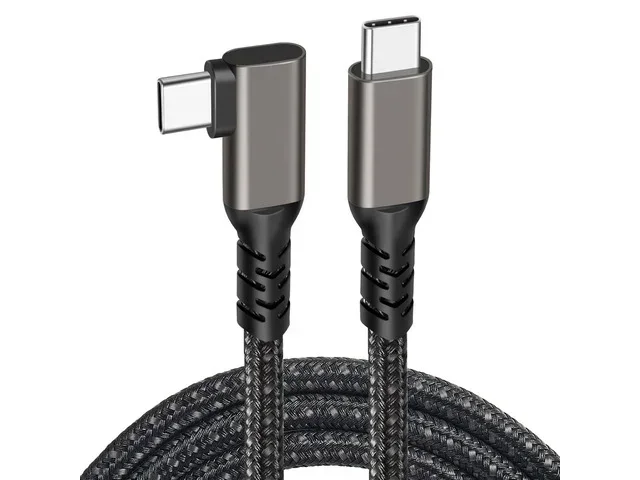
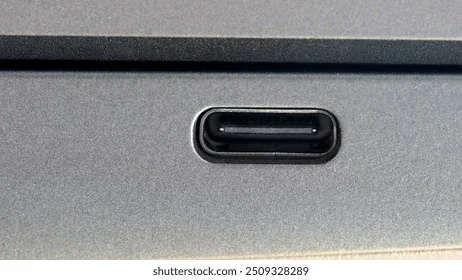
Yes, newer iPhones use USB-C. Apple switched from Lightning to USB-C starting with the iPhone 15 lineup. If you own an iPhone 15 or later, you use a USB-C port for charging, data transfer, and accessories. Older models still rely on the Lightning connector.
You probably have noticed something different about the newest iPhones. The charging port is not the same as it used to be. Apple made a big change, and it affects how you charge your phone, connect your accessories, and share files. If you have been asking yourself, do iPhones use USB-C, the short answer is yes. But the full story is more interesting than a simple yes or no.
This guide breaks down everything you need to know. We will cover which iPhone models use USB-C, why Apple made the switch, and what it means for you as a user. Whether you are shopping for a new iPhone or just curious about the change, you are in the right place. Let us dive in.
Key Takeaways
- iPhone 15 and newer models use USB-C instead of Lightning.
- The switch happened in 2023 due to EU regulations and universal convenience.
- USB-C enables faster charging and better data transfer speeds on supported iPhones.
- You can use one cable for your iPhone, iPad, laptop, and more.
- Older iPhones still use Lightning, so check your model before buying new accessories.
- USB-C accessories are widely available and growing every year.
📑 Table of Contents
Which iPhone Models Use USB-C?
The USB-C transition started with the iPhone 15 lineup in 2023. Every model in that series uses a USB-C port. This includes the iPhone 15, iPhone 15 Plus, iPhone 15 Pro, and iPhone 15 Pro Max. Apple continued this design with the iPhone 16 series, so all current iPhones ship with USB-C.
Before 2023, every iPhone used Apple’s proprietary Lightning connector. The iPhone 14, iPhone 13, iPhone 12, and all older models still rely on Lightning. If you own one of these older phones, you will need a Lightning cable or a USB-C adapter to connect to modern USB-C accessories.
A Quick Look at the Timeline
- iPhone 15 and later: USB-C port
- iPhone 14 and earlier: Lightning port
- iPhone 15 Pro models: USB-C with faster data transfer speeds
Apple also changed the packaging. New iPhones no longer include a charging brick in the box. You get a USB-C to USB-C cable instead. This means you need a compatible USB-C charger to power up your device.
Why Did Apple Switch to USB-C?
Apple did not make this change on a whim. There are real reasons behind the shift, and they go beyond just keeping up with trends. Understanding the “why” helps you appreciate the switch more.
EU Regulations Played a Big Role
The European Union passed a law requiring all smartphones to use USB-C by the end of 2024. This regulation aimed to reduce electronic waste and make life easier for consumers. Apple could not ignore this rule, especially since the EU is one of its largest markets. So, the company made the move to USB-C across its entire smartphone lineup.
One Cable for Everything
Think about how many devices you carry. Your phone, tablet, laptop, earbuds, and maybe a portable charger. Before USB-C, you needed different cables for different devices. With USB-C, you can use one cable for almost everything. This is a huge convenience factor. You no longer need to dig through a drawer full of tangled cords to find the right one.
Better Performance and Compatibility
USB-C supports faster data transfer and higher power delivery compared to Lightning. The iPhone 15 Pro models use USB-C 3.0, which allows speeds up to 10 Gbps. This makes transferring large files, backing up your phone, and connecting to external displays much smoother. If you use a USB-C SSD enclosure or external drive, your iPhone can handle it with ease.
Benefits of USB-C on iPhones
The switch to USB-C brings several real-world benefits. Let us look at what you actually gain as a user.
Faster Charging
USB-C supports USB Power Delivery, which allows for much faster charging than Lightning. You can charge your iPhone from zero to 50 percent in about 30 minutes with the right charger. This is a noticeable improvement over the old Lightning speeds. If you are always on the go, faster charging means less time tethered to a wall.
Universal Compatibility
USB-C is everywhere. Your laptop probably uses it. Your tablet probably uses it. Many Android phones use it too. This means you can share chargers with friends, use the same cable at work and home, and buy accessories without worrying about compatibility. The USB-C ecosystem continues to grow, and more accessories become available every year.
Improved Data Transfer
Transferring photos, videos, and files from your iPhone is faster with USB-C. Pro users who work with large media files will appreciate the speed boost. You can connect your iPhone to a computer and move files quickly without waiting. This is especially helpful for content creators and professionals who handle large amounts of data on their phones.
Access to More Accessories
With USB-C, your iPhone works with a wider range of accessories. You can connect USB-C headphones, external monitors, storage drives, and more. The best USB type C headphones work seamlessly with newer iPhones. You also have more options for car chargers, portable batteries, and docking stations.
USB-C vs Lightning: What Changed?
It is helpful to understand the differences between USB-C and Lightning. Both are charging ports, but they work quite differently.
Speed and Power
USB-C supports much higher power delivery and data transfer speeds. Lightning maxes out at lower speeds and power output. USB-C can deliver up to 100 watts of power, while Lightning is limited to much less. This means USB-C charges your iPhone faster and can power other devices too.
Reversibility and Design
Both USB-C and Lightning are reversible, which is a nice feature. You do not have to flip the connector to get it right. However, USB-C is a larger, more robust connector. It feels more secure in the port and is less likely to wear out over time.
Price and Availability
Lightning cables are still available, but they are becoming harder to find. USB-C cables are cheaper and more widely available. You can grab one at almost any store, gas station, or airport. This makes it easier to replace a lost or damaged cable without hunting for a specific Lightning option.
A Quick Comparison
- USB-C: Faster charging, faster data transfer, universal compatibility, widely available
- Lightning: Slower charging, limited data speeds, Apple-only ecosystem, becoming obsolete
If you are upgrading from an older iPhone, you will notice the difference right away. The convenience of a single cable for all your devices is hard to go back to.
What You Need to Know About USB-C Accessories
Switching to USB-C means you may need to replace some of your old accessories. Here is what to keep in mind.
Do You Need New Cables?
If you have USB-C devices already, you probably already have compatible cables. If you only own older Lightning devices, you will need to buy new USB-C cables. Look for certified cables from reputable brands to ensure safety and performance.
Chargers and Power Banks
You will need a USB-C charger to take full advantage of fast charging on your iPhone. Many people already have USB-C chargers from their laptops or tablets. You can use the same one for your iPhone, which saves money and reduces clutter. Portable power banks with USB-C ports are also a great investment for travel and emergencies.
Adapters and Dongles
Apple includes a basic USB-C to USB-C cable with new iPhones. But if you need to connect older USB-A devices, you will want a USB-C adapter. These small dongles are inexpensive and very useful. They let you connect flash drives, older chargers, and other accessories to your iPhone.
Audio and Display Options
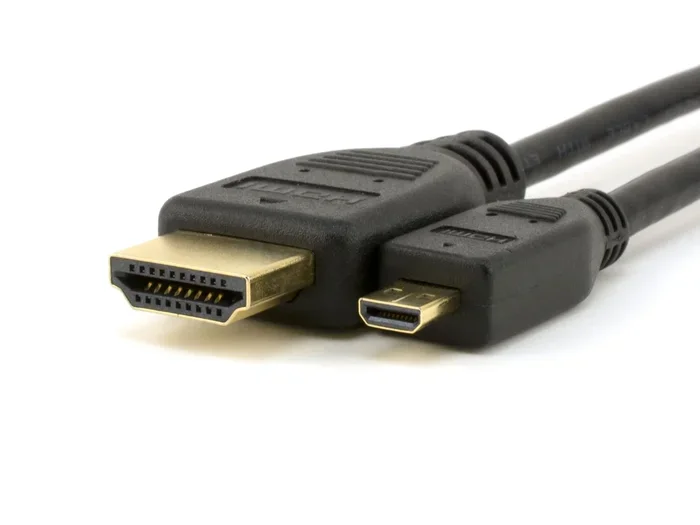
You can now connect USB-C headphones directly to your iPhone. This is great if you want a simple, wire-free audio experience. You can also connect your iPhone to external displays using a USB-C to HDMI or USB-C to DisplayPort cable. This is handy for presentations, streaming content on a bigger screen, or extending your workspace.
Common Mistakes People Make With iPhone USB-C
Switching to a new port comes with a learning curve. Here are some mistakes to avoid.
Buying Cheap, Uncertified Cables
Not all USB-C cables are created equal. Cheap, uncertified cables can damage your device or charge very slowly. Always look for cables that are MFi certified or from trusted brands. A good cable protects your iPhone and delivers the speeds you expect.
Assuming All USB-C Is the Same Speed
Not every USB-C connection offers the same data transfer speed. The iPhone 15 base models use USB-C 2.0, which is slower than the USB-C 3.0 on Pro models. If you need fast file transfers, check which USB-C standard your iPhone supports before buying cables or accessories.
Forgetting About Your Other Devices
Switching your iPhone to USB-C does not mean all your devices will match. Your iPad, AirPods, or other accessories might still use Lightning. Plan ahead and think about which cables and chargers you will need for your full setup.
The Future of iPhone Connectivity
USB-C is here to stay for iPhones. Apple has fully embraced the standard, and there is no indication of going back. Future iPhones will continue to use USB-C, and the technology will only improve. Faster speeds, better power delivery, and more versatile connections are on the horizon.
The move to USB-C also aligns with Apple’s broader push toward a more connected ecosystem. Your iPhone, iPad, Mac, and accessories all share the same port. This makes the entire Apple experience smoother and more streamlined. Even if you use a USB-C NVMe SSD for expanded storage, your iPhone can handle it with the right adapter.
As USB-C continues to evolve, we can expect even better performance from future iPhones. The standard is constantly improving, and Apple will likely take advantage of each new USB-C revision. This is good news for consumers who want the best possible experience from their mobile devices.
Final Thoughts
So, do iPhones use USB-C? The answer is clear for anyone with an iPhone 15 or newer. Apple made the switch to USB-C for good reasons, and the benefits are real. Faster charging, universal compatibility, better data speeds, and a simpler accessory ecosystem make USB-C a win for iPhone users.
If you are still on an older iPhone with Lightning, the transition to USB-C is worth considering. The convenience of one cable for all your devices is hard to beat. And with USB-C accessories becoming more affordable and widely available, there has never been a better time to make the switch.
Embrace the change. The USB-C future is bright, and your iPhone is ready for it.
Frequently Asked Questions
Do all iPhones use USB-C now?
No, only iPhone 15 and newer models use USB-C. iPhone 14 and all older models still use the Lightning connector. If you are unsure which model you have, check the back of your phone or go to Settings > General > About.
Can I use my old Lightning cables with a new iPhone?
No, iPhone 15 and newer models do not support Lightning cables. You will need a USB-C cable to charge and connect your new iPhone. You can buy USB-C to Lightning cables if you need to connect older Lightning accessories.
Is USB-C faster than Lightning for charging?
Yes, USB-C is significantly faster than Lightning for charging. With a USB-C Power Delivery charger, you can charge your iPhone much quicker. The iPhone 15 Pro models benefit the most from fast USB-C charging speeds.
Do I need to buy a new charger when I switch to USB-C?
Not necessarily. If you already own USB-C chargers from other devices like a laptop or tablet, you can use them with your new iPhone. Apple no longer includes a power brick in the iPhone box, so you may need to supply your own.
Can I connect USB-C accessories to my iPhone?
Yes, you can connect a wide range of USB-C accessories to newer iPhones. This includes headphones, external storage drives, monitors, and more. The USB-C port on your iPhone supports various peripherals, making it very versatile for daily use and professional workflows.
Will future iPhones continue to use USB-C?
Yes, Apple has fully committed to USB-C for all iPhones going forward. The EU regulation pushed this change, and Apple has no plans to revert to Lightning. Future iPhone models will continue using and improving USB-C connectivity.