Do You Really Need Hdmi 2 1 for Ps5
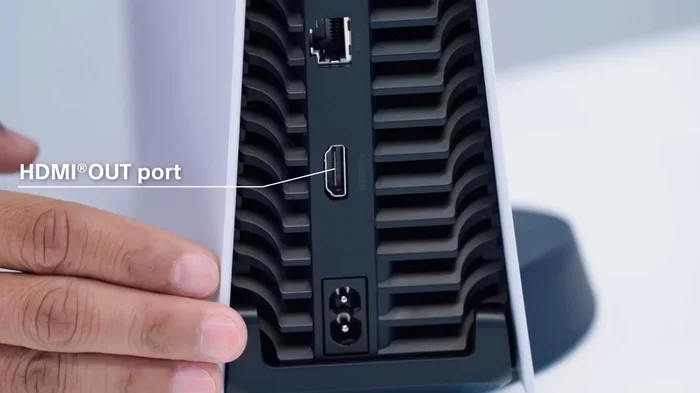
HDMI 2.1 is not strictly required to use a PS5, but it unlocks major features like 4K at 120Hz, VRR, and ALLM that elevate your gaming experience. If you own a compatible TV or monitor, switching to an ultra high speed HDMI cable is one of the best upgrades you can make. This guide explains everything you need to know about HDMI 2.1 for PS5 and helps you decide if the upgrade is right for you.
You just unboxed your PS5. You plug in the included cable, turn it on, and start gaming. It looks great. It feels great. But then you see a post online saying you need HDMI 2.1 to get the best experience. So you wonder, do you really need it?
The short answer is no, not strictly. Your PS5 will work perfectly fine with an older HDMI cable. But the longer answer is more interesting. HDMI 2.1 opens the door to features that make next-gen gaming feel truly next-gen. Things like 4K at 120Hz, Variable Refresh Rate, and Auto Low Latency Mode. These are not just buzzwords. They change how your games look and feel.
In this guide, we will walk through everything you need to know about HDMI 2.1 for PS5. We will cover what it does, who needs it, and whether spending money on an upgrade makes sense for your setup. By the end, you will know exactly what to do.
Key Takeaways
- HDMI 2.1 is optional for PS5: Your console works fine with HDMI 2.0, but you miss out on key features.
- 4K at 120Hz needs HDMI 2.1: This smooth frame rate is only possible with an HDMI 2.1 connection.
- VRR and ALLM require HDMI 2.1: These technologies reduce screen tearing and input lag significantly.
- Not all TVs support HDMI 2.1: Check your display before buying a new cable.
- Ultra high speed HDMI cables are affordable: You do not need to spend a fortune to get HDMI 2.1 performance.
- PS5 storage upgrades complement HDMI 2.1: Pairing a fast NVMe M.2 SSD for PS5 with HDMI 2.1 gives you the full next-gen experience.
📑 Table of Contents
- What Is HDMI 2.1 and Why Does It Matter for PS5?
- Do You Need HDMI 2.1 for PS5? The Honest Answer
- What Happens When You Use HDMI 2.0 Instead of HDMI 2.1?
- How to Know If Your TV Supports HDMI 2.1
- Do You Need to Buy a New HDMI Cable?
- Is HDMI 2.1 Worth the Upgrade?
- Common Mistakes People Make with HDMI 2.1 and PS5
- Final Thoughts
What Is HDMI 2.1 and Why Does It Matter for PS5?
HDMI 2.1 is the latest version of the HDMI standard. It was released in 2017 and brought big improvements over HDMI 2.0. Think of it as an upgrade to the highway that carries video and audio from your console to your screen.
HDMI 2.1 offers much higher bandwidth. Bandwidth is the amount of data that can travel through the cable at once. More bandwidth means higher resolutions, faster frame rates, and better overall image quality. Here is what HDMI 2.1 brings to the table:
- Higher bandwidth: Up to 48 Gbps compared to HDMI 2.0’s 18 Gbps.
- 4K at 120Hz: Smooth motion at ultra-high resolution.
- 8K support: Future-proofing for even higher resolutions.
- VRR (Variable Refresh Rate): Matches the display refresh rate to the console’s output.
- ALLM (Auto Low Latency Mode): Reduces input lag automatically.
- eARC (Enhanced Audio Return Channel): Supports higher-quality audio formats.
For PS5 owners, the most important features are 4K at 120Hz, VRR, and ALLM. These are the features that make games feel smoother, more responsive, and more immersive. Without HDMI 2.1, you are limited to 4K at 60Hz or lower resolutions at higher frame rates.
HDMI 2.0 vs HDMI 2.1: The Key Differences
It helps to compare the two versions side by side. HDMI 2.0 has been the standard for years, and many TVs still use it. HDMI 2.1 is the newer, faster standard built for next-gen consoles and gaming PCs.
- HDMI 2.0: Supports 4K at 60Hz, 18 Gbps bandwidth, basic HDR.
- HDMI 2.1: Supports 4K at 120Hz, 8K at 60Hz, 48 Gbps bandwidth, VRR, ALLM, eARC.
The difference is clear. HDMI 2.0 can handle 4K gaming, but it caps out at 60 frames per second. HDMI 2.1 doubles that to 120fps, which makes a huge difference in fast-paced games like shooters and racing titles.
Do You Need HDMI 2.1 for PS5? The Honest Answer
Here is the truth. You do not need HDMI 2.1 to play PS5 games. The console is fully backward compatible with HDMI 2.0 cables and ports. You can enjoy excellent 4K gaming at 60Hz with a standard HDMI 2.0 connection. The games will look fantastic, and you will have a great time.
But if you want the full next-gen experience, HDMI 2.1 becomes important. It is the difference between good and great. Let us look at who benefits most from this upgrade.
Who Should Use HDMI 2.1 with PS5
Not everyone needs HDMI 2.1, but certain players will benefit a lot. You should consider an HDMI 2.1 setup if:
- You own a 120Hz TV or monitor that supports HDMI 2.1 inputs.
- You play fast-paced games where smooth motion matters, like first-person shooters or racing games.
- You want to reduce screen tearing and input lag as much as possible.
- You plan to keep your setup for several years and want future-proofing.
- You care about the best possible audio quality through eARC.
If none of these apply to you, HDMI 2.0 is perfectly fine. There is no shame in sticking with what works. But if you have a high-refresh-rate display, HDMI 2.1 is a game-changer.
What Happens When You Use HDMI 2.0 Instead of HDMI 2.1?
Many people worry that using an HDMI 2.0 cable will hold back their PS5. Let us clear up what actually happens.
With HDMI 2.0, your PS5 will still output 4K resolution. You will get crisp, beautiful visuals. But the frame rate will be capped at 60fps. For many games, this is more than enough. Story-driven games, RPGs, and slower-paced titles do not need 120fps to be enjoyable.
However, you will miss out on VRR and ALLM. These features help smooth out frame drops and reduce lag. Without them, you might notice occasional screen tearing in fast-action scenes. It is not a dealbreaker, but it is a noticeable difference for competitive or fast-paced gamers.
Also, HDMI 2.0 does not support eARC, which means you may not get the full quality of Dolby Atmos or other advanced audio formats through your TV’s eARC port.
How to Know If Your TV Supports HDMI 2.1
Before you buy an HDMI 2.1 cable, you need to check if your TV or monitor supports it. Not every display does, even if it is a 4K TV.
Check Your TV’s Specs
Look up your TV model online and check the specifications. You need to find one of these terms:
- HDMI 2.1 port
- 4K at 120Hz support
- VRR support
- ALLM support
If your TV was bought in 2020 or later, there is a good chance it supports HDMI 2.1. But always double-check. Some TVs have HDMI 2.1 on only one or two ports, while others use older HDMI 2.0 ports across the board.
Check Your Monitor
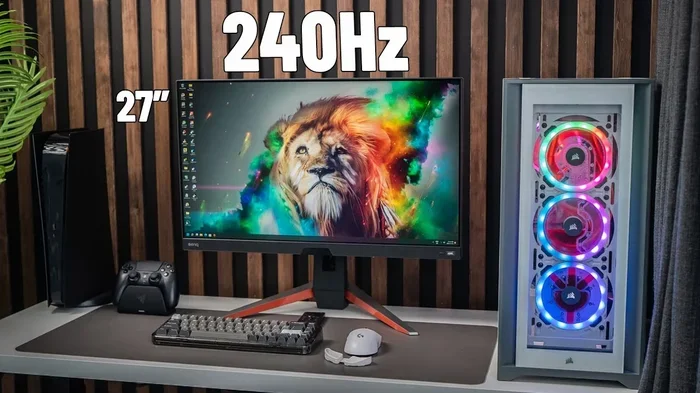
PC monitors are trickier. Many 4K monitors support HDMI 2.0 but not HDMI 2.1. If you are using a monitor with your PS5, look for models that specifically list HDMI 2.1 and 120Hz support at 4K resolution.
Pro tip: If your TV has multiple HDMI ports, check which ones are HDMI 2.1. Often, only the ports labeled HDMI 2 or HDMI 3 support the full bandwidth needed for 4K at 120Hz.
Do You Need to Buy a New HDMI Cable?
If your TV supports HDMI 2.1, you will need an Ultra High Speed HDMI cable. These cables are certified for HDMI 2.1 and can handle the full 48 Gbps bandwidth.
The good news is you probably do not need to spend a lot. Ultra High Speed HDMI cables are widely available and affordable. You do not need the most expensive brand-name cable to get great performance. Any cable that carries the Ultra High Speed HDMI certification will work perfectly.
Here are some quick tips for choosing the right cable:
- Look for the Ultra High Speed HDMI label on the packaging.
- Avoid cables that only say “High Speed.” Those are for HDMI 2.0.
- Go for a cable length that fits your setup, ideally under 6 feet for best performance.
- You do not need to buy a cable from the PS5 manufacturer. Third-party cables work just as well.
Once you have the right cable and a compatible TV, you can enable VRR and ALLM in your PS5 settings. Go to Settings, then Screen and Video, and look for the Enable VRR and Enable 120Hz Output options.
Is HDMI 2.1 Worth the Upgrade?
This is the big question. And the answer depends on your setup and preferences. Let us break it down.
If you have a 60Hz TV, HDMI 2.1 will not make a difference for frame rate. Your TV cannot display more than 60 frames per second no matter what cable you use. In that case, stick with HDMI 2.0 and save your money.
If you have a 120Hz TV or monitor, HDMI 2.1 is absolutely worth it. The difference in smoothness is real and noticeable. Fast-moving games look incredible at 120fps. The VRR feature alone is worth it because it eliminates screen tearing without any extra effort from you.
Think of it this way. HDMI 2.0 is like driving a reliable car on a regular road. HDMI 2.1 is like getting a sports car on a highway. Both get you where you need to go, but one is a much better experience when the road allows it.
Also consider pairing your HDMI 2.1 upgrade with a fast storage solution. A 2TB NVMe SSD for PS5 can dramatically reduce load times and give you plenty of space for your game library. The combination of fast storage and a high-refresh-rate display creates the best possible PS5 experience.
Common Mistakes People Make with HDMI 2.1 and PS5
There are a few things that trip up even experienced gamers. Avoid these common mistakes:
- Buying a cable that is not Ultra High Speed certified: Some cables look like HDMI 2.1 cables but do not support the full bandwidth. Always check the certification.
- Using the wrong HDMI port on your TV: Many TVs have a mix of HDMI 2.0 and HDMI 2.1 ports. Plug into the right one to get 120Hz output.
- Not enabling VRR in PS5 settings: Even with HDMI 2.1, VRR will not work unless you turn it on in the settings menu.
- Expecting 8K gaming right now: Very few games run at 8K on PS5, and the hardware is not optimized for it yet. Focus on 4K at 120Hz instead.
- Ignoring your TV’s refresh rate: A 120Hz TV is needed to actually see 120fps. No cable can make a 60Hz TV display 120fps.
Avoiding these mistakes ensures you get the most out of your HDMI 2.1 setup without wasting money or time.
Final Thoughts
So, do you really need HDMI 2.1 for PS5? The honest answer is: it depends on your setup. If you have a 120Hz display and want the smoothest, most responsive gaming experience, yes, HDMI 2.1 is worth it. It unlocks features that make next-gen gaming feel truly next-gen.
But if you have a standard 60Hz TV or just want a reliable setup without any fuss, HDMI 2.0 is perfectly fine. Your PS5 will still deliver stunning visuals and great performance.
The beauty of HDMI 2.1 is that it is future-proof. As more games support 120fps and as display technology continues to advance, having an HDMI 2.1 connection puts you ahead of the curve. It is a small investment that pays off over time.
Whatever you decide, make sure your PS5 is set up for the best performance. Fast storage with a quality Western Digital SN850P NVMe SSD and a reliable display connection go hand in hand. Together, they make your PS5 feel faster, smoother, and more enjoyable every single day.
Take a look at your current setup. Check your TV’s specs. If you have a 120Hz display, grab an Ultra High Speed HDMI cable and enable VRR in your settings. You will notice the difference immediately. Your PS5 is capable of so much more than you might think, and HDMI 2.1 is the key to unlocking it.
Frequently Asked Questions
Can I use HDMI 2.0 with PS5?
Yes, absolutely. Your PS5 works perfectly fine with HDMI 2.0 cables and ports. You will get 4K resolution at 60Hz, which is a great experience for most games. HDMI 2.0 just does not support 120Hz or VRR.
What is the difference between HDMI 2.0 and HDMI 2.1 for gaming?
The main difference is bandwidth and supported features. HDMI 2.1 offers much higher bandwidth, allowing 4K at 120Hz, VRR, ALLM, and eARC. HDMI 2.0 is limited to 4K at 60Hz without these advanced features. For fast-paced gaming, HDMI 2.1 makes a noticeable difference.
Do I need a 120Hz TV to benefit from HDMI 2.1?
Yes, you do. HDMI 2.1 can deliver 120fps, but your TV or monitor must have a 120Hz refresh rate to display it. If your display is only 60Hz, HDMI 2.1 will not give you higher frame rates. The cable would still support better audio and future features, though.
Are Ultra High Speed HDMI cables expensive?
Not at all. Ultra High Speed HDMI cables are widely available at reasonable prices. You do not need to spend a premium to get certified HDMI 2.1 performance. Look for the official Ultra High Speed HDMI certification label on the packaging.
Will HDMI 2.1 improve my PS5’s load times?
No, HDMI 2.1 does not affect load times. Load times depend on your PS5’s internal storage or an external SSD like a M.2 NVMe SSD for PS5. HDMI 2.1 only affects video output, resolution, frame rate, and audio quality.
Can I use HDMI 2.1 for PS5 and also connect other devices?
Yes. HDMI 2.1 cables work with all HDMI devices. They are backward compatible with older devices and standards. You can plug your PS5, streaming box, or Blu-ray player into the same HDMI 2.1 port without any issues.