Can Laptop Explode
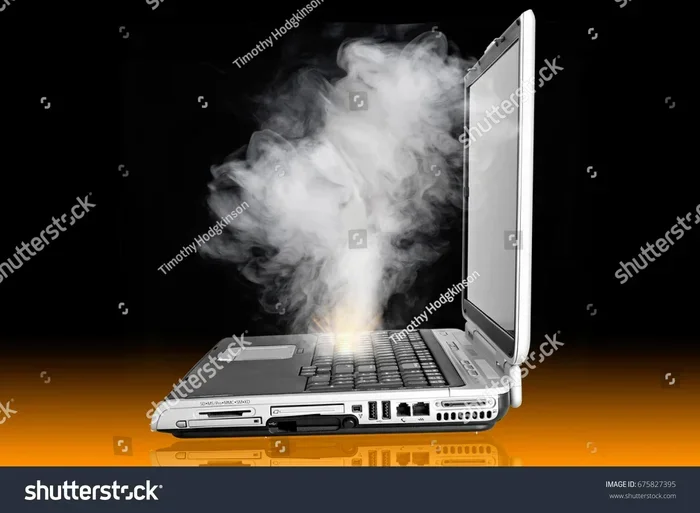
Can a laptop explode? It is rare, but yes — under extreme conditions like laptop overheating, battery damage, or manufacturing defects, a laptop can catch fire or even explode. Understanding the causes, recognizing the warning signs, and following simple safety tips can protect your device and keep you safe.
You may have seen the scary videos online. A laptop starts smoking, then sparks fly, and in some cases, it actually catches fire or explodes. It makes you wonder — can a laptop really explode? The short answer is yes, but it is extremely rare. Let us look at why this happens and what you can do to stop it from happening to you.
Most people trust their laptops without thinking twice. You set it on your lap, leave it plugged in all day, and shove it under a pillow while you sleep. None of these things feel dangerous. But over time, they can create real problems. Can a laptop explode from overheating? Yes, it can. But the good news is that you have a lot of control over preventing it.
This guide breaks down everything you need to know. We will cover the real causes, the warning signs to watch for, and practical steps you can take right now to keep your laptop safe. Whether you use your laptop for work, gaming, or just browsing, this information matters.
Key Takeaways
- Laptop explosions are rare: Modern laptops have built-in safety features, but extreme conditions can still cause failures.
- Overheating is the main culprit: Blocked vents, dust buildup, and high workloads can push temperatures to dangerous levels.
- Damaged batteries are a serious risk: Swollen or punctured lithium-ion batteries can lead to fires or explosions.
- You can prevent most issues: Simple habits like proper ventilation and regular cleaning go a long way.
- Know the warning signs: Unusual heat, swelling, strange smells, or crackling sounds mean stop using the laptop immediately.
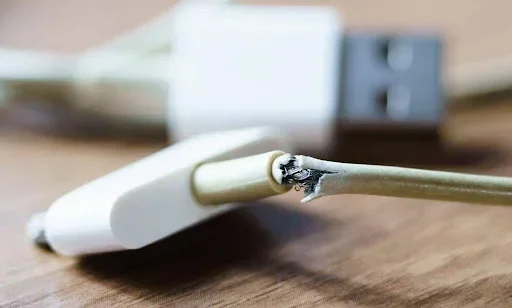
- Using the right charger matters: Cheap or incompatible chargers can cause electrical problems that may lead to overheating.
📑 Table of Contents
- Can a Laptop Explode? Understanding the Real Risk
- Common Causes of Laptop Overheating
- Can a Laptop Explode From Overheating?
- How to Prevent Your Laptop from Overheating
- What to Do If Your Laptop Starts Smoking or Catching Fire
- Should You Upgrade Your Laptop’s RAM to Reduce Heat?
- Common Myths About Laptop Explosions
- Final Thoughts
Can a Laptop Explode? Understanding the Real Risk
The idea of a laptop exploding sounds like something from a movie. But it does happen in real life. The truth is that laptops are complex devices with many parts that generate heat. When something goes wrong, the results can be dangerous.
So, can a laptop explode? There are a few main reasons this can occur:
- Battery failure: Lithium-ion batteries power most modern laptops. If the battery gets damaged, punctured, or overheats, it can enter a state called thermal runaway. This causes the battery to swell, leak, or catch fire.
- Overheating: When a laptop cannot cool itself properly, internal temperatures rise. This can damage components and, in extreme cases, cause a fire.
- Manufacturing defects: Rarely, a laptop leaves the factory with a flaw. This could be a faulty battery cell or a design issue that causes dangerous heat buildup.
- Third-party chargers: Using cheap, unverified chargers can send the wrong voltage to your laptop. This can damage the battery and internal circuits.
The risk is real but small. Millions of laptops work safely every day. Still, understanding the causes helps you stay ahead of any problems.
What Is Thermal Runaway?
This is the term that scares people the most. Thermal runaway happens when a battery overheats and starts a chain reaction. The heat causes the battery to produce more heat, which causes even more heat. It spirals out of control fast. This is the main reason can a laptop explode from overheating is a real concern.
Thermal runaway can be triggered by:
- A punctured or swollen battery
- Exposing the laptop to extreme heat
- Using a damaged or incompatible charger
- A manufacturing defect in the battery cell
When thermal runaway starts, it is very difficult to stop. This is why prevention is so important.
Common Causes of Laptop Overheating
Overheating is the biggest factor behind laptop fires and explosions. Most laptops are designed to handle normal heat. But when the cooling system fails or gets blocked, trouble starts.
Blocked Vents and Dust Buildup
Your laptop has small vents that let hot air escape. Over time, dust and lint clog these vents. When air cannot flow through, heat builds up inside the laptop. This is one of the most common reasons laptops overheat.
Think of it like trying to breathe through a pillow. Your laptop needs airflow to stay cool. Block the vents, and the temperature rises fast.
Running Heavy Tasks for Long Periods
Gaming, video editing, and running multiple programs at once put a heavy load on your laptop. This generates a lot of heat. If your cooling system is not strong enough, or if you run these tasks for hours without a break, the temperature can climb to dangerous levels.
If you are someone who pushes your laptop hard, you should pay extra attention to cooling. Want to boost performance without overheating? Check out Can You Upgrade Ram In A Laptop for tips on improving your system safely.
Using Your Laptop on Soft Surfaces
Using your laptop on a bed, couch, or pillow is convenient. But soft surfaces block the vents underneath. This traps heat and causes the temperature to rise quickly. It is one of the simplest ways to put your laptop at risk.
Can a Laptop Explode From Overheating?
This is the question most people want answered. And the answer is yes — but only under extreme conditions. Normal use will not cause an explosion. However, ignoring overheating warnings can lead to serious consequences.
Can a laptop explode from overheating in everyday situations? Not usually. But if you consistently run your laptop at very high temperatures, the risk goes up. Here is what can happen when a laptop gets too hot:
- The battery swells and may leak
- The keyboard or casing gets damaged
- The internal fans fail from overuse
- The motherboard or other components short out
- In worst cases, the battery catches fire
Most laptops have built-in safety features. They will shut down automatically if the temperature gets too high. But these systems are not perfect. They can fail, especially if the laptop is old or has been damaged.
Warning Signs Your Laptop Is Overheating
Your laptop gives you clues before things get dangerous. Watch for these signs:
- The bottom or keyboard feels extremely hot to the touch
- The fans are running loudly all the time
- The laptop shuts down randomly without warning
- Performance drops suddenly during heavy tasks
- You notice a burning smell or unusual odor
- The battery starts to swell or the laptop casing changes shape
If you notice any of these signs, stop using the laptop right away. Let it cool down in a safe place. If the battery is swollen, do not use it again. Take it to a professional for inspection.
How to Prevent Your Laptop from Overheating
The good news is that preventing laptop overheating is straightforward. A few simple habits can make a big difference.
Keep the Vents Clean
Clean the vents regularly with compressed air. This removes dust and keeps airflow moving. Do this at least once a month if you use your laptop often.
Use a Hard, Flat Surface
Always use your laptop on a hard, flat surface like a desk or table. This allows air to flow freely underneath. If you like using your laptop on the couch, get a laptop tray or cooling pad.
Use a Cooling Pad
A cooling pad is a simple accessory that blows cool air up into the laptop. It is especially helpful for gaming laptops or anyone who runs heavy tasks for long periods.
Do Not Block the Fans
Make sure nothing is covering the fan vents. Do not put your laptop under a blanket or inside a bag while it is running. Keep it in an open area where air can circulate.
Update Your Software and Drivers
Sometimes overheating is caused by software issues. Outdated drivers or malware can make your laptop work harder than it needs to. Keep your system updated and run regular scans for malware.
Manage Your Power Settings
You can adjust your laptop’s power settings to reduce heat. Switch to a power-saving mode when you are not doing heavy work. This lowers the strain on your processor and battery.
What to Do If Your Laptop Starts Smoking or Catching Fire
Even with the best prevention, emergencies can happen. Knowing what to do can save your laptop — and possibly your life.
If your laptop starts smoking or you see sparks:
- Unplug it immediately: Do not touch the laptop if it is smoking near the charger.
- Turn it off if you can: Hold down the power button to shut it down.
- Move it away from flammable items: Get it away from curtains, papers, or furniture.
- Do not use water: Lithium-ion battery fires cannot be put out with water. Use a fire extinguisher rated for electrical fires if you have one.
- Get to safety: If the laptop starts to flame up, move away and call emergency services.
Do not try to pick up a smoking or flaming laptop with your bare hands. The battery can rupture and spray hot chemicals. Your safety always comes first.
Should You Upgrade Your Laptop’s RAM to Reduce Heat?
Upgrading your laptop’s RAM can actually help reduce heat in some cases. When your laptop has more memory, it does not need to work as hard. This means less strain on the processor, which generates less heat.
If you are thinking about upgrading your memory, check out Can I Upgrade Ram On Laptop for a complete guide on how to do it safely and effectively.
More RAM also means better multitasking. You can run more programs at once without your laptop struggling. This reduces the overall workload and keeps temperatures lower.
However, RAM upgrades will not fix every overheating problem. If your laptop is already running hot, cleaning the vents and using a cooling pad will help more than adding RAM alone.
Common Myths About Laptop Explosions
There are a lot of myths floating around about laptops catching fire or exploding. Let us clear up some of the most common ones.
Myth 1: All Laptops Will Eventually Explode
This is not true. The vast majority of laptops never experience any kind of battery failure or fire. Manufacturers follow strict safety standards, and millions of laptops work perfectly for years.
Myth 2: Leaving Your Laptop Plugged In Will Cause It to Explode
Leaving your laptop plugged in all the time can shorten battery life over time. But it will not cause an explosion. Modern laptops have battery management systems that stop charging once the battery is full.
Myth 3: Only Cheap Laptops Overheat
Expensive laptops can overheat too. Gaming laptops, in particular, generate a lot of heat during intense use. The price tag does not protect you from overheating — proper care does.
Myth 4: You Can Put Out a Laptop Fire with Water
Never use water on a lithium-ion battery fire. Water can make it worse. Use a Class ABC fire extinguisher or smother small flames with a heavy blanket and call for help.
Final Thoughts
So, can a laptop explode? Yes, but it is very rare. The real danger comes from ignoring overheating, using damaged batteries, or cutting corners with cheap accessories. By taking a few simple precautions, you can keep your laptop running safely for years.
Keep your vents clean. Use your laptop on hard surfaces. Replace swollen batteries immediately. And if something feels wrong, do not ignore it. Your laptop is an investment — and your safety is worth more than any device.
Stay informed, stay careful, and enjoy your laptop without worry. The knowledge you have gained from this article puts you ahead of most users. Share it with friends and family who might not know the risks. A little awareness goes a long way in keeping everyone safe.
Frequently Asked Questions
Can a laptop battery explode on its own?
A laptop battery can explode on its own if it is damaged, swollen, or defective. Lithium-ion batteries are sensitive to heat and physical damage. If you notice your battery is swelling, stop using the laptop immediately and get it replaced.
Is it normal for a laptop to get hot while gaming?
Yes, it is normal for a laptop to get warm during gaming or heavy tasks. However, if it gets so hot that you cannot touch it, or if it shuts down on its own, that is a sign of overheating. Use a cooling pad and make sure the vents are clear.
How can I tell if my laptop battery is swollen?
A swollen battery may cause the laptop casing to warp or the keyboard to lift. You might also notice the trackpad pushing up or the bottom panel becoming uneven. If you see any of these signs, stop using the laptop and have the battery replaced right away.
Can using a third-party charger cause a laptop to explode?
Using a cheap or incompatible charger can send the wrong voltage to your laptop. This can damage the battery and internal components. Over time, this increases the risk of overheating or battery failure. Always use the charger that came with your laptop or a certified replacement.
What should I do if my laptop catches fire?
If your laptop catches fire, unplug it immediately and turn it off if possible. Move away from the laptop and call emergency services. Do not use water to put out a lithium-ion battery fire. Use a fire extinguisher rated for electrical fires if you have one available.
Does upgrading RAM help prevent laptop overheating?
Upgrading RAM can help reduce the workload on your processor, which may lower heat output. However, it is not a cure for overheating caused by dust, blocked vents, or cooling system failures. Use RAM upgrades alongside other cooling practices for the best results.