Protect Your Laptop Tips for Drops Spills
Protecting your laptop from drops and spills is simpler than you think. With the right laptop protection gear and smart daily habits, you can avoid costly repairs and keep your device running smoothly. This guide covers everything from shockproof cases to spill-resistant keyboards so your laptop stays safe.
Your laptop is one of the most important tools you own. Whether you use it for work, study, or entertainment, a single drop or spill can cause serious harm. Protecting your laptop from physical damage is not just smart, it is essential.
Every year, millions of laptops suffer drop damage or liquid damage that could have been prevented. A cracked screen, a sticky keyboard, or a dead motherboard can cost hundreds of dollars to fix. The good news is that laptop protection does not require a lot of money or effort. With a few simple steps and the right protective accessories, you can keep your device safe for years.
In this guide, you will learn proven tips to shield your laptop from drops and spills. We will cover everything from hard shell covers and padded laptop bags to daily habits that reduce risk. Whether you are a student, a professional, or just someone who loves their device, these strategies will help you avoid accidental damage and expensive repair cost.
Key Takeaways
- Use a hard shell case or padded sleeve: A laptop sleeve with shock absorption cuts drop damage significantly.
- Add a keyboard cover and screen protector: These protective accessories guard against spills and scratches every day.
- Keep liquids away from your workspace: Simple anti-slip pads and smart placement reduce accidental damage risk.
- Back up your data regularly: Even with impact protection, a spill can harm internal components and stored files.
- Act fast after a spill: Immediate spill repair steps can save your laptop from permanent liquid damage.
- Consider device insurance: Coverage for drop damage and spills saves hundreds in repair cost over time.
📑 Table of Contents
- Why Laptop Drops and Spills Happen So Often
- Essential Gear to Protect Your Laptop From Drops
- Smart Daily Habits to Prevent Laptop Damage
- What to Do Immediately After a Spill
- Protecting Your Data After Physical Damage
- Is Device Insurance Worth It for Laptop Protection?
- Final Thoughts on Protecting Your Laptop
Why Laptop Drops and Spills Happen So Often
Laptops are portable by design. That means they move with you everywhere. And where there is movement, there is risk. Understanding why drop damage and spills occur is the first step toward prevention.
Common Causes of Laptop Drops
Most laptop drops happen during everyday moments. You might carry your laptop from room to room without a secure grip. You might set it down on an uneven surface and watch it slide off. Or you might trip while walking with your laptop in a bag.
Here are the most common situations that lead to drops:
- Carrying your laptop in a bag without proper padding
- Placing it on the edge of a desk or table
- Using your laptop on your lap without a stable base
- Handing it to someone else without a firm grip
- Working in crowded or tight spaces
Each of these scenarios can result in impact protection failure. A fall from just a few feet can crack a screen or damage internal parts like the hard drive or RAM. If you have upgraded your ram upgrade for my laptop, you know how important it is to keep those components safe.
Why Spills Are So Dangerous
Spills are even more common than drops. Coffee, water, juice, and soda are constant companions at desks and kitchens. A single splash on your keyboard can seep inside and short-circuit the motherboard. Liquid damage is one of the leading reasons people need spill repair services.
What makes spills so dangerous is that the damage is not always visible right away. Liquid can travel along the circuit board and corrode connections over time. Even if your laptop seems fine after a spill, hidden liquid damage may be spreading inside. This is why acting quickly and having laptop protection measures in place is so important.
Essential Gear to Protect Your Laptop From Drops
The right gear makes a huge difference. Think of laptop protection like wearing a seatbelt. You hope you never need it, but it can save you when things go wrong.
Hard Shell Cases and Shockproof Covers
A hard shell cover is one of the best investments you can make for drop damage prevention. These cases wrap around the edges of your laptop and absorb shock on impact. They are especially useful if you frequently move your laptop between rooms or take it to coffee shops.
Look for a durable laptop case that fits your model snugly. A shockproof case with rubberized corners offers extra impact protection. Some cases even come with built-in screen protectors that add another layer of defense.
Padded Laptop Sleeves and Bags
If you carry your laptop in a bag, a padded laptop bag is a must. The padding acts as a buffer between your laptop and any bumps or jolts during transport. A thick neoprene or foam-lined sleeve can handle minor drops inside a backpack.
When choosing a padded laptop bag, consider these features:
- Water-resistant outer material to guard against rain and spills
- Soft inner lining that cushions the laptop from all sides
- A snug fit so the laptop does not shift around inside
- Extra compartments for chargers and accessories to reduce loose items
Remember, a laptop sleeve works best when combined with other protective accessories. It is one layer of laptop protection, not the only one you need.
Keyboard Covers and Screen Protectors
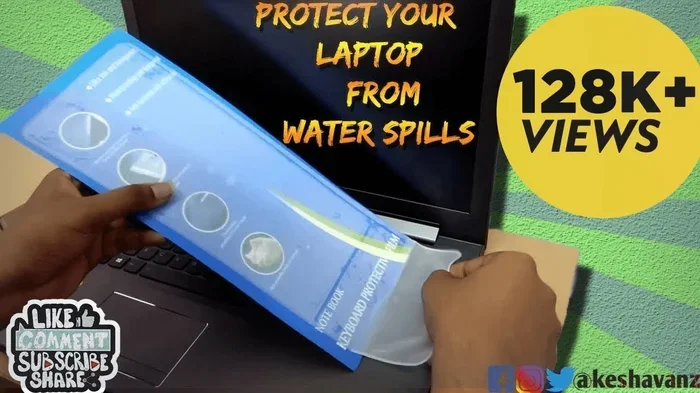
A keyboard cover is a thin, flexible sheet that sits over your keys. It blocks liquids from seeping down between the keys and reaching the internal circuitry. This is one of the simplest and most affordable forms of spill repair prevention.
Similarly, a screen protector adds a transparent shield over your display. It guards against scratches from keys in your bag and minor impacts that could crack the screen over time. Together, a keyboard cover and screen protector create a strong barrier for your durable laptop experience.
Smart Daily Habits to Prevent Laptop Damage
Gear helps, but your daily habits matter just as much. Small changes in how you use and carry your laptop can greatly reduce the risk of drop damage and liquid damage.
Keep Liquids Far From Your Workspace
This might sound obvious, but it is worth repeating. Always place drinks on a separate surface away from your laptop. Use a laptop stand to elevate your device, which also gives you more room for your coffee mug on the desk.
An anti-slip pad under your laptop or mouse can prevent your device from sliding off the desk. These small pads are cheap and they add a layer of impact protection that you will appreciate more than you think.
Handle Your Laptop With Care During Transport
When moving your laptop, always hold it with both hands. Close the lid before carrying it. This protects the screen and reduces pressure on the hinge area. If you use a bag, make sure the laptop sits in its own padded compartment, away from heavy items like books or water bottles.
One more tip that many people overlook: never place your laptop on the edge of a table or counter. A slight nudge can send it tumbling. Keep your laptop on a stable, flat surface whenever possible. This simple habit alone can prevent a lot of accidental damage.
Maintain Your Laptop Regularly
Regular maintenance keeps your laptop running well and helps you spot early signs of wear. Clean your keyboard gently with compressed air to remove dust and crumbs. Wipe the screen with a microfiber cloth. Check that all ports and connections are secure.
If you ever notice your laptop running slowly or acting up, it might be time to check your memory. A how to increase ram on your laptop guide can help you boost performance and keep your device responsive. Taking care of the inside of your laptop is just as important as protecting the outside from drops and spills.
What to Do Immediately After a Spill
Even with the best laptop protection, spills can still happen. Knowing what to do in the first few minutes can mean the difference between a quick fix and a costly spill repair.
Step-by-Step Spill Response
Follow these steps right away if liquid hits your laptop:
- Power off immediately. Do not just close the lid. Shut the laptop down completely to prevent electrical short circuits.
- Unplug everything. Remove the power cable, USB devices, and any external accessories.
- Flip the laptop upside down. This helps the liquid drain out instead of soaking deeper into the board.
- Remove the battery if possible. Some laptops allow easy battery removal. This adds another layer of safety against liquid damage.
- Dry the surface gently. Use a soft cloth to blot the outside. Do not shake the laptop or use a hairdryer on high heat.
- Let it air dry for at least 24 hours. Place it in a dry, warm area with good airflow before turning it back on.
After the laptop is completely dry, you can power it on and check if everything works. If you notice any issues, seek professional spill repair help right away. The sooner you act, the better your chances of saving your device from permanent liquid damage.
Protecting Your Data After Physical Damage
Hardware damage is not the only concern when your laptop suffers a drop or spill. Your personal files, photos, and documents are also at risk. Data backup is a critical part of any laptop protection plan.
Cloud storage services make it easy to keep copies of your important files safe. You can also use an external hard drive for regular backups. If your laptop is damaged beyond repair, having a recent backup means you do not lose anything valuable.
Protecting your storage matters too. If you use an M 2 NVMe SSD for laptop, your data is stored on a fast and reliable chip. Even so, a severe drop damage event can still affect the drive. This is why data backup should always be part of your safety routine.
Is Device Insurance Worth It for Laptop Protection?
Device insurance can be a smart addition to your laptop protection strategy. Many plans cover drop damage, liquid damage, and other accidental damage that standard warranties do not cover.
Before buying insurance, compare the cost of the premium with the repair cost for common issues like a cracked screen or water damage. For many people, insurance pays for itself after just one incident. Check if your credit card or home insurance already includes laptop coverage before buying a separate plan.
Also look at what each policy covers. Some plans replace your laptop with a new one, while others only offer repair or a refurbished replacement. Understanding the terms helps you choose the right durable laptop protection plan for your needs.
Final Thoughts on Protecting Your Laptop
Protecting your laptop from drops and spills does not have to be complicated. Start with the basics: a hard shell cover, a padded laptop bag, a keyboard cover, and a screen protector. Build smart daily habits like keeping liquids away and handling your device with care. And always have a backup plan for your data in case the worst happens.
These steps add up. Together, they create a strong defense against drop damage, liquid damage, and accidental damage. Your laptop is an investment, and a little laptop protection goes a long way in keeping it safe and working well for years to come.
Take a few minutes today to review your current setup. Do you have a laptop sleeve? A keyboard cover? A data backup routine? Small changes now can save you from big headaches later. Your laptop will thank you for it.
Frequently Asked Questions
How can I protect my laptop from drops?
Use a hard shell case or shockproof cover with rubberized corners. Carry your laptop in a padded laptop bag with a snug fit. Always hold your laptop with both hands and avoid placing it on the edge of surfaces. These steps provide strong impact protection against everyday drops.
What should I do immediately after spilling liquid on my laptop?
Power off the laptop immediately and unplug all accessories. Flip it upside down to let the liquid drain out. Remove the battery if possible. Let it air dry for at least 24 hours before turning it back on. Acting fast reduces the risk of permanent liquid damage and the need for expensive spill repair.
Are keyboard covers really effective for spill prevention?
Yes, keyboard covers are very effective. They create a barrier that blocks liquids from reaching the internal circuitry beneath the keys. A thin, flexible keyboard cover is one of the most affordable and practical forms of laptop protection against spills.
Does device insurance cover drop and spill damage?
Many device insurance plans do cover drop damage and liquid damage as part of accidental damage protection. However, coverage varies by provider and policy. Always check the terms before purchasing insurance to make sure it covers the risks you are most concerned about.
How often should I back up my laptop data?
You should back up your data at least once a week, or more often if you create or modify important files regularly. Use cloud storage or an external hard drive for data backup. This ensures that even if your laptop suffers drop damage or liquid damage, your files remain safe and recoverable.
What is the best material for a laptop sleeve?
Neoprene and foam-lined materials offer the best impact protection for laptop sleeves. They are soft, shock-absorbing, and water-resistant. Look for a sleeve that fits your laptop snugly and has a durable outer shell for extra laptop protection during transport.