Is 25 Feet Too Long for Hdmi
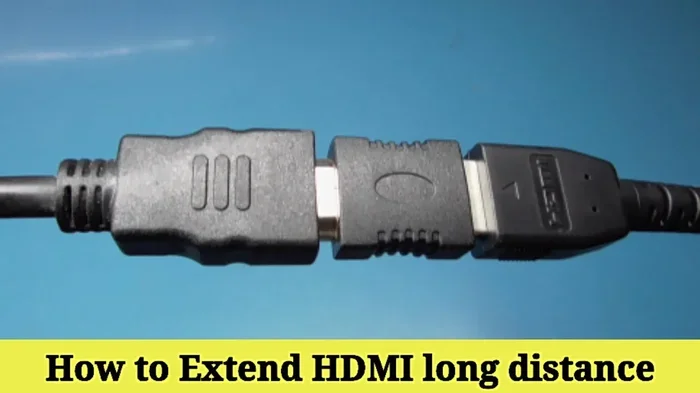
Yes, 25 feet can be too long for a standard HDMI cable, especially if you need 4K or higher resolutions. Signal degradation becomes a real risk at this distance, leading to flickering, no signal, or poor image quality. However, active HDMI cables, extenders, and splitters can solve this problem and keep your setup running smoothly.
Have you ever needed to run an HDMI cable across a room, down a hallway, or through a wall? If so, you have probably wondered whether 25 feet is too much. The short answer is yes, 25 feet can be too long for a standard HDMI cable. But the full answer depends on a few things. Let us break it all down so you can make the right choice for your setup.
HDMI cables carry both video and audio in a single wire. That is one of the reasons they are so popular. But the longer the cable, the more the signal has to travel. Over distance, that signal weakens. This is called signal degradation. When it happens, you might see a blurry picture, no picture at all, or audio dropouts. Not fun when you are trying to enjoy a movie or give a presentation.
The good news is that there are real solutions. You do not have to settle for a bad picture just because your cable run is long. Active cables, extenders, and splitters can all help. In this guide, we will walk through everything you need to know about running an HDMI cable at 25 feet. By the end, you will know exactly what to buy and what to avoid.
Key Takeaways
- Standard HDMI cables lose signal quality beyond 15-20 feet: At 25 feet, you may experience issues with 4K and high-bandwidth content.
- Active HDMI cables are the best fix for long runs: They boost the signal and maintain quality over longer distances.
- HDMI extenders and repeaters help too: These devices regenerate the signal so you can run cables much farther without problems.
- Not all setups suffer equally: Lower resolutions and older HDMI versions handle longer cables better than newer ones.
- Cable quality matters a lot: Cheap cables at 25 feet are more likely to fail than well-built ones from reputable brands.
- An HDMI splitter can help manage long cable runs: It lets you distribute your signal across multiple displays without losing quality.
- Test your setup before mounting: Always run the cable and check for issues before you make it permanent.
📑 Table of Contents
How HDMI Signal Works Over Distance
To understand why 25 feet can be a problem, it helps to know how HDMI signals travel. An HDMI cable sends digital data from one device to another. This data includes video, audio, and control signals. The faster the data moves, the more bandwidth the cable needs. Higher resolutions like 4K and 8K need a lot of bandwidth.
What Happens When the Signal Travels Too Far
When an HDMI signal travels through a cable, it loses strength over distance. Think of it like speaking through a wall. The farther away someone is, the harder it is to hear them clearly. With HDMI, this loss of strength shows up in a few ways:
- Flickering screen: The picture might blink or go in and out.
- No signal at all: Your TV or monitor says there is no input.
- Reduced resolution: The picture drops from 4K to 1080p or lower.
- Audio issues: Sound might cut out or become distorted.
- Color problems: Colors might look washed out or incorrect.
These problems are more common with high-bandwidth content. If you are watching a 4K movie at 60Hz or playing a game with HDR, the cable needs to carry a lot of data. A 25-foot standard cable simply may not be up to the task.
Is 25 Feet Too Long for Standard HDMI Cables?
The honest answer is it depends on your setup. Standard passive HDMI cables work well up to about 15 feet. Beyond that, the risk of signal problems goes up. At 25 feet, many users run into issues, especially with newer HDMI versions.
HDMI Version and Bandwidth Matter
Not all HDMI cables are the same. The version of HDMI your devices support plays a big role. Here is a quick look at how different versions handle distance:
- HDMI 1.4: Can handle 1080p reasonably well at 25 feet. 4K is not really supported at this distance.
- HDMI 2.0: Better than 1.4, but 4K at 60Hz may still struggle over 25 feet.
- HDMI 2.1: Needs the most bandwidth. It is the most likely to have problems at 25 feet with a standard cable.
If your devices use HDMI 2.1 and you want 4K at 120Hz or 8K, a 25-foot passive cable is almost certainly too long. You will need a different solution.
Resolution and Refresh Rate Impact
The resolution and refresh rate you are using also matter a lot. A simple desktop setup at 1080p and 60Hz might work fine on a 25-foot cable. But push that to 4K at 120Hz, and you are asking for trouble. The higher the resolution, the more data the cable must carry, and the more likely it is to lose signal over distance.
If you are building a gaming setup or a home theater, pay close attention to this. A bad cable can ruin your experience. You might get a picture that looks great for a few minutes and then suddenly goes black.
Solutions for Running HDMI Over 25 Feet
The good news is that you have several options for making a 25-foot HDMI run work perfectly. Let us look at the best solutions.
Option 1: Active HDMI Cables
An active HDMI cable has built-in electronics that boost the signal as it travels. This makes it much more reliable at longer distances. You can find active cables that work well at 25 feet and even longer.
Here are some tips for choosing an active HDMI cable:
- Look for cables rated for the resolution you need, like 4K 60Hz or 4K 120Hz.
- Choose cables from reputable brands with good reviews.
- Check the cable thickness. Thicker cables often have better shielding and signal boost.
- Make sure the cable supports your HDMI version (2.0 or 2.1).
Active cables do need power in most cases. They usually draw a small amount of power from the HDMI port itself. This is normal and nothing to worry about.
Option 2: HDMI Extenders and Repeaters
An HDMI extender is a small device that regenerates the signal. You place it in the middle of your cable run, and it boosts the signal so it can travel farther. This is a great option if you already have a long cable and are having problems.
Repeaters work similarly. They take the weak signal and strengthen it before sending it back through the cable. Many extenders also allow you to switch between devices, which is handy if you have multiple sources.
Option 3: Use an HDMI Splitter
An HDMI splitter can also help with long cable runs. It takes one HDMI input and splits it into multiple outputs. This is useful if you need to connect the same source to more than one display. A good splitter can also help maintain signal quality over longer distances.
For example, if you need to run HDMI to two TVs in different rooms, a splitter combined with a quality cable can make it work. Check out the best HDMI splitter for dual monitors to find a reliable option that fits your needs.
Option 4: Fiber Optic HDMI Cables
For the longest runs, fiber optic HDMI cables are the gold standard. They use light instead of electrical signals, so there is almost no signal loss. You can run fiber optic HDMI cables 50 feet, 100 feet, or even longer without any quality drop.
The downside is price. Fiber optic HDMI cables cost more than standard ones. But if you need a reliable 25-foot run with 4K or higher, they are worth every penny.
Common Problems with Long HDMI Cables
Even with the right cable, long HDMI runs can cause issues. Here are the most common problems and how to fix them.
Signal Interference
Long cables are more prone to picking up interference from other electronics. Power cords, routers, and even microwaves can cause problems. The best way to avoid this is to use a cable with good shielding. Braided or foil-shielded cables block interference much better than cheap, unshielded ones.
Connector Issues
At 25 feet, the weight of the cable can put stress on the connectors. Over time, this can cause loose connections. Make sure your cable has sturdy, well-built connectors. If you are plugging and unplugging often, look for cables with reinforced strain relief.
HDCP Handshake Failures
HDCP is a copy protection system used by HDMI devices. Sometimes, long cables cause HDCP handshake failures. This shows up as a black screen or an error message. If this happens, try unplugging both ends, waiting a few seconds, and plugging them back in. If the problem persists, an active cable or extender usually fixes it.
Quick Tips for the Best HDMI Experience at 25 Feet
Want to make sure your 25-foot HDMI setup works perfectly? Follow these simple tips:
- Always test before you mount: Run the cable and check the picture and sound before you put it behind a wall or above a ceiling.
- Buy quality over price: A good HDMI cable costs more, but it saves you from headaches later.
- Check your HDMI version: Make sure your cable, source device, and display all support the same HDMI version.
- Keep cables away from power lines: Run HDMI cables at least a few inches away from power cords to reduce interference.
- Use an extender if needed: If a standard cable does not work, do not keep trying. Use an extender or active cable instead.
These small steps can make a huge difference. They save time, money, and frustration in the long run.
When to Consider Alternative Connections
Sometimes, HDMI is not the best choice for long cable runs. If you are running a cable more than 25 feet, it might be worth considering other options. DisplayPort and USB-C with adapters can sometimes handle longer runs better. Wireless HDMI transmitters are another option, though they add a small bit of latency.
For audio, if you are using HDMI just for sound, you might consider optical or analog connections instead. These can carry audio over longer distances without the same signal issues. If you are setting up a sound system and wondering about audio quality over distance, check out what is good frequency response for speakers to understand how audio quality is measured and what to look for.
Final Thoughts
So, is 25 feet too long for HDMI? For a standard passive cable, yes, it can be. But that does not mean you are stuck. With the right tools, a 25-foot run works just fine. Active cables, extenders, repeaters, and fiber optic options give you plenty of choices. The key is to match your solution to your needs. If you need 4K at high refresh rates, invest in a quality active cable or fiber optic option. If you just need 1080p for a simple setup, a standard cable might still work.
Take the time to plan your setup. Measure your distance, check your device specs, and choose the right cable type. A little preparation goes a long way. You will enjoy a clear picture, great sound, and zero frustration every time you turn on your display.
Remember, every setup is different. What works for one person might not work for another. Use the tips in this guide to find the best solution for your situation. And if you are ever unsure, go with a quality active cable or extender. You will not regret it.
Frequently Asked Questions
Can I use a 25-foot standard HDMI cable for 4K?
It is possible, but not reliable. Standard passive HDMI cables often struggle with 4K signals at 25 feet. You are more likely to experience signal loss, flickering, or no signal at all. For a dependable 4K setup at this distance, use an active HDMI cable or a fiber optic cable instead.
What is the difference between an active and passive HDMI cable?
A passive HDMI cable has no built-in electronics. It simply carries the signal from one point to another. An active HDMI cable has internal chips that boost and regenerate the signal as it travels. This makes active cables much better for longer runs like 25 feet, where signal degradation is a real concern.
Do HDMI extenders really work?
Yes, HDMI extenders work very well for long cable runs. They take the incoming signal, boost it, and send it through another cable. This allows you to extend your HDMI connection well beyond the normal 15-20 foot limit. Many extenders also support 4K resolution and HDR, making them a great solution for home theaters and office setups.
Is fiber optic HDMI better than regular HDMI for long runs?
Absolutely. Fiber optic HDMI cables use light to transmit data, which means there is almost no signal loss over distance. You can run them 50 feet, 100 feet, or more without any quality drop. They are more expensive than regular cables, but for long runs and high resolutions, they are the best choice available.
Can interference from other cables affect my HDMI signal?
Yes, it can. Long HDMI cables are more susceptible to interference from nearby power cords, routers, and other electronics. This can cause flickering, color distortion, or audio dropouts. To reduce interference, use a cable with good shielding and keep your HDMI cable away from power lines whenever possible.
What should I do if my HDMI signal keeps dropping at 25 feet?
First, try a different cable. A higher-quality or active cable might solve the problem. If that does not work, add an HDMI extender or repeater in the middle of your run. You can also check your HDMI version and make sure all your devices support the same version. If the issue persists, consider switching to a fiber optic HDMI cable for a more reliable connection.