Why Do Usb C Cables Break So Fast
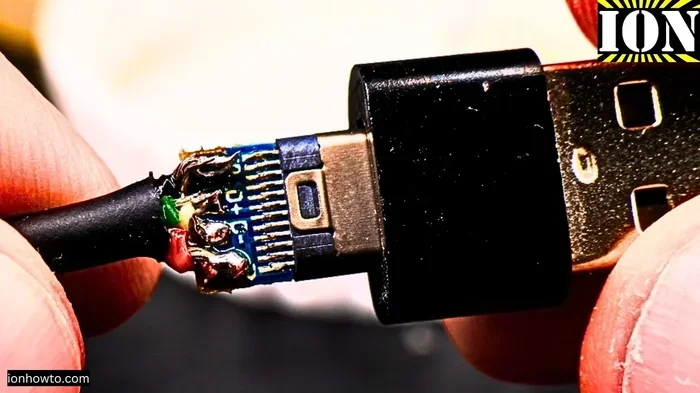
USB-C cables break fast due to thin design, poor strain relief, and constant bending. Understanding the real causes helps you pick better cables and avoid frustration. Learn the top reasons and simple fixes to make your USB-C cables last longer.
You plug in your USB-C cable every day. You charge your laptop. You sync your phone. You transfer files. And then one morning, it stops working. Sound familiar? You are not alone. USB-C cables breaking fast is one of the most common tech complaints out there. People buy new cables constantly, and it feels like a never-ending cycle of spending money and throwing cables in the trash.
But why does this keep happening? Is it your fault? Is it the cable? The truth is, there are real reasons behind this problem. And the good news is, once you understand them, you can take steps to fix it. In this article, we will explore the top reasons USB-C cables break so fast, what causes the damage, and how you can make your cables last much longer.
Whether you use USB-C for charging, data transfer, or connecting accessories like an audio device, cable durability matters. A broken cable means downtime, frustration, and extra costs. So let us dive into the real reasons behind this annoying problem.
Key Takeaways
- Thin cable design is the #1 reason USB-C cables fail quickly.
- Strain relief at the connector is the most common breakage point.
- Bending habits and heat exposure speed up cable wear significantly.
- Cheap cables lack the internal reinforcement needed for daily use.
- Simple habits like proper coiling and cable management can double cable lifespan.
- Replacing cables early prevents damage to your devices and ports.
📑 Table of Contents
The Real Reason USB-C Cables Break So Quickly
The design of USB-C cables is both a blessing and a curse. The connector is small, reversible, and compact. That makes it incredibly convenient. But that same compactness creates real problems when it comes to durability. The cable has to carry power, data, and sometimes video signals through a very tiny space. And it has to do it hundreds or thousands of times.
The Thin Design Problem
One of the biggest reasons USB-C cables break fast comes down to thickness. Many USB-C cables are simply too thin for what they need to do. Inside the cable, there are multiple tiny wires packed tightly together. There are power wires, data wires, and sometimes shielding layers. When the outer jacket is thin, all of those internal wires have very little protection.
Think of it like a garden hose. A thin hose kinks easily and wears out fast. A thicker hose handles pressure and bending much better. The same idea applies to USB-C cable durability. Cables with a thinner outer shell cannot handle repeated bending, pulling, or twisting. The internal wires start to fray, and eventually, the cable fails.
Some manufacturers cut corners to make cables cheaper and more flexible. But flexibility without strength is a recipe for failure. A cable that bends too easily will also break too easily. This is the core design trade-off that makes so many USB-C cables fall apart quickly.
Strain Relief and Stress Points
The most common USB-C cable failure point is right where the cable meets the connector. This area is called the strain relief. It is the flexible section designed to absorb bending stress and protect the internal wires. When the strain relief is poorly made or missing entirely, every bend puts direct stress on the solder joints and thin wires inside.
Over time, this stress causes the wires to break inside the cable. You might not even see visible damage on the outside at first. But internally, the connection is weakening. One day, the cable just stops working. This is why some cables work intermittently before dying completely. The internal wires are fraying with every use.
Premium cables solve this problem with reinforced strain relief boots. They use thicker, more flexible materials at the connector joint. This simple design feature makes a huge difference in USB-C cable lifespan. But many budget cables skip this entirely, which is why they fail so quickly.
Common USB-C Cable Failure Points
Understanding where and how cables break helps you prevent it. There are a few specific areas where USB-C cable damage happens most often. Let us look at each one.
Where Do USB-C Cables Usually Break?
There are three main spots where USB-C cables fail:
- The connector end – Where the plug meets the cable body. This is the most common failure point.
- The middle of the cable – Where the cable bends frequently during use.
- The other connector – The opposite end, especially if it is plugged into a device that gets moved often.
The connector end breaks because of repeated plugging and unplugging. Each time you connect or disconnect the cable, there is physical stress on the internal contacts. Over hundreds of cycles, this wear adds up. The middle of the cable breaks from bending during daily use, especially if you carry your device while it is charging.
Interestingly, the breakage pattern can also depend on how you use the cable. If you always plug the cable in the same direction, one side of the connector wears faster. If you carry your laptop with the cable plugged in, the cable gets bent and twisted constantly. These habits directly impact how long your USB-C cable lasts.
Connector Damage vs. Cable Fraying
It is important to understand the difference between connector damage and cable fraying. They are two different problems with different causes.
Connector damage happens when the metal pins inside the USB-C plug bend, wear out, or lose contact. You might notice your cable only works when you hold it at a certain angle. Or it might stop charging altogether. This type of damage often comes from forcing the connector, plugging it in at an angle, or regular wear on the pins.
Cable fraying is when the outer jacket of the cable starts to split or crack, exposing the internal wires. This usually happens from repeated bending or catching the cable on sharp edges. Fraying not only looks bad, but it also creates a safety risk. Exposed wires can cause short circuits or even electrical burns in some cases.
Both problems lead to the same result: a dead cable. But knowing which type of damage you are dealing with helps you prevent it in the future.
How Daily Use Wears Down Your USB-C Cable
Your daily habits play a huge role in how fast your USB-C cables break. Some people go through a cable every few months. Others use the same cable for years. The difference is usually in how the cable is handled.
Bending and Twisting Habits
The way you bend your cable matters more than you might think. Sharp bends are much worse than gentle curves. When you fold a cable at a 90-degree angle, you put enormous stress on the internal wires at that point. Over time, those wires break. This is called fatigue, and it is the same reason a paperclip breaks after you bend it back and forth enough times.
Many people wrap their cables tightly around a power brick or wrap them in a tight coil. This creates sharp bends that damage the internal structure. A better approach is to use loose figure-eight coils or simply let the cable hang naturally. These small changes can significantly extend your USB-C cable durability.
Another common habit is running a cable under a desk or chair. The cable gets stepped on, pulled by the furniture, and pinched against sharp edges. All of this adds up over weeks and months. If your cable lives in a high-traffic area, it will naturally wear out faster.
Heat and Environmental Factors
Heat is a hidden enemy of USB-C cables. When a cable carries power, it generates heat. Fast charging makes this worse. If the cable is already under stress from bending, the added heat accelerates the breakdown of the outer jacket and internal insulation.
Leaving cables in hot cars, near radiators, or in direct sunlight speeds up material degradation. The plastic outer jacket becomes brittle and cracks. The internal wires lose flexibility and become prone to breaking. If you want your cables to last, keep them in cool, dry places when not in use.
Moisture is another factor. Sweat from your hands, humidity, and accidental spills can all corrode the internal connectors over time. This is especially true for cables that live in your pocket or bag where moisture can build up without you noticing.
Does Cable Quality Really Matter?
The short answer is yes. Cable quality makes a massive difference in how long your USB-C cables last. Not all cables are created equal, and the price difference usually reflects real differences in materials and construction.
Cheap vs. Premium USB-C Cables
Budget cables often use thinner wires, less shielding, and weaker strain relief. They might work fine at first, but they degrade quickly. A cheap cable might last three months of normal use. A premium cable with proper reinforcement can last two to three years or more.
Premium cables use higher-quality copper wires, thicker outer jackets, and better connector housing. They also tend to have better heat dissipation, which means they handle fast charging without degrading as quickly. The internal construction is simply more robust.
Some brands also include additional features like braided nylon jackets, which resist fraying much better than standard PVC. Others use reinforced connector heads that resist bending stress. These features add cost but dramatically improve USB-C cable lifespan. When you buy a quality cable, you are saving money in the long run because you do not need to replace it as often.
What to Look for in a Durable USB-C Cable
When shopping for a durable USB-C cable, look for these features:
- Braided nylon jacket – Resists fraying and handles bending better than standard plastic.
- Reinforced strain relief – Look for a flexible boot at the connector joint.
- Thicker cable gauge – A slightly thicker cable carries more current and handles stress better.
- Certified cables – Look for USB-IF certification or Thunderbolt certification for quality assurance.
- Right-angle connectors – These reduce bending stress at the connection point.
Even the best cables will eventually fail, but choosing quality from the start means fewer replacements and less frustration. Think of it like buying shoes. A well-made pair lasts longer and protects your feet better than a cheap pair that falls apart in two months.
Also, consider how you use your USB-C devices. If you use a portable drive like a Sandisk Extreme Portable USB C NVMe SSD, you are plugging and unplugging the cable frequently. That puts extra stress on the connector. In these cases, a durable cable with a reinforced connector is especially important.
How to Make Your USB-C Cables Last Longer
The good news is that you can take simple steps to extend the life of your USB-C cables. Most of these tips cost nothing and take almost no extra time.
Simple Habits That Extend Cable Life
- Avoid sharp bends. Keep cable bends gentle and wide. Never fold a cable at a sharp angle.
- Do not yank the cable out. Pull from the plug body, not the cable itself. Yanking stresses the connector joint.
- Use cable organizers. Velcro ties or cable clips keep cables from getting tangled and bent in wrong directions.
- Unplug by gripping the plug. Never pull the cable out of the wall or device by pulling on the wire.
- Store cables properly. Use loose coils or a cable case. Avoid tight wraps that create permanent kinks.
- Keep cables away from heat sources. Do not leave them on radiators, in hot cars, or in direct sunlight.
These habits might feel small, but they add up over time. A cable that you handle gently and store properly can easily last twice as long as one that gets tossed around carelessly.
Cable Management Tips
Good cable management is one of the easiest ways to protect your USB-C cables. Here are a few practical ideas:
- Use a cable reel or wrap to keep cables tidy when not in use.
- Label your cables so you do not grab the wrong one and stress it.
- Keep spare cables in a dedicated bag or drawer, not tangled in a junk drawer.
- Use cable sleeves or spiral wrap to protect high-stress areas.
- Rotate your cables. Using multiple cables in turns distributes wear evenly.
Think of your cables like tools. The better you care for them, the longer they serve you. A few minutes of cable management each week can save you from buying replacement cables every few months.
It is also worth noting that damaged cables can cause problems beyond just not charging. A frayed cable can damage your device’s USB-C port. If you have ever experienced issues where your USB mouse stopped working unexpectedly, a damaged cable or port could be the culprit. Keeping your cables in good shape protects all your USB-C devices.
When to Replace a USB-C Cable
Even with the best care, cables eventually wear out. Knowing when to replace a cable saves you from frustrating interruptions and protects your devices.
Here are clear signs that it is time for a new USB-C cable:
- The cable only works when held at a certain angle or position.
- The outer jacket is visibly cracked, split, or frayed.
- The cable gets unusually hot during use.
- Charging speed has noticeably slowed down.
- The cable does not connect securely and feels loose in the port.
- You see exposed wires or damaged connector pins.
If you notice any of these signs, stop using the cable immediately. A damaged cable can harm your device, cause data loss, or even create a fire hazard in extreme cases. Replacing a cable is always cheaper than replacing a device.
Also, if you are using a cable with a device like an M.2 NVMe to USB C SSD enclosure, a faulty cable can cause data transfer errors or even corrupt files. In these situations, cable reliability is not just a convenience issue, it is a data safety issue.
Final Thoughts
USB-C cables breaking fast is a real problem, but it is not something you just have to accept. The design challenges are real, but with the right knowledge and habits, you can make your cables last much longer. Choose quality cables with good strain relief and braided jackets. Handle them gently. Store them properly. And replace them when they show signs of wear.
The small investment in a good cable pays off quickly. You save money, you avoid frustration, and you protect your devices from damage caused by faulty connections. Next time you reach for a USB-C cable, remember these tips. Your cables, your devices, and your wallet will thank you.
Take a moment today to check your cables. Look for signs of wear, replace the ones that are failing, and start building better habits. A little care goes a long way when it comes to keeping your USB-C cables in good shape for years to come.
Frequently Asked Questions
Why does my USB-C cable stop working after a few months?
Most USB-C cables fail because of repeated bending stress, poor strain relief, or thin cable construction. The internal wires break over time, especially at the connector joint where the cable flexes the most. Cheap cables with weak construction tend to fail even faster.
Can a broken USB-C cable damage my device?
Yes, a damaged cable can cause problems. Frayed wires can short-circuit and damage USB ports. Loose connections can cause power fluctuations that harm sensitive electronics. If your cable shows visible damage, replace it immediately to protect your devices.
What is the best way to store USB-C cables?
Store cables in loose coils or use a cable case. Avoid tight wraps that create permanent kinks. Keep them in a cool, dry place away from direct sunlight and heat sources. Proper storage prevents material degradation and internal wire damage.
Are expensive USB-C cables worth the money?
Generally, yes. Premium cables use better materials, stronger strain relief, and higher-quality internal wiring. They last significantly longer than budget cables. When you calculate the cost of replacing cheap cables every few months, investing in a quality cable saves money over time.
How can I tell if my USB-C cable is damaged internally?
Signs of internal damage include intermittent charging, needing to hold the cable at a specific angle, slow data transfer speeds, and the cable getting unusually hot. If you notice any of these symptoms, the internal wires are likely frayed and the cable should be replaced.
Do right-angle USB-C cables last longer?
Right-angle connectors reduce bending stress at the connection point, which is the most common failure spot. By keeping the cable at a 90-degree angle, they prevent sharp bends that damage internal wires. This simple design feature can noticeably extend cable life.
=== CONCLUSION ===
USB-C cables break fast for clear and understandable reasons. Thin design, poor strain relief, bad bending habits, and low-quality materials all contribute to the problem. But now that you know the causes, you can take action. Choose better cables, handle them with care, and use smart storage habits. Your cables will last longer, your devices will stay safe, and you will save money in the long run. Start today, and say goodbye to constantly replacing your USB-C cables.