Is Hdmi Arc Only for Audio
HDMI ARC is not only for audio. It primarily handles audio signals, but it also supports CEC commands and works with your TV, soundbar, and home theater setup. Understanding HDMI ARC helps you get the best audio and device control without extra cables.
Key Takeaways
- HDMI ARC is not just for audio: It also handles control signals between your TV and audio devices.
- eARC is an upgrade: It supports higher-quality formats like Dolby Atmos and multi-channel audio.
- You still need a video connection: ARC does not replace your standard HDMI cable for video.
- CEC control works through ARC: You can use one remote to control multiple devices.
- Setting up ARC is simple: Just enable it in your TV settings and use an ARC-compatible HDMI port.
- Common issues are fixable: Audio sync and compatibility problems have easy solutions.
📑 Table of Contents
- Is HDMI ARC Only for Audio? Let Us Break It Down
- What Is HDMI ARC and How Does It Work?
- HDMI ARC vs. eARC: What Is the Difference?
- What Else Can HDMI ARC Do?
- Common HDMI ARC Problems and How to Fix Them
- When Should You Use HDMI ARC?
- HDMI ARC vs. Optical Cable: Which Is Better?
- Quick Tips for Getting the Most Out of HDMI ARC
- Final Thoughts
Is HDMI ARC Only for Audio? Let Us Break It Down
You have probably seen the label “ARC” on the back of your TV or soundbar. And you might have wondered, what does it actually do? Many people think HDMI ARC is only for audio. But the truth is a bit more interesting than that.
HDMI ARC stands for Audio Return Channel. It lets your TV send audio back to a soundbar, receiver, or speaker system. But it does more than just carry sound. It also sends control signals between devices. This means you can use one remote to control your TV and your audio setup at the same time.
In this guide, we will clear up the confusion. We will explain what HDMI ARC really does, how it works, and whether it handles video too. By the end, you will know exactly how to get the most out of your home theater setup.
What Is HDMI ARC and How Does It Work?
HDMI ARC is a feature built into the HDMI standard. It allows audio to travel in both directions through a single cable. Normally, audio goes from a source device to your TV. But with ARC, audio can also travel from your TV back to a soundbar or receiver.
This is a big deal. Without ARC, you would need a separate cable to connect your TV to your speaker system. That means more cables on your floor. More clutter. More hassle. ARC simplifies your audio setup and keeps things clean.
How ARC Handles Audio Signals
When you watch a show on your TV, the audio can come from the TV’s built-in speakers. But most people prefer better sound. With HDMI ARC, the TV sends the audio signal to your external speaker system. This works for all kinds of audio formats, including stereo, Dolby Digital, and even multi-channel sound.
The audio quality you get depends on your devices and the ARC version you are using. Standard ARC supports basic surround sound. But if you want the best Dolby Atmos experience, you will need eARC, which we will cover next.
Does ARC Carry Video Too?
Here is the important part. HDMI ARC is designed for audio. It does not carry a separate video signal. Your TV still needs a standard HDMI connection to receive video from your cable box, gaming console, or streaming device. Think of ARC as a dedicated audio lane on the same cable. The video lane is handled separately.
So to answer the question directly: HDMI ARC is not for video. It is specifically built for audio return and device control. If you want both audio and video to flow through one cable, you need a regular HDMI connection alongside ARC.
HDMI ARC vs. eARC: What Is the Difference?
You may have also heard of eARC. This stands for Enhanced Audio Return Channel. It is the newer and better version of standard ARC. Both serve the same basic purpose, but eARC brings big improvements.
Audio Quality Comparison
Standard ARC supports compressed audio formats. This is fine for most everyday listening. But if you are into high-quality home theater, standard ARC will hold you back. It cannot pass uncompressed or high-bandwidth audio formats.
eARC, on the other hand, supports lossless audio and advanced formats. This includes Dolby Atmos and DTS:X. If you want your soundbar or receiver to deliver the full cinematic experience, eARC is the way to go. You will notice a huge difference in audio quality, especially with a good frequency response speaker setup.
Bandwidth and Compatibility
eARC also has much more bandwidth. This means it can handle more audio channels at once. Standard ARC typically handles 2-channel or basic 5.1 surround. eARC can handle 7.1 surround and even object-based audio formats.
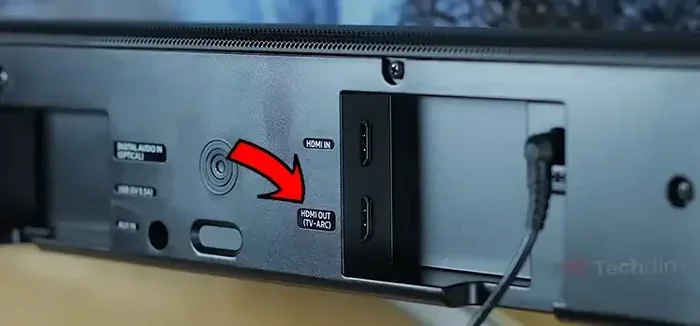
Not all devices support eARC yet. You need a TV, soundbar, or receiver that specifically mentions eARC support. Check the HDMI port labels on your TV. Look for ports marked with “ARC” or “eARC” to know what your setup can handle.
What Else Can HDMI ARC Do?
Beyond audio, HDMI ARC has a really useful feature. It supports CEC, which stands for Consumer Electronics Control. This might sound technical, but it is actually very simple and helpful.
Control Multiple Devices With One Remote
CEC lets you control all your connected devices with your TV remote. So when you turn on your TV, your soundbar turns on too. When you change the volume, it adjusts the soundbar. When you turn off the TV, the soundbar powers down as well.
This is called audio passthrough in some setups. It saves you from grabbing multiple remotes every time you want to watch something. It makes your entire audio device setup feel seamless and connected.
HDMI-CEC and Device Control
Different brands call CEC by different names. Samsung calls it Anynet+. LG calls it SimpLink. Sony calls it BRAVIA Sync. But they all do the same thing. They let your TV and audio gear talk to each other.
To use this feature, you need to enable CEC in your TV settings. Then make sure your soundbar or receiver also has CEC turned on. Once both are enabled, the control works automatically. It is one of the best reasons to use HDMI ARC instead of an optical cable.
Common HDMI ARC Problems and How to Fix Them
HDMI ARC is great. But like any technology, it can have issues. Here are some common problems and how to solve them.
No Audio Coming Through ARC
This is the most common complaint. You plug everything in, but you get no sound. First, check that you are using the right HDMI port on your TV. Not all ports support ARC. Look for the port labeled “ARC” or “eARC.”
Next, go into your TV settings and make sure ARC is turned on. On some TVs, this is under Sound Settings or External Speaker Settings. If you still have no sound, try unplugging the HDMI cable and plugging it back in.
Audio and Video Are Out of Sync
Sometimes the audio does not match the video. Lips move, but the sound comes a split second late. This is called audio latency. It can be annoying, especially when watching fast action scenes.
To fix this, try lowering the audio delay in your soundbar or receiver settings. Many devices have a manual sync adjustment. You can also try a different HDMI cable. A high-speed cable with good build quality can reduce latency issues.
ARC Keeps Disconnecting
If your ARC connection drops often, the HDMI cable might be the problem. Older cables may not support ARC properly. Try using a newer High Speed HDMI cable or an Ultra High Speed cable for eARC.
Also, make sure your firmware is up to date. Both your TV and your audio device should have the latest software. Updates often fix compatibility bugs that cause disconnections.
When Should You Use HDMI ARC?
Now that you know what HDMI ARC does, you might wonder when it is the right choice. Here are some situations where ARC really shines.
- You have a soundbar or home theater system: ARC lets you connect it to your TV with just one cable instead of two.
- You want fewer cables on your desk or entertainment center: ARC reduces cable clutter and keeps things tidy.
- You want one-remote control: CEC through ARC means you can control your TV and speakers with the same remote.
- You are building a simple home theater setup: ARC gives you good audio quality without needing extra equipment.
- You want to avoid optical cables: HDMI ARC often gives better audio quality than optical connections.
If you are setting up a new entertainment system, HDMI ARC should be your go-to connection method for audio. It is convenient, reliable, and widely supported across modern TVs and speakers.
HDMI ARC vs. Optical Cable: Which Is Better?
Many people compare HDMI ARC to optical audio cables. Both carry audio from your TV to a speaker system. But they have some key differences.
| Feature | HDMI ARC | Optical Cable |
|---|---|---|
| Audio Quality | Good (better with eARC) | Good (compressed formats only) |
| Video Support | No | No |
| Device Control | Yes (CEC support) | No |
| Number of Cables | One (shared with video) | One (audio only) |
| Dolby Atmos Support | Yes (with eARC) | No |
| Setup Difficulty | Easy | Easy |
As you can see, HDMI ARC has the edge. It supports device control and higher-quality audio formats. An optical cable is a good backup option, but it cannot do everything ARC can.
If you want the best experience, use HDMI ARC for audio and a separate HDMI cable for video. This gives you the best of both worlds. You get great sound and clear video without any compromises.
Quick Tips for Getting the Most Out of HDMI ARC
- Always use an ARC-labeled HDMI port on your TV. Regular ports will not support ARC even if the cable is connected.
- Enable ARC in your TV settings before connecting your audio device. This ensures the connection works from the start.
- Use a high-quality HDMI cable rated for ARC or eARC. Cheap cables can cause dropouts and sync issues.
- Update your device firmware regularly. Manufacturers often release updates that improve ARC compatibility and fix bugs.
- Test your setup with different audio formats to make sure everything plays correctly.
- Consider eARC if you have a Dolby Atmos setup. Standard ARC will not pass the full Atmos experience.
Final Thoughts
So, is HDMI ARC only for audio? The short answer is yes, with a twist. HDMI ARC is built for audio, but it also handles control signals between your devices. It does not carry video. You still need a standard HDMI connection for that. But when it comes to simplifying your setup and getting great sound, HDMI ARC is hard to beat.
Whether you are using a basic soundbar or a full-blown home theater system, understanding HDMI ARC helps you make smarter decisions. You will get better audio quality, fewer cables, and easier control. It is one of those features that makes your entire entertainment experience better without you having to think about it.
Take a few minutes to check your TV settings and make sure ARC is enabled. You might be surprised at how much better your setup sounds once everything is connected the right way. Your ears will thank you.
Frequently Asked Questions
Can HDMI ARC carry video signals too?
No, HDMI ARC is designed only for audio. It sends audio from your TV back to a soundbar or receiver. You still need a separate HDMI connection for video. The ARC feature works alongside your regular video connection, not instead of it.
Do I need a special HDMI cable for ARC?
Most standard HDMI cables support basic ARC. But for the best results, especially with eARC, use a High Speed or Ultra High Speed HDMI cable. A quality cable ensures stable audio and reduces sync issues. Check the cable packaging for ARC compatibility.
What is the difference between HDMI ARC and eARC?
Standard ARC supports basic audio formats and compressed surround sound. eARC supports uncompressed audio and advanced formats like Dolby Atmos. eARC also has more bandwidth and better device control features. If your TV and soundbar both support eARC, use it for the best experience.
Why is my HDMI ARC not working?
First, check that you are using an ARC-labeled HDMI port on your TV. Then make sure ARC is enabled in your TV settings. Try unplugging and replugging the cable. If the problem continues, update your TV and audio device firmware. A loose connection or outdated software causes most ARC issues.
Can I use HDMI ARC with any soundbar?
Not all soundbars support HDMI ARC. Check your soundbar’s specifications before buying. Look for an ARC or eARC label on the soundbar or its HDMI port. Most modern soundbars do support ARC, but older or budget models may not. Always confirm compatibility first.
Does HDMI ARC support Dolby Atmos?
Standard ARC does not support Dolby Atmos. You need eARC to pass Dolby Atmos audio from your TV to your soundbar or receiver. If you want the full immersive audio experience, make sure both your TV and audio device support eARC. This is one of the biggest reasons to upgrade to eARC-enabled equipment.