Gaming Pc Build Under 1500
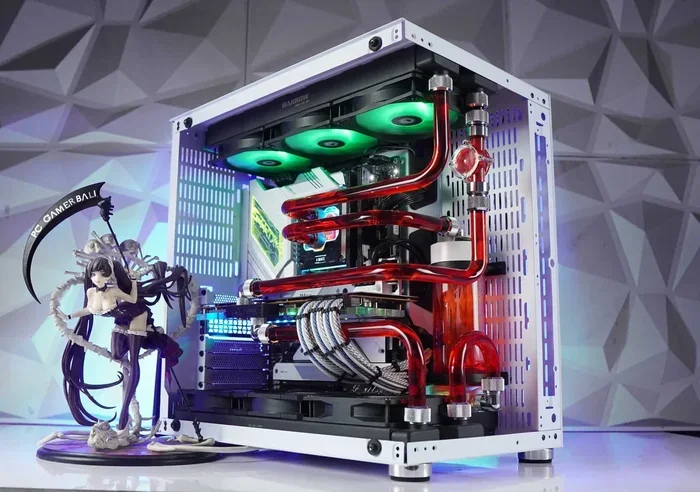
Building a gaming PC under 1500 gives you amazing performance without breaking the bank. You get the freedom to choose every part, upgrade later, and save money compared to prebuilt options. This guide walks you through the best components, step-by-step build process, and smart tips to maximize your budget gaming PC build experience.
A gaming PC build under 1500 is one of the sweet spots in the PC building world. You get enough budget to grab solid components that handle modern games at high settings. At the same time, you still have money left over for a good monitor, keyboard, or headset. Whether you are a college student, a casual gamer, or someone who wants a powerful machine without spending a fortune, this budget range delivers real value.
In this guide, we break down every part you need. We share the best component picks, walk you through the build process step by step, and highlight mistakes to avoid. By the end, you will feel confident enough to start your own affordable gaming setup from scratch. Let us dive in.
Key Takeaways
- Smart Component Choices: A gaming PC build under 1500 can deliver excellent 1080p and even 1440p gaming performance with the right parts.
- Custom Beats Prebuilt: Building your own PC saves money and gives you full control over quality and upgrade paths.
- Balance Your Budget: Prioritize the GPU and CPU first, then allocate funds to RAM, storage, and cooling wisely.
- Avoid Common Pitfalls: Skimping on the power supply or forgetting compatibility checks are the top mistakes budget builders make.
- Upgrade-Friendly Design: A solid budget gaming PC build today leaves room for future upgrades without replacing everything.
- Free Upgrades Matter: Using open box deals or best buy gaming PC sales can stretch your 1500 dollars further than expected.
📑 Table of Contents
Why Build a Gaming PC Under 1500?
Many gamers wonder whether they should buy a prebuilt machine or build one themselves. The truth is, building your own gaming PC under 1500 comes with serious advantages. First, you control every single component. You know exactly what goes into your machine, which means no bloatware, no mystery parts, and no overpriced markup. Second, a custom build almost always costs less than a prebuilt with the same performance level.
When you build your own PC, you also get the freedom to choose quality parts. For example, you can pick a gaming PC case with great airflow instead of settling for a cramped, noisy prebuilt chassis. You also get a warranty on each individual part, which is much better than dealing with a single warranty that covers the whole system. If one component fails, you only replace that part.
Another big reason is future-proofing. A budget gaming PC build under 1500 dollars gives you room to upgrade later. Maybe you want to add more RAM next year or swap in a better graphics card. With a custom build, you can do that easily. With a prebuilt, you are often stuck with whatever came in the box.
What Can You Expect From a 1500 Dollar Build?
At the 1500 dollar price point, you can expect smooth 1080p gaming at high or ultra settings in most modern titles. You can also push 1440p gaming with some settings adjustments in demanding games. A build in this range typically includes a solid mid-range processor, a capable graphics card with 8 to 12 GB of VRAM, 16 GB of DDR4 or DDR5 RAM, and a fast NVMe SSD for quick load times.
If you want to stretch your budget even further, consider checking out our guide on the best gaming PC under 1500 for prebuilt options that might save you time and effort.
Best Components for a Gaming Pc Build Under 1500
Choosing the right parts is the most important step in any gaming PC build under 1500. Every component plays a role, but some matter more than others for gaming performance. Here is a breakdown of the best parts that fit within your budget.
Processor (CPU)
The CPU is the brain of your computer. For a budget gaming PC build, you want a processor that balances strong single-core performance with enough cores for multitasking. The AMD Ryzen 5 7600 and Intel Core i5-13400F are two excellent choices in this price range. Both offer great gaming performance and won’t break your budget.
These processors handle modern games beautifully. They also run cool and use energy efficiently, which means lower electricity bills over time. If you are new to building PCs, both of these CPUs are beginner-friendly and work well with budget motherboards.
Graphics Card (GPU)
The GPU is the most important part for gaming. In a gaming PC under 1500 dollars build, you want to allocate a big chunk of your budget here. The NVIDIA RTX 4060 Ti and the AMD Radeon RX 7700 XT are two fantastic options. Both deliver smooth frame rates at 1080p and 1440p resolutions.
If you want even more value, keep an eye out for open box deals on higher-end cards. Sometimes you can find an RTX 4070 or RX 7800 XT at a significant discount, which would really elevate your build.
RAM and Storage
For gaming, 16 GB of RAM is the sweet spot right now. You can get a solid 16 GB DDR5 kit for a reasonable price, and it will handle virtually every game on the market. If you plan to stream or run heavy background apps while gaming, consider 32 GB for future-proofing.
Storage-wise, a 1 TB NVMe SSD is the way to go. It gives you fast boot times, quick game loads, and plenty of space for your library. You can always add a larger hard drive later for mass storage if needed.
Motherboard and Power Supply
Your motherboard connects everything together. For a budget build, a B650 or B760 chipset board works perfectly. These boards support the CPUs mentioned above and offer all the features you need without overspending.
The power supply is a part you should never cheap out on. A quality 650W or 750W 80+ Bronze certified PSU keeps your system safe and stable. A reliable power supply also leaves headroom if you decide to upgrade your GPU later.
Step-by-Step Gaming Pc Build Under 1500 Guide
Building a PC might seem intimidating, but it is actually quite straightforward once you know the steps. Here is a simple walkthrough for your gaming PC build under 1500.
Step 1: Prepare Your Workspace
Find a clean, well-lit table with plenty of room. Lay down a soft cloth or anti-static mat to protect your components. Keep your screwdriver, zip ties, and manual handy. Working in a clutter-free space makes the whole process much smoother.
Step 2: Install the CPU
Open your motherboard box and carefully lift the CPU socket latch. Align the gold triangle on your processor with the triangle on the socket, then gently place it in. Do not force it. Close the latch, and you are done with this step.
Step 3: Install the CPU Cooler
Most budget CPUs come with a stock cooler, which works fine for gaming. Apply a small dot of thermal paste to the center of the CPU, then mount the cooler firmly. Connect the fan cable to the CPU_FAN header on your motherboard.
Step 4: Install RAM and M.2 SSD
Push your RAM sticks into the correct slots (usually slots 2 and 4 for dual channel). They should click into place with even pressure. For your NVMe SSD, slide it into the M.2 slot on the motherboard at an angle, then press it flat and secure it with the tiny screw.
Step 5: Mount the Motherboard in the Case
Install the I/O shield into your case first. Then align the motherboard with the standoffs and screw it in gently. Make sure no screws are touching the back of the board.
Step 6: Install the GPU and Power Supply
Remove the necessary PCIe slot covers from the back of your case. Insert your graphics card firmly into the top PCIe slot and screw it in. Then mount the PSU at the bottom of the case and route the main 24-pin and CPU power cables to their respective headers.
Step 7: Cable Management and Final Checks
Tie up your cables with zip ties to keep airflow clean. Double-check every connection before you power on. Make sure the GPU power cables are seated properly, and the front panel headers are connected. Once everything looks good, plug in your monitor, keyboard, and mouse, then hit the power button.
Prebuilt vs Custom: Which Is Better for a Budget Build?
This is a question many gamers face when starting their gaming PC build under 1500 journey. Both options have pros and cons, so let us compare them honestly.
Prebuilt PCs offer convenience. You open the box, plug it in, and start gaming. There is no assembly required. For people who are not comfortable with hardware, a prebuilt is a perfectly valid choice. You can find decent prebuilt gaming PCs under 1500 from trusted retailers.
However, custom builds win on value and flexibility. When you build your own PC, every dollar goes toward actual performance parts. Prebuilt manufacturers often mark up prices significantly for the same components. You also get to choose the exact parts you want, including better cases, cooler fans, and higher-quality PSUs.
If you are someone who enjoys hands-on projects or wants full control over your machine, a custom build is the clear winner. The process is fun, educational, and deeply satisfying when you boot up your new system for the first time.
Common Mistakes to Avoid When Building a Gaming Pc
Even experienced builders make mistakes sometimes. Here are common errors that can cost you time, money, or performance in your gaming PC build under 1500.
- Skimping on the power supply: A cheap PSU can damage your entire system. Always buy from a reputable brand with an 80+ certification.
- Ignoring compatibility: Make sure your CPU fits your motherboard socket, your RAM matches your motherboard type (DDR4 vs DDR5), and your case fits your GPU length.
- Forgetting thermal paste: If your CPU cooler does not come with pre-applied paste, you need to apply it yourself. Without it, your CPU will overheat.
- Overlooking cable management: Messy cables block airflow and cause your system to run hotter. Take the extra few minutes to route cables neatly.
- Buying the cheapest GPU you can find: Your graphics card does the heavy lifting for gaming. Spending a little extra here pays off in frame rates and visual quality.
For more tips on protecting your investment, check out our article on best virus protection for gaming PC to keep your new build safe from malware.
Final Thoughts on Your Gaming Pc Build Under 1500
Building a gaming PC under 1500 is one of the best decisions any gamer can make. You get a machine tailored to your needs, full upgradeability, and the satisfaction of creating something with your own hands. The components outlined in this guide give you a powerful, reliable system that handles modern games with ease.
Remember, the key to a successful budget build is balance. Spend more where it matters (GPU and CPU), save where it is safe (case and accessories), and always buy from reputable brands. Your affordable gaming setup can rival or even beat many prebuilt systems at double the price.
If you are still deciding between parts, our guide on the best budget build gaming PC can help you narrow down your choices. And once your PC is built, do not forget to grab a comfortable headset and a solid mouse to complete your setup.
Start planning your build today. With the right parts and a little patience, you will be gaming in style for years to come. A gaming PC build under 1500 is not just a budget option. It is a smart investment in your gaming future.
Frequently Asked Questions
Can I build a gaming PC under 1500 dollars and still play modern games?
Absolutely. A well-built PC in this price range handles modern titles at high settings in 1080p and solid performance in 1440p. The key is to prioritize your GPU and CPU and avoid overspending on extras you do not need right away.
Is it cheaper to build a PC or buy a prebuilt one?
Building your own PC is almost always cheaper for the same level of performance. Prebuilt manufacturers add markup costs for assembly, warranties, and profit margins. When you build yourself, every dollar goes directly into components.
Do I need experience to build a gaming PC?
No experience is needed. Most modern PC builds follow a straightforward process with plenty of online tutorials. As long as you handle components carefully and follow each step, anyone can build a gaming PC under 1500 successfully.
What is the most important part of a budget gaming PC build?
The graphics card and processor matter the most for gaming performance. Allocate the largest portion of your 1500 dollar budget to these two components. A strong GPU paired with a capable CPU will give you the best gaming experience at any price.
Can I upgrade my budget gaming PC later?
Yes, that is one of the biggest advantages of a custom build. You can swap out your GPU, add more RAM, or upgrade your storage whenever your needs change. A well-planned budget gaming PC build leaves room for future upgrades.
How long does it take to build a gaming PC?
For a first-time builder, expect to spend about 2 to 3 hours on the assembly process. Experienced builders can finish in under an hour. Take your time, double-check connections, and enjoy the process rather than rushing through it.