Is There a Android Hdmi Adapter
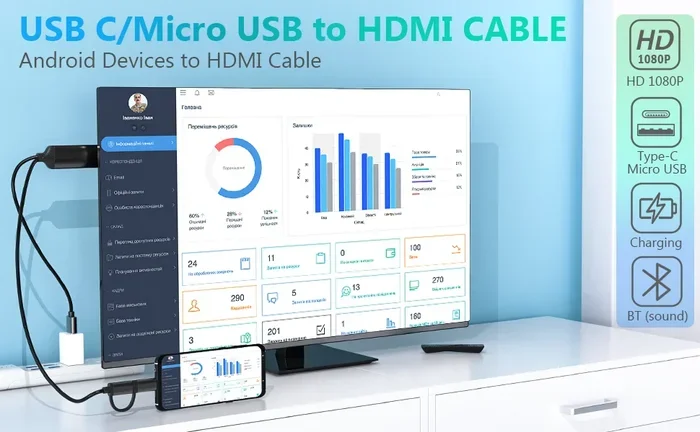
Yes, Android HDMI adapters exist and they work with most Android phones and tablets. Whether your device uses USB-C or Micro USB, there is an adapter that can send your screen to a TV or monitor. This guide covers the types, compatibility, and tips for choosing the right Android HDMI adapter.
Have you ever wanted to show something on your phone screen but wished it were bigger? Maybe you want to watch a movie on your TV, share photos with family, or give a presentation at work. An Android HDMI adapter makes all of this possible. It connects your Android device directly to a display, and the experience is surprisingly simple once you know what to look for.
But here is the thing: not all adapters are the same. Some work with newer phones that have USB-C ports. Others are made for older devices with Micro USB. And some phones do not support wired HDMI output at all. This guide will walk you through everything you need to know. We will cover the different types of adapters, how to check if your phone is compatible, and what to look for when you buy one.
If you have ever searched for ways to get your phone screen on a bigger display, you are in the right place. Let us dive in and break it all down.
Key Takeaways
- Multiple adapter types exist: USB-C to HDMI, Micro USB to HDMI, and MHL adapters all serve different Android devices.
- Compatibility matters: Not every Android phone supports HDMI output. Check your device specs before buying.
- USB-C is the most common: Newer Android devices use USB-C, making USB-C to HDMI adapters the most popular choice.
- Wireless options are available: If you do not want cables, wireless screen mirroring is a solid alternative.
- Price varies widely: Basic adapters cost under $15, while premium models with extra features can cost $50 or more.
- Check for MHL support: MHL (Mobile High-Definition Link) is a key technology that enables HDMI output from older Android devices.
📑 Table of Contents
- What Is an Android HDMI Adapter?
- How to Check If Your Android Phone Supports HDMI Output
- Types of Android HDMI Adapters Compared
- How to Choose the Right Android HDMI Adapter
- Common Uses for an Android HDMI Adapter
- Wireless Alternatives to Android HDMI Adapters
- Common Mistakes People Make When Buying Android HDMI Adapters
- Final Thoughts
What Is an Android HDMI Adapter?
An Android HDMI adapter is a small device that plugs into your Android phone or tablet and sends the video and audio signal to an HDMI cable. That HDMI cable then connects to a TV, monitor, or projector. The result is that your phone screen appears on the larger display, often in full resolution.
Think of it like a bridge. Your phone produces a digital signal, and your TV expects an HDMI signal. The adapter translates between the two so they can talk to each other. Most adapters also pass through charging, which means you can keep your phone powered while you use it.
There are a few different technologies behind these adapters, and the one you need depends on your device. Let us look at the main types next.
USB-C to HDMI Adapters
This is the most common type today. If your Android phone has a USB-C port, a USB-C to HDMI adapter is what you need. These adapters are small, plug-and-play, and work with most modern Android phones released in the last five years. They support high-definition video output, often up to 4K resolution.
One of the best things about USB-C to HDMI adapters is that they are widely available. You can find them at most electronics stores, online marketplaces, and even convenience shops. Prices range from around $5 for basic models to $40 for premium options with extra features like Ethernet ports or SD card readers.
Micro USB to HDMI Adapters
If you have an older Android phone, it might use a Micro USB port instead of USB-C. In that case, you need a Micro USB to HDMI adapter. These adapters are less common now because most manufacturers have moved to USB-C. But they still work, and many people have older devices sitting in drawers that could benefit from a bigger screen.
One thing to keep in mind with Micro USB adapters is that they often require your phone to support MHL technology. We will talk more about MHL in a moment.
MHL Adapters
MHL stands for Mobile High-Definition Link. It is a technology standard that allows mobile devices to output high-definition video and audio through a USB connection. MHL adapters were very popular before USB-C became the standard. If your older Android phone supports MHL, you can use an MHL adapter to connect it to a TV or monitor.
However, MHL support has largely been phased out by phone manufacturers. Newer phones use USB-C with DisplayPort Alt Mode, which does the same job without needing a special MHL chip. If you are buying a new adapter, you are almost always better off with a simple USB-C to HDMI adapter.
How to Check If Your Android Phone Supports HDMI Output
Before you rush out and buy an Android HDMI adapter, you should confirm that your phone actually supports HDMI output. Not every Android device has this capability, and buying the wrong adapter can be frustrating.
Here are the steps to check:
- Check your phone’s specifications. Look up your phone model online and search for “HDMI output” or “MHL support.” The manufacturer’s website usually lists this under the technical specifications section.
- Look at your charging port. If your phone has a USB-C port, it likely supports video output. If it has a Micro USB port, check whether MHL is supported.
- Search your phone’s settings. Some Android phones have a “Cast” or “Screen Output” option in the settings menu. If you see this, your phone supports wired or wireless display output.
- Check for DisplayPort Alt Mode. This is a feature found in most USB-C phones that allows them to output video through a USB-C to HDMI adapter. It is the modern replacement for MHL.
If you are also curious about how much memory your device has, you can check What Is The Ram On A Laptop to understand how device memory affects overall performance, even though that article focuses on laptops.
Types of Android HDMI Adapters Compared
Not sure which adapter to get? Here is a quick comparison of the most common types of Android HDMI adapters available on the market.
| Adapter Type | Best For | Max Resolution | Price Range |
|---|---|---|---|
| USB-C to HDMI | Modern Android phones and tablets | 4K at 60Hz | $5 – $40 |
| Micro USB to HDMI | Older Android phones | 1080p at 30Hz | $8 – $25 |
| MHL Adapter | Legacy Android devices | 1080p at 60Hz | $10 – $30 |
| USB-C Hub with HDMI | Users who need multiple ports | 4K at 60Hz | $20 – $60 |
As you can see, the USB-C to HDMI adapter is the most versatile and affordable option for most people. If you have a newer phone, this is the one to get. If you have an older device, double-check whether it supports MHL before purchasing a Micro USB to HDMI adapter.
How to Choose the Right Android HDMI Adapter
Buying the right adapter is not just about picking the cheapest option. There are a few things you should consider to make sure you get a product that works well and lasts.
Check Your Device Compatibility
This is the most important step. Make sure the adapter you buy is compatible with your specific phone model. Some adapters work with most Android devices, but others are designed for specific brands or models. Always check the product listing for a compatibility list before you buy.
Look for 4K Support
If you want to watch movies or play games on a big screen, you will want an adapter that supports 4K resolution. Most modern USB-C to HDMI adapters do support 4K, but cheaper models may only support 1080p. If you plan to use the adapter for mobile productivity or presentations, 1080p might be enough. But for entertainment, go with 4K.
Consider Build Quality
Not all adapters are built the same. Some feel cheap and loose in the port, while others are sturdy and well-made. Look for adapters with a solid connector and good cable length. A shorter cable can sometimes give you a better signal, especially at higher resolutions.
Read Reviews Before Buying
This is a simple but effective tip. Before you buy any adapter, read the customer reviews. Look for feedback on picture quality, ease of use, and durability. If multiple reviewers mention the same problem, that is a red flag. If the reviews are mostly positive, you are probably looking at a solid product.
Think About When You Are Buying
If you are not in a rush, you might want to wait for a sale. When Is The Best Time To Purchase A Laptop can also apply to accessories. Major shopping events like Black Friday, Cyber Monday, and Amazon Prime Day often have great deals on tech accessories including HDMI adapters. You can save a lot of money if you are patient.
Common Uses for an Android HDMI Adapter
Once you have your Android HDMI adapter, the possibilities are pretty wide open. Here are some of the most common ways people use them:
- Watching movies and shows on a bigger screen. Streaming services like Netflix, YouTube, and Disney Plus look much better on a TV than on a small phone screen.
- Mobile gaming. If you play games on your phone, casting them to a TV can make the experience more immersive and fun.
- Work presentations. Need to show something on a screen during a meeting? An HDMI adapter lets you display your phone’s screen without needing a laptop.
- Sharing photos and videos. Want to show your vacation photos to friends and family? Plug your phone into the TV and scroll through your gallery on the big screen.
- Using your phone as a second monitor. Some people use their phone as an extended display for their laptop, which can boost productivity.
Each of these use cases works best with a reliable adapter that delivers a clear picture and stable connection. The cheap adapters might work for basic tasks, but if you want a smooth experience, investing a little more in a quality product is worth it.
Wireless Alternatives to Android HDMI Adapters
Not a fan of cables? You are not alone. Many people prefer wireless options because they are more convenient and less cluttered. If an Android HDMI adapter does not sound appealing, there are wireless alternatives you can explore.
Chromecast is one of the most popular wireless options. It plugs into your TV’s HDMI port and connects to your Wi-Fi network. You can then cast content from your Android phone to the TV with a few taps. It is simple to set up and works well for streaming.
Miracast is another wireless option built into many Android phones and smart TVs. It lets you mirror your phone screen to a TV without any extra hardware. Just make sure both your phone and TV support Miracast, and you should be good to go.
Bluetooth and Wi-Fi Direct are also options, though they usually offer lower picture quality compared to a wired HDMI connection. If you need the best possible image quality, a wired adapter is still the way to go.
Common Mistakes People Make When Buying Android HDMI Adapters
It is easy to make a mistake when buying an HDMI adapter. Here are some common errors to avoid:
- Buying without checking compatibility. This is the number one mistake. Always verify that your phone supports video output before you buy an adapter.
- Choosing the cheapest option. Ultra-cheap adapters often have poor build quality and may not deliver the resolution they claim. Spending a few extra dollars on a reputable brand can save you a lot of frustration.
- Ignoring cable length. A very short cable can be limiting, while a very long one might cause signal loss. Aim for a cable between 3 and 6 feet for the best balance.
- Not checking the resolution. Some adapters only support 1080p, even if they advertise 4K. Read the product details carefully to make sure you are getting what you pay for.
- Forgetting about power delivery. Some adapters do not pass through charging. If you plan to use your phone for a long time while connected to a display, make sure your adapter supports power delivery.
Avoiding these mistakes will help you find an adapter that works well and gives you a great experience every time you use it.
Final Thoughts
An Android HDMI adapter is a simple but incredibly useful accessory. It turns your phone or tablet into a powerful media device that can connect to any screen with an HDMI input. Whether you want to watch movies, play games, share photos, or give presentations, the right adapter makes it happen with just a few plugs.
The key is to know your device, check compatibility, and choose the right type of adapter for your needs. USB-C to HDMI adapters are the best choice for most people today, but older devices may need Micro USB or MHL adapters. And if you prefer going wireless, options like Chromecast and Miracast are worth considering too.
Take your time, do a little research, and you will find the perfect adapter for your setup. Once you have it, you will wonder how you ever lived without a bigger screen for your phone content.
Frequently Asked Questions
Do all Android phones support HDMI output?
No, not all Android phones support HDMI output. Most modern phones with USB-C ports do support video output through DisplayPort Alt Mode. However, some budget phones may not have this feature. Always check your phone’s specifications before buying an adapter.
Can I use an Android HDMI adapter with a tablet?
Yes, you can. Most Android tablets use USB-C ports, so a USB-C to HDMI adapter works great with them. Just make sure your tablet supports video output, which most modern tablets do.
Do I need a special HDMI cable with an Android adapter?
No, you can use any standard HDMI cable with an Android HDMI adapter. The adapter connects to your phone on one end and to the HDMI cable on the other. The HDMI cable then connects to your TV or monitor.
Why does my Android HDMI adapter not work with my phone?
This usually happens for one of a few reasons. Your phone might not support video output, the adapter might be incompatible with your phone model, or the adapter might be defective. Try checking your phone’s specs and the adapter’s compatibility list first.
Can I charge my phone while using an HDMI adapter?
Many Android HDMI adapters pass through charging, which means you can plug in your charger while the adapter is connected. However, not all adapters support this feature. Check the product description to confirm before you buy.
What is the difference between an Android HDMI adapter and a USB-C hub?
An Android HDMI adapter is designed specifically to output video to a display. A USB-C hub, on the other hand, offers multiple ports like HDMI, USB-A, and SD card slots. A USB-C hub is a better choice if you need more connectivity options beyond just HDMI output.