How Much Does Ram Cost for a Pc

The cost of RAM for a PC varies widely based on type, capacity, and speed. A basic 8GB DDR4 kit typically costs between $30 and $50, while a 16GB DDR4 set runs around $50 to $80. For high-performance 32GB DDR5 kits, expect to pay $100 to $200. Choosing the right RAM depends on your needs, budget, and whether you are building a new PC or upgrading an existing one.
How much does RAM cost for a PC? This is one of the most common questions people ask when they are building or upgrading a computer. RAM, or random access memory, plays a huge role in how fast and smooth your system runs. Whether you are a student, a gamer, or a professional, understanding RAM pricing helps you make smart buying decisions.
RAM prices have changed a lot over the years. A few years ago, 16GB of RAM cost a small fortune. Today, you can grab a solid 16GB kit for less than $80. The market is more competitive than ever, which means better deals for consumers. In this guide, we will walk you through everything you need to know about RAM costs. We will cover different types, capacities, and where to find the best deals.
What Is RAM and Why Does It Matter?
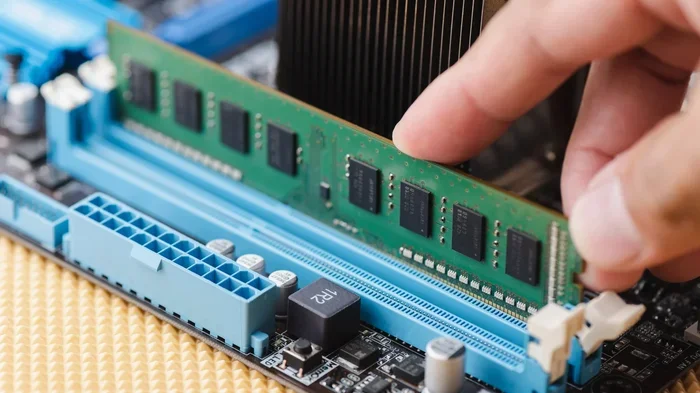
RAM is the short-term memory of your computer. It holds data that your processor needs to access quickly. Without enough RAM, your PC will slow down. Apps will lag, and your system will struggle with multitasking. The more RAM you have, the more programs you can run at the same time without performance drops.
When people ask about how much RAM costs for a PC, they usually want to know what they will pay for a specific amount. The price depends on several factors, including the type of RAM, the capacity, and the speed rating. Let us break this down in detail.
Factors That Affect RAM Pricing
Not all RAM is priced the same. Several factors influence the final cost. Understanding these factors helps you make a smarter purchase.
Type of RAM (DDR4 vs DDR5)
The type of RAM is the biggest factor in pricing. DDR4 has been the standard for years and is still widely used. DDR5 is the newer generation and offers faster speeds and better efficiency. However, DDR5 RAM costs more than DDR4. A DDR4 16GB kit is much cheaper than a DDR5 16GB kit of the same capacity.
If you are on a tight budget, DDR4 is still a great choice. It delivers solid performance for everyday use and gaming. If you want future-proofing and the latest technology, DDR5 is worth the extra cost. For most people, DDR4 RAM offers the best value for money right now.
Capacity (8GB, 16GB, 32GB, and More)
Capacity directly affects the price. More RAM means a higher cost. Here is a general idea of what to expect:
- 8GB RAM: $30 to $50 for a single stick or kit
- 16GB RAM: $50 to $80 for a 2-stick kit
- 32GB RAM: $100 to $200 for a 2-stick kit
- 64GB RAM: $200 to $400+ for a 4-stick kit
Most casual users and office workers do fine with 8GB. Gamers and content creators should aim for 16GB or more. Professionals who work with video editing, 3D rendering, or large datasets may need 32GB or even 64GB.
Speed and Frequency
RAM speed is measured in megahertz (MHz). Higher MHz means faster data transfer. But does faster RAM cost more? Yes, it usually does. A 3200MHz DDR4 kit costs a bit more than a 2400MHz kit. The difference is not huge, but it adds up if you are buying multiple sticks.
For most users, RAM speed does not make a massive difference in everyday use. Gamers and power users may notice a slight improvement with faster kits. But the real-world gains are often small. Do not pay a premium for high speed unless you really need it.
Brand and Warranty
Brand reputation also affects pricing. Well-known brands like Corsair, Kingston, G.Skill, and Crucial often charge a bit more. But they also offer better warranties and quality assurance. Cheaper no-name RAM can be risky. It may not be as reliable, and it could lack proper cooling or stability features.
When you are shopping for RAM, look for kits that come with a lifetime warranty. This gives you peace of mind and protects your investment.
How Much Does RAM Cost for Different PC Types?
The type of PC you have also influences RAM pricing. Desktop PCs and laptops use different types of memory, and the costs vary accordingly.
Desktop PC RAM Costs
Desktop RAM is generally cheaper than laptop RAM. This is because desktop sticks are larger and easier to manufacture. A standard desktop DDR4 16GB (2x8GB) kit costs between $50 and $80. DDR5 desktop kits start around $100 for 16GB and go up from there.
Desktop users also have more flexibility. You can mix and match RAM sticks, upgrade one stick at a time, or fill all available slots. This makes it easier to find deals and build a system that fits your budget.
Laptop RAM Costs
Laptop RAM, also known as SODIMM, is smaller and more compact. Because of its size, it often costs a bit more than desktop RAM. A 16GB laptop DDR4 SODIMM kit typically runs between $55 and $90.
Not all laptops allow RAM upgrades. Many modern laptops have soldered RAM that cannot be replaced. Before you buy RAM for a laptop, make sure your system supports upgrades. Check your laptop manual or search online for your specific model.
Is 8GB RAM Enough for a PC?
For basic tasks like web browsing, word processing, and streaming videos, 8GB of RAM is usually enough. You can find 8GB kits for as low as $30. However, 8GB is becoming the minimum standard rather than the ideal. Many modern applications and operating systems use more memory than they did a few years ago.
If you plan to do any multitasking, or if you want your PC to last a few years, consider 16GB instead. The extra cost is small compared to the performance boost you will get. For gaming, 8GB is the bare minimum, but 16GB is strongly recommended.
If you are curious about how much RAM a laptop really needs, check out our guide on how much RAM is good for a laptop. It covers the same principles for desktop PCs too.
Where to Buy RAM and How to Save Money
Finding the best price for RAM takes a little effort, but the savings are worth it. Here are some practical tips to help you buy RAM without overspending.
Best Places to Buy RAM
- Amazon: Wide selection, fast shipping, and frequent deals
- Newegg: Great for tech components and regular sales
- Best Buy: Good for in-store pickup and occasional discounts
- Micro Center: Often has the lowest prices in physical stores
- Manufacturer websites: Corsair, Kingston, and Crucial often run promotions
Tips to Save Money on RAM
- Buy kits instead of individual sticks: Two-stick kits are almost always cheaper per GB than buying sticks separately.
- Wait for sales: Major shopping events like Black Friday, Prime Day, and back-to-school sales often feature RAM discounts.
- Consider DDR4 over DDR5: Unless you need the latest technology, DDR4 offers excellent performance at a lower price.
- Check refurbished options: Some retailers sell opened or refurbished RAM at a discount. Make sure there is still a warranty.
- Compare prices across multiple retailers: A quick price comparison can save you $10 or more on the same kit.
How Much Does It Cost to Upgrade Laptop RAM?
Upgrading laptop RAM can be a cost-effective way to breathe new life into an older machine. The RAM stick itself is only part of the cost. If you are comfortable doing it yourself, you save on labor fees. If you prefer professional installation, expect to pay an additional $30 to $50.
The RAM stick for a laptop upgrade typically costs between $30 and $60 for 8GB, and $55 to $90 for 16GB. For a full upgrade guide, you can read our article on how to upgrade the RAM of a laptop. It covers the process step by step.
How Much RAM Do You Really Need?
This depends entirely on what you use your PC for. Here is a simple breakdown:
- Basic use (browsing, email, office apps): 8GB is sufficient
- Gaming: 16GB is the recommended minimum
- Content creation (video editing, graphic design): 16GB to 32GB
- Professional work (3D rendering, programming, virtual machines): 32GB or more
If you are unsure about your needs, start with 16GB. It is the most versatile option and handles most workloads with ease. You can always add more RAM later if needed. For more details on how much RAM your laptop should have, visit our page on how much RAM does a laptop have.
Common Mistakes People Make When Buying RAM
Avoid these common pitfalls when shopping for RAM for your PC:
- Buying the wrong type: Not all RAM fits all motherboards. Check your motherboard manual for supported RAM types and speeds.
- Ignoring compatibility: Some older systems do not support DDR5. Make sure your system is compatible before you buy.
- Overbuying: More RAM is not always better. If you only use basic apps, 32GB is a waste of money.
- Skipping the kit: Buying single sticks can cost more per GB and may also limit your ability to use dual-channel mode.
- Forgetting about speed: Faster RAM costs more, but the real-world difference is often minimal for most users.
Quick Tips for Choosing the Right RAM
- Check your motherboard’s supported RAM type and maximum capacity.
- Buy a 2-stick kit for dual-channel performance.
- Stick with reputable brands for reliability.
- Compare prices across at least three retailers before buying.
- Consider your actual usage needs before splurging on high-capacity or high-speed kits.
Final Thoughts on RAM Costs for PCs
So, how much does RAM cost for a PC? The answer depends on your needs and budget. For most users, a 16GB DDR4 kit priced between $50 and $80 offers the best balance of performance and value. If you need more power, 32GB DDR5 kits are available for $100 to $200. And for basic computing, 8GB RAM can be found for as little as $30.
RAM is one of the most impactful upgrades you can make for your PC. It is also one of the most affordable. A simple RAM upgrade can make an old computer feel new again. Whether you are building a new system or upgrading an existing one, spending a little time on research will help you get the best deal.
Keep an eye out for sales, compare prices, and always verify compatibility before you buy. With the right RAM, your PC will run faster, smoother, and more efficiently. The investment is small, but the payoff in performance is significant.
Key Takeaways
- 8GB RAM costs $30-$50: Great for basic computing and everyday tasks.
- 16GB RAM costs $50-$80: The sweet spot for most users and casual gamers.
- 32GB RAM costs $100-$200: Ideal for heavy multitasking, video editing, and gaming.
- DDR5 RAM is more expensive than DDR4: But it offers better future-proofing and speed.
- Buying RAM in kits saves money: Two-stick kits are often cheaper than buying sticks separately.
- Upgrade timing matters: Watch for sales and seasonal deals to get the best price.
- Compatibility is key: Always check your motherboard and system requirements before buying.
Frequently Asked Questions
How much does 16GB of RAM cost for a PC?
A 16GB DDR4 RAM kit typically costs between $50 and $80. DDR5 16GB kits range from $100 to $150. Prices vary by brand, speed, and retailer, but 16GB remains the most popular and cost-effective option for most users.
Is 8GB RAM enough for a PC in 2024?
8GB is enough for basic tasks like web browsing and office work. However, for gaming and multitasking, 16GB is recommended. Operating systems and apps are using more memory every year, so 8GB is becoming the bare minimum rather than the ideal choice.
Can I mix different RAM sticks in my PC?
Yes, you can mix RAM sticks, but it is not always ideal. Matching the same brand, speed, and capacity ensures the best performance. If you mix different RAM, your system will usually default to the slowest stick’s speed. For optimal results, buy a matched kit.
Does more RAM make a PC faster?
More RAM helps with multitasking and running memory-heavy applications. It does not speed up your processor or graphics card directly. But having enough RAM prevents slowdowns and keeps your system running smoothly when you have many apps open.
How much does it cost to have a shop install RAM?
Professional RAM installation typically costs between $30 and $50. However, installing RAM yourself is very easy and takes only a few minutes. Most modern PCs have accessible RAM slots on the motherboard. If you are comfortable opening your PC case, you can save on installation fees.
Why is DDR5 RAM more expensive than DDR4?
DDR5 is newer technology with faster speeds and improved efficiency. The manufacturing process is more advanced, which drives up the cost. As DDR5 becomes more mainstream, prices are expected to drop. For now, DDR4 offers the best value for most users.