How Long Does a Gaming Pc Really Last
A gaming PC typically lasts between 5 and 10 years, depending on component quality and usage habits. Regular maintenance, smart upgrades, and proper cooling can significantly extend your gaming computer’s lifespan. Understanding what affects gaming pc longevity helps you get the most value from your investment.
The question “how long does a gaming pc really last” comes up often among gamers and buyers. A well-built gaming computer can last between 5 and 10 years with proper care. The real answer depends on your components, usage habits, and how often you upgrade. This guide breaks down every factor that affects gaming pc lifespan so you can make smart decisions. You will learn what to expect, how to stretch your investment, and when it is time for a new machine.
When you spend hundreds or even thousands of dollars on a gaming pc, you want it to last. Nobody likes replacing their setup every couple of years. But the truth is, a gaming computer does not last forever. Parts wear out. New technology makes older gear feel slow. Understanding how long your gaming pc will last helps you plan your budget and avoid surprises.
Several things decide how long a gaming pc really lasts. The quality of parts matters a lot. How you use the computer matters too. Even the way you maintain it plays a big role. Let us dive into all of this so you get a clear picture.
Key Takeaways
- 5 to 10 Year Lifespan: A well-built gaming PC lasts 5 to 10 years with proper care and maintenance.
- Component Quality Matters: Premium parts like GPUs, CPUs, and power supplies directly impact how long your system runs.
- Usage Patterns Are Critical: Heavy daily use shortens lifespan, while casual gaming extends it significantly.
- Regular Maintenance Helps: Cleaning dust, replacing thermal paste, and removing junk files keeps your PC running strong.
- Smart Upgrades Beat Full Replacements: Upgrading the GPU, adding RAM, and improving cooling extends your gaming setup lifespan without breaking the bank.
- Budget Tier Matters: Budget builds last 3 to 5 years, mid-range lasts 5 to 7, and high-end builds can last 7 to 10+ years.
- Replace When Repair Costs Exceed Value: If fixes cost more than half a new system, it is time to replace your gaming PC.
📑 Table of Contents
What Affects How Long a Gaming Pc Really Lasts
Not all gaming computers are built the same way. Some last a decade while others struggle after three years. The difference comes down to a few key factors. Let us look at what really matters.
Component Quality Matters
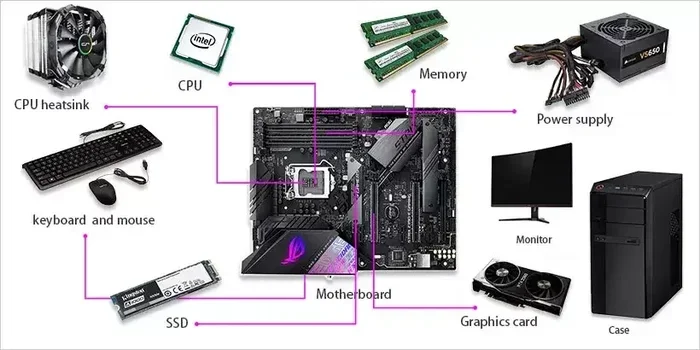
The parts inside your gaming pc set the foundation for its lifespan. Premium components tend to run cooler and last longer. Cheap parts may save money upfront but often fail sooner. For example, a solid power supply unit protects your whole system from damage. A low-quality one can cause problems down the road.
Branded components from trusted manufacturers usually offer better computer hardware durability. They come with longer warranties too. This gives you peace of mind. When you build or buy a gaming pc, always check the brand reputation. Read reviews and look at user experiences.
The pc build quality also matters. A well-ventilated case with good airflow keeps temperatures down. Heat is the enemy of electronics. A cramped case with no airflow will shorten your gaming setup lifespan fast.
Usage Patterns and Workloads
How you use your gaming computer plays a huge role in its longevity. A PC used for casual gaming 3 hours a day lasts much longer than one running heavy workloads 12 hours a day.
Here are common usage patterns that affect gaming pc longevity:
- Casual gaming: 2 to 4 hours per session. This is the easiest on your hardware.
- Hardcore gaming: 6+ hours daily. Heat builds up faster and components wear out sooner.
- Content creation: Video editing and rendering push both CPU and GPU hard.
- Streaming while gaming: This doubles the workload on your processor and memory.
The more stress you put on your pc components lifespan, the faster they degrade. Running your gaming pc at full load every day will wear it out faster than light use.
How Long Does a Gaming Pc Really Last: Average Component Lifespans
Different parts of your gaming pc have different lifespans. Understanding this helps you plan upgrades. Not everything needs replacing at the same time.
GPU and CPU Longevity
The graphics card and processor are the heart of any gaming pc. They also take the most stress during gaming sessions.
A modern GPU typically lasts 4 to 7 years of regular gaming use. The gpu lifespan depends on how hot it runs and how hard you push it. A well-cooled graphics card can even last 10 years if you are okay with lower frame rates in new games.
The CPU usually outlasts the GPU. A good processor can run for 7 to 10 years without issues. However, software updates and new games demand more processing power over time. Your cpu longevity in gaming may end not because the chip broke, but because it became too slow.
Storage and RAM Durability
Storage devices and memory also play a role in your gaming pc durability. They do not fail as often as GPUs, but they still have limits.
Solid state drives typically last 5 to 7 years under heavy use. Traditional hard drives last shorter, around 3 to 5 years. If you want better pc hardware longevity, always choose an SSD over an HDD.
RAM is surprisingly durable. Most discussions about how much ram does a laptop have focus on capacity, but the lifespan is similar. Quality RAM modules can last 8 to 10 years without any problems. They rarely fail unless there is a power surge or physical damage.
Signs Your Gaming Pc Is Getting Old
Knowing the warning signs helps you act before your gaming pc completely fails. Catching problems early saves you money and data.
Performance Drops and Compatibility Issues
The first sign of an aging gaming computer is slower performance. Games that ran smoothly before now stutter or lag. This happens because new games demand more from your hardware.
You may also notice compatibility issues. New game updates or software may not support your older pc components lifespan. Driver updates stop coming for old hardware. This is a clear sign your gaming pc lifespan is nearing its end.
Other warning signs include:
- Frequent crashes or blue screens
- Unusual noises from fans or drives
- Overheating even during light tasks
- Long loading times that were not there before
- Graphical glitches or artifacts on screen
If you notice several of these signs, your gaming pc may need attention. Sometimes a simple fix like thermal paste replacement brings new life to an old system.
How to Extend Your Gaming Pc Lifespan
You do not have to accept a short gaming pc lifespan. With the right habits, you can stretch your gaming computer durability for years. Here are proven ways to keep your gaming pc running strong.
Regular Cleaning and Maintenance
Dust is the number one enemy of any gaming setup lifespan. It blocks airflow and causes components to overheat. A simple cleaning routine goes a long way.
Clean your PC every 3 to 6 months. Use compressed air to blow dust out of fans and vents. Wipe down surfaces with a soft cloth. Do not use vacuum cleaners near sensitive components.
Also, keep your software clean. Run how to remove junk files from pc regularly to free up space and keep your system running smoothly. A cluttered hard drive slows down your entire gaming pc.
Smart Upgrades Over Time
Instead of replacing your whole gaming pc, upgrade individual parts. This saves money and extends your pc upgrade cycle significantly.
Start with the GPU. A new graphics card can make an old system feel brand new. Next, consider adding more RAM. Many people wonder how much memory they need when planning upgrades. More RAM helps with multitasking and newer games. You can also look into how to upgrade the ram of a laptop for guidance even if you use a desktop, since the principles are similar.
Replacing your thermal paste every 2 to 3 years keeps temperatures low. Good pc cooling solutions also make a big difference. Consider adding more case fans or upgrading to a better CPU cooler.
Check best specs for a gaming pc every year or two. This helps you know exactly what to upgrade first. A smart upgrade plan beats a full replacement every time.
Gaming Pc Lifespan by Budget Tier
Not all gaming pc builds are equal. Your budget shapes the quality of parts and overall gaming pc longevity. Here is what to expect from each tier.
Budget Builds
A budget gaming pc typically lasts 3 to 5 years. These systems use entry-level parts that handle moderate gaming. They heat up faster and have less room for upgrades.
Budget builds often use lower-wattage power supplies and basic coolers. This limits their computer hardware durability. You may need to replace the GPU or PSU within 3 years as new games demand more power.
Mid-Range Builds
A mid-range gaming pc hits the sweet spot for most gamers. These systems last 5 to 7 years comfortably. They use quality mid-tier components that balance performance and durability.
Mid-range builds offer enough headroom for upgrades. You can swap out the GPU or add RAM without replacing the whole system. This makes the pc upgrade cycle much more affordable.
High-End Builds
A premium gaming pc can last 7 to 10 years or more. These systems use top-tier parts with excellent gaming pc build quality. They stay relevant longer because they have more processing power to spare.
High-end builds also benefit from better cooling and higher-quality components. The gaming pc value over time is much better. You get more years of solid performance per dollar spent.
When Should You Replace Your Gaming Pc
Knowing when to replace your gaming pc saves you from wasting money on repairs. It also keeps you from playing games with poor performance.
Consider a replacement when your gaming pc can no longer run the games you want. If your GPU is more than 5 years old and struggles with modern titles, it is time to upgrade. The same goes for your CPU if it cannot handle new software demands.
Also think about repair costs. If fixing your old system costs more than half the price of a new one, replacement makes sense. Frequent breakdowns and compatibility issues are clear signals too.
For most gamers, a full replacement every 5 to 7 years keeps the experience fresh. You stay current with technology and enjoy better performance in every new game.
Conclusion
So, how long does a gaming pc really last? The answer is 5 to 10 years for most systems. Your exact gaming pc lifespan depends on component quality, usage habits, and maintenance routines.
A well-maintained gaming computer with quality parts can easily reach the 7-year mark and beyond. Regular cleaning, smart upgrades, and proper cooling all play a role. The key is to stay proactive instead of reactive.
Take care of your gaming pc and it will take care of you. Plan your upgrades wisely and enjoy every moment of your gaming setup lifespan. Your wallet and your games will thank you.
Frequently Asked Questions
How long does a budget gaming PC usually last?
A budget gaming PC typically lasts 3 to 5 years. These systems use entry-level components that handle moderate gaming. Heat and wear build up faster on lower-end parts, so expect a shorter gaming pc lifespan compared to premium builds.
Can a gaming PC last 10 years?
Yes, a high-quality gaming PC can last 10 years or more. This requires premium components, regular maintenance, and smart upgrades over time. Many gamers keep their systems for a decade by replacing only the GPU or adding RAM as needed.
What is the most common reason a gaming PC fails early?
Overheating is the number one killer of gaming PCs. Dust buildup, poor airflow, and dried-out thermal paste cause components to run too hot. This leads to performance drops, crashes, and eventually hardware failure. Regular cleaning prevents most of these issues.
Should I replace my whole gaming PC or upgrade parts?
Upgrading parts is almost always the better choice. Swapping out the GPU, adding RAM, or replacing storage can breathe new life into an old system. A full replacement only makes sense when repair costs exceed half the price of a new machine.
How often should I clean my gaming PC?
Clean your gaming PC every 3 to 6 months. Use compressed air to remove dust from fans, vents, and heatsinks. Keeping your system clean improves computer hardware durability and prevents overheating problems that shorten your gaming setup lifespan.
Does running a gaming PC 24/7 shorten its lifespan?
Running your PC 24/7 can slightly reduce component lifespan due to constant heat and wear. However, modern hardware is built to handle continuous use. Good cooling and regular maintenance make 24/7 operation perfectly fine for most systems.