500w Psu Enough for Rx 9060 Xt Guide
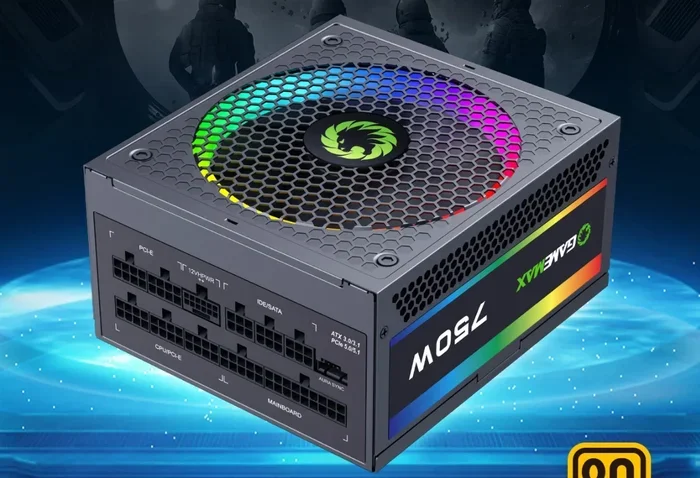
A 500W PSU can power the RX 9060 XT, but it depends on your entire system setup. The RX 9060 XT draws around 160W to 180W under load, which leaves limited headroom for other components. This guide breaks down whether a 500W PSU enough for Rx 9060 Xt setup is safe, what factors matter, and how to avoid common power supply mistakes.
A 500W PSU Enough for Rx 9060 Xt? Let Us Break It Down
If you are building a PC around the AMD Radeon RX 9060 XT, one question keeps popping up: is a 500W PSU enough for Rx 9060 Xt builds? The short answer is yes, but with some important caveats. A 500-watt power supply unit can handle this graphics card in most cases, but the rest of your components play a huge role too. In this guide, we will walk through everything you need to know about power supply sizing, system power draw, and how to pick the right unit for your gaming setup.
The RX 9060 XT is AMD’s latest mid-range graphics card aimed at gamers who want solid performance without breaking the bank. It is power efficient compared to higher-end cards, which is great news for budget builders. Still, choosing the right PSU is one of the most important decisions you will make for your system. A bad power supply can cause crashes, damage parts, or limit your ability to upgrade later. Let us dive into the details.
Understanding the RX 9060 XT Power Requirements
Before we talk about whether 500 watts is enough, let us understand what the RX 9060 XT actually draws. The card has a total board power of around 160W to 180W under full load. That is quite modest compared to higher-end GPUs like the RX 7900 XTX or Nvidia’s RTX 4080. AMD designed this card to be energy efficient, which makes it a great option for mid-range builds.
Power Draw Breakdown
Here is a simple look at how much power different parts of your system consume during gaming:
- RX 9060 XT GPU: 160W to 180W
- Mid-range CPU: 65W to 105W
- RAM (16GB DDR4): 5W to 10W
- Storage (SSD + HDD): 10W to 20W
- Fans and extras: 10W to 15W
When you add all of this up, a typical gaming system with the RX 9060 XT draws around 300W to 350W under full load. That means a 500W PSU gives you roughly 150W to 200W of headroom. In most cases, that is enough. But here is where it gets tricky. If you plan to overclock your CPU or GPU, or if you have more drives and fans, that headroom shrinks fast.
If you are also considering how much memory your system needs, check out our guide on is 16GB RAM enough for architecture to understand how component choices affect overall system performance.
Is 500W Enough for the RX 9060 XT?
So, is a 500W PSU enough for Rx 9060 Xt setups? For most users, yes. A 500-watt power supply handles the RX 9060 XT plus a standard mid-range CPU and a few storage drives without any issues. The card is designed to be power efficient, and AMD recommends a 500W PSU as the minimum for this GPU.
But there is a big “but.” The number on the PSU label is not the same as the actual power it delivers safely. A low-quality 500W PSU might only deliver 400W of stable power on the +12V rail, which is the rail that powers your GPU and CPU. This is where many beginners make mistakes.
When 500W Works Well
A 500W PSU is a good fit when you have the following setup:
- RX 9060 XT as your only graphics card
- A mid-range CPU like the Ryzen 5 7600 or Intel Core i5-13400
- 16GB of DDR4 RAM
- One NVMe SSD and one HDD for storage
- Standard case fans
In this scenario, your total system draw stays well under 400W, and the 500W PSU has comfortable headroom. Your system runs cool, stable, and quietly.
When 500W Falls Short
On the other hand, a 500W PSU might not cut it if you have a high-end CPU, plan to overclock, or run multiple GPUs. For example, pairing the RX 9060 XT with an Intel Core i9 or Ryzen 9 processor pushes your power draw higher. Overclocking the GPU or CPU adds even more wattage. In those cases, you should look at a 650W or 750W PSU instead.
If you are planning a gaming build and wondering about memory choices, our article on 8GB RAM laptop for gaming explains how RAM capacity affects gaming performance and system stability.
Choosing the Right PSU for Your RX 9060 XT Build
Picking a PSU is not just about wattage. You also need to consider efficiency ratings, connector types, brand reliability, and future upgrade potential. A good PSU protects your entire system, and skimping here can cost you more in the long run.
Check the 80 Plus Rating
The 80 Plus certification tells you how efficiently a PSU converts AC power from your wall into DC power for your components. Higher efficiency means less wasted energy and less heat inside your case. Here are the common ratings you will see:
- 80 Plus White: Basic efficiency, around 80% at typical loads
- 80 Plus Bronze: Slightly better, around 85% efficiency
- 80 Plus Gold: Great for most builds, around 87% to 90% efficiency
- 80 Plus Platinum/Titanium: Top-tier efficiency, 90% and above
For a 500W PSU running an RX 9060 XT system, an 80 Plus Gold rating is a sweet spot. It gives you great efficiency without paying a premium.
Modular vs. Non-Modular PSUs
Modular PSUs let you connect only the cables you need. This improves airflow inside your case and makes cable management easier. Non-modular PSUs come with all cables attached, which can create a messy build. For a clean, well-ventilated system, a modular PSU is the better choice.
If you are upgrading an existing system and need to add more RAM, check out our RAM upgrade for laptop guide to see if your current setup supports memory expansion.
Power Connectors and Compatibility
The RX 9060 XT uses a single 8-pin PCIe power connector. Most modern 500W PSUs come with at least one 8-pin connector, but some only have a 6-pin cable. If your PSU has only a 6-pin connector, you will need an adapter, which is fine but adds a potential point of failure.
Always make sure your PSU has the right connectors before you buy. Here is a quick checklist:
- Check if the PSU has an 8-pin PCIe power connector
- Verify the +12V rail amperage on the PSU label
- Make sure the total wattage covers your full system draw
- Confirm the PSU has enough SATA and Molex connectors for your drives
- Look for a warranty of at least 5 years from a reputable brand
Common Mistakes When Choosing a PSU for the RX 9060 XT
One of the biggest mistakes people make is buying the cheapest PSU they can find. Power supplies are not something you should cheap out on. A low-quality unit can deliver unstable voltage, which damages your GPU, CPU, and motherboard over time.
Mistake 1: Ignoring the +12V Rail Rating
The +12V rail is where most of your power goes. A 500W PSU might have a +12V rail rated for only 30 amps, which gives you 360W of usable power on that rail. That sounds like enough, but remember that other rails and inefficiencies eat into that number. Always check the +12V rating on the PSU label.
Mistake 2: Buying a No-Name Brand
Brands like Corsair, EVGA, Seasonic, and Thermaltake have a long track record of reliability. No-name PSUs from unknown brands often exaggerate their wattage claims and lack proper safety protections. Stick with trusted brands even if they cost a bit more.
Mistake 3: Not Planning for Future Upgrades
If you think you might upgrade your GPU or add more drives later, a 500W PSU might become a bottleneck. Leaving room for future upgrades is always smart. If your budget allows, a 650W PSU gives you much more flexibility without costing too much more.
If you are also thinking about storage, our guide on 512GB PCIe NVMe M.2 SSD for laptop can help you choose the right storage for your build.
Expert Tips for a Stable RX 9060 XT System
Tip 1: Use a Power Meter
A simple power meter plugged into your wall can tell you exactly how much power your system draws during gaming. This helps you verify whether your 500W PSU is truly enough or if you are pushing it too hard.
Tip 2: Keep Your PSU Ventilated
PSUs generate heat, especially under heavy load. Make sure your case has proper airflow around the PSU intake. A PSU that runs too hot will throttle its output and shorten its lifespan.
Tip 3: Do Not Daisy-Chain Power Connectors
Some PSUs allow you to split a single 8-pin connector into two separate cables. This is not recommended because each cable has a current limit, and splitting them can cause overheating. Use one dedicated 8-pin connector for your GPU.
Expert Insight: Why PSU Quality Matters More Than Wattage
A high-quality 500W PSU will always outperform a low-quality 650W PSU. The reason is simple: quality units deliver stable voltage across all rails, have better ripple suppression, and include overcurrent and overvoltage protection. These features keep your components safe even during power spikes. When you invest in a good PSU, you are investing in the longevity of your entire system.
Conclusion
So, is a 500W PSU enough for the RX 9060 XT? For most standard builds, absolutely. The RX 9060 XT is a power-efficient card that draws around 160W to 180W, leaving plenty of room on a 500W supply for a mid-range CPU, RAM, and storage. Just make sure your PSU is from a reputable brand, has an 80 Plus Gold rating or higher, and includes the right PCIe power connectors. Avoid cheap no-name units, plan for future upgrades, and always check your system’s total power draw before making a final decision.
A good power supply is the backbone of a stable PC. Take your time, do your research, and your RX 9060 XT system will run smoothly for years to come.
Key Takeaways
- The RX 9060 XT needs around 160W to 180W under full gaming load, making a 500W PSU workable but tight.
- Your total system power draw matters more than GPU alone because the CPU, RAM, and storage all consume watts.
- An 80 Plus certified PSU delivers better efficiency and more stable power delivery for your components.
- A 500W PSU leaves little margin for overclocking, which can cause system instability or shutdowns.
- Always check the PCIe power connectors on your PSU to make sure they match the RX 9060 XT requirements.
- Branded, quality PSUs are safer than cheap units because they protect your hardware from power surges.
Frequently Asked Questions
Can a 500W PSU run the RX 9060 XT with a high-end CPU?
It can, but it leaves very little headroom. High-end CPUs like the Ryzen 9 or Intel Core i9 draw 125W or more. Combined with the RX 9060 XT, your system may push close to 350W under load. A 500W PSU works, but a 650W unit gives you much safer margins.
Does the RX 9060 XT need an 8-pin or 6-pin power connector?
The RX 9060 XT uses a single 8-pin PCIe power connector. Most quality 500W PSUs include at least one 8-pin cable. If your PSU only has a 6-pin connector, use a 6-to-8-pin adapter, but make sure it is from a reliable brand.
Is it okay to use a non-modular 500W PSU for the RX 9060 XT?
Yes, it is perfectly fine. Non-modular PSUs work just as well as modular ones. The only difference is cable management and airflow. If your case has good airflow, a non-modular PSU will not cause any problems.
How long does a 500W PSU typically last?
A quality 500W PSU from a reputable brand can last 5 to 7 years or more. Cheaper units may degrade faster, especially if they run hot or under heavy loads. Always check the warranty period as an indicator of quality.
Will a 500W PSU limit the performance of the RX 9060 XT?
No, a 500W PSU will not limit the performance of the RX 9060 XT as long as it is a quality unit. The GPU will draw only the power it needs. Performance is limited by the GPU itself, not the PSU, unless the PSU cannot deliver stable power.
Can I overclock the RX 9060 XT with a 500W PSU?
You can, but it is risky. Overclocking increases power draw, and a 500W PSU leaves limited headroom. If you overclock, make sure your total system draw stays under 450W. Otherwise, you may experience crashes or shutdowns during heavy gaming sessions.