What Is a Computer Case 7
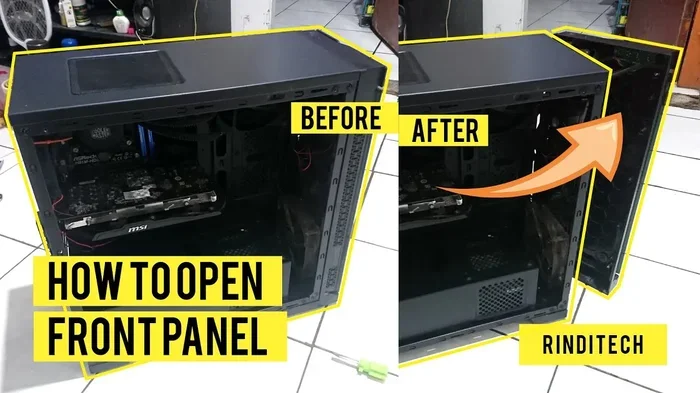
A computer case is the outer shell that holds and protects all your PC components. It comes in different sizes, shapes, and styles to fit various builds. Whether you are assembling a desktop or upgrading an old one, choosing the right case matters for airflow, compatibility, and aesthetics.
A computer case might look like a simple metal box, but it is so much more than that. It is the backbone of your entire desktop setup. Every piece of hardware you love sits inside it. From the motherboard to the graphics card, everything needs a home. And that home is the case.
Many people overlook the importance of a good case. They focus on the processor or the graphics card. But without a proper enclosure, none of those parts would work safely. Dust gets in. Heat builds up. Components can get damaged. A well-chosen case solves all of these problems. In this guide, we will break down everything you need to know about computer cases. You will learn what they are, the different types available, and how to pick the right one for your needs.
Key Takeaways
- Definition: A computer case is the enclosure that houses and protects all internal PC hardware.
- Types Matter: Cases come in several form factors including full tower, mid tower, and mini tower to suit different builds.
- Airflow is Critical: Proper ventilation inside your case keeps components cool and extends their lifespan.
- Compatibility Counts: Your case must match your motherboard size, GPU length, and PSU wattage.
- Builds Include RAM: Understanding what goes inside a case, such as what is the RAM on a laptop, helps you plan better builds.
- Cable Management Makes a Difference: A clean interior improves airflow and makes future upgrades easier.
📑 Table of Contents
What Exactly Is a Computer Case?
A computer case, also called a PC chassis or desktop enclosure, is the outer shell that holds all your internal hardware. Think of it as the skeleton of your computer. Without it, your parts would be exposed and vulnerable. The case keeps everything organized and protected.
Inside the case, you will find the motherboard, CPU, RAM, power supply, storage drives, and expansion cards. Each of these components generates heat during use. The case helps manage that heat through built-in fans and ventilation panels. It also provides a structured space for cable management, which keeps your build clean and functional.
The case does more than just hold parts together. It plays a big role in cooling, noise reduction, and even aesthetics. A good case makes your PC look great and run smoothly. A bad case can cause overheating and performance issues. That is why understanding what a computer case does is so important before you buy one.
Different Types of Computer Cases
Not all cases are the same. They come in various sizes and designs to fit different needs. The type you choose depends on your budget, the components you plan to use, and the space you have available. Let us look at the most common types.
Full Tower Cases
A full tower case is the largest option available. It offers plenty of room for big components and extra drives. These cases typically support E-ATX motherboards and multiple graphics cards. They are perfect for high-end gaming rigs and workstations. If you want maximum airflow and expansion options, a full tower is the way to go. They can be bulky, though. You need a large desk or floor space to accommodate them.
Mid Tower Cases
The mid tower is the most popular case size. It strikes a great balance between size and functionality. Most mid towers support ATX motherboards and standard GPUs. They offer enough room for cooling fans and storage drives. For most builders, a mid tower hits the sweet spot. It is not too big, not too small. It works well for gaming PCs, office computers, and general use.
Mini Tower and Compact Cases
Mini tower cases are smaller and more compact. They are ideal for builds where space is limited. These cases usually support micro-ATX or mini-ITX motherboards. They may have fewer drive bays and less room for large coolers. However, they are great for portable setups or minimalist builds. Just be aware that compact cases can run warmer due to reduced airflow.
Open Frame and Server Cases
Open frame cases have no sides or top. They are often used in server environments or workshop benches. These cases offer maximum airflow but zero dust protection. They are not ideal for everyday use at home or in an office. Server cases, on the other hand, are designed for rack mounting. They prioritize function over form and are built to house multiple systems in one location.
Key Components Housed Inside a Computer Case
Every computer case is designed to hold specific parts. Understanding what goes inside helps you choose the right case. Here are the main components you will find in any desktop build.
- Motherboard: The main circuit board that connects all components. Cases come with specific mount points for different motherboard sizes.
- CPU (Processor): The brain of your computer. It usually sits under a cooler that fits inside the case.
- RAM (Memory): Random access memory stores temporary data. If you are curious about what goes into your system, understanding what is a good RAM size for a laptop can help you plan your desktop memory needs too.
- Graphics Card (GPU): The GPU handles visuals and gaming performance. Longer cards need cases with compatible GPU slots.
- Power Supply Unit (PSU): The PSU delivers electricity to all components. It usually sits at the bottom or top of the case.
- Storage Drives: SSDs and HDDs store your files, games, and operating system. Most cases include drive bays or mounting brackets.
- Cooling Fans: Fans circulate air through the case to keep temperatures in check. Many cases come with pre-installed fans.
Each of these parts needs space and proper mounting. That is why checking the case specifications before buying is essential. A mismatch can lead to compatibility headaches. Always verify the maximum GPU length, CPU cooler height, and motherboard support before making a purchase.
Why Airflow Matters in a Computer Case
Airflow is one of the most important features of any computer case. When your PC runs, its components generate heat. Without proper airflow, that heat builds up and causes problems. Over time, high temperatures can reduce performance and even damage hardware.
A well-designed case uses intake and exhaust fans to move air through the chassis. Cold air enters from the front or bottom. Hot air exits from the top or rear. This continuous flow keeps temperatures stable. Some cases also include dust filters to keep debris out of the internal components.
Here are some quick tips to improve airflow in your case:
- Position intake fans at the front and bottom of the case.
- Place exhaust fans at the top and rear to push hot air out.
- Keep cables tidy and away from fan paths.
- Use dust filters and clean them regularly.
- Consider adding more fans if temperatures run high.
Good airflow also keeps your system quieter. Fans do not need to spin as fast when air moves freely. This means less noise and a more pleasant computing experience. If you are worried about heat, check how your GPU performs. For example, monitoring what is a good idle GPU temperature can help you understand whether your case is cooling effectively.
How to Choose the Right Computer Case
Picking the right case can feel overwhelming with so many options. But it does not have to be. Follow these simple steps to find the perfect fit for your build.
Step 1: Determine Your Motherboard Size
Start by deciding which motherboard you will use. ATX boards need a mid tower or larger. Micro-ATX and mini-ITX boards can fit in smaller cases. Always check the case specifications for supported motherboard types before buying.
Step 2: Check GPU and CPU Cooler Compatibility
Measure your graphics card length and CPU cooler height. Compare these dimensions to the case specifications. A case that is too short will not fit a long graphics card. A low-profile CPU cooler might be needed for compact cases.
Step 3: Consider Your Budget
Cases range from budget-friendly options under $50 to premium builds costing $200 or more. You do not always need to spend a lot. A solid mid-range case offers good airflow, build quality, and aesthetics. Focus on features that matter most to you.
Step 4: Think About Aesthetics and Build Quality
Many modern cases come with tempered glass side panels and RGB lighting. These look great and let you show off your components. However, aesthetics should not come at the cost of function. Make sure the case has good ventilation and sturdy construction. A well-built case lasts longer and protects your investment.
Common Computer Case Mistakes to Avoid
Even experienced builders sometimes make mistakes when selecting or using a computer case. Here are a few common pitfalls to watch out for.
- Ignoring GPU length: A case that looks spacious might not fit a long graphics card. Always check the maximum GPU support.
- Skipping cable management: Messy cables block airflow and make future upgrades difficult. Take the time to route cables properly.
- Forgetting about PSU placement: Some cases place the PSU at the top, which can affect cooling. Bottom-mounted PSU setups are generally better.
- Overlooking fan configurations: A case with only one fan will not cool much. Plan for at least two or three fans for balanced airflow.
- Choosing style over substance: A pretty case with poor ventilation will cause overheating. Always prioritize airflow and build quality first.
Avoiding these mistakes saves time, money, and frustration. Take a few extra minutes to research your case before you buy. Your future self will thank you when your PC runs cool and quiet.
The Role of a Computer Case in a Build
A computer case is more than just a box. It is a functional part of your entire system. It affects performance, cooling, noise levels, and even how easy it is to upgrade your parts. A great case makes building and maintaining a PC much simpler.
When you plan a new build, the case should be one of your first decisions. It determines what motherboard you can use, how many drives you can install, and what kind of cooling solution fits. Starting with the case and working outward ensures everything fits together perfectly.
For those who are new to PC building, remember that every component matters. The RAM you choose, for instance, affects how smoothly your system runs. Understanding is 8GB of RAM good for a laptop or a desktop setup gives you a solid baseline for memory planning. Your case should comfortably house all the parts you need now and room to grow later.
A well-planned build with a quality case will serve you well for years. You will enjoy better performance, easier maintenance, and a system that looks as good as it runs. Take your time, do your research, and pick a case that fits your vision.
Final Thoughts
A computer case is the foundation of any desktop PC. It protects your hardware, manages heat, and organizes your components. Choosing the right case makes every other part work better. Whether you are a casual user or a hardcore gamer, investing in a quality case pays off.
Remember to consider size, airflow, compatibility, and build quality. Do not rush the decision. A thoughtful choice leads to a better computing experience. Now that you understand what a computer case is and how to choose one, you are ready to build or upgrade with confidence. Happy building!
Frequently Asked Questions
What is the purpose of a computer case?
A computer case protects and organizes all your internal hardware. It provides a structured space for components like the motherboard, GPU, and RAM. It also manages airflow to keep temperatures under control.
What are the main types of computer cases?
The main types include full tower, mid tower, mini tower, and open frame cases. Full towers offer the most space. Mid towers are the most popular for general use. Mini towers are compact and great for smaller builds.
How do I know if a case will fit my components?
Check the case specifications for supported motherboard sizes, maximum GPU length, and CPU cooler height. Always compare these numbers to your component dimensions before purchasing.
Why is airflow important in a computer case?
Airflow keeps internal temperatures stable. Proper cooling prevents overheating, which can reduce performance and damage components. Good airflow also reduces fan noise and extends hardware lifespan.
Can I use a laptop case for a desktop build?
No, laptop cases and desktop cases are completely different. Laptop enclosures are designed for portable, compact hardware. Desktop cases are built for larger components like full-size motherboards and dedicated graphics cards.
How often should I clean my computer case?
You should clean your case every three to six months. Remove dust filters and wipe them down. Use compressed air to blow dust out of fans and components. Regular cleaning keeps your PC running cool and quietly.