What Is a Type C Charging Cable
A Type C charging cable is a universal connector that powers laptops, phones, and tablets with a reversible plug design. It supports fast charging, data transfer, and video output through a single compact cable. This guide covers everything you need to know about USB-C cables and why they have become the standard for modern devices.
If you have picked up a laptop in the last few years, you have probably noticed a small, oval-shaped port on the side. That is a USB Type C port, and the cable that plugs into it is what we call a Type C charging cable. This tiny connector has taken over the tech world, and for good reason.
Before USB-C came along, we dealt with bulky rectangular plugs that only fit one way. Remember those days? The Type C charging cable changed all of that. It is small, fast, reversible, and powerful. Whether you are charging a laptop, transferring files, or connecting to a monitor, one cable can do it all.
In this guide, we will break down everything you need to know about the Type C charging cable. We will cover how it works, why it matters for your laptop, and how to pick the right one. By the end, you will feel confident about your USB-C charging setup and never buy the wrong cable again.
Key Takeaways
- Universal Connector: A Type C charging cable works across many devices, from laptops to smartphones and tablets.
- Reversible Design: The plug flips both ways, so you never have to fumble with orientation.
- Fast Charging and Data: USB-C supports rapid power delivery and high-speed data transfer speeds.
- Future-Proof Standard: Most new laptops and gadgets now use USB-C as their main port.
- Compatibility Matters: Not all USB-C cables are equal, so choosing the right one is important for performance.
📑 Table of Contents
- What Exactly Is a Type C Charging Cable?
- Why Is the Type C Charging Cable So Popular?
- Type C Charging Cable vs. Other Cable Types
- How to Choose the Right Type C Charging Cable
- Common Uses for a Type C Charging Cable
- Common Mistakes People Make with Type C Charging Cables
- Expert Tips for Getting the Most from Your Type C Charging Cable
- Frequently Asked Questions
- Final Thoughts
What Exactly Is a Type C Charging Cable?
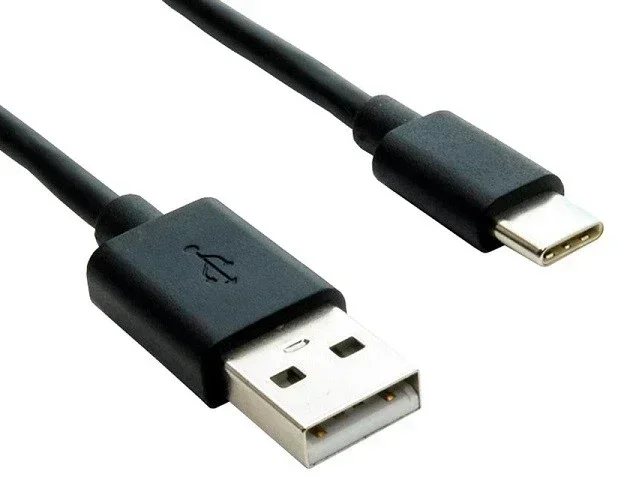
A Type C charging cable is a power and data cable that uses the USB-C connector standard. The connector is small, oval-shaped, and reversible. That means you can plug it in either direction, and it will work. No more flipping it three times to get the right orientation.
The USB-C standard was developed by the USB Implementers Forum, a group of tech companies that set universal connectivity rules. Today, almost every new laptop, tablet, and phone uses this connector. It replaced older USB-A and micro-USB designs because it is smaller and much more capable.
How Does a Type C Charging Cable Work?
The Type C charging cable uses a set of pins inside the connector to carry power, data, and video signals. A standard USB-C cable has 24 pins arranged in two rows. This design allows it to handle multiple tasks at once.
Here is what a single USB-C cable can do:
- Charge your device with power delivery up to 240 watts.
- Transfer data at speeds up to 40 Gbps with USB 3.2 or Thunderbolt.
- Send video signals to external displays through DisplayPort Alt Mode.
- Connect peripherals like keyboards, mice, and docking stations.
All of this from one tiny cable. That is the beauty of the Type C charging cable. It consolidates many older cable types into a single universal connector.
Why Is the Type C Charging Cable So Popular?
The Type C charging cable has become the go-to connector for several important reasons. Let us look at why it has won over users and manufacturers alike.
Reversible Plug Design
This is the feature everyone loves. The USB-C connector is symmetrical, so it works no matter which way you insert it. You do not have to look at the cable or feel around for the right side. Just plug it in, and it works. This simple design change has saved countless people from cable frustration.
Fast Charging Speeds
One of the biggest reasons the Type C charging cable took off is its support for USB Power Delivery, or USB-PD. This protocol allows the cable to deliver much more power than older USB standards.
Here is a quick comparison of charging speeds:
- USB 2.0: Up to 2.5 watts of power delivery.
- USB 3.0: Up to 4.5 watts.
- USB-C with USB-PD: Up to 240 watts.
That means your laptop can charge in a fraction of the time it used to. Even if you are using a Type C charging cable to power a tablet or phone, the speeds are dramatically faster than older cables.
Versatility Across Devices
Another reason the Type C charging cable is so popular is its versatility. You can use the same cable to charge your laptop, sync your phone, connect a game controller, or hook up an external hard drive. This one-cable-fits-all approach reduces clutter and saves money.
Many users also use a USB-C adapter to connect older devices. For example, you can plug a USB-C to USB-A adapter into your laptop and still use your older accessories. The flexibility of the Type C charging cable makes it a must-have laptop accessory.
Type C Charging Cable vs. Other Cable Types
Not all charging cables are the same. The Type C charging cable is different from older cable types in several key ways. Let us compare the most common ones you will encounter.
| Feature | USB Type C | USB Type A | Micro USB |
|---|---|---|---|
| Reversible Plug | Yes | No | No |
| Max Power Delivery | 240W | Up to 15W | Up to 10W |
| Max Data Speed | 40 Gbps | Up to 5 Gbps | Up to 480 Mbps |
| Video Output | Yes (Alt Mode) | No | No |
| Connector Size | Small | Large | Very Small |
| Common Use | Laptops, phones, tablets | Desktops, chargers | Older phones, gadgets |
As you can see, the Type C charging cable outperforms older cable types in nearly every category. It is faster, more powerful, and more versatile. This is why most modern laptop chargers now use USB-C as the primary connection.
How to Choose the Right Type C Charging Cable
Not all USB-C cables are created equal. Some support fast charging and high-speed data, while others are basic and slow. Here is what you should look for when buying a Type C charging cable for your laptop.
Check the Power Delivery Rating
If you want to charge your laptop quickly, look for a cable rated for USB Power Delivery (USB-PD). Most laptops need at least 60W to charge properly. Some high-performance machines need 100W or more. Always check the wattage rating on the cable or charger before you buy.
Look for Data Transfer Speed
If you plan to transfer large files or connect external drives, pick a cable that supports USB 3.1 or USB 3.2 speeds. These cables can move data at 10 Gbps or 20 Gbps. A basic USB 2.0 Type C charging cable will only give you 480 Mbps, which is fine for charging but too slow for large transfers.
Consider Cable Length
Cable length matters more than you might think. A longer cable gives you more flexibility, but it can also reduce charging speed slightly. For most users, a Type C charging cable between 3 and 6 feet works perfectly. If you need to reach across a room, consider a cable with a thicker gauge wire to maintain power delivery.
Buy from Trusted Brands
Cheap, no-name cables can be dangerous. They may not handle the power your laptop needs and could damage your device over time. Stick with reputable brands or cables that are certified by the USB-IF (USB Implementers Forum). This ensures your USB-C cable meets safety and performance standards.
Common Uses for a Type C Charging Cable
The Type C charging cable is not just for plugging your laptop into a wall. It has many practical uses that make it an essential part of your daily tech routine.
Charging Your Laptop
This is the most common use. Almost all modern laptops, including many models from major brands, now use a USB-C charging port. You simply plug your Type C charging cable into the laptop and a power adapter, and you are good to go.
If you are wondering whether 8GB of RAM is enough for your laptop while you are on the go and need to manage power efficiently, that is a separate but related consideration. Having enough memory helps your laptop handle tasks without draining the battery too quickly, especially when you are charging on the move.
Data Transfer Between Devices
Need to move photos from your camera to your laptop? A Type C charging cable makes this fast and easy. Connect your device, and the high-speed data transfer kicks in immediately. You can also use it to back up files to an external hard drive or flash drive.
Connecting to External Displays
Many USB-C cables support video output through DisplayPort Alt Mode or Thunderbolt. This means you can connect your laptop directly to a monitor, projector, or TV using just one cable. No extra adapters needed in most cases.
Docking Stations and Hubs
A USB-C docking station turns your laptop into a full desktop setup. You plug one Type C charging cable into the dock, and it handles power, display, and peripheral connections all at once. This is a game-changer for people who work from home or switch between desk and couch.
Common Mistakes People Make with Type C Charging Cables
Even though the Type C charging cable is simple to use, people still make mistakes that can cause problems. Here are a few to avoid.
Assuming All USB-C Cables Are the Same
This is the biggest mistake. A basic USB-C cable might only support 10W of power and slow data speeds. If you need fast charging or high-speed transfers, you must buy a cable that specifically supports those features. Always read the specs before purchasing.
Using Damaged Cables
A frayed or bent cable might still work, but it can be a safety hazard. Damaged cables can cause inconsistent charging, slow data transfer, or even short circuits. If your Type C charging cable shows signs of wear, replace it right away.
Ignoring Compatibility
Not every USB-C cable works with every device. Some laptops require specific power delivery profiles to charge properly. Always check your laptop manual or manufacturer website to confirm which cables and chargers are compatible.
Expert Tips for Getting the Most from Your Type C Charging Cable
Here are some practical tips from tech experts to help you get the best performance from your Type C charging cable.
- Invest in a quality cable. A well-built USB-C cable with proper shielding lasts longer and charges faster.
- Avoid running cables under rugs or furniture. This can damage the internal wires and reduce performance.
- Clean your USB-C port regularly. Dust and lint can build up and interfere with charging and data transfer.
- Use the cable that came with your laptop when possible. OEM cables are tested for compatibility and safety.
- Check for USB-IF certification. This seal guarantees the cable meets industry standards for performance and safety.
Following these simple steps will keep your Type C charging cable working at its best for years to come.
Frequently Asked Questions
Is a Type C charging cable the same as a USB-C cable?
Yes, they are the same thing. The terms Type C charging cable and USB-C cable are used interchangeably. Both refer to a cable with a USB Type C connector on one or both ends. The connector is small, oval-shaped, and reversible.
Can I use any Type C cable to charge my laptop?
Not all USB-C cables are created equal. Some only support low power delivery, which may not be enough to charge a laptop. Look for cables rated for at least 60W of USB Power Delivery to ensure safe and fast charging for most laptops.
Does a Type C charging cable support video output?
Yes, many USB-C cables support video output through DisplayPort Alt Mode or Thunderbolt. This allows you to connect your laptop to an external monitor or TV directly. Check the cable specifications to confirm video support before relying on it for presentations or extended display use.
How fast can a Type C charging cable transfer data?
The speed depends on the cable standard. A USB 3.2 Gen 2 cable can transfer data at up to 20 Gbps, while a Thunderbolt 4 cable reaches 40 Gbps. Basic USB 2.0 cables only manage 480 Mbps, which is much slower. Always check the data speed rating when buying a Type C charging cable.
Can I use a Type C cable to connect accessories like a mouse or keyboard?
Absolutely. The USB-C connector works with a wide range of peripherals, including mice, keyboards, and external drives. You may need a USB-C adapter if your accessories use older connectors. This makes the Type C charging cable a versatile part of your laptop setup.
How long should a good Type C charging cable be?
A Type C charging cable between 3 and 6 feet is ideal for most users. It gives you enough reach without sacrificing charging speed. If you need a longer cable, look for one with a thicker wire gauge to maintain proper power delivery over the extra distance.
Final Thoughts
The Type C charging cable is one of the most important advancements in laptop connectivity. It is fast, versatile, and easy to use. Whether you are charging your device, transferring files, or connecting to an external display, this single cable handles it all.
Understanding how to choose the right USB-C cable and how to use it properly can save you time, money, and frustration. With the right Type C charging cable, your laptop setup becomes simpler and more efficient.
Take a moment to check your current cables. Are they certified? Do they support the power and speed your devices need? Making the switch to a quality Type C charging cable is one of the easiest upgrades you can make for your laptop. Your devices will thank you for it.