What Is a Plc Communication Error
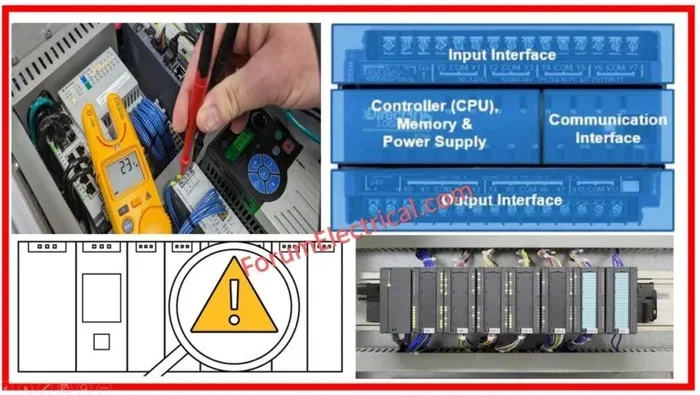
A Plc Communication Error happens when a Programmable Logic Controller loses its connection with other devices on the network. This error can stop your entire production line in its tracks. Understanding the root causes, common error codes, and step-by-step fixes saves you hours of downtime. Whether you are dealing with a communication timeout, network configuration issue, or hardware fault, this guide walks you through it all.
A Plc Communication Error is one of the most frustrating problems you can face in industrial automation. If you have ever watched a production line grind to a halt because a controller stopped talking to its devices, you know how costly this can be. This guide breaks down everything you need to know about PLC communication errors in plain, simple language. You will learn what causes them, how to spot them, and exactly how to fix them.
## What Exactly Is a Plc Communication Error
A PLC communication error occurs when a Programmable Logic Controller cannot send or receive data from connected devices. Think of the PLC as the brain of a machine. It needs to talk to sensors, motors, and other controllers to keep things running. When that conversation breaks down, you get an error.
These errors show up in many forms. You might see a flashing red light on the PLC panel. You might get a warning message on your computer screen. Or the system might just stop working without any clear warning. The error codes vary depending on the brand and model of your PLC. But the core problem is always the same. The communication link between devices has been interrupted.
Industrial automation systems rely heavily on smooth communication. A single broken link can shut down an entire factory floor. That is why understanding PLC troubleshooting steps is so important for anyone working with these systems.
## Common Causes of Plc Communication Errors
Several things can trigger a communication failure in a PLC system. Let us look at the most common culprits.
### Network Configuration Issues
One of the top reasons for a Plc Communication Error is incorrect network configuration. Every device on the network needs a unique address. If two devices share the same IP address or station number, they will conflict. This creates a communication breakdown.
Network configuration problems also happen when subnet masks or gateway settings are wrong. These small details matter a lot. A single wrong digit can stop communication completely. Always double-check your settings before assuming something is broken.
### Cable and Connection Problems
Loose cables are a surprisingly common cause of communication timeout errors. Ethernet cables, serial cables, and fiber optic links can all develop issues over time. Vibration from heavy machinery can loosen connections. Dust and moisture can corrode contact points.
Damaged cables are another frequent problem. A pinched cable or a frayed end will interrupt the signal. This is why regular physical inspections of your PLC network are so important. A quick visual check can save hours of troubleshooting.
### Protocol Mismatches
PLCs use different communication protocols. Common ones include Modbus, Ethernet/IP, Profibus, and DeviceNet. If two devices try to talk using different protocols, they cannot understand each other. This mismatch causes a communication error almost every time.
Protocol settings must match on both ends of the connection. The baud rate, parity, and data bits all need to align. When they do not, the system will throw an error and stop communicating.
### Hardware Failures
Sometimes the problem is physical. A failed communication module on the PLC or a broken port on a peripheral device can cause errors. Hardware faults like these are harder to diagnose because they look like software problems at first.
Plc fault diagnosis should always include a hardware check. Use diagnostic tools to test each communication port. Replace any damaged modules promptly to restore communication.
### Electromagnetic Interference
Industrial environments are noisy places. Large motors, welding equipment, and high-voltage lines all create electromagnetic interference. This noise can disrupt the signals traveling through your PLC network.
Shielded cables help reduce this problem. Proper grounding is also critical. Keeping communication cables away from power cables prevents most interference issues.
## Types of Plc Communication Errors You Should Know
Not all PLC communication errors are the same. Different systems use different error codes and indicators. Here are the most common types you will encounter.
### Communication Timeout Errors
A communication timeout happens when the PLC waits too long for a response. It sends a request and gets nothing back. This usually means the target device is offline or unreachable.
Communication timeout errors often point to cable problems or device power failures. Start by checking the physical connections. Then verify that the target device is powered on and responding.
### Protocol Error Codes
These errors occur when data is sent but received incorrectly. The message gets corrupted during transfer. Protocol error codes tell you exactly what went wrong in the communication handshake.
Checking the error codes in your PLC software is the first step. The codes will tell you whether it is a framing error, a checksum error, or a parity error. Each type has a different fix.
### Network Segment Errors
In larger systems, PLCs connect through network segments. A network segment error means one part of the network has gone down. Other segments may still work fine.
This type of error is common in systems that use daisy-chained connections. If one device on the chain fails, it can break the entire segment. Identifying the faulty device restores communication to the rest of the network.
## How to Diagnose a Plc Communication Error
Diagnosing a PLC communication error does not have to be scary. Follow these steps to find the problem quickly.
Step 1: Check the Status Indicators. Most PLCs have LED lights that show communication status. A green light means good communication. A red or blinking light means there is a problem.
Step 2: Read the Error Codes. Use your PLC programming software to read any stored error codes. Write them down. Look them up in the manufacturer’s manual. The manual will tell you exactly what each code means.
Step 3: Test Physical Connections. Unplug and replug all cables. Look for visible damage. Use a cable tester if you have one. A simple cable swap can sometimes fix the problem instantly.
Step 4: Verify Network Settings. Check IP addresses, station numbers, and protocol settings on both the PLC and the target device. Make sure they match exactly.
Step 5: Use Diagnostic Tools. Many PLC systems come with built-in diagnostic tools. These tools can monitor network traffic and spot problems in real time. Some manufacturers also offer free diagnostic software you can download.
Quick Tip: Always document your network settings. When a Plc Communication Error strikes, having a record of your correct configuration saves valuable time.
## Step-by-Step Fixes for Plc Communication Errors
Once you have found the cause, fixing the problem is usually straightforward. Here is how to handle the most common scenarios.
### Fix 1: Reset the Network Connection
Sometimes a simple reset fixes the problem. Power down the PLC and all connected devices. Wait 30 seconds. Power everything back up in the correct order. This clears temporary communication glitches.
### Fix 2: Correct Network Configuration
If network configuration is the problem, update the settings. Go into your PLC programming software. Check the IP address, subnet mask, and gateway. Compare them against the correct values for your setup. Make changes carefully and save them before restarting.
### Fix 3: Replace Damaged Cables
If you found a damaged cable during your inspection, replace it. Use cables rated for industrial environments. Shielded cables are best for areas with high electromagnetic interference. Proper cable management also prevents future damage.
### Fix 4: Update Firmware and Software
Outdated firmware can cause communication failures. Check the manufacturer’s website for updates. Install the latest firmware for your PLC and all connected devices. Always back up your configuration before updating.
### Fix 5: Replace Faulty Hardware
If a communication module or port has failed, you will need to replace it. Identify the exact model number from the PLC manual. Order a replacement and install it following the manufacturer’s instructions. After replacement, reconfigure the network settings.
Common Mistake: Many people skip the reconfiguration step after replacing hardware. Always recheck your settings after any hardware swap.
## Preventing Plc Communication Errors
Prevention is always better than cure. Here are proven ways to keep your PLC network healthy and error-free.
### Perform Regular Maintenance Checks
Schedule regular inspections of all cables, connections, and communication modules. Look for signs of wear, corrosion, or loose fittings. Clean connectors with compressed air or contact cleaner. Catching small problems early prevents big failures later.
### Keep Your Network Organized
Label every cable and connection point. Keep a written record of your network layout and settings. This makes troubleshooting much faster when a communication error does occur.
### Use Quality Components
Cheap cables and connectors fail more often. Invest in industrial-grade components that are built to last. Quality hardware reduces the frequency of communication failures over time.
### Monitor Your Network Continuously
Use monitoring software to watch your PLC network health in real time. These tools alert you to problems before they become full-blown errors. Early detection means faster fixes and less downtime.
### Train Your Team
Make sure everyone who works with the PLC system understands basic troubleshooting. Training reduces panic when errors appear. A calm, systematic approach to PLC troubleshooting steps resolves problems faster.
## When to Call in the Experts
Not every Plc Communication Error can be fixed with basic troubleshooting. Some problems need professional help. Here are signs that it is time to call an expert.
– The error persists after trying all basic fixes.
– Multiple PLCs on the same network show errors simultaneously.
– You suspect a firmware corruption that you cannot resolve.
– The PLC hardware shows physical damage that is beyond your expertise.
Professionals have advanced diagnostic tools and deep experience. They can solve complex industrial automation communication problems quickly. Calling an expert early can save you from making the problem worse.
## How Modern Systems Reduce Communication Errors
Modern PLC systems have built-in features that reduce communication errors significantly. Redundant network paths keep systems running even when one link fails. Advanced error detection protocols catch problems before they spread.
Some systems now use SaaS environment monitoring tools that track PLC health remotely. These cloud-based platforms alert technicians to problems before they cause downtime. They also provide detailed logs that help diagnose recurring issues.
Industrial cameras like fleet safety camera systems and WDR camera setups are also integrated into modern PLC networks. These cameras feed real-time visual data back to the controller, helping operators spot communication issues visually. AHD camera technology further enhances the quality of this visual monitoring in industrial settings.
## Expert Insights on Plc Communication Reliability
Industry experts agree that most PLC communication errors come down to three things. Poor cable management, incorrect network settings, and lack of preventive maintenance. Addressing these three areas eliminates the majority of problems.
One expert tip is to use diagnostic tools during every scheduled maintenance window. These tools can detect weak signals or marginal connections before they fail completely. Catching these early signs saves you from unexpected downtime.
Another key insight is to keep spare communication modules on hand. When a module fails, having a replacement ready means you can fix the problem in minutes instead of hours. This simple preparation makes a big difference in keeping your industrial control system running smoothly.
## Key Takeaways
Key Takeaways
- Plc Communication Errors are common in industrial automation and can halt production lines quickly.
- Network configuration problems, cable faults, and protocol mismatches are the top causes.
- Diagnostic tools like PLC status LEDs and diagnostic software help you pinpoint issues fast.
- Preventive maintenance and proper network configuration reduce future errors significantly.
- Expert help is needed when software fixes do not resolve persistent communication failures.
- Communication timeout errors often result from simple cable or connection problems.
- Regular firmware updates keep your PLC systems running smoothly and error-free.
Key Takeaways
- Plc Communication Errors happen when a PLC cannot exchange data with connected devices on the network.
- Common causes include network configuration mistakes, cable faults, protocol mismatches, and hardware failures.
- Communication timeout errors often result from simple connection or power issues.
- Diagnostic tools and error codes are your best friends when troubleshooting PLC communication failures.
- Prevention through regular maintenance, quality components, and network monitoring reduces errors significantly.
- Professional help is warranted when basic fixes do not resolve persistent communication errors.
- Modern systems with remote monitoring and redundant paths make industrial automation communication more reliable than ever.
## Frequently Asked Questions
What does a Plc Communication Error look like?
A Plc Communication Error usually appears as a flashing red light on the PLC unit, an error message on your programming software, or a complete loss of control over connected devices. The exact display depends on your PLC brand and model.
Can a loose cable cause a Plc Communication Error?
Yes, absolutely. Loose or damaged cables are one of the most common causes of communication timeout errors. A simple cable reseat or replacement often fixes the problem immediately.
How do I find my Plc error codes?
Open your PLC programming software and navigate to the diagnostics or error log section. The software will display any stored error codes along with descriptions. Your PLC manual will explain what each code means.
Is a Plc Communication Error the same as a hardware failure?
Not always. A communication error can be caused by software, configuration, or cable issues. Hardware failure is just one possible cause. Always check the simpler possibilities first before assuming a hardware problem.
How can I prevent Plc Communication Errors?
Regular maintenance, proper cable management, correct network configuration, and using quality components are the best ways to prevent communication failures. Monitoring your network continuously also helps catch problems early.
What should I do first when a Plc Communication Error occurs?
Start by checking the status LEDs on the PLC. Then read any error codes displayed in your software. Next, inspect physical connections and cables. This simple sequence solves the majority of PLC communication errors quickly.
## Conclusion
A Plc Communication Error can seem intimidating at first, but it is manageable once you understand the basics. The key is to stay calm and follow a systematic approach. Check your connections, verify your network configuration, read your error codes, and work through the fixes step by step.
Most communication errors come from simple, fixable problems. Cable issues, configuration mistakes, and protocol mismatches account for the vast majority of cases. With the right knowledge and a little patience, you can get your system back up and running fast.
Remember that prevention is your best tool. Regular maintenance and good network habits keep PLC communication problems from happening in the first place. Keep this guide handy for your next troubleshooting session. You will be surprised how quickly you can resolve even the most frustrating Plc Communication Error on your own.
Frequently Asked Questions
What is What Is A Plc Communication Error?
What Is A Plc Communication Error is an important topic with many practical applications.