What Is Pci Simple Communications Controller
The PCI Simple Communications Controller is a hardware component listed in Windows Device Manager that handles communication functions on your motherboard. When this device shows up as an unknown or unrecognized device, it usually means the driver is missing or outdated. This guide walks you through what the controller does, why errors happen, and how to fix them step by step.
Have you ever opened Device Manager and spotted a device called PCI Simple Communications Controller with a yellow triangle next to it? If so, you are not alone. This is one of the most common mystery devices that Windows users encounter. The good news is that fixing it is usually straightforward. In this guide, we will break down exactly what this device is, why it appears, and how to resolve any issues you might face.
The PCI Simple Communications Controller plays an important role in how your computer handles communication between hardware components. Whether it is related to your modem, serial port, or other internal devices, understanding this controller helps you keep your system running smoothly. Let us dive into everything you need to know about the PCI Simple Communications Controller.
Key Takeaways
- Point 1: The PCI Simple Communications Controller is a generic Windows label for communication hardware on your motherboard.
- Point 2: Missing or outdated drivers are the most common cause of this device showing up as an unknown device.
- Point 3: You can fix most issues by updating drivers through Device Manager or the manufacturer’s website.
- Point 4: Keeping your drivers updated is one of the best investments for the lifespan of your PC.
- Point 5: Ignoring this error can lead to hardware conflicts and system instability over time.
- Point 6: Most users can resolve the issue in under 15 minutes with the right steps.
📑 Table of Contents
- What Is PCI Simple Communications Controller?
- Why Does This Device Show Up in Device Manager?
- Common Causes of PCI Simple Communications Controller Errors
- How to Fix PCI Simple Communications Controller Issues
- Preventing Future PCI Simple Communications Controller Issues
- When to Seek Professional Help
- Conclusion
What Is PCI Simple Communications Controller?
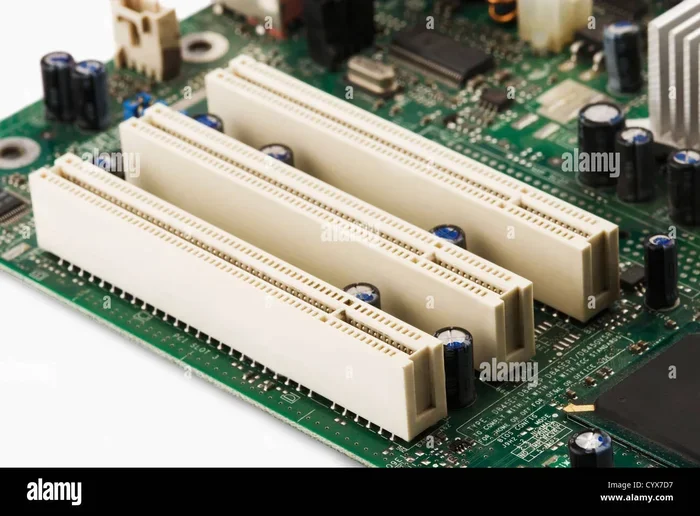
The PCI Simple Communications Controller is a label that Windows uses to identify a hardware device connected to the PCI bus on your motherboard. PCI stands for Peripheral Component Interconnect. It is a standard connection type that allows hardware components to communicate with the CPU and each other. When Windows cannot identify the exact function of a PCI device, it assigns this generic name.
In simple terms, this controller manages low-level communication tasks inside your computer. It might handle functions related to your modem, audio codec, firewire connection, or other peripheral devices. The device itself is not a standalone piece of hardware you can touch. Instead, it is a logical representation of communication pathways built into your motherboard.
The Role of This Device in Your System
Every modern computer relies on multiple communication channels. The PCI Simple Communications Controller acts as a bridge between your motherboard and various internal devices. It ensures that data flows correctly between components. Without proper drivers, this bridge cannot function properly.
You will typically find this device listed under the “Other Devices” section in Device Manager. This placement is a clear sign that Windows has detected the hardware but has not yet loaded the correct driver. Once the right driver is installed, the device usually moves to its proper category and the yellow warning icon disappears.
Why Does This Device Show Up in Device Manager?
There are several reasons why the PCI Simple Communications Controller might appear in your Device Manager. Understanding these causes is the first step toward fixing the problem. Most of the time, the issue is simple and easy to resolve.
Understanding the Generic Label
Windows uses generic device names when it does not have the specific driver for a piece of hardware. The PCI Simple Communications Controller label is essentially a placeholder. It tells you that something is connected and recognized at a basic level, but Windows does not know exactly what it is yet.
This happens frequently after a fresh Windows installation. During setup, Windows installs basic drivers for most hardware. However, specialized communication devices often need manufacturer-specific drivers that Windows does not include by default. That is when this generic label appears.
How Device Manager Identifies Unknown Hardware
When your computer boots up, Device Manager scans for all connected hardware. For each device, it looks for a matching driver in its built-in database. If no match is found, the device gets flagged as unknown. The PCI Simple Communications Controller label is what Windows assigns in these cases. The system knows there is a PCI device handling communication, but it cannot pinpoint the exact function.
Each device also has a unique hardware ID. This ID helps Windows narrow down which driver to use. When the hardware ID does not match any driver in the database, the generic label kicks in. You can view this ID by right-clicking the device and selecting Properties.
Common Causes of PCI Simple Communications Controller Errors
Several factors can trigger errors related to the PCI Simple Communications Controller. Knowing what causes them helps you pick the right fix. Here are the most common culprits.
Missing Drivers After a Fresh Windows Install
The number one reason this error appears is a missing driver. When you install Windows on a new computer or after a clean format, the operating system does not automatically install every driver. It relies on a generic set of drivers that cover most hardware. Specialized communication devices are often left out. This is why the PCI Simple Communications Controller shows up as an unknown device right after installation.
Outdated or Corrupted Chipset Drivers
Your motherboard chipset controls how all the internal components communicate. If the chipset drivers are outdated or corrupted, the PCI Simple Communications Controller may stop working correctly. This can happen after a Windows update that overwrites existing drivers. It can also occur when you upgrade your operating system without updating drivers first.
Corrupted drivers can cause a range of issues beyond just the unknown device warning. You might experience audio problems, modem failures, or system instability. Keeping your chipset drivers current is one of the best investments for the lifespan of your PC. It prevents a host of communication-related errors.
Hardware Conflicts and System Resource Issues
Sometimes, two devices compete for the same system resources. This is called a hardware conflict. When this happens, the PCI Simple Communications Controller may show up with an error code. You might see messages like “This device cannot start” or “Code 10” in Device Manager.
Hardware conflicts are less common on modern systems, but they still happen. They are especially likely when you add new hardware to your computer. The new device might claim resources that the PCI communication controller needs to function properly.
How to Fix PCI Simple Communications Controller Issues
Fixing this issue is easier than most people think. You do not need to be a tech expert. Here are the most effective methods, listed from simplest to most advanced.
Method 1: Update Drivers Through Device Manager
The first thing you should try is updating the driver directly through Device Manager. Here is how to do it:
- Right-click the Start button and select Device Manager.
- Expand the “Other Devices” section.
- Right-click the PCI Simple Communications Controller entry.
- Select “Update driver.”
- Choose “Search automatically for drivers.”
- Follow the on-screen prompts to complete the process.
Windows will search its online database for a matching driver. If it finds one, it will install it automatically. This method works in most cases where the device simply needs a driver update. This is the quickest fix and should always be your first step.
Method 2: Download Drivers from the Motherboard Manufacturer
If the automatic update does not work, you should visit your motherboard manufacturer’s website. Every major manufacturer like ASUS, MSI, Gigabyte, and ASRock maintains a driver support page for each motherboard model.
Find your exact motherboard model number. Go to the support or download section. Look for the chipset driver package. Download and install it. This package usually includes the correct driver for the PCI Simple Communications Controller along with other essential drivers.
After installing, restart your computer. The unknown device should now be properly identified and functioning. If you are also looking to improve your overall system performance, check out what is the best CPU cooler for your setup to keep things running cool and stable.
Method 3: Run Windows Update
Windows Update often includes driver updates that are not available through Device Manager. Running a full update can sometimes resolve the issue without any manual work.
- Go to Settings and select Update & Security.
- Click “Check for updates.”
- Install all available updates, including optional driver updates.
- Restart your computer.
Check Device Manager after the restart. The PCI Simple Communications Controller should now have the correct driver loaded. This method is the easiest and often overlooked by many users.
Method 4: Use the Manufacturer’s Detection Tool
Some motherboard manufacturers offer automatic driver detection tools. These tools scan your system and identify missing or outdated drivers. They then download and install the correct ones for you. This is a great option if you prefer a hands-off approach to driver management.
Keep in mind that some of these tools are third-party applications. Always download them from the official manufacturer website to avoid malware. If you are exploring other hardware upgrades or software tools, you might also want to learn about what is the best emulator for PC in 2026 if virtualization is part of your workflow.
Preventing Future PCI Simple Communications Controller Issues
Prevention is always better than cure. Once you have resolved the issue, you want to make sure it does not come back. Here are some practical tips to keep your drivers and hardware running smoothly.
- Update drivers regularly. Set a monthly reminder to check for driver updates. This is especially important after major Windows updates that can overwrite existing drivers.
- Use a driver management tool. Tools like Driver Booster or the manufacturer’s own utility can automate the update process and save you time.
- Create a system restore point before updating drivers. This gives you a safety net if something goes wrong during the installation process.
- Avoid downloading drivers from sketchy websites. Stick to official manufacturer sources or Windows Update for driver downloads to keep your system safe.
- Monitor Device Manager periodically. A quick glance once a week can catch unknown devices early before they cause bigger problems.
One of the best investments for the lifespan of your PC is staying on top of driver maintenance. Taking a few minutes each month can save you hours of troubleshooting later. A well-maintained system with updated drivers runs faster and more reliably.
When to Seek Professional Help
Most PCI Simple Communications Controller issues can be resolved at home. However, there are situations where professional help is the right call.
If you have tried all the methods above and the device still shows an error, there might be a deeper hardware problem. A failing motherboard or a damaged PCI slot can cause persistent driver errors that no software fix can resolve. Similarly, if you see error codes like Code 43 or Code 44 that keep coming back after every fix, it is time to consult a professional.
A technician can run diagnostic tools that go beyond what Device Manager can show. They can test your motherboard, check the PCI bus for errors, and determine whether a hardware replacement is needed. Do not hesitate to seek help if you are unsure. It is better to be safe than to risk damaging other components in your system.
Conclusion
The PCI Simple Communications Controller might look intimidating at first, but it is really just a generic label for a communication device on your motherboard. Most of the time, it shows up because a driver is missing or outdated. With the right steps, you can fix it in minutes.
Start with the simplest fix, which is updating the driver through Device Manager. If that does not work, head to your motherboard manufacturer’s website for the correct driver. Run Windows Update as a backup plan. And remember, keeping your drivers up to date is one of the simplest ways to maintain a healthy and stable PC.
Now that you know what the PCI Simple Communications Controller is and how to handle it, you are better equipped to tackle this common Windows issue. Your system will run smoother, and you will spend less time staring at mystery error messages in Device Manager. Take action today and give your PC the care it deserves.
Frequently Asked Questions
What does PCI Simple Communications Controller do?
This device handles low-level communication functions on your motherboard. It manages data exchange between the CPU and internal hardware components like modems, audio codecs, and serial ports. Windows assigns this generic name when it cannot identify the exact driver for the device.
Is PCI Simple Communications Controller a virus or malware?
No, it is not a virus or malware. It is a legitimate Windows device entry for hardware connected to the PCI bus. The yellow warning icon simply means Windows has not found the correct driver for that hardware. You should never ignore it, but it is not something to be afraid of.
Can I disable the PCI Simple Communications Controller?
You can disable it in Device Manager, but you should not unless you are certain it is not needed. Disabling it may cause loss of functionality for communication devices on your motherboard, such as your modem or audio system. Only disable it if you know exactly what you are doing.
Why does the PCI Simple Communications Controller keep coming back after I fix it?
This usually happens when the root cause is not fully resolved. It could be a corrupted driver that gets reinstalled by Windows, a hardware conflict, or a failing motherboard component. Try uninstalling the device and then scanning for hardware changes. If the problem persists, update your chipset drivers or check for hardware issues.
Do I need to pay for drivers for the PCI Simple Communications Controller?
No, you do not need to pay. All necessary drivers are available for free from your motherboard manufacturer’s website or through Windows Update. Avoid paid driver update tools that promise to fix everything. They are often unnecessary and sometimes misleading.
Will this error affect my PC performance?
In most cases, the error will not significantly impact performance. However, if the device handles a critical function like audio or modem communication, you may experience issues with those specific features. Keeping drivers updated ensures all hardware components work at their best.